Chinon Auto S-180
This camera manual library is for reference
and historical purposes, all rights reserved.
This page is copyright© by

M.
Butkus, NJ.
This page may not be sold or distributed without
the expressed permission of the producer
I have no connection with any camera company.
On-line camera manual library
Back to main on-line manual page
If you find this manual useful,
how about a donation of
$3 to:
M. Butkus, 29 Lake Ave.,
High Bridge, NJ 08829-1701
and send your e-mail
address
so I can thank you.
Most other places would charge
you $7.50 for
a electronic copy
or $18.00 for a hard to read Xerox copy.
This will help me to continue to host this site,
buy new manuals, and pay their shipping costs.
It'll make you feel better, won't it ?
If you use Pay Pal, use the link below.
Use the above address for a check, M.O. or cash.
Problems
opening PDF files or printing problems
- click here
Click here for a PDF of this
HTML Chinon Auto S-180 flash
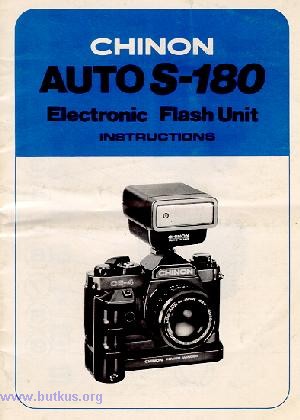
We thank you for selecting Chinon flash unit.
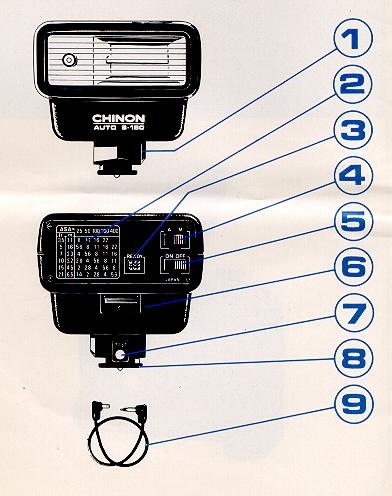
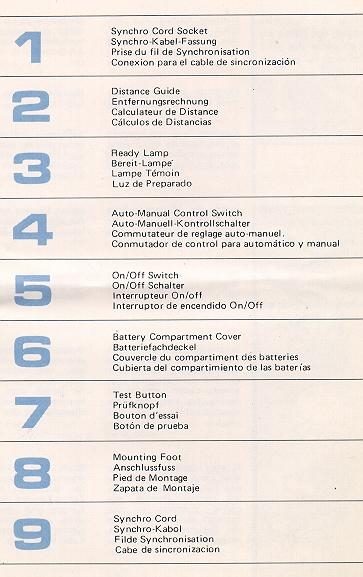
Remove Battery Compartment Cover and insert AA size batteries according
to the diagram inside.
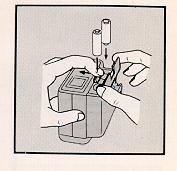
Close the battery compartment cover.
Caution: Incorrect insertion of the batteries will prevent proper operation
of the flashlight, and may cause damage!
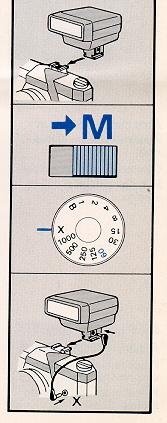
Insert the Mounting Foot of your flash into the camera's accessory Shoe
Clip.
Set the Auto-Manual Control Switch to manual marked "M ".
Set the shutter speed of your camera to the proper setting for electronic
flash use, or to 1/60 seconds. (Ready your camera owner's manual for details
on the flash synchronization.)
If your camera has a hot shoe contact, your flash is now fully synchronized
with the camera through the center contacts in the camera's shoe in this
case the Synchro Cord is not necessary.
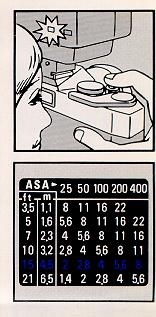
If the camera has not the hot shoe contact, use the Synchro Cord which
comes with your flash unit.
Switch the flash unit on and take a picture after the Ready Lamp glows.
The flash picture taking distance is indicated on the Distance Guide.
Formula for f-stop: Use this handy formula for figuring out the f-stop.
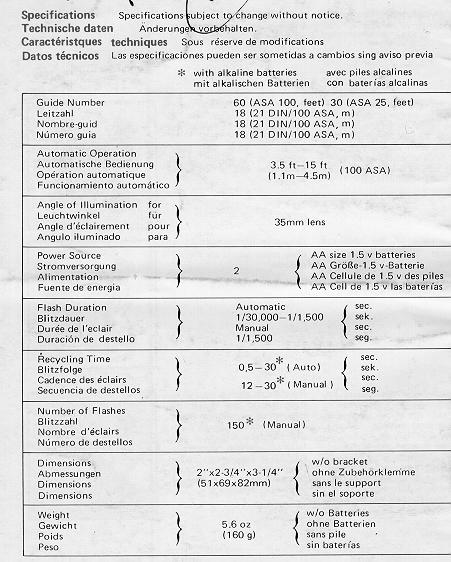
Guide Number - divided by - Distance = Lens Aperture (F-stop)
Ex. When using a ASA 100 film and standing 4.5m from a subject.
Set the lens f-stop to f4, (18 / 4.5 = 4).
Guide number is shown in Specification on the last page of this instruction
manual.
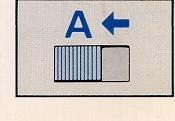
When used for automatic flash photography, your flash automatically
controls light output and sets the correct exposures for the subject within
the automatic range. Once you set the aperture (f-stop) on your camera,
there is no need to change it again while taking pictures within the available
automatic range.
Set the Auto-Manual Control Switch to Auto marked "A".
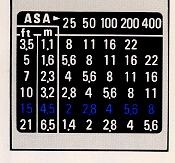
Consult the exposure table on the back of your flash. The lens aperture
of BLUE colored row are to be set according to the distance and the ASA
or DIN film speed corresponding to the film in your camera. (EX:
ASA 400, set your aperture to F8)
Slide the On-Off switch to "ON" and focus your camera. Take the picture
after the Ready Lamp glows. {Note: If you have a flashmatic camera, you
cannot use the automatic operation but have to follow the manual operation.)
The use of flash eliminates squinting and shadows and help bring out
natural facial expressions on the subject. When taking pictures, avoid
shooting into highly reflective surface like mirrors glass or glittering
water.
If you have to shoot a subject with such reflectors behind, use the
automatic operation for flash or shoot from a different angle so that any
reflections do not directly go into the camera lens.

When not in use, switch the unit off. Take the batteries out when the
flash unit is being stored or when it will
be stored during a long time.
Keep your flash unit away from dust and moisture to prolong its life.
It is a good idea to bring out your flash unit from storage and "TEST FLASH"
it (about 10 times) once or twice a month.
Do not use Nickel Cadmium battery. (Webmaster: the new Alkaline rechargeables
are fine)
Do not try to open or repair your flash unit since the electric circuit
inside carries a high voltage. If your flash needs repair or does not work
correctly, take it to where you bought it from. Opening the unit voids
the warranty.