Chinon CA-4 / 4s
AKA - Agfa Selectronic 2
(similar)
Chinon CA-4 has
electronic self-timer
(AKA: Revueflex ACX)
Chinon CA-4s has mechanical self-timer
(AKA: Revue AX3)
Both are only fully automatic, no
manual operation
This camera
manual library is for reference
and historical purposes, all rights reserved.
This page is copyright© by

,
M. Butkus, NJ.
This page may not be sold or distributed without
the
expressed permission of the producer.
I have no connection with any camera
company.
On-line camera manual library.
Back to main on-line
manual page
If you find this manual useful,
how about a donation
of $3 to:
M. Butkus, 29 Lake Ave.,
High Bridge, NJ 08829-1701
and send your e-mail
address
so I can thank you.
Most other places would charge
you
$7.50 for a electronic copy
or $18.00 for a hard to read Xerox copy.
This will help me to continue to host this site,
buy new manuals, and pay
their shipping costs.
It'll make you feel better, won't it ?
If you use Pay Pal, use the link below.
Use the above address for a check, M.O. or cash.
Venmo
@mike-butkus-camera Ph 2083
AKA -
The Agfa Selectronic 2 (SLR),
it offered
auto exposure metering.
Agfa had the large red button added to their
versions. |
Click here for Chinon CA-4 / 4s PDF
version of manual
- better printing
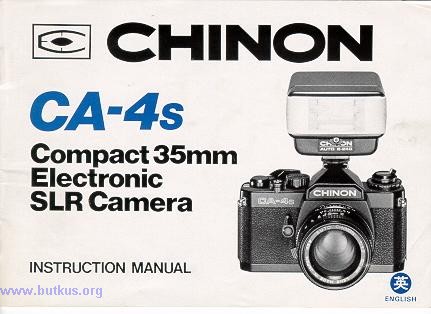
The only difference I can find between the two models is the CA-4 has
a electronic self-timer against
the manual one on the CA-4s.
|
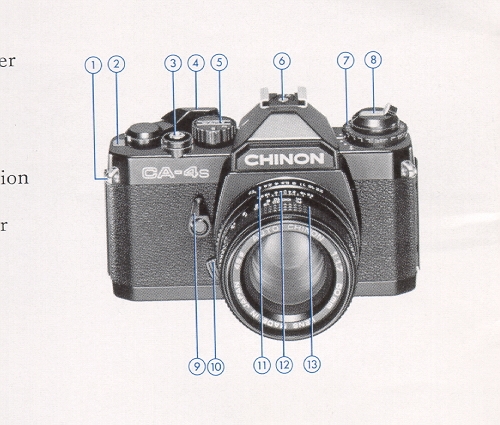
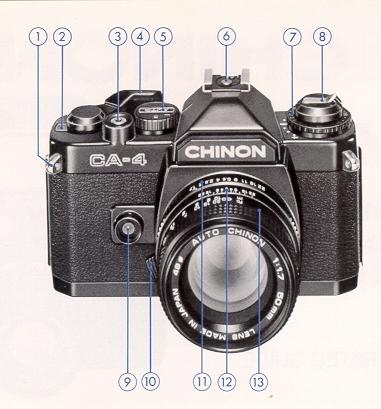
1. Shoulder strap eyelet
2. Frame counter
3. Shutter release button/Exposure meter switch
4. Film advance lever
5. Shutter operation mode selector
6. Hot shoe
7. Film speed dial/Exposure compensation dial
8. Film rewind knob/Back cover opener
9. Self-timer lever
10. Lens lock release lever
11. Aperture ring
12. Depth of field scale
13. Focusing ring
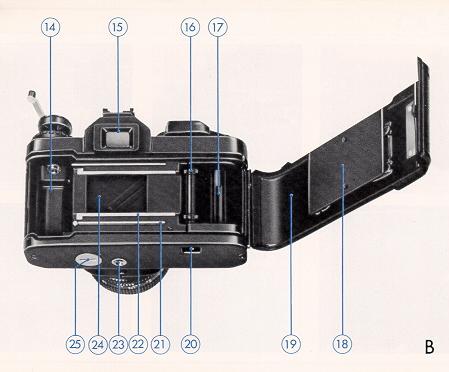
14. Film chamber
|
17. Take-up spool
15. Viewfinder eyepiece
16. Sprocket teeth
18. Film pressure plate
19. Film chamber cover
20. Rewind button
21. Film guide rail
22. Film rail
23. Tripod socket
24. Shutter
25. Battery compartment cover
|
SPECIFICATIONS
Type: 35mm automatic SLR (Single Lens Reflex) compact camera
with aperture priority exposure system (AE).
Picture Format: 24 x 36mm.
Lens Mount: Chinon Universal bayonet mount.
Mirror: Large, quick return, shockless system.
Shutter: Seiko MFC electromagnetic metal focal plane shutter,
stepless speeds from 1 to 1/1000 sec. on automatic,
"B",
"X" (X = 1/100 sec.), Automatic speeds electronically controlled.
Viewfinder: Fixed eye-level pentaprism, central split image
with microprism collar and ground glass,
10 LED's indicate
shutter speeds and over/under exposure.
Viewfinder Magnification: 0.87x
Viewfinder Visibility: 92%
Exposure Meter: TTL, center weighted full aperture system employing
a silicon blue photo cell.
Exposure Compensation: Built-in +/- 1 EV in one third stop increments.
Exposure Range: EV+2 (F/1.9, [sec.) to EV +18 (F/16, 1/1000
sec..) - ASA 100 F/1.9 lens.
ASA Range: 25 - 3200 (DIN 15 - 36) with safety lock.
Film Advance: Single stroke in an arc of 130° with 25°
stand off.
Film Counter: Automatically indicates number of exposures and
resets to " S" when camera back is opened.
Film Rewind: Folding crank type.
Accessory Shoe: Hot shoe type with X sync. and contact for Chinon
dedicated flash.
Synchronization: "X" strobe sync. at 1/100 sec.
Self-Timer: Built-in
Popover Source: Three 1.5V silver oxide G13 batteries (S-76
type).
Battery Test: Built-in with LED indicator. Meter ON/OFF Switch:
Meter switch is activated when shutter
release button is
pressed, meter remains on for several seconds after button is released.
Camera Back: Hinged, swing open type, detachable, memo holder
provided.
Body Dimensions: 135.5 (W) x 86.0 (H) x 50.5 (D) mm.
(5.33/t x 3.38" x 1.99")
Body Weight: 455 grams (16.0 oz.).
INTRODUCTION
Welcome to the world of CHINON photography!
Your Chinon CA-4 /4s camera is
one of the most advanced 35mm SLR cameras incorporating features normally found
only in higher priced models.
This fantastic compact camera employs the latest
state-of-the-art electronics which will ensure carefree operation every time.
In order to take full advantage of the features of your CA-4/ 4s, please read
the instruction manual carefully so as to totally familiarize yourself with the
camera before actually starting to take pictures.
We thank you for choosing
CHINON quality products and we wish you years of satisfactions and enjoyment.
BASIC OPERATION - CA-4 / 4s
INSTALLING THE BATTERIES
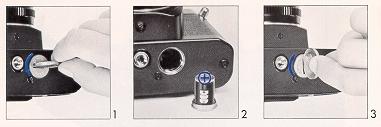
1. By using a coin, unlock the battery compartment cover by turning it counterclockwise
(Fig. 1).
2. Remove the battery holder which is attached with the cover. Then, place three
1.5V G-13 type silver oxide batteries (Eveready S-76 or equivalent) with the plus
(+) side facing upwards (Fig. 2).
3. Replace the battery compartment cover by turning fully clockwise (Fig. 3).
Note: Clean the batteries with a dry cloth or tissue paper before inserting and
thereafter every six months. × Make sure that the batteries are inserted correctly,
i.e., check polarity. × The shutter speed indicator LED and the action lamp
will operate only when batteries are correctly installed and fresh.
BATTERY TESTING
To test the batteries, set the shutter operation mode selector to the "AUTO "
position (Fig. 4). While looking at the shutter speed indicator scale in the viewfinder,
slightly depress the shutter release button. If the batteries are in good condition
(battery voltage is high enough), at least one of the indicator LEDs will light
up. If an LED fails to illuminate, the batteries are too weak and need to be replaced,
they are incorrectly inserted or the shutter operation mode selector is set to "
X " or "B "
FILM LOADING
Your Chinon CA-4 camera can be used with any type of 35mm film.
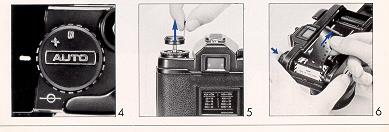
1. Pull up the film rewind knob until the camera back pops open (Fig. 5).
2. Then, insert a film cartridge into the film chamber with the protruding end
facing the bottom of the camera (Fig. 6).
3. Push in the film rewind knob and slightly turn the knob in either direction
until it catches the film cartridge spool.
4. Insert the trimmed end of the film into a slot of the multi-slotted take-up
spool.
5. Turn the shutter operation mode selector to the " X " position and advance
the film while holding the film lightly
down onto the
transport sprockets.
6. Release the shutter if necessary and advance the film until the sprockets
engage with the upper and lower perforation
of the film
(Fig. 7)
7. Close the camera back firmly until it locks with a click.
8. Turn the film rewind knob gently until the film slack is taken up and
the rewind knob stops. Do not force or further rewind the film.
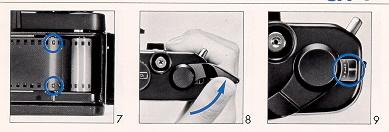
9. Advance the film and release the shutter three times ((Fig. 8).
The rewind knob should rotate counterclockwise
when the
film is advanced and the "l" marking should appear in the frame counter window
(Fig. 9).
10. Turn the shutter operation mode selector to the "AUTO" position and start
to take pictures (Fig. 10).
MEMO HOLDER
Your Chinon CA-4s camera has a built-in memo holder feature. To utilize
the memo holder feature, simply cut off the top
of the film
box and insert it into the memo holder located on the back cover of your camera.
This will enable you to
quickly and easily identify the type
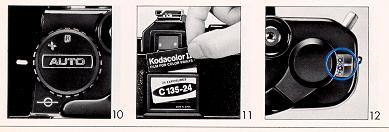
of the film and the ASA speed used in your camera (Fig. 11).
FRAME COUNTER
Your Chinon CA-4 /4s is equipped with a frame counter which displays the number
of exposures and resets automatically
upon opening the camera
back. When the camera back is opened, the counter shows " S " indicating the start
of the
picture taking process.
When film is loaded according to the procedure previously described, the counter
displays " 1 " indicating the camera
is ready for the first
exposure.
Every time the film advance lever is turned the counter will proceed one stop
forward. The number 24 and 36 are colored
in orange to warn
the end of commonly available films (Fig. 12).
The action lamp (LED) located on the front of the camera body will illuminate
while the shutter is activated. The subject
can easily observe
when the shutter is released.
FILM ADVANCEMENT
Make sure the film has been loaded properly. Operate the film advance lever through
a full stroke. When the film end
is reached the film advance
lever may stop before the lever is fully turned. Do not force the lever! Stop winding
at
once and rewind the film (Fig. 13). Please refer to "Unloading
Exposed Film ".
Note: × When the batteries are dead, you can still use CA-4 / 4s camera.
Reset the shutter operation mode selector from "AUTO" to "X" which will provide
a shutter speed of 1/l00 sec. ASA/DIN SETTING
The film speed dial located on the top of the camera is coupled directly to
the internal exposure control circuitry. The correct exposure factor for the
film is automatically set by aligning the ASA number of the film you are using
with the index mark on the camera body. The ASA number of the film is printed
on the film box or the instruction sheet packed with the film.
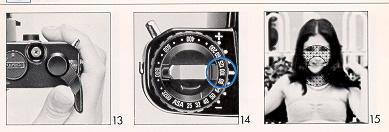
Turn the film speed dial by lifting up and align the appropriate ASA number
with the white index mark. Be sure to check the ASA number whenever you put
a new film into the camera (Fig. 14).

FOCUSING
Your Chinon CA-4 / 4s has three built-in focusing aids. 1. The center of the
viewfinder is split image with a microprism collar which is surrounded by ground
glass. When the camera is in focus, the image of these focusing aids become sharpest.
While observing the subject through the viewfinder, rotate the lens focusing ring
until the upper and lower split image match up to form one uniform image (Fig. 15).
This split image focusing is particularly helpful when the subject is dominated
by vertical lines. 2. The microprism is also helpful. When it is out of focus, the
image on the microprism will be composed of a collection of asterisks (Fig. 16).
These sparkling asterisks will disappear when the focus is properly adjusted. You
can double check the focus setting by the image on the
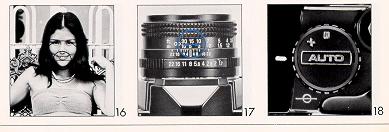
3. You can also focus indirectly. Actually measure or estimate the camera-to-subject
distance and set the lens focusing ring to the appropriate setting (Fig. 17).
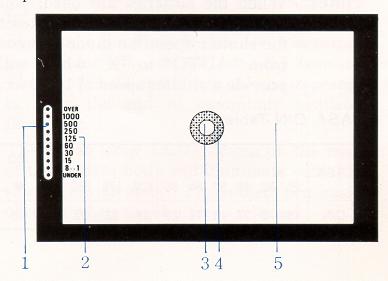
1: Shutter speed indicator/ Flash ready lamp (LED)
2. Shutter speed scale (ground glass)
3. Split-image range finder spot
4. Microprism ring
5. Fine matte outer field
AUTOMATIC EXPOSURE
Your CA-4 /4s camera features TTL, center weighted full aperture light measuring
automatic exposure control. As long as the shutter operation mode selector is set
to "AUTO", you do not have to worry about the exposure factor (Fig. 18).
The sensitive and accurate internal circuitry will compute the correct exposure
for the photographic condition and control the shutter speeds steplessly from an
1 second time exposure to a fast 1/1000 second.
When the shutter release button is depressed halfway, the exposure control circuit
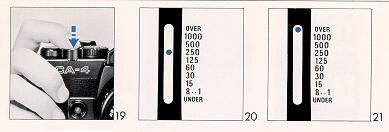
is energized and will be in the monitoring stage (Fig. 19). You can see the computerized
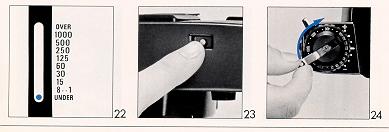
shutter speed displayed in the viewfinder by a red LED (Fig. 20). If the lens F
stop or the aperture size is too large for the lighting condition, the over exposure
indicator at the top of the scale will flash (Fig. 21). When this happens, stop
down the lens diaphragm by turning the lens F stop ring or use a film with a lower
ASA number.
Another alternative is to use a ND filter in front of the lens. They are available
as accessories from your local camera store.
If the displayed speed is 1/30
sec. or slower, use of a tripod is recommended. Or you can increase the shutter
speed by opening the lens diaphragm. Use of a flash unit is also suggested. Please
refer to "Chinon dedicated flash system".
If the computed shutter speed is even longer than one second (semi-darkness condition),
the under exposure indicator at the bottom of the scale will light up and flash
when the available light is less than - 2EV (Fig. 22). Note: F stop selection: The
following may be used as a guide to determine the lens F stop when you are using
the camera; Sunny day outside . . . F/8 -F/16
Cloudy day outside . . F/4 - F/5.6
Inside . . . . . . . . . . . . F/1.9 - F/2.8 (without flash)
SHUTTER RELEASE
Your Chinon CA-4 /4s features a two-stage shutter release with a safety cover
to prevent accidental shutter release or battery drain. When the shutter release
button is depressed halfway, the electronic circuit starts functioning.
When the button is fully depressed, it will trigger the shutter. Always hold
the camera steady and gently depress the shutter release button to make an exposure.
UNLOADING EXPOSED FILM
When the film in the camera is
fully exposed the film advance lever will stop.
Do not attempt to force the lever any further. Rewind the film and replace with
new film. Push in the rewind button at the bottom of the camera (Fig. 23). Unfold
the rewind crank of the rewind knob and turn the rewind crank clockwise (Fig. 24).
You will feel friction as the film is rewound. Suddenly, when the film is rewound
completely, the friction will decrease, then lift the rewind knob to open the camera
back (Fig. 25).
When the camera back is opened, the frame counter will automatically reset to
the " S " position. The rewind button on the bottom of the camera will pop out upon
the next advancement of the film advance lever.
Note: Your exposed film should be processed without delay.
CONVENIENT FEATURES:
INTERCHANGEABLE LENSES
Your Chinon CA-4 / 4s camera is equipped with a Chinon bayonet mount which accepts
all interchangeable lenses with the universal bayonet mount. To remove the lens
from the camera body, depress and hold the lens lock release lever on the camera
body, turn the lens counterclockwise as far as it will go, and lift it up from the
body (Fig. 26).
Note: Do not remove or replace the lens while the camera is functioning.
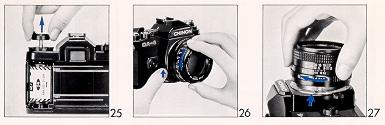
To attach the lens, match the red dot on the camera body with the red dot on
the lens (Fig. 27). Then insert the lens into the camera body and turn it clockwise
until the lens locks with a click.
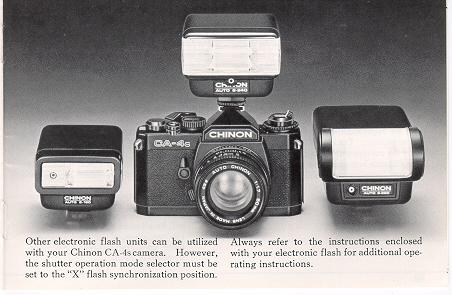
CHINON DEDICATED FLASH SYSTEM
Specially designed and developed automatic flash units are available for your
Chinon CA-4 / 4s camera as optional accessories. This highly advanced dedicated
flash system permits carefree flash photography. You no longer have to alter the
shutter operation mode selector from the " auto " position since the flash is integrated
electronically with the camera body.
Set the f/stop indicated on the exposure calculator dial of your Chinon flash
to the corresponding aperture ring on the lens. A few seconds after your Chinon
flash is turned to the " on" position, the flash ready light will illuminate. Your
Chinon CA-4 / 4s has a special viewfinder ready-light system which is electronically
coupled to the auto flash.
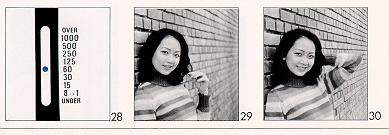
When the flash has reached adequate power, the viewfinder 1/60 sec. shutter speed
indicator (LED) will flash signaling the camera and flash are ready to operate (Fig.
28)
After the picture has been taken and before the flash has recycled, the
camera will automatically switch to the automatic mode until the flash has once
again recycled. In this case, your flash must be set to the " AUTO " position.
Stop at your Chinon dealer today to get a complete demonstration of Chinon quality
automatic electronic flashes they will light up your life!
| Model |
Chinon Auto S-180 |
Chinon Auto S-240 |
Chinon Auto S-280 |
| 1. Type: |
Automatic Flash |
Thyristor Electronic Flash (power cut-off system) |
Thyristor Electronic Flash (power cut-off system) |
| 2. Auto Flash System: |
YES |
Yes |
Yes |
| 3. Dedicated for CA-4 /4s camera: |
NO |
Yes |
Yes |
4. Guide Number in M
. ASA
100
. ASA 400 |
16
36 |
24
48 |
28
56 |
5. Setting:
. ASA 100
. ASA 400 |
One aperture setting
F4
F8 |
Two aperture settings
F4/F8
F8/F16 |
Two aperture settings
F4/F8
F8/F16 |
| 6. Manual Flash: |
YES |
Yes |
Yes |
7. Auto-operation:
F4 (
SA 100)
F8 SA 400)
F8 (ASA 100) 1
F16 (ASA 400)1
|
1m - 4.5M (3.28ft - 14.7ft) |
0.7m - 6m (2.3ft - 19.6ft)
0.7m - 3m (2.3ft
- 9.8ft) |
0.7m - 7m (2.30 - 22.9ft)
0.7 - 3.5m (2.3ft
- 11.4ft) |
| 8. ASA Range: |
25 - 400 |
25 - 400 |
25 - 400 |
| 9. Sensor Acceptance Angle |
Approx. 20 degrees |
Approx. 20 degrees |
Approx 20 degrees |
| 10. Flash Duration:
Auto
Manual
|
1/3000 - 1/1500
1/1500
|
1/3000 - 1/750
1/750
|
1/3000 - 1/750
1/750
|
11. Recycling Time:
Auto |
10 sec. |
0.5 - 10 sec. |
0.5 - 10 sec. |
| 12. Number of flashes: (Alkaline batteries) |
Approx. 150 on manual |
Approx. 200 on manual |
Approx. 150 on manual |
| 13. Bounce capability: |
NO |
NO |
Yes |
| 14. Illumination Angle: |
for 35mm lens |
for 35mm lens |
for 35mm lens |
| 15. Power Source: |
Two AA batteries |
Four AA batteries |
Four AA batteries |
| 16. Open Flash Button |
Yes |
Yes |
Yes |
| 17. Sync. Jack: |
Yes |
Yes |
Yes |
| 18. Dimensions: |
51x69x82mm |
58x77x85mm |
56x133x77mm |
| 19. Weight: |
160g |
210g |
250g |
DEPTH OF FIELD
Depth of field designates the nearest and furthest limits of the area that will
be sharp in the picture in front of and beyond the subject. The larger the lens
opening, the shallower is the depth of field. The smaller the lens opening; the
greater the depth of field becomes (Fig. 29 & 30).
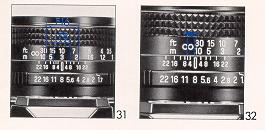
Depth of Field Scale:
The depth of field scale indicates (after focusing) the approximate area that
will be sharp in the picture. Locate on the depth of field scale the corresponding
pair of f/stop figures. The distance between these two f/stop figures on the focusing
ring will be the area of sharpness in your picture (Fig. 31).
SELF-TIMER
The self-timer when set, trips the shutter mechanism after a delay of 7-12 seconds.
This feature is useful should the photographer wish to be included in the picture,
and is also useful for taking pictures at slow shutter speeds when a cable release
is not available.
When using the self-timer, the camera must be mounted on a tripod, or a solid
support of some kind.
To operate, move the self-timer lever counterclockwise as far as it will go.
Advance the film transport lever. Upon pressing upward on the self-timer lever with
your finger. the self-timer mechanism will start to operate (Fig. 32).
Note: Do not depress the shutter release button, since the self-timer mechanism
will not operate and the shutter will be released instantly.
Do not advance the film transport lever until the self-timer operation completely
stops.
INFRA-RED PHOTOGRAPHY
Your CA-4 / 4s camera accepts infra-red film. To use infra-red film an extra
focusing adjustment must be made. After focusing note the figure that is adjacent
to the green marking on the distance scale of the lens (Fig. 33), then move that
figure over to the infra-red mark engraved on the lens. This adjustment is only
required for black and white infra-red film. When using a color infra-red film,
you should focus in the normal way.
Note: Read the instructions carefully packed with the infra-red film for further
information.
CARE OF THE CAMERA
Your Chinon CA-4 / 4s camera is a precision instrument. Used with care, it will
provide years of trouble free service. Protect your camera from dirt. rain, dampness
and excessive heat. Avoid touching the lens. To clean the lens, wipe it gently with
a soft lint less cloth or lens tissue. Do not use eyeglass tissue as it might damage
the lens coating.
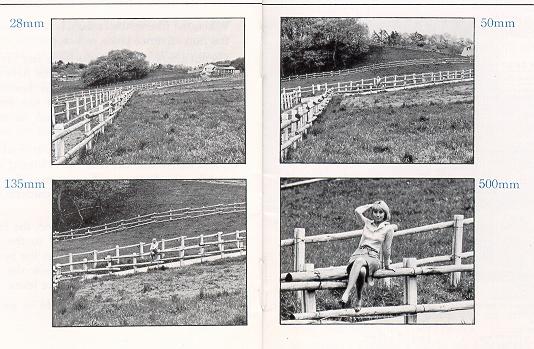
* Standard Lenses
45mm t|2.8 50mm f/1.9
f/1.7 multicoated
f/1.4 multicoated
* Wide-angle lenses
28mm f/2.8 multicoated 35mm f/2.8 multicoated
* Telephoto lenses
135mm f/2.8 multicoated
200mm f/3.5 multicoated
300mm f/5.6 multicoated
500mm f/8 multicoated
* Zoom lenses
28 - 50mm f/3.5 - 4.5 multicoated
35 - 100mm f/3.5 - 4.3 multicoated
80-200mm f3.8 multicoated
* Accessories
Auto Flash S-180
Auto Flash S-240
Auto Flash S-280
Synchro-eye for flash (slave unit)
Deluxe carrying case
Filter 49mm (Skylite, UV, ND4X, Y2, PL)
Rubber eyepiece
Eyepiece adapter ( - 3, +1, +3)
Rubber lens hood
Auto extension ring
Bellows
Minicopy stand
Spare ring for mini-copy stand
Cable release adapter (13 inch, 20 inch)
Angle finder
Table tripod
Neck Strap
1.5V silver oxide battery (3 pcs. in one set)
3 clips lens cap
Eyepiece cover
Body cap
and many more