and historical purposes, all rights reserved.
This page is copyright© by
 , M. Butkus, N.J.
This page may not be sold or distributed without
the expressed permission of the producer.
I have no connection with any camera company.
If you find this manual useful,
how about a donation of
$3 to:
M. Butkus, 29 Lake Ave.,
High Bridge, NJ 08829-1701
and send your e-mail
address
so I can thank you.
Most other places would charge
you $7.50 for
a electronic copy
or $18.00 for a hard to read Xerox copy.
buy new manuals, and pay their shipping costs.
It'll make you feel better, won't it ?
If you use Pay Pal, use the link below.
Use the above address for a check, M.O. or cash.
Back to main Camera Manual Site
Click here for Chinon S-360 PDF version
-
Better printing
ENGLISH
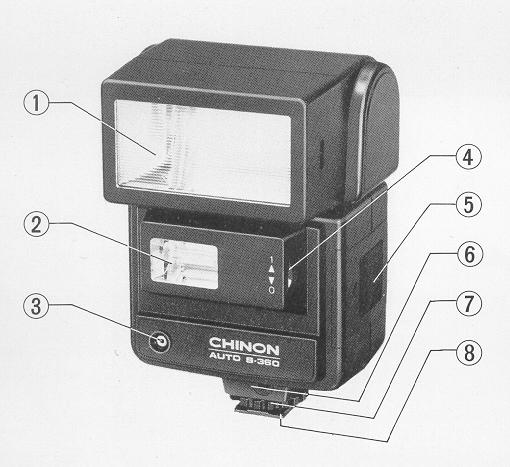
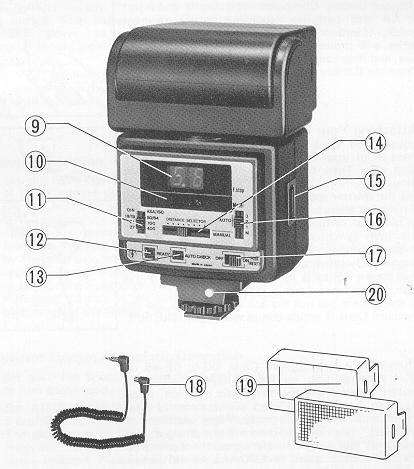
Description of Flash Unit Elements
| 1. Main-Reflector
2. Sub Reflector 3. Light Sensor 4. Sub-Reflector Switch 5. Battery Compartment Cover 6. Synchro Cord Socket 7. Lock Ring 8. Mounting Foot 9. F. Stop Indicator 10. Distance Range Indicator |
11. Film Speed Selector
12. Ready Lamp 13. Auto Checker 14. Distance Selector 15. Power Pack Socket 16. Auto/Manual Selector 17. On/Off Switch 18. Synchro Cord 19. Filter Kit 20. Test Button |
|
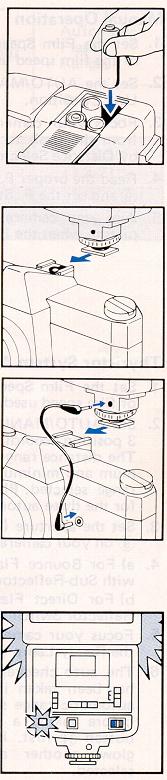
Inserting the Batteries Remove the Battery Compartment Cover 3) and insert 4 AA size batteries according to the diagram inside, (Caution: Incorrect insertion of the batteries will prevent proper operation of the flashgun, and may cause damage.) Close the Battery Compartment Cover. Attaching Your Flash to the Camera Loosen the Lock Ring (7). Insert the Mounting Foot (8) of your flash into the camera's accessory shoe clip. Then tighten the flash with the Lock Fang. Set the shutter speed of your camera to the proper setting for electronic flash use, or to 1/60 seconds. (Read your camera owner's manual for details on the flash synchronization.) If your camera has a hot shoe contact, your flash is now fully synchronized with the camera through the center contacts in the camera's shoe. In this case, the Synchro Cord is not necessary. If the camera doesn't have a hot shoe contact, use the Synchro Cord (1-9)which comes with your flash unit. When used with a Chinon CE-5, CO-5, CE-4S or CE-4 cameras you no longer have to alter the shutter speed from the automatic position, since the flash is "dedicated" and is electronically integrated with the camera body. When switched to the "ON" position and when fully charged, the flash unit will electronically signal the camera to alter the shutter speed to 1/60 of a second (set to 1/90 sec. with CG-5). After the flash picture has been taken the camera will automatically revert back to the automatic shutter speed setting appropriate for the lighting condition.
|
Battery Operation
|
Slide On/Off Switch is to the "On" ("B" mark) position and then F. Stop Indicator and Distance Range Indicator glow. In a few seconds the Ready Lamp (12) should glow, indicating the flash is ready to shoot. Push the Test Button (14) to make sure your flash
unit works properly. If the flash discharges, then wait until the Ready
Lamp glows again.
|
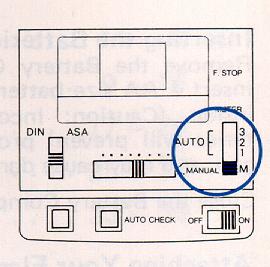
Manual Operation
2. Set the AUTO/MANUAL Selector (17) to "MANUAL" position.
3. Focus your camera and estimate the distance from the flash to subject and set the distance by Distance Selector (15).
4. Read the proper F. Stop from F. Stop Indicator (9) and set the F. Stop on your camera.
5. Aim your camera at the subject and take the picture when the Ready Lamp (12) glows,
|
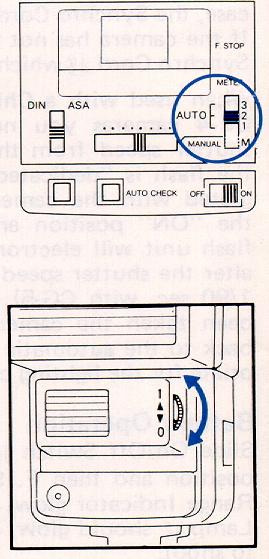
1. Set the Film Speed Selector (11) to the position
of film speed used.
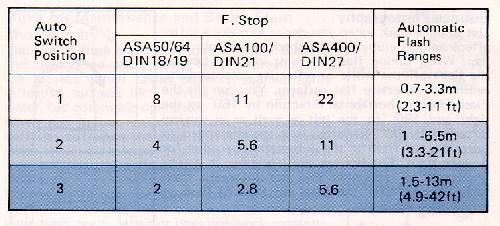
2. Set AUTO/MANUAL Selector (17) to 1, 2, or 3 position according to the flash range required. The distance range indicator (10) shows the maximum and minimum distances for the automatic range selected. Please refer to the table below for the three automatic flash ranges. 3. Set the aperture (F. Stop) of F. Stop Indicator (9) on your camera. 4. a) For Bounce Flash Operation, Us twin-flash with
Sub-Reflector switched on ("1" position).
5. Focus your camera and take the picture after the Ready Lamp (12) glows. 6. The auto checker (13) will glow after a picture has been taken if the subject was within the automatic range selected. This can be checked before taking a picture by pressing the test button (14) first, If the auto checker does not glow, another automatic range should be selected.
|
Dedication System With CHINON
Cameras
Used with Chinon CE-5 and CG-5, the flash ready indicator (red LED) in the viewfinder will glow signaling the camera and flash are ready to operate. With Chinon CE-5, CE-4S and CE-4, the viewfinder 1/60 sec. shutter speed will glow.
Auto Shut-Off
Your flash is designed to automatically shut off the power supply to save the battery energy. When the unit is switched on, the F. Stop Indicator (9) and Distance Range Indicator (10) come on to indicate the start of charging. After some time, both indicators go off to indicate the power supply has shut-off and the charging stopped, if the unit is left unoperated. The Ready Lamp (12) stays on until the charged energy runs out. You can fire your unit as long as the Ready Lamp is on, and the unit, if fired, resets to the original state. A short push of the On/Off switch (Reset Button) (18) can also charge the unit again.
(If neither the Ready Lamp nor the F. Stop Indicator come on after the On/Off switch is turned on, push the On/Off Switch to reset the flash unit.)
Bounce Photography
|
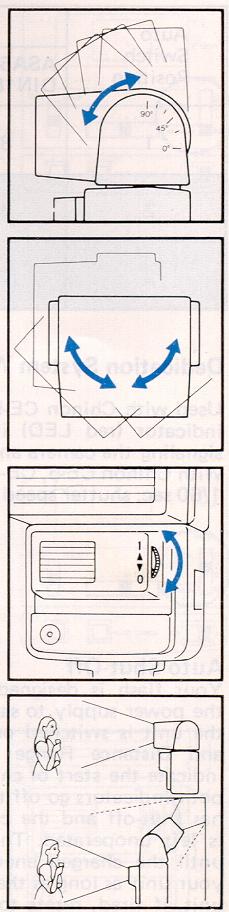
Use bounce flash when you desire to make a softer effect and to eliminate the shadow on your subject. When taking flash pictures indoors, bounce the light off the white or reflective colored walls ceiling or reflective flat surfaces. You can tilt the Flash Head in horizontal direction by 160° to the right and 180° to the left as well as in vertical direction by 90° upwards. It is recommended to operate your flash in the automatic operation for bounce flash. For bounce photography, it is very important to remember that the automatic flash range should refer the total distance of flash to reflector to subject. You can enjoy dual flash light with the Sub-Reflector (2) . Slide the Sub-Reflector Switch (4) to "1" position. Both the flash lights from Main Reflector (1) and Sub-Reflector will give you a variety of flash techniques as illustrated. If you do not want to use the Sub-Reflector, slide the Sub-Reflector Switch to "0" position. Use twin flash with Sub-Reflector switched on for bounce flash operation. Single flash with Sub-Reflector switched off is desirable when shooting directly at your subject. Note: For Bounce Dual Flash Photography in Automatic Operation. As the Sub-reflector gives always the same light output, you shall determine the camera lens aperture according to the Sub-reflector's guide number (G. No. 12 ASA100/21DIN). In order to get the clear efficiency of shadow from bounce lighting you can set the flash by one F-stop bigger. Example: With ASA100/21DIN film. Subject distance
3m from the camera.
Flash Auto setting to be F5.6.
|
Hints for Maintenance and Better Flash Photography
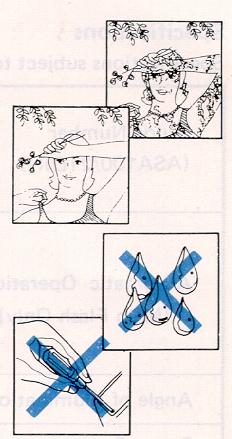 |
The use of flash eliminates squinting and shadows
and help bring out natural facial expressions on the subject. When taking
pictures, against highly reflective surfaces like mirrors, glass or glittering
water, use automatic operation.
Do not try to open or repair your flash unit since the electric circuit inside carries a high voltage, If your flash needs repair or does not work correctly, take it to where you bought it from. Opening the unit voids the warranty.
|
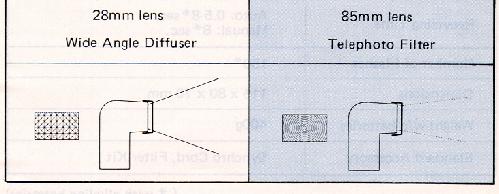
Filter Kit (Wide angle Diffuser & Telephoto
Filter)
Your flash light can be widened or lengthened with
this filter kit. This filter affects the total distance the subject
can be away from the flash.
Automatic Operation
| ASA 100/DIN21 | Wide Angle Diffuser | Telephoto Filter |
| F 2.8 | 4.3 - 29 feet | 6.6 - 49 feet |
| F 5.6 | 2.3 - 14 feet | 5.0 - 24 feet |
| F 11 | 1.7 - 7 feet | 3.3 - 12 feet |
Specifications
Specifications subject to change without notice:
| Guide Number
(ASA100/21 DIN) |
36 (Main Flash)
12 (Sub Flash) |
| Automatic Operation
(Main Flash Only) |
f2.8(ASA100/DIN21)
1.5-13m (4.9 - 42 ft) f5.6(ASA1 00/DIN21 )
f11 (ASA100/DIN21)
|
| Angle of Illumination | 35mm lens |
| Power Source | 4 AA size 1.5v batteries |
| Flash Duration | Automatic 1/30,000-1/500 see,
Manual 1/500 sec. |
| Recycling Time | Auto: 0.5-8*sec. Manual: 8*sec. |
| Number of Flashes | 150* |
| Dimensions | 115 x 80 x 70mm |
| Weight w/o batteries | 400g |
| Standard Accessory | Synchro Cord. Filter Kit |
( * with alkaline batteries)