If you find this manual useful,
how about a donation of
$3 to:
M. Butkus, 29 Lake Ave.,
High Bridge, NJ 08829-1701
and send your e-mail
address
so I can thank you.
Most other places would charge
you $7.50 for
a electronic copy
or $18.00 for a hard to read Xerox copy.
This will help me to continue to host this site,
buy new manuals, and pay their shipping costs.
It'll make you feel better, won't it ?
If you use Pay Pal, use the link below.
Use the above address for a check, M.O. or cash.
Back to my main Camera manual page
Click here for CHINON SPLASH PDF version
- Better printing
| TABLE OF CONTENTS
Nomenclature . 2
Specifications 6
Simplified Guide for Using Your Camera 10
Installing the Batteries 12
Battery Testing 14
Automatic Film Speed Setting 16
Automatic Film Loading 16
Holding the Camera 22
Viewfinder 24
|
Waterproof Photography 26
Auto-Focus Shooting 30
Focus Lock System 34
Film Rewinding 36
Flash Photography 38
Attach Neckstrap 42
Care of the Camera 43
|
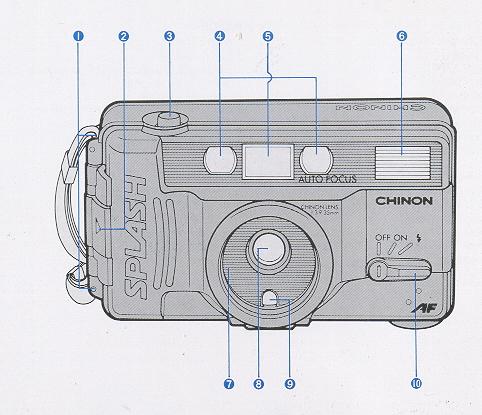 |
NOMENCLATURE
1. Strap eyelet
2. Film door closure
3. Shutter release button
4. Autofocus window
5. Viewfinder
6. Flash
7. Fixed waterproof and protective lens cover
8. Lens
9. Exposure metering window
10. Power/Flash switch lever
|
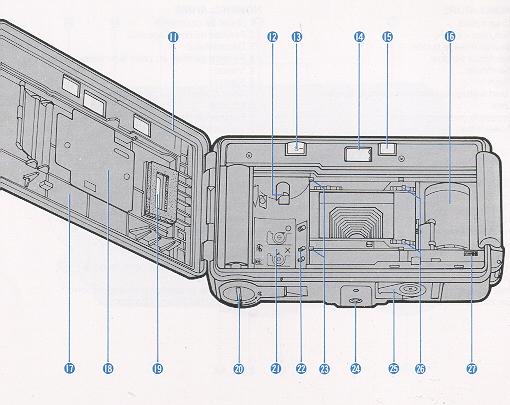 |
11 Waterproof seal
12. Film rewind shaft
13. Frame counter
14. Viewfinder eyepiece
15. Flash ready indicator
16. Take-up spool
17. Back cover
18.Film pressure plate
19. Film type window
20. Battery cap
21. Film chamber
22. Automatic film speed setting contacts
23. Film guide
24.Tripod screw
25. Rewind switch lever
26. Sprocket
27. Film tip mark
|
SPECIFICATIONS
TYPE: Weatherproof, dust and sand resistant, fully automatic 35 mm compact autofocus camera.
PICTURE FORMAT: 24x36 mm
LENS: 35 mm F3.9, 3 elements in 3 groups. VIEWFINDER: Albada type bright frame with AF
frame, parallax marks, AF lock indication LED (green) and under exposure warning/battery check
LED (red).
SHUTTER: Programmed electronic shutter; 1/90 sec. - 1/410 sec., mechanical release, shutter
locks when the power/flash switch lever is in the OFF position.
EXPOSURE METER: Programmed EE, CdS.
EV RANGE: EV1O.5--EV14.5 (ISO 100).
AUTOMATIC FILM SPEED SETTING: The film speed is automatically set when using a
OX-coded film of ISO 100/21° - 1000/31°. Non-DX film will be set to ISO 100/21°.
FOCUSING: Infrared automatic focusing system with possible prefocus; cancellable.
FOCUSING RANGE: 1 .3 meters (4.26 ft) to infinity.
FILM LOADING: Auto loading system with built-in motor.
FILM WIND: Automatic power winder for single frame advance.
FILM REWIND: Automatic power rewinding; rewind actuated with rewind switch lever.
AUTO REWIND STOP: Film rewinding automatically stops upon completion.
EXPOSURE COUNTER: Indicates number of exposed frames and returns frame by frame while
rewinding, and resets to "S" when camera back is opened.
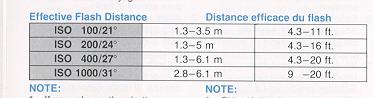
FLASH: Fixed type electronic flash, flashmatic, Guide number 10 (ISO 100 meters), Effective
range of 1.3--3.5 meters (4.26 - 11.48 ft) at ISO 100, Recycling time of approximately 5
seconds. Flash ready indicator built-in.
WATER RESISTANCE: Washable with water.
OTHER FEATURES: Film type window, tripod screw and neck strap.
POWER SOURCE: Two 1.5, V "AA" size alkaline batteries (LR6).
DIMENSIONS: 1 40(W)x 77(H) x 53(0) mm (5.51 x3.03"x2.09").
WEIGHT: 370 g (13.06 oz)
|
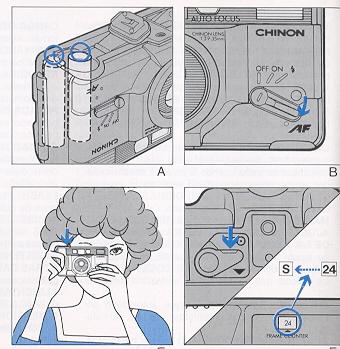
SIMPLIFIED GUIDE FOR USING YOUR CAMERA
1. Installing Batteries (Fig. A)
2. Set the Power/Flash switch lever to the ON position (Fig. B)
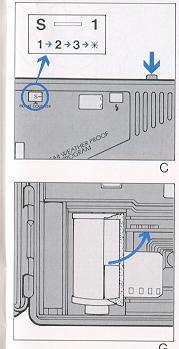
3. Automatic Film Loading (Release shutter 3 times) (Fig. C)
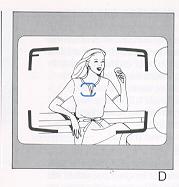
4. Be Sure to Direct AF Frame at Your Subject (Fig. D)
|
 |
|
5. Release the Shutter (Fig. E)
6. Automatic Film Rewind (Fig. F)
7. Remove the Exposed Film (Fig. G)
|
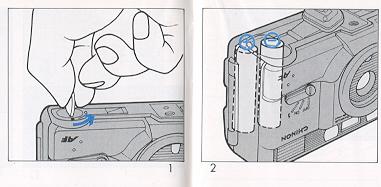
1. Put a small coin in the groove and turn it as illustrated to open the Battery Cap (Fig. 1). Place two 1.5 V "AA" size
alkaline
batteries (LR-6) into the battery compartment so as to correspond with the positive (+) and
negative (--) marks shown inside (Fig. 2).
|
INSTALLING THE BATTERIES
NOTE:
* If you do not intend to use your camera for a long period of time, remove the batteries and store them in a dry location. This will
prevent the possibility of battery leakage and damage to your camera. Do not use Ni-Cad batteries. Be sure to replace both batteries at the same time when the batteries
are too weak to operate the camera. When replacing the batteries, make sure they are not wet. If
so, wipe it with cloth before use.
|
 |
|
BATTERY TESTING
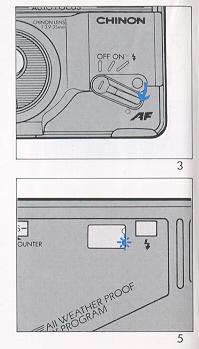
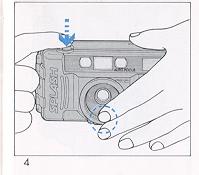
1. Set the Power/Flash Switch Lever to the ON position (Fig. 3) 2. Cover the exposure metering window
with your hand and press the shutter release button halfway (Fig.
4).
3. Make sure the under-exposure warning LED (red) lights up (Fig. 5). If the
red LED fails to illuminate, the batteries are too weak and need to be replaced.
NOTE: * When the Power/Flash Switch Lever is in the OFF position the shutter will be blocked. As
temperature decreases, especially below 0°C (32°F) battery performance declines. Keep batteries
warmed under these conditions.
|
 |
AUTOMATIC FILM SPEED SETTING
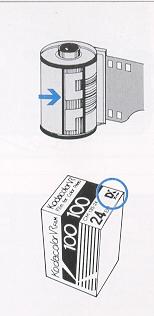
The film speed is automatically set when using a DX-coded film of
ISO 100/21° - 1000/31 Non-DX films will be set to ISO 100/21° (Fig. 6).
|
 |
AUTOMATIC FILM LOADING
Always load and unload your camera in subdued light, and never in direct sunlight.
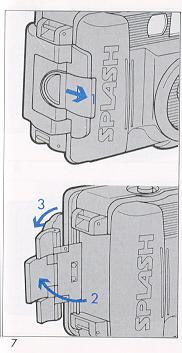
1. Slide the film door closure latch in the direction of the arrow and lift up the closure as illustrated to open the back cover (Fig. 7).
|
| 2. Insert a film cartridge into the film
chamber (Fig. 8). |
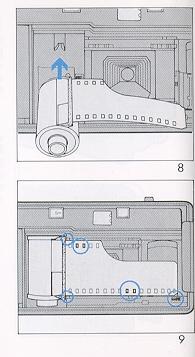 |
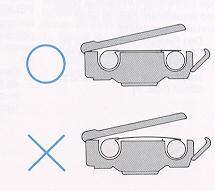
| 3. Align the trimmed end of the film on the
take-up spool with the yellow film tip mark. When loading film, make sure that the film lies flat
between the film guides. Engage the perforation of the film with the teeth of the sprocket (Fig. 9).
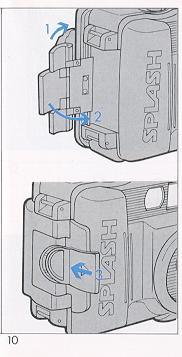
Close the back cover as illustrated (Fig. 10). |
 |
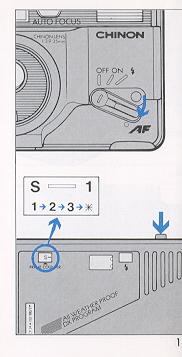 |
4. Set to the Power/Flash Switch Lever to ON
position and release the shutter button three times until
the figure 1" appears in the frame counter (Fig. 11). The
camera is now properly loaded.
NOTE:
* If the film counter does not function, the film is not properly advancing. Open the back cover and re-load
the camera. When inserting film cartridge, make sure they are not wet. If so,
wipe it with cloth before use.
|
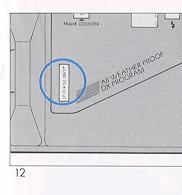
| 4. Cartridge Window
This camera is equipped with a convenient Cartridge Window so that you can check what type of
film is in use (Fig. 12). |
 |
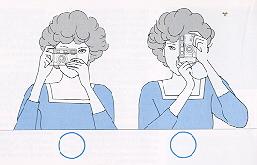 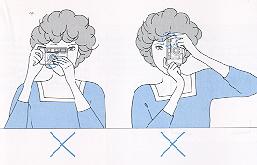 |
HOLDING THE CAMERA
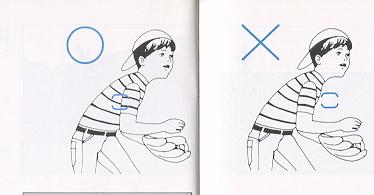
Hold the camera firmly in both hands with at least one elbow at your side to ensure camera
steadiness when taking a picture.
|
|
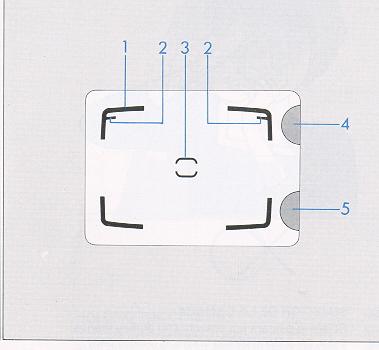
VIEWFINDER
(1) Bright line frame
(2) Parallax marks
(3) Auto-focus frame
(4) AF indication LED (green)
(5) Under exposure warning! Battery check LED (red)
|
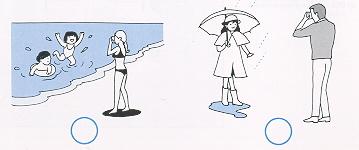 |
WATER PROOF PHOTOGRAPHY
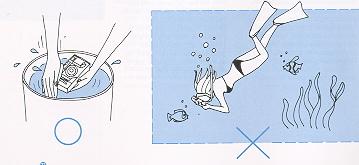
Your SPLASH AF camera is designed to be water-resistant. It can safely be washed with water. You can use it anywhere, even
on a rainy day or at the beach. Do not intend to use it under water.
|
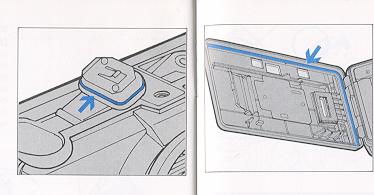 |
Check Waterproof Seal
1. Make sure the waterproof
rubber seal inside is not partly or wholly removed.
2. Make sure there is no sand or foreign material on or around the waterproof
seal.
NOTE:
* When replacing batteries and/ or inserting a film cartridge, make sure that they are not wet. If so, wipe
with cloth before use.
When the lens cover or autofocus window is covered with waterdrops or dirt,
wipe them clean with a soft cloth before taking a picture.
|
|
AUTO-FOCUS SHOOTING
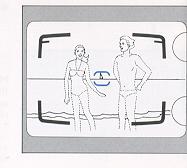
1. Look through the viewfinder and compose the picture so that the main subject is placed in the auto focus frame (3).
2. Gently press
the shutter release button halfway. The camera automatically focuses and the AF signal (green)
will light.
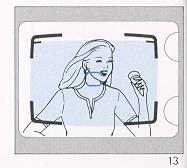
3. When taking a picture closer than 1.5 meters (5 feet), the image area is indicated by the two
parallax marks (2) in the top left and top right corners of the viewfinder. Compose the photograph
within the imaginary zone extending from the corner of the parallax marks (Fig. 13).
NOTE: When a subject is positioned closer than 1.3 meters (4.26 feet), the pictures will not be in focus.
|
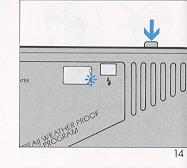
4. Press the shutter release button all the way. If the underexposure warning LED (5) lights up, use
the built-in flash (Fig. 14).
See FLASH PHOTOGRAPHY.
NOTE:
The following subjects will not be properly auto-focused:
* Shiny subjects such as water surfaces or the exterior of a car body.
* Subjects viewed through a glass window. Semi-reflective subjects.
|
 |
| FOCUS LOCK SYSTEM
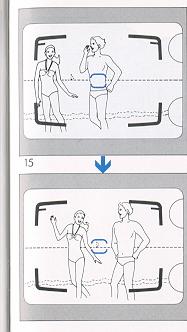
This feature may be used to eliminate tricky focusing situations such as when the main subject is
located "off center" in the viewfinder. In such a situation, first focus on the main subject (by
placing the subject in the AF frame) and partially depress the shutter release button. Hold the
shutter release button in the halfway position and recompose the subjects in the viewfinder and
fully depress the shutter release button to take the picture (Fig. 15). This focus lock feature can be
cancelled by removing your finger from the release button.
|
|
NOTE:
When auto rewinding takes a long time to complete, replace the batteries with
a fresh set.
|
FILM REWIND
When the film in the camera is fully exposed, the motor stops and shutter
release is blocked. Start rewinding at once.
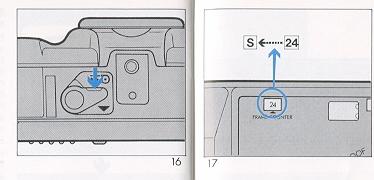
1. Slide the Rewind Switch Lever
in the direction of the arrow to rewind the film (Fig. 16). 2. During
rewinding, the frame number counts backward showing how many frames are still
remaining to be rewound. When rewinding is over, "S" appears in the frame
counter and rewinding is automatically stopped (Fig. 17). Open the back cover
and remove the film.
|
|
|
 |
FLASH PHOTOGRAPHY
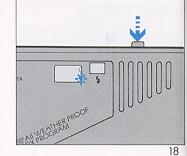
Switch to flash photography if the under-exposure warning LED lights up while pressing the
shutter release button halfway (Fig. 18).
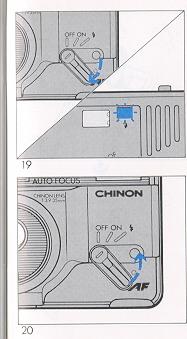
1. Set the Power/Flash Switch Lever to the position to turn on the flash.
2. Make sure that the Flash Ready Indicator is illuminated before taking a
picture (Fig. 19).
3. When the flash is no longer required, be sure to slide back the lever to
the ON or OFF position (Fig. 20).
|

 |
Daylight Flash Photography
If the main subject has less light falling on it than the surrounding area
and background, underexposure of the main subject will result. If such
situations, use the flash even in daylight.
NOTE:
* If you release the shutter
before the Flash Ready Indicator glows, the exposure will not be correct.
|
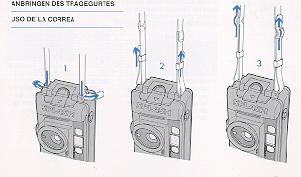 |
ATTACH NECK STRAP |
| CARE OF THE CAMERA
Your camera is a precision instrument. When used with care it will provide years of trouble-free
service. Protect your camera from dirt, rain, dampness and excessive heat. Avoid touching the
lens. To clean the lens, wipe it gently with a soft lintless cloth or tissue. Do
not use eyeglass tissues as they might damage the lens coating. Do not
disassemble and touch the inside of the camera as possible high voltage in the
flash circuitry can be dangerous.
|
Because we continually strive to improve our products, we may change specifications without
prior notice.
 M. Butkus, N.J.