and historical purposes, all rights reserved.
This page is copyright© by
 ,
M. Butkus, N.J.
,
M. Butkus, N.J.
This page may not be sold or distributed without
the expressed permission of the producer.
I have no connection with any camera company.
If you find this manual useful,
how about a donation of
$3 to:
M. Butkus, 29 Lake Ave.,
High Bridge, NJ 08829-1701
and send your e-mail
address
so I can thank you.
Most other places would charge
you $7.50 for
a electronic copy
or $18.00 for a hard to read Xerox copy.
buy new manuals, and pay their shipping costs.
It'll make you feel better, won't it ?
If you use Pay Pal, use the link below.
Use the above address for a check, M.O. or cash.
Back to main on-line manuals page
CLICK HERE
TO GO TO
CHINON CM-7 - English
Chinon CM-7 Bedienungsanleitung
Chinon CM-7 Mode D'Emploi
Chinon CM-7 Manual de Instrucciones
- - - - - - - - - - - - - - - -
CLICK HERE TO CONTINUE TO Chinon CM-7 PDF
FILE MADE FROM THIS HTML PAGE
TABLE OF CONTENTS
|
Nomenclature ............... 2 Specifications ................ 6 Lens Mounting .............10 Installing the batteries ... 12 Battery Testing ................... 14 Film Loading ................ 16 Frame Counter ............. 20 Advancing the Film ....... 22 Film Speed Setting ....... 22 |
Release Lock ............... 24 Exposure Setting I ........ 26 Exposure Setting II ....... 30 Focusing ..................... 34 Unloading Exposed Film ... 36 "B" (Bulb) Setting ......... 38 Self Timer ................... 40 Flash Photography ........ 42 Depth of Field ................ 44 Infrared Photography ..... 46 Optional Accessories ..... 48 |
NOMENCLATURE
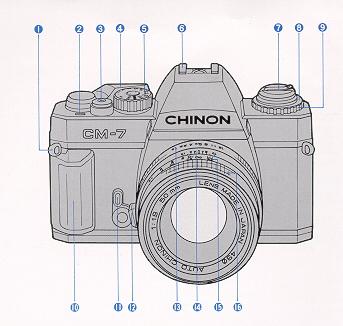 |
1. Shoulder strap eyelet 2. Frame counter 3. Shutter release button 4. Film advance lever 5. Shutter speed dial 6. Hot shoe |
 |
7. Film rewind knob/back cover opener 8. Film speed index 9. Film speed dial 10. Hand grip 11. Self-timer lever 12. Lens lock release button 13. Aperture ring 14. Depth-of-field scale |
|
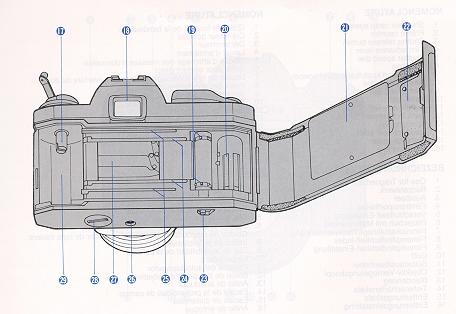
15. Distance scale 16. Focusing ring 17. Rewind shaft 18. Viewfinder eyepiece 19. Sprocket teeth 20. Take-up spool 21. Film pressure plate 22. Back cover |
23. Rewind button 24. Film rail 25. Film guide rail 26. Tripod socket 27. Shutter 28. Battery compartment cover 29. Film chamber |
SPECIFICATION
Type: 35 mm SLR camera with LED type light measuring system.
Picture Format: 24 x 36 mm.
Lens Mount: Chinon universal bayonet mount (K, KA, RK mount compatible).
Shutter: Vertical run metal focal plane shutter, mechanical release.
Shutter Speeds: 1 -1/2000 sec., "B".
Flash Synchronization: Hot-shoe, X contact, 1/125 sec.
Viewfinder: Fixed eye level pentaprism, central split image with micro prism collar and ground glass.
Viewfinder Magnification: 0.86x (@50 mm, infinity)
Viewfinder Visibility: 93%
Dioptric Factor: - 1.0 diopter
Displays in Viewfinder: Red + mark LED
(overexposure), green (dot) mark LED (correct
exposure),
red (dot) mark LED (under exposure)
Exposure Metering: TTL center weighted full aperture system employing
one CdS,
3-step exposure indicator with 3 LEDs.
Exposure Range: EV +3 - EV +20 (F1.4 50 mm, ISO 100).
ISO Range: 25-1600 (DIN 15-33) by 1/3 step.
Film Advance: Single stroke in an arc of 130° with 30° stand off.
Film Counter: Automatically indicates number of exposures and resets
to "S" when
camera back is opened.
Film Loading: Multi-slot take-up spool type.
Film Rewind: By depressing the rewind button and cranking the rewind lever.
Release Lock: Shutter release button is interlocked with the advance
lever stored
at unused position.
Cable Release: Possible.
Self-Timer: Built in, approximately 10 sec. delay.
Power Source: Two 1.5V alkaline batteries (LR44) or silver oxide batteries (SR44).
Body Dimensions: 133(W) x 85(H) x 50(D) mm. (5.24" x 3.35" x 1.97")
Body Weight: 410 grams (14.5 oz).
LENS MOUNTING
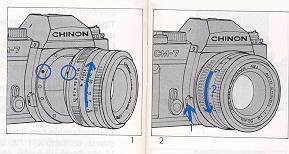
Your CM-7 is equipped with a CHINON "K" bayonet mount which accepts all
interchangeable lenses with the "K" bayonet. To attach the lens, match the red
dot on the camera body and turn it clockwise until
the lens locks with a click. To remove the lens from the camera body, depress
the lens lock release lever, turn the lens counterclockwise as far as it will go
and lift it up from the body (Fig. 1, 2).
INSTALLING THE BATTERIES
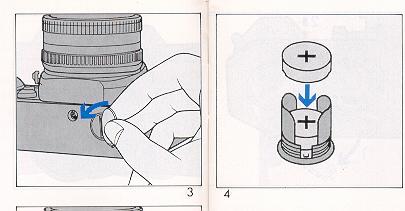
1. By using a coin, unlock the battery compartment cover by turning it counterclockwise (Fig. 3).
2. Place two 1.5 V alkaline batteries (LR44, A76) or two 1.5 V silver oxide batteries (SR44, S76, G13) with the minus (-) side touching the cap (Fig. 4).
3. Turn the battery compartment cover clockwise until it closes firmly (Fig. 5). NOTE: Clean the batteries with a dry cloth or paper before inserting and
thereafter at regular intervals. Make sure that the batteries are inserted correctly, i.e., check polarity. The shutter will operate only when the
batteries are correctly installed and not exhausted. Keep the batteries out of reach of children.
BATTERY TESTING
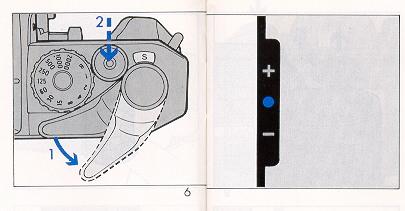
Pull the film advance lever to the stand-off position or fully wind it to activate the meter switch, and set the shutter speed dial to any setting other
than "B" and press halfway the shutter release button. If the batteries are in good condition, one of the three LED's located inside the viewfinder will
illuminate (Fig. 6). If an LED fails to illuminate, the batteries are too weak and need to be replaced, or are incorrectly installed.
FILM LOADING
Your CM-7 camera can be used with any kind of 35 mm film.
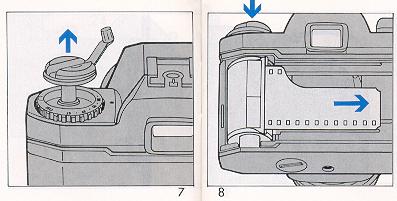
2. Then, insert a film cartridge into the film chamber with the protruding end of the cartridge positioned toward the bottom of the camera.
3. Push down the film rewind knob and slightly turn the knob in either direction until it "seats" properly into the film cartridge spool (Fig. 8).
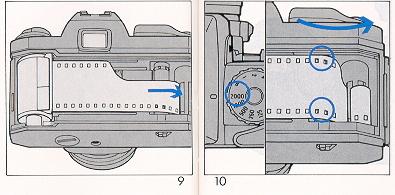
4. Insert the trimmed end of the film into one of the slots on the take-up spool (Fig. 9).
5. Turn the shutter speed dial to any setting and advance the film while holding the film lightly down on to the transport sprocket teeth.
6. Release the shutter if necessary and advance the film until the sprocket teeth engage with the upper and lower perforations of the film (Fig. 10).
8. Turn the film rewind knob gently clockwise until all the slack is taken up and the rewind knob stops. Do not force or further rewind the film (Fig. 11).
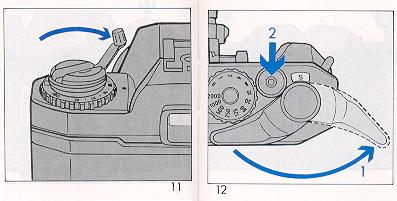
9. Advance the film and release the shutter three times (Fig. 12).
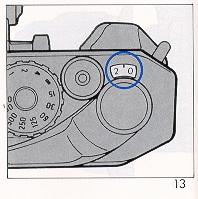
The rewind knob should rotate counter clockwise as the film is advanced and the "1" (between O and 2) marking should appear in the frame counter window after "O" (Fig. 13).
FRAME COUNTER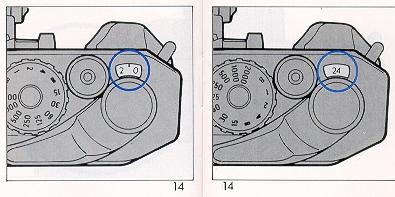
Your CM-7 is equipped with a frame counter which displays the number of exposures made and resets automatically to "S" (start position) upon opening the back cover.
When a film is loaded according to the procedure previously described, the counter displays "1" (between 0 and 2) indicating that the camera is ready for the first exposure. Every time the film advance lever is turned, the counter will proceed one stop forward. The number 12, 20, 24 and 36 are colored in red to warn the end of commonly available films (Fig. 14).
ADVANCING THE FILMMake sure the film has been loaded properly. Operate the film advance lever through a full stroke. When the film end is reached, the film advance lever may stop before the lever is fully turned. Do not force the lever. Stop winding at once and rewind the film. Refer to "Unloading Exposed Film".
FILM SPEED SETTING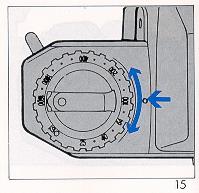
The film speed is specified on the box or in the instruction sheet packed with the film. Set the film speed (ISO number) index by turning the film speed dial according to the value indicated on the film (Fig. 15).
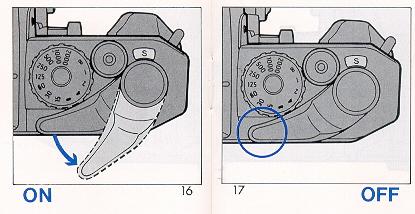
Pull the film advance lever to the stand-off position (Fig. 16) or fully wind it to activate the meter switch when taking pictures. When the film advance lever is returned to the storage position (Fig. 17) the shutter is locked to prevent accidental release. When not in use, return the film advance lever to this original position.
(emphasizing shutter speed)
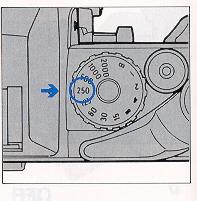
2. With brighter subjects, fast moving subjects or with high rated film speeds, it is recommended to use fast (higher) shutter speeds.
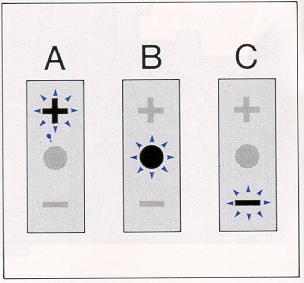
A: Over Exposure B: Correct Exposure C: Under Exposure
EXPOSURE SETTING II
(emphasizing aperture)
2. The suitable aperture value changes according to the brightness of the subject, the depth-of-field desired, or the film speed or shutter speed in use. The typical settings of the aperture with ISO 100/21° film are as follows:
* Sunny day outside: F/8 - F/16
* Cloudy day outside: F/4 - F/5.6
* Inside (without flash): F/1.9 - F/2.8
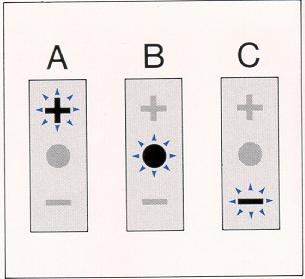
A: Over Exposure
B: Correct Exposure
C: Under Exposure
FOCUSING
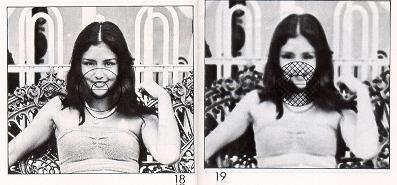
2. Turn the lens focus ring until the upper and lower split images match up to form a uniform image (Fig. 18). This split image focusing is particularly helpful when the subject is dominated by vertical lines.
3. The microprism is also very helpful. When out of focus, the image on the microprism will appear to shimmer (Fig. 19).
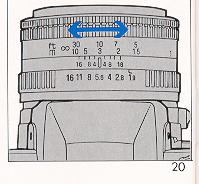
4. When the focus is properly set, the subject image will be sharply defined in the viewfinder. You can double check the focus setting by the image on the
ground glass. You can also focus indirectly. Actually measure or estimate the distance to the subject and set the lens focus ring to the appropriate setting
(Fig. 20).
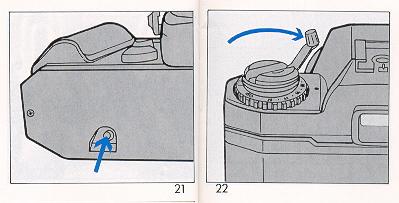
2. Push in the rewind button on the bottom of the camera (Fig. 21).
3. Unfold the rewind crank on the rewind knob. Turn the rewind crank clockwise (Fig. 22).
4. When the pressure eases, the film is completely wound into the film cartridge.
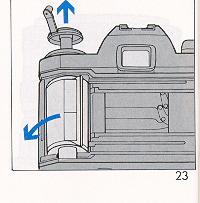
5. Lift up the rewind knob to open the camera back (Fig. 23). Your exposed film should be processed without delay.
"B" (BULB) SETTING
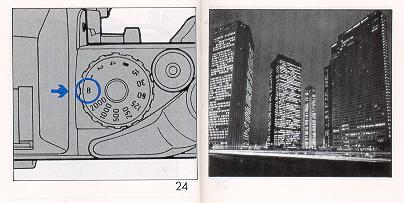
The B setting is used for shooting night scenes or long time exposure. Set the shutter speed dial to the "B" position (Fig. 24). The shutter and mirror
will move to the open (up) position as long as the shutter release button is depressed. Use of a cable release and a tripod is recommended for stability to
prevent camera movement during time exposures.
SELF-TIMER
The self-timer is now ready for use (Fig. 25).
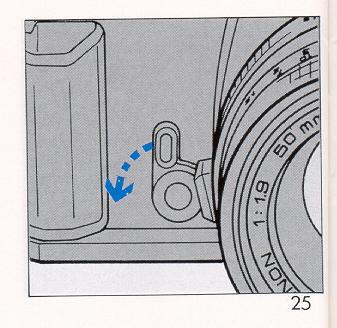
2. Press the shutter release button and the self-timer will release the shutter in approximately 10 seconds.
3. Once the self-timer is set, it must be activated. Cancellation is not possible.
4. The self-timer is very useful when you wish to include yourself in a picture.
It is also useful for taking pictures at slow shutter speeds when a cable release is not available.
FLASH PHOTOGRAPHY
It is advisable to use a flash when the exposure indicators in the viewfinder show that the light level is too low, such as indoors, at night time,
or in daylight when the subject is too dimly lit to provide adequate exposure. Electronic flash units as well as conventional flash units using flash bulbs may
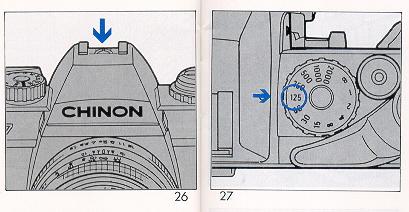
be utilized. The CM-7 has a shoe (accessory shoe with a built-in flash contact) for "X" synchronization (Fig. 26). 1. Set the shutter speed dial at 1/125 second
or lower (Fig. 27). 2. The lens aperture is determined by the calculation table indicated on the flash unit. Follow the instructions given in the instruction
manual of your flash unit.
DEPTH OF FIELD
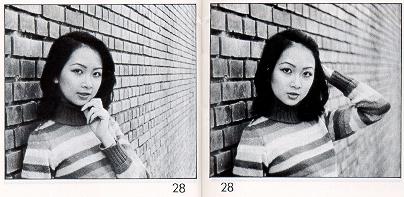
"Depth of field" designates the nearest and furthest limits of the area that will be sharply defined in the picture in front of and beyond the subject. Depth
of field is controlled by the f-stop ring on the lens. The larger the lens opening (f-stop), the shallower is the depth of field.
The smaller the lens opening, the greater the deph of field will become (Fig. 28).
DEPTH OF FIELD SCALE:
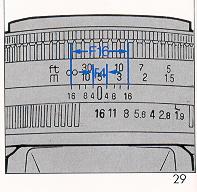
The depth of field scale indicates (after focusing) the approximate area that will be sharp in the picture. Locate on the depth of field scale the
corresponding pair of f-stop figures. The distance between these two f/ stop figures on the focusing ring will be the area of greatest sharpness in your
picture (Fig. 29).
INFRARED PHOTOGRAPHY
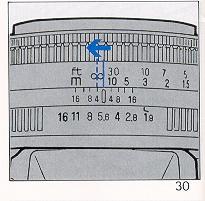
If you intend to take infrared photographs using infrared film and either an R2 or 02 filter, an extra focusing adjustment must be made. After focusing note
the distance setting aligned with the focus index, and move that figure over to the red infrared mark engraved on the lens (Fig. 30). Focus adjustment is not
required when using infrared color films. NOTE: Read the instructions packed with the infrared film for further information.
OPTIONAL ACCESSORIES
* 50 mm f/1.7 multicoated
* 50 mm f/1.9
Wide-angle Lens
17 mm f/3.5 multicoated
28 mm f/2.8 multicoated
Telephoto Lens
135 mm t/2.8 multicoated
Zoom Lens
28-70 mm f/3.5-4.5 multicoated MACRO
35-70 mm f/3.4-4.5 multicoated MACRO
35-80 mm f/3.5-4.8 multicoated MACRO
35-105 mm f/3.5-4.5 multicoated MACRO
35-200 mm f/4.0-5.6 multicoated MACRO
70-210 mm f/4.0-5.6 multicoated MACRO
75-300 mm f/5.6 multicoated MACRO
Accessories
CHINON AUTO "S" series flashes Auto extension ring
Bellows
Deluxe carrying case Soft gadget bag
Wide band strap with CHINON logo