This camera manual library is for reference
and historical purposes, all rights reserved.
This page is copyright© by
 , M. Butkus,
N.J.
, M. Butkus,
N.J.
This page may not be sold or distributed without
the expressed permission of the producer.
I have no connection with any camera company.
If you find this manual useful,
how about a donation of
$3 to:
M. Butkus, 29 Lake Ave.,
High Bridge, NJ 08829-1701
and send your e-mail
address
so I can thank you.
Most other places would charge
you $7.50 for
a electronic copy
or $18.00 for a hard to read Xerox copy.
buy new manuals, and pay their shipping costs.
It'll make you feel better, won't it ?
If you use Pay Pal, use the link below.
Use the above address for a check, M.O. or cash.
Back to my main Camera Manual Site
CLICK HERE FOR CHINON CP-5S
MADE
DIRECTLY FROM MANUAL
CHINON CP-5S ENGLISH
CHINON CP-5S MODE D'EMPLOI
CHINON CP-5S GEBRAUCHSANLEITUNG
CHINON CP-5S MANUAL DE INSTRUCCIONES
CLICK HERE FOR A PDF FILE
MADE FROM THIS
HTML PAGE
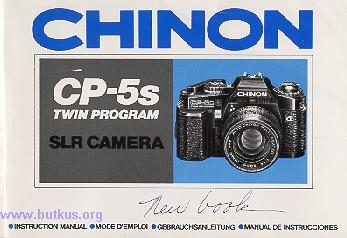
THIS IS THE BASICALLY THE SAME MANUAL AS THE CP-5, ALL NEEDED CHANGES WERE MADE
HENCE - SOME IMAGES MAY CONTAIN CP-5 CAMERA PARTS
This camera has the contact to match the Chinon AF lens sold.
INTRODUCTION
Welcome to the exciting world of CHINON photography!
Your Chinon CP-6 camera is the most sophisticated 35mm SLR available from CHINON. The CP-6 is the world's first two-stage programmed AE camera aperture
priority AE and full manual control. The two-stage programmed AE allows you to shoot fast moving or slow moving subjects to allow maximum versatility
with your creative photographic needs. Employing a full information electronic viewfinder with variable intensity LED's, the CP-5 program camera is extremely
easy to operate even under the most adverse lighting conditions.
Your CP-5 program camera is designed with built-in electronic auto focus contacts
that will permit automatic AF operation when used with the optional Chinon 35-70mm AF lens. Total unmanned automatic operation is also possible when
further used with the optional Chinon power winders and wireless remote control unit.
TABLE OF CONTENTS
|
Nomenclature ..... 4 Specifications ..... 8 Shoulder strap instructions ..... 16 Lens mounting ..... 16 Battery installation ..... 18 Battery testing ..... 20 Film loading ..... 22 Frame counter ..... 26 Film advancement ..... 26 ISO/ASA setting ..... 28 Basic Operations: I. Focusing ..... 30 II. Programmed AE (Auto-Exposure) mode ..... 32 III. Shutter release and release lock ..... 36 IV. Unloading exposed film ..... 38 V. Self-timer/Audible signal on-off switch ..... 40 Vl. Flash photography ..... 44 |
For Advanced Use: I. Multi-mode Metering ..... 48 II. Exposure Memory III. Two Stage Program AE IV. Taking pictures in A mode ..... 52 V. Taking a picture in M mode ..... 56 VII. Exposure compensation ..... 66 VIIl. Time exposure ..... 68 VIII. Multiple exposure ..... 70 lX. Depth of field ..... 72 System Operation: I. Direct focusing system ..... 74 II. Remote control system ..... 78 III. Data back system ..... 78 IV. Auto winder system ..... 80 V. Flash system ..... 82 Vl. Multi-sound system ..... 84 Optional Accessories ..... 88 |
NOMENCLATURE
|
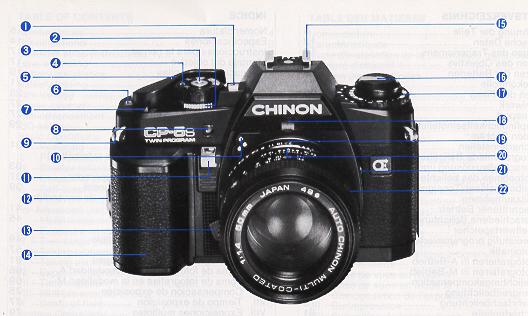
1. Manual shutter speed select button /Exposure memory button 2. Metering mode select lever 3. Shutter release button 4. Exposure mode select dial 5. Film advance lever 6. Film counter window 7. Multi exposure lever |
8. Self timer LED 9. Shoulder strap eyelet 10. AF electronic contacts 11. Self timer / Audible signal on-off switch 12. Power grip attachment screw 13. Lens lock release lever 14. Power grip (battery compartment) |
|
15. Accessory shoe (hot shoe) 16. Film rewind knob and back opening knob 17. Film speed dial (ISO/ASA) 18. F-stop window |
19. Aperture ring 20. Depth of field scale 21. X-sync socket 22. Focusing ring |
|
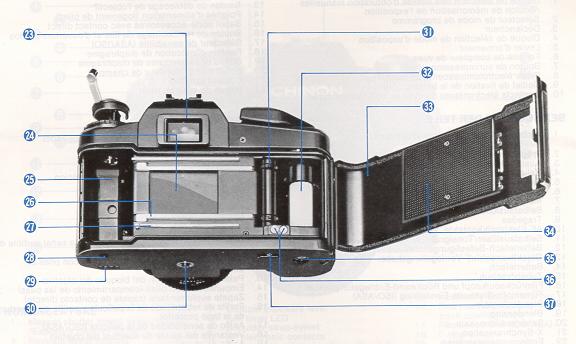
23. Viewfinder eyepiece 24. Metal focal plane shutter 25. Film chamber 26. Film rail 27. Film guide rail 28. Power source contact 29. Power winder electronic contacts 30. Tripod socket |
31. Sprocket teeth 32. Multi-slotted needle 33. Camera back 34. Film pressure plate 35. Power winder coupler 36. Auto Date electronic contacts 37. Rewind button |
SPECIFICATIONS:
Type: 35mm automatic compact SLR camera with TTL full aperture selectable multi-mode metering (Center Weighted AVERAGE Metering, SPOT Metering and SPOT-AVERAGE metering), twin program AE (instant stop-down re-metering), Aperture priority AE, and manual exposure system.
Picture format: 24 x 36mm
Lens Mount: CHINON universal bayonet mount (K, KA, RK mount compatible) with built-in CHINON AF lens contacts.
Mirror: Quick return mirror with sub mirror.
Shutter: Electromagnetically controlled focal plane shutter, stepless speeds from 8 sec to 1/1000 sec on automatic maximum operation time at AE (A, P1 or P2 mode) is 30 seconds, 14 speeds from 8 to 1/1000 sec on manual exposure. Electronically controlled automatic and manual exposure.
Shutter Release: Electromagnetic type shutter release with safety lock and provision for cable release.
Viewfinder: Fixed eyelevel pentaprism (silver-coated) central split image with micro prism collar, 18 digital LED's indicate shutter speeds (green), over/under exposure (red), and program AE (green), Aperture visible in viewfinder (optical type).
Viewfinder magnification: 0.87X at infinity with standard 50mm lens.
Viewfinder visibility: 92%
Auto Focus Type: Built-in AF contacts for CHINON AF lens (only 3 available), activated by shutter release.
In-Focus Trigger: shutter will not be released unless the optional AF lens is in focus.
Exposure Meter: TTL full aperture AVERAGE metering and SPOT metering plus capability of measuring light in accordance with the averaged reading of SPOT and center weighted AVERAGE metering (SPOT-AVERAGE) employing two silicon blue cells.
Exposure Range: at F1.4 50mm, ISO 100.
Center weighted average metering - EV + 1 (F1.4, 1 sec.) to EV + 19 (F22, 1/1000 sec.)
Spot metering - EV + 3(F1.4, 1/4 sec.) to EV + 19 (F22, 1/1000 sec.)
Exposure Compensation: Built-in exposure memory lock system with audible signal activated by halfway depression on shutter release button at SPOT, and by "M' button at AVERAGE metering (Aperture priority AE mode only)
ISO Range: ISO 25-3200 with 1/3EV segment (for DX coded film)
Exposure Compensation: +2EV to -2EV
Programmed AE mode: Two stages available.
P1: The programmed AE designed for fast moving object. Lens aperture stays open up to the shutter speed of 1/60 sec. Between 1/60 -1/1000 sec., the aperture varies in accordance with the programmed shutter speed.
P2: The Programmed AE designed for slow moving objects depth-of-field well considered AE character. Lens aperture stays full open up to the shutter speed of 1/8 sec. At faster than 1/8 sec., the aperture varies in accordance with the programmed shutter speed.
Programmed AE signal: Built-in with flashing "P" LED when the aperture is set within 4 stops from full aperture opening. Beyond 4 stops from full aperture opening, "P" LED will remain "ON" at program AE mode.
Manual Shutter Speed selector: One-touch activation type by pressing the shutter release button halfway. Also serves as Exposure
Memory button at A mode. Depressing the "M" button, shutter speed starts from 1/125 sec. and goes up with LED indication. Depressing both
"M" button and shutter release button, shutter speed goes down from 1/125 sec. A with LED indication in viewfinder.
S.C.S. (Shutter speed Change Signal): Built-in with audible buzzer signal along with manual shutter speed change.
M.E.S.: (Manual Exposure Signal): Built-in with audible buzzer signal when the proper exposure is achieved by turning aperture ring.
Camera Shake, over/under warning: shutter speed slower than 1/30 sec., under/over warning with double audible signal.
Film Advance: Single stroke in an arc of 130 degrees with 25 degree stand off. Motorized film advance with optional power winder.
Film Loading: Multi-slotted needle type
Film Rewind: By depressing the rewind button and cranking the rewind lever.
Film Counter: Automatically indicates number of exposure and resets to "S" when the camera back is opened.
Multiple Exposure:Built-in switch which disengages film advance and film counter.
Self timer: Electronically controlled at 10 sec. with flashing red LED and audible buzzer signal.
"B" (Bulb) Timer Signal: Built-in with variable audible buzzer signals.
Accessory Shoe: Hot shoe type with "X" sync and a contact for CHINON dedicated flash.
"X" Synchronization: "X" flash sync at 1/100 sec.
Slow Synchronization: 1/60 see or slower at manual
Special Contacts for CHINON AF lens: Built-in
Special Contact for CHINON Auto Date: Built-in (only goes to the year 2019)
Power Source: 3 x 1 .5V "AAA" (AM-4)
Power Hold System: 30 sec. at manual exposure mode
Battery Check: Built-in with digital LED indicator
Accessories: Chinon power winders, Dedicated flashes, Info Back-2 data imprinting unit, Auto Date data imprinting unit, Super multi-coated lenses, AF lenses, Deluxe carrying cases and many more.
Dimensions: 136 (W) x 88 (H) x 51 (D) mm. (5.35" x 3.46" x 2.01") Weight: 520g (18.34 oz)
SHOULDER STRAP INSTRUCTIONS
|
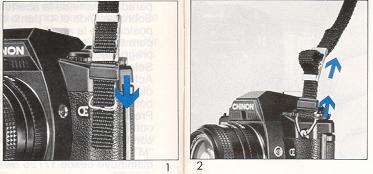
Place the end of the shoulder strap through the retaining ring connected to the camera body lug. Fold the shoulder strap over the retaining ring. Place the ends of the strap through the plastic retainer. Pull tight to secure. Follow the same procedure for the other side of the camera (Fig. 1, 2). |
LENS MOUNTING
|
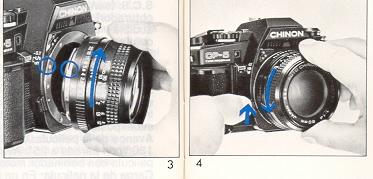
Your CHINON CP-5 program is equipped with a CHINON "K" bayonet mount which accepts all interchangeable lenses with the "K" bayonet mount. To attach the lens, match the red dot on the camera body with the red dot on the lens (Fig. 3). |
Then insert the lens into the camera body and turn it clockwise until the lens locks with a click. To remove the lens from the camera body, depress the lens lock release lever, turn the lens counterclockwise as far as it will Do, and lift it up from the body (Fig. 4)
BATTERY INSTALLATION
|
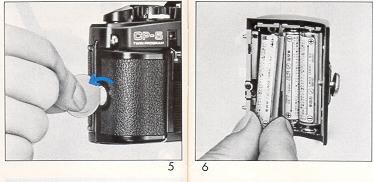
1. Turn counterclockwise the screw on the side of the power grip to remove the power grip from the camera body (Fig. 5).
2. Place three 1.5V "AAA" alkaline bakeries (LR-03, AM-4) in the power grip (Fig. 6). 3. Attach the power grip to the camera body by turning the screw clockwise to secure it. |
NOTE:
2. If you do not use your camera for a long period of time, remove the bakeries, and store in a dry location. This will prevent the possibility of battery leakage and damage to your camera.
|
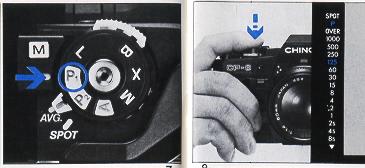
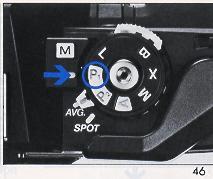
1. Set the "exposure mode select dial" to the "P"
position (Fig. 7).
2. Look through the viewfinder and depress the shutter release button halfway down to confirm at least one of LED indicators in the viewfinder illuminates (Fig. 8). 3. When nothing illuminates, replace the batteries with a fresh set or check to ensure the batteries are correctly installed. |
FILM LOADING
|
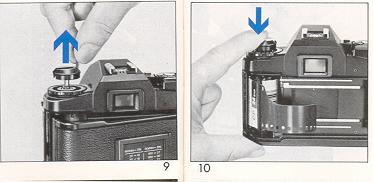
Pull up on the film rewind knob until the camera back pops open (Fig. 9). Then insert a film cartridge into the film chamber with the protruding end of the cartridge positioned to the bottom of the camera. Push down the film rewind knob and slightly turn the knob in either direction until it "seats" properly into the film cartridge spool (Fig. 10). |
|
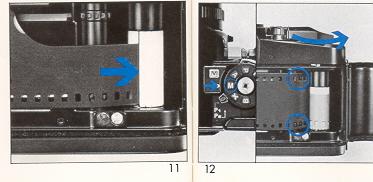
Insert the trimmed end of the film into a slot of the multi-slot needle (Fig. 11). Turn the exposure mode select dial to "M" or "X" setting and advance the film while holding the film lightly down on to the transport sprockets. |
Release the shutter if necessary and advance the film until the sprockets engage with the upper and lower perforations
of the film (Fig. 12). Then close the camera back firmly until it locks with a click. Now turn the film rewind knob gently until all the slack
is taken up and the rewind knob stops.
|
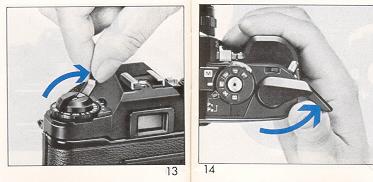
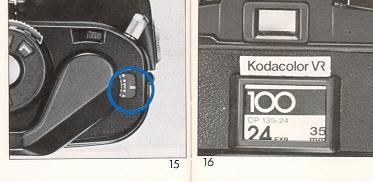
Do not force or further rewind the film (Fig. 13) Advance the film and release the shutter three times (Fig. 14). The rewind knob should rotate counterclockwise as the film is advanced and the "1" marking should appear in the frame counter window (Fig. 15). |
|
Turn the exposure mode select dial to the desired position. A convenient memo holder is provided on the back of your camera. Whenever you load new film, just cut off the top of the film box and put it in the memo holder as a reminder (Fig. 16). |
FRAME
COUNTER
|
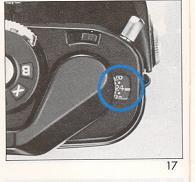
Your CHINON ,CP-6 program is equipped with a frame counter which displays the number of exposures made and resets automatically upon opening the camera back. At the very beginning, the counter shows "S" indicating the start of the picture taking process. When a film is loaded according to the procedure previously described the counter displays "1" indicating that the camera is ready for the first exposure. Every time the film advance lever is turned, the counter will proceed one stop forward. The number 24 and 36 are colored in orange to warn the end of commonly used films (Fig. 17) |
FILM ADVANCEMENT
When the film end is reached, the film advance lever may stop before the lever is fully turned. Do not force the lever. Stop winding at once and rewind the film. Refer to "UNLOADING EXPOSED FILM."
ISO/ASA SETTING
|
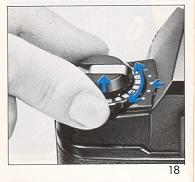
The film speed dial located on top of the camera is coupled directly to the internal exposure control circuitry and the correct exposure factor for the film is automatically set by aligning the ISO/ASA number of the film you are using with the index mark on the camera body (Fig. 18). The ISO/ASA number of the film is printed on the film box or in the instruction sheet packed with the film. Pull out the film speed dial and turn the dial to align the appropriate ISO/ASA number with the green index mark. Be sure to check the ISO/ASA number whenever you put new film into the camera. |
BASIC OPERATIONS
I. Focusing
|
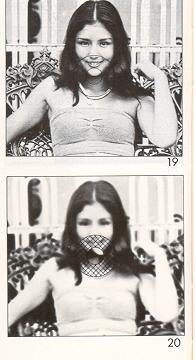
At the center of the viewfinder is the split image with microprism collar which is then surrounded by ground glass. When the
camera is in focus, the image on these focusing aids becomes sharpest.
While observing the subject through the viewfinder, turn the lens focus ring until the upper and lower split images match up to form a uniform
image (Fig. 19).
This split image focusing is particularly helpful when the subject is dominated by vertical lines. The microprism is also very helpful; when out of focus; the image on the microprism will be composed of a collection of asterisks (Fig. 20). These sparkling asterisks will disappear when the focus is properly set. You can double check the focus seeing by the image on the ground glass. |
|
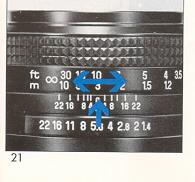
You can also focus indirectly. Actually measure or estimate the distance to the subject and set the lens focus ring to the appropriate setting (Fig. 21). |
II. Programmed Auto-Exposure
|
(AE) mode ("P" mode)
Your CHINON CP-5s program camera automatically selects the most suitable combination of shutter speed and aperture for the optimum exposure. The programmed AE mode is ideal for general picture taking by shooting very quickly and easily, eliminating troublesome exposure setting according to light conditions. |
 |
The CHINON CP-6 program camera is also equipped with the World's First "Two-Stage" Program AE
mode. It is recommended to use, in most cases the "P1 "
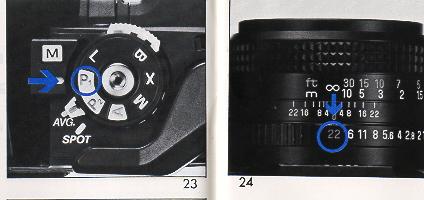
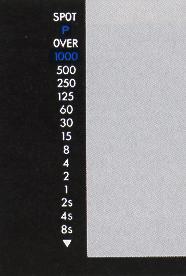
mode, which selects fastest practical shutter speed. 1. Set the Exposure Mode Select dial to the "P1" position (Fig. 22). 2. Set the lens at it's minimum aperture. 3. While looking at the shutter speed indicator scale in the viewfinder, slightly depress the shutter release button. |
The "P" LED and program selected shutter speed LED indicators light up (Fig. 24). Further pressure on the shutter button will release the shutter.
* Programmed AE mode warning: The "P" LED indicator (green) in the viewfinder will "flicker" when the lens aperture is set within four stops of the lens full aperture opening. Beyond four stops of full aperture opening, the "P" LED indicator will remain illuminated at the programmed AE mode. Thus, set the lens aperture, so as not to cause the "Programmed AE mode warning" LED to "flicker."
For more detailed usage of programmed AE, please refer to the section "Two-Stage programmed AE" for advanced use.
III.
Shutter release and release lock
|
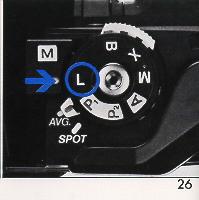
Your CHINON CP-5s program camera features a two stage electromagnetic shutter release with safety lock. When the shutter release button is depressed halfway, the electronic circuitry starts functioning. When the button is fully depressed, it will trigger the shutter. Always hold the camera steady and gently depress the shutter release button to make an exposure. The position marked "L" on the exposure mode select dial is the shutter release safety lock position. |
When this is aligned with
the index mark, the batteries are disconnected from the circuitry and an exposure cannot be made (Fig. 25). This position is also used when the
camera is not to be used for a long time.
IV.
Unloading exposed film
|
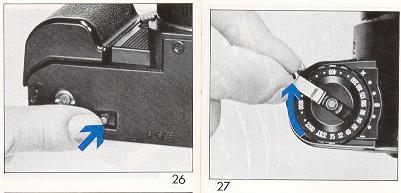
When the film in the camera is fully exposed, the film advance lever will stop. Do not attempt to force the lever any further, but rewind the film and replace with a new one. Push in the rewind lock release button at the bottom of the camera (Fig. 26). Unfold the rewind crank of the rewind knob. Turn the rewind crank clockwise (Fig. 27). |
You will feel friction as the film is rewound from the camera, back into the film cartridge. Suddenly, when the film is rewound completely, the friction
decreases and the rewind crank will turn with ease.
|
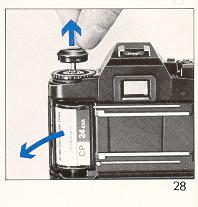
Then pull up on the rewind knob to open the camera back (Fig. 28). When the camera back is opened the frame counter will automatically reset to "S". The rewind lock release button on the bottom of the camera will pop out to the normal position when the film advance lever is advanced again. Your exposed film should be processed without delay. |
V. Self-timer/Audible signal on-off switch
|
Your CHINON CP-5s program camera is equipped with an electronic self-timer with a red LED indicator, together with a piezo ceramic buzzer (audible signal). |
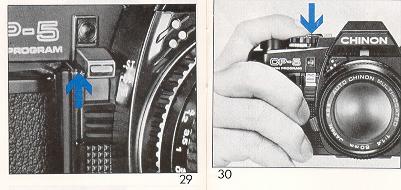
Thin self-timer switch also functions as an audible signal on-off switch. The built-in self-timer electronically delays the shutter release for ten seconds. The camera should be mounted on a firm support during self-timer operation. To activate the self-timer, place the self-timer switch to the upper position and depress the shutter release button (Fig. 29, 30). You will notice the red self-timer LED blinking with the piezo ceramic buzzer (audible signal) and two seconds before the shutter release the flashing frequency will increase giving you or your audience time to smile. The self-timer may also be utilized for releasing the shutter at low shutter speeds when a cable release is not available. If you decided not to use the self-timer, you can cancel it even after it has started to operate. Just return the self-timer switch to the normal position for cancellation.
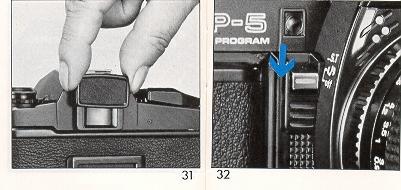
NOTE: When utilizing the self-timer with the exposure mode select dial set at "P" or "A", it is recommended to block
the viewfinder with an eyepiece cover or similar item to prevent extraneous light from interfering with the automatic exposure system of the camera
(Fig. 31 ).
|
* Audible Signal ON/OFF Switch When the Audible Signal ON/OFF Switch (self-timer switch) is pulled down to the lower position, all audible signals of the camera will be eliminated (Fig. 32). Your Chinon CP-5S program camera is equipped with six different audible signals. For more details, see "SYSTEM OPERATION". |
Vl.
Flash photography
Your CHINON CP-5s program camera is designed with a unique flash system, making flash photography simple. The CP-5s gives
a wide range of use, such as X sync at 1/100 sec. and slower sync flash photography possibility.
|
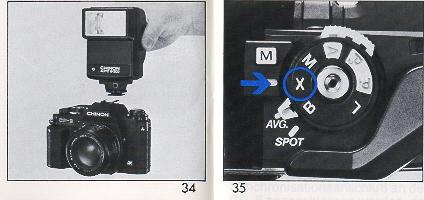
1. Mount a CHINON dedicated flash to the camera (Fig. 33). Set the f/ stop indicated on the exposure calculator dial of your CHINON flash to the corresponding aperture ring on the lens. Set the exposure mode select dial to "A" or "X" position (Fig. 34). |
|
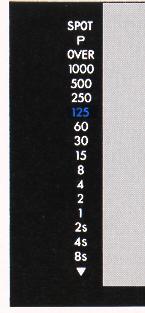
2. A few seconds after your CHINON flash is turned to the "ON" position, the flash ready light will illuminate. When the flash has reached adequate power, the camera's shutter speed is automatically set to the 1/100 sec., and 1/125 sec. shutter speed indicator (green) will blink, signaling the camera flash is ready to operate (Fig. 35). 3. With the exposure mode select dial set at "A", after the picture has been taken and before the flash has recycled, the camera will automatically switch to the automatic exposure mode until the flash has once again recycled.
|
|
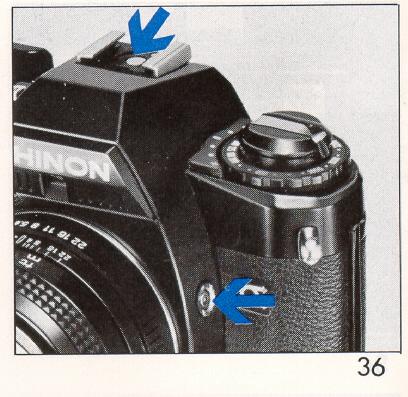
Other electronic flash units can be utilized with your CHINON CP-5s program camera. However, if the unit does not incorporate
a built-in hot shoe, a P.C. cord must be connected to the "X" synchronization terminal on your CP-5s program camera for proper flash synchronization.
Also the exposure mode select dial must be set to the "X" position (Fig. 36). NOTE: It is advisable to use only CHINON dedicated flash units or units designed specially for use on CHINON cameras. (Webmaster): Any auto (non-dedicated flash) will work with this camera. They can be expensive units to $30 units. By placing the flash in AUTO mode, look at your film ASA and distance to your subject. Set your camera to manual, at 1/60 sec. or "X" and to the F-stop stated on the flash. Some flash units will have multiple colors (flash power) and have more than one F-stop. These determine the max. distance to the subject. |
NOTE: When
"FP" or "M" type flash bulbs are used, the shutter speed must be set to 1/15 sec. or slower. Use of a tripod is always recommended.
For details on "Slow Synchronization", refer to "SYSTEM OPERATION".
FOR ADVANCED USE:
I. Multi-mode metering system
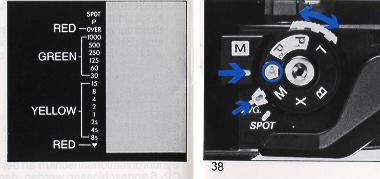 |
By simply switching the metering select lever, SPOT metering and center weighted AVERAGE metering plus capability of measuring light in accordance with the averaged reading of SPOT and center weighted AVERAGE metering (SPOT AVERAGE) can be obtained regardless of the AE mode chosen. |
1. AVERAGE: center weighted average metering method
This metering system is considered as the conventional way to measure light. The light value of the subjects placed in the viewfinder is measured evenly with the stress on the light value in the center of the composition. Simply set the Metering Mode Select Lever to the AVG position to employ this metering mode (Fig. 38).
2. SPOT: spot metering method
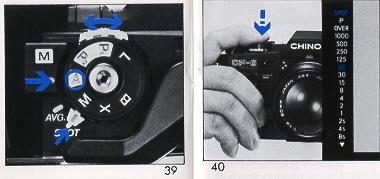 |
This method to measure a light value of the subject placed in the center of the viewfinder, which covers about 2% of the total picture area. The spot metering system measures the area covered by the split-image and microprism part of the focusing screen. |
A.) This method is extremely useful when there is a big gap between light and dark areas of the subject, e.g. when taking pictures of a subject with direct sunlight toward the camera (backlit conditions), or of a subject
spot-lit with a dark background. 1.) Set the Metering Mode Select Lever to the SPOT position (Fig. 39).
B.) The shutter release button depressed halfway, the SPOT digital LED in the viewfinder (red) and the selected shutter speed at this SPOT metering mode will light up (Fig.
40).
NOTE: When using a PL filter in the SPOT mode, be sure to use a circular Polarized Light (PL) filter for best results.
3. SPOT-AVERAGE: Averaged reading of SPOT and center
weighted AVERAGE metering ("A" mode)
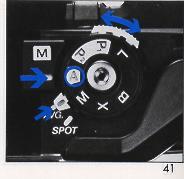 |
This unique SPOT-AVERAGE metering method is to measure light in accordance with averaged reading of "spot" and "center weighted average" metering.
This method of light measuring is useful in such cases when taking pictures of a scene in extremely backlit condition, or when there is a big gap between brightness of a main subject and background-under these conditions, AVERAGE metering will be much affected by the background brightness while SPOT metering will only measure the light in the
center. |
1.) Set the Exposure Mode Select Dial to the "A" position, the Metering Mode Select lever to the
"AVG" position (Fig. 41).
2.) Look through the viewfinder compose the picture and focus.
3.) Depress the shutter release button halfway and at the same time depress the Manual Shutter Speed Select Button once which will instantly memorize the center weighted averaged metering data (Fig. 42).
4.) Continue to depress the shutter release button halfway and center the main part of the subject in the spot metering zone, then set the Metering Mode Select lever to the "SPOT' position (Fig. 43). Instantaneously the camera will compute the averaged reading of the center weighted average metering and spot metering, giving an audible signal.
NOTE: In the viewfinder, the shutter speed digital LED at SPOT AVERAGE metering blinks, and the spot-metered shutter speed digital LED lights up.
5.) While keeping the shutter release button halfway depressed, compose the picture and release the shutter.
NOTE: The SPOT-AVERAGE metering cannot be used in program modes (P1 or P2). Please use "A" mode for SPOT-AVERAGE metering.
II. Exposure Memory
Under normal circumstances your CHINON CP-5s will produce perfectly exposed photographs, due to the integrated automatic exposure circuitry. However, some lighting conditions might occur that could misguide the system, such as subjects with a very high contrast or strongly backlit scenes. In such cases the exposure memory should be
used.
1. Exposure memory at SPOT metering mode.
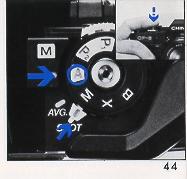 |
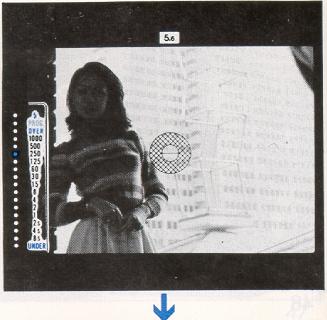
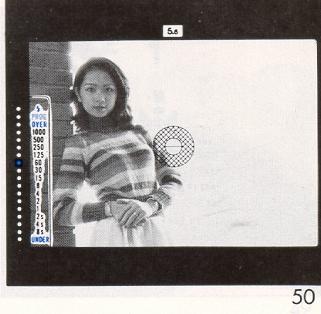
Exposure memory lock is executed by depressing the shutter release button halfway at the "A" mode. Center the main part of the subject in the spot metering zone with the Metering Mode Select Lever set in the "SPOT" position and depress the shutter release button halfway to memorize the exposure, giving an audible signal (Fig. 44). While keeping the shutter release button halfway depressed, recompose the picture as you desire and release the shutter. The spot-metered shutter speed indicator in the viewfinder will flicker, and the metered shutter speed at the time of recomposing will stay lit: |
2. Exposure memory at AVERAGE metering mode
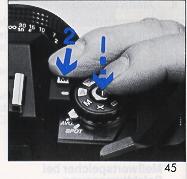 |
1. ) Make sure that the exposure mode select dial is set to the "A" position. 2.) Look through the viewfinder and center your subject in the split micro prism center spot, and depress the shutter release button halfway. 3.) Then press the manual shutter speed select button once which will instantly memorize the light value of the subject (indicated by an audible signal). Once the manual shutter speed button is depressed, there is no need to hold it further, as long as the shutter release button is halfway depressed (Fig. 45). |
4.) Focus and compose the subject in the viewfinder as you desire then press the shutter release button all the way to take the
photograph.
NOTE: When the exposure mode select dial is set to the program mode (P1 or P2), exposure will not be memorized.
|
|
|
|
I. Two-stage programmed AE
|
1. Program
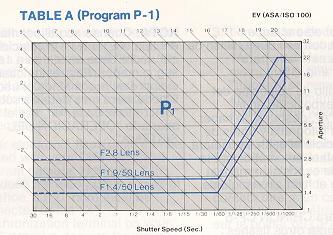 |
P1 (Table A) The P1 mode minimizes the camera
shake and is designed to be used when photographing "hi speed" (moving)
objects.
|
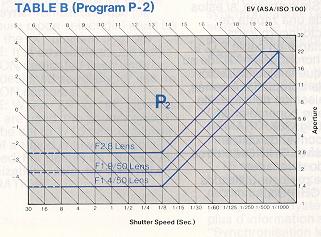
2. Program
 |
P2 (Table B) The P2 mode gives priority to the lens aperture, which affects the depth of field. This mode is convenient when taking picture of hard-to-focus objects and when using wide angle lens. |
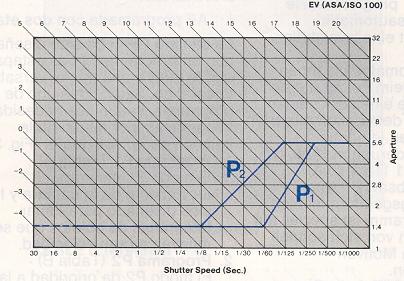
3. Programmed AE mode warning and aperture setting.
 |
(Table C) Unlike other program cameras, CHINON CP-5s camera accepts any existing "K" mount lenses even in the program mode. Generally, you should set the aperture at its minimum setting. Although you can take a perfectly exposed picture at any aperture setting, the applicable programmed range is limited in this connection, thus the program AE mode warning LED is useful to check the lens aperture setting for program mode. The programmed AE mode warning "P" LED will "flicker" when the lens aperture is within four stops of the full opening aperture. Set the aperture within the range so that the warning LED will not "flicker". |
Follow your own photographic needs; however, in such a case for instance, using 50mm f1.4 lens with its f/stop set at 5.6, the camera is controlled by
the program characteristics of f/1.4 through f/5.6, beyond f/5.6, camera is controlled by the aperture priority automatic exposure mode (See table C).
IV. Taking pictures in A mode
|
After you have set the exposure mode select dial (to "A") and desired aperture, the camera will automatically select the stepless shutter speed from 8 sec. to a fast 1/1000 sec. "A" mode is convenient for taking picture at specific aperture settings based on your individual needs. 1. Set the exposure mode select dial to the "A" position. Set the desired aperture by rotating lens aperture ring (Fig. 38).
|
2. When the shutter release button is depressed halfway, the exposure control circuit is energized and will be in the monitoring stage (Fig. 39). You can see the computerized shutter speed displayed in the viewfinder by green and yellow LED's (Fig. 40).
|
* If the lens F stop or the aperture size is too large for the lighting condition, the red over exposure indicator (third from the top of the scale) will glow, giving double audible buzzer signals (Fig. 41). When this happens, stop down the lens diaphragm by turning the lens F stop ring or use a film with a lower ASA number. Another alternative is to use a ND (neutral density) filter in front of the lens. |
* If the displayed speed is 1/30 or slower (yellow LED's with audible signal), use of a tripod is recommended, or you can increase the shutter speed by opening the lens diaphragm. Use of a flash unit is also suggested.
* If the computed shutter speed is even longer than 8 sec. (semi darkness condition) the under exposure indicator (red LED with double audible signal) at the bottom of the scale will light up (Fig. 42). Open the lens diaphragm by turning aperture ring, use a film with a higher ASA number or use a flash.
V. Taking a picture in M mode
|
You can manually control the CHINON CP-5s when the camera is set to the "M" mode. Just one push of the manual shutter speed select button selects the desired shutter speed and the audible signal will be heard when correct exposure is obtained. Furthermore, CHINON CP-5s program camera is equipped with convenient "power-hold circuitry". |
* Manual shutter speed select button
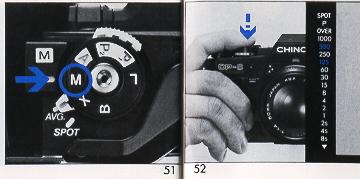
1. Set the exposure mode select dial to the "M" mode position (Fig. 43).
2.
When the shutter release button is depressed halfway the 1/125 shutter speed LED will blink and the metered shutter speed will be displayed (Fig. 44).
3. Select the desired shutter speed by depressing the shutter speed select button. The shutter speed LED indicator increases step by step as you press the button.
4. When you press both shutter release button and manual shutter speed select button, the shutter speed LED indicator decreases step by step.
* There are two methods of selecting the correct exposure (M mode)
1. In the Shutter Speed Preferred Selection: set the required shutter speed.
|
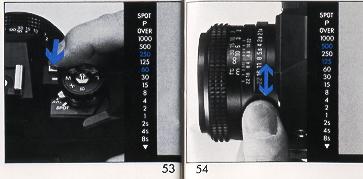
Rotate the lens aperture ring until the selected shutter speed and the metered
speed are matched up on the scale in the viewfinder (Fig. 45).
|
2. In the Aperture priority AE: Set the required aperture on the lens. Change shutter speed until both LED's are coincident (Fig. 53).
* Other features at M mode
1. Power-hold circuitry: One push of the shutter release button holds the camera circuitry for 30 seconds.
2. S.C.S. (Shutter speed Change Signal): An audible signal will be heard when the manual shutter speed changes. When the correct exposure (shutter speed) is obtained, a longer audible signal is heard.
3. M.E.S. (Manual Exposure Signal): For the shutter speed preference (#1 above), an audible signal is heard when the correct exposure aperture is obtained. NOTE: At "M" mode, the camera shake and over/under warning audible signals are not operative.
VI. Exposure Compensation (at "P" or "A" mode)
|
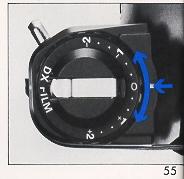
Your CHINON CP-5s program camera incorporates an exposure compensation dial which can be utilized for special purposes such as bracketing exposure, compensation for back-lit or spot-lit situations. If you would prefer darker or brighter pictures than those obtained by the automatic exposure system, this feature is very helpful. |
You can change the exposure factor up to one full stop either plus or minus in 1/3 EV increments.
Pull out and turn the film speed dial to the desired position (Fig. 51).
NOTE: After exposures have been made, be sure to return the dial to the normal exposure position.
IV. Exposure Memory
Under normal circumstances your CHINON CP-5s program camera will produce perfectly exposed photographs, due to the integrated automatic exposure circuitry. However some lighting conditions might occur that could misguide the system such as subjects with a very high contrast or strongly back-lit scenes. In such cases the exposure memory feature should be used.
|
|
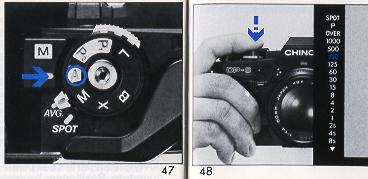
1. Make sure that the exposure mode select dial is set to the "A" position (Fig. 47).
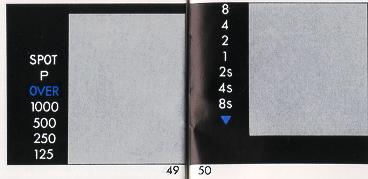
2. Depress the shutter release button half way and measure the light on the main part of the subject you want to shoot excluding all unnecessary light from the side or background (Fig. 48). Then press the manual shutter speed select button once which will instantly memorize the light value of the subject giving an audible signal (Fig. 49). Once the button is depressed, there is no need to hold the manual shutter speed select button further as long as the shutter release button is depressed halfway. |
VlI. Time Exposure (Night Photography)
|
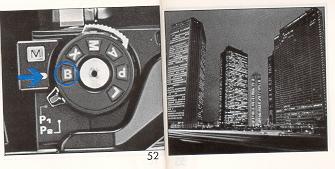
Set the exposure mode select dial to the "B" position (Fig. 52). The shutter mirror will reflex to the open (up) position while the shutter release button is depressed. Use of cable release and a tripod is recommended for stability to prevent vibration during time exposures. Your CHINON CP-5s program camera is equipped with "B Timer Signal" system which gives audible signals as time passes: |
* "B" timer signal:
For the first 60 seconds, an audible buzzer will be heard every second. After 60 seconds, at intervals of 10 seconds, an
audible buzzer will be heard in four different signals.
VllI. Multiple Exposure
|
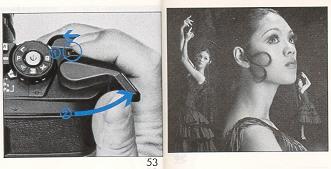
Another attractive feature of your CHINON CP-5s program camera is the built-in unlimited multiple exposure provision. The multiple exposure lever is located in front of the film advance lever (Fig. 53). When you activate the film advance lever simply press and hold the multiple exposure lever to the left. This lever should be held throughout the film advancement. |
By doing so the advance mechanism and the film counter will be disengaged. Only the shutter will be charged when the film advance lever is activated. Therefore, the film will not advance and you can make unlimited multiple exposures on any single frame.
NOTE: You can make multiple exposures as you wish. However, each time the multiple exposure lever must be held before and throughout the film advancement.
IX. Depth of Field
|
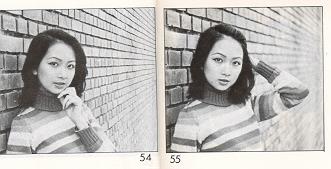
Depth of field designates the nearest and furthest limits of the area that will be sharp in the picture in front of and beyond
the subject. Depth of field is controlled by f/stop. The larger the lens opening (f/stop), the shallower is the depth of field. The smaller the
lens opening, the greater the depth of field will become. (Fig. 54, 55). |
|
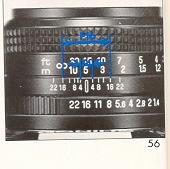
Depth of Field Scale: The depth of field scale indicates (after focusing) the approximate area that will be sharp in the
picture. Locate on the depth of field scale the corresponding pair of f/stop figures. The distance between these two f/stop figures on the focusing
ring will be the area of the sharpness in your picture
(Fig. 56). |
SYSTEM OPERATION
|
I.
Direct Focusing System
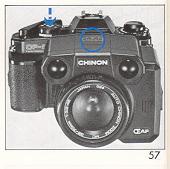
Your CHINON CP-5s program camera has built-in AF electronic contacts which will allow activation of the optional Chinon 35-70mm f/3.3-4.5 Auto Focus Lens by depressing the shutter release button of the camera. To activate the AF system, operate the film advance lever, look through the viewfinder, center the subject by utilizing the split image with microprism collar in the viewfinder, then depressing the shutter release button halfway. |
The focusing ring will automatically rotate until the subject is in focus (Fig. 57). You may also focus by depressing the auto focus button on the auto focus lens unit. When the camera is in focus, the green AF LED on top of the lens will glow giving an audible buzzer signal and the shutter can be released.
* In-Focus Trigger System: Even if the shutter release button is depressed all the way, the shutter will not release until the subject is properly focused. This direct in-focus trigger system ensures properly focused pictures every time the shutter is released.
II. Remote Control System
|
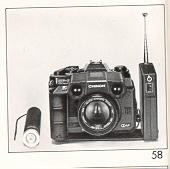
When used with optional CHINON AF lens (with built-in AF contacts) optional power winder and optional remote control unit, you
can operate the CP-5s camera up to 130 feet away. (Fig. 58). |
III. Data Back System
|
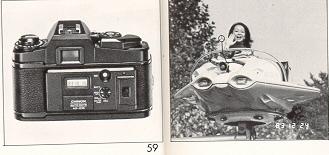
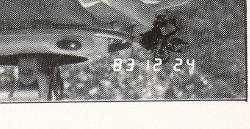
The optional Auto Date (AD-510) Data Back features electronic imprint of year, month, day or hour, minute directly on your
negative or slide, the built-in quartz clock/calendar automatically resets until the year 2019.
Humm, it's 2022... guess I'm out of luck ! |
|
Your CHINON CP-5s is designed with direct electronic contacts so the data will be automatically imprinted each time the shutter
is released. When the data is imprinted, the word "PRINT" appears in the display window. (Fig. 59). (this is only good to the year 2019) |
IV. Power Winder System
|
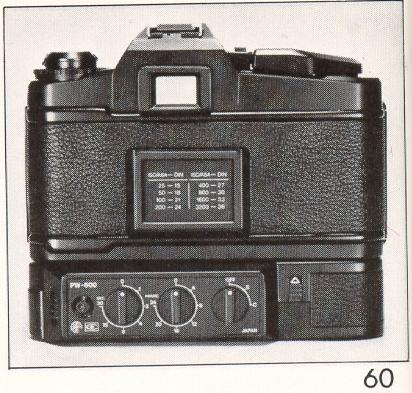
CP-5s optional power winder system features the World's First "Single Power Source System". When equipped with CHINON Power Winders
(PW-600, PW-610), the camera's power source is supplied from the power winder. This system is extremely convenient when photographing in cold
weather. You can shoot continuously for a predetermined amount of frames (up to 24 exposures), at intervals of your choice (up to 30 seconds) (Fig. 60). |
V. Flash
System
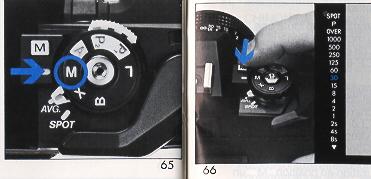
With optional CHINON dedicated flash units, you can take flash photographs with the camera set at "A", "M" or "X". When
the flash is fully charged, the shutter speed is automatically set to the 1/100 sec. and the flash ready indicator will blink.
* Slow Synchronization
If you desire to synchronize at slower than 1/100 sec., set the exposure mode select dial to the "M" position (Fig. 61).
Select the desired shutter speed by depressing the manual shutter speed select button. The shutter will be released at the selected speed (Fig.
62). Set the aperture calculated as indicated by the flash unit.
Vl. Multi-sound System
Your CHINON CP-5s program camera provides full information via various buzzer warnings and colorful LED's to simplify the highly sophisticated CP- 5s technology.
2. M.E.S. (Manual Exposure Signal): For the shutter speed preference at "M", an audible signal is heard when the correct exposure aperture is obtained.
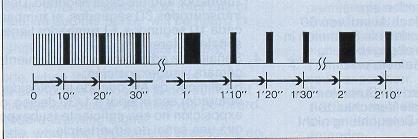
3. B timer signal:
For time exposure at "B" setting; for the first 60 seconds, an audible buzzer signal will be heard
every second. After 60 seconds, at intervals of 10 seconds, an audible buzzer will be heard in four different signals.
4. Camera shake and Under Exposure Warning Signals: At AE mode, when the shutter speed is slower than 1/30 sec. or the exposure is not sufficient (under), an audible buzzer warning will be heard.
5.
Over Exposure Warning Signal: At AE mode, when the exposure is excessive, an audible signal will be heard.
6.
Memory Signal:At "A" mode for exposure memory, an audible signal will be given in different length when the manual shutter speed select
button is pressed once to memorize the light value in AVERAGE metering mode, or when the shutter release button is halfway depressed to memorize the
live value in SPOT metering mode.
7. Self Timer Signal: When the self-timer is operated, an audible buzzer will be heard together with a blinking red LED.
8. Focus Signal: When using the optional AF lens, an audible buzzer signal will be emitted from the lens when the shutter release button is depressed and the subject is in proper focus. OPTIONAL ACCESSORIES
INFO BACK-2 (DP-520), INFO BACK (DB-010):
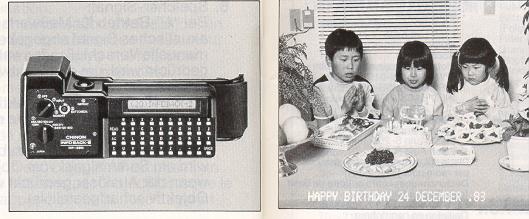
Accessory data back featuring electronic
imprint of up to 30 characters (alpha or numeric) of information onto your negative or slide, via a compact 36 button digital control panel. Built-in
memory feature will continuously imprint the same message or you can change the information as you like. Info Back-2 (DP-520) deluxe accessory data
back incorporates the feature of LCD readout via built-in monitor window.
AUTO FOCUS LENSES:
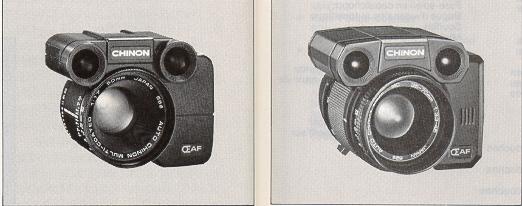
50MM MCF/ 1.7 AF - 35-70mm F/3.3 - 4.5AF
ZOOM. CHINON Auto Focus lenses focus the subject via active infrared beam. The subject is focused at pin-point sharpness even under extremely low
or no light situations and/or low contrast situations. And since the lenses have their own built-in auto focus button, you can use these lenses on
any "K" mount camera. The 35-70 AF lens has built-in AF contracts so operation is achieved by depressing the CP-5s camera shutter release button.
(Chinon made a 80-70mm tele AF zoom)
Chinon
OPTIONAL ACCESSORIES
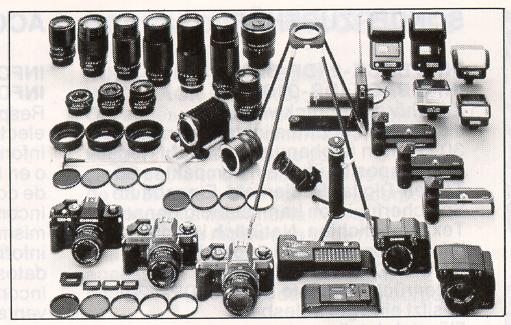
CHINON OPTIONAL ACCESSORIES
|
OPTIONAL ACCESSORIES Telephoto lenses Zoom Lenses Auto Focus lenses
|
Accessories |