If you find this manual useful,
how about a donation of
$3 to:
M. Butkus, 29 Lake Ave.,
High Bridge, NJ 08829-1701
and send your e-mail
address
so I can thank you.
Most other places would charge
you $7.50 for
a electronic copy
or $18.00 for a hard to read Xerox copy.
This will help me to continue to host this site,
buy new manuals, and pay their shipping costs.
It'll make you feel better, won't it ?
If you use Pay Pal, use the link below.
Use the above address for a check, M.O. or cash.
<<< IF YOU WOULD LIKE THIS OR ANY PDF FILE
PRINTED, BOUND AND MAILED TO YOU,
SEE THIS OUTSIDE COMPANY'S OFFER >>>
Back to my main camera manuals page
CLICK
HERE FOR A PDF FILE OF
CHINON CP-7M English Pt. 1
CHINON CP-7M
Bedienungsanleitung
CHINON CP-7M Mode D'Emploi
CHINON CP-7M Manual de
Instrucciones
CHINON CP-7M English Pt. 2
CHINON CP-7M Bedienungsanleitung
CHINON CP-7M
Mode D'Emploi
CHINON CP-7M Manual de Instrucciones
Chinon CP-7m PDF version of this HTML manual
Chinon CP-7m
Bedienungsanleitung - HTML
Chinon CP-7m Mode D'Emploi - HTML
Chinon CP-7m Manual de Instrucciones - HTML
TABLE OF CONTENTS
|
Noncenclature
Specifications
Data panel
Shoulder strap instructions
Lens mounting
Battery installation
Battery testing
Main switch
Shutter release
Film loading
Setting the exposure mode
Three-stage programmed AE
Mode reset button
Focusing
Unloading exposed film
Flash photography
|
Self-timer operation
Exposure Modes:
I. Three-stage programmed AE mode
II. Taking pictures in A mode
III. Taking pictures in M mode
Exposure adjustment
Setting the film speed
AE lock
Multiple exposure
"Bulb" operation (B mode)
Interval timer
Depth of field
Infrared photography
Memory storage
Optional accessories
Care of the camera
|
NOMENCLATURE
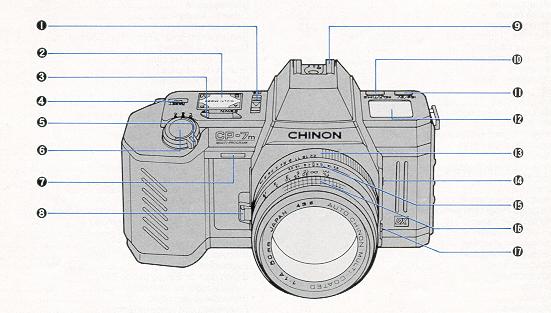 |
1) Multiple exposure (M.E.) switch
2) Exposure mode elector
3) UP/DOWN button
4) Mode reset button
5) Main switch
6) Shutter release button
7) Self-timer LED
8) Lens lock release lever
|
|
9) Accessory shoe (hot shoe)
10) SELF/TIME button
11) ISO/EV button
12) Data panel
13) Aperture ring
14) Cable release socket
15) Depth of field scale
16) Focusing ring
|
17) AE lock button
18) Viewfinder eyepiece
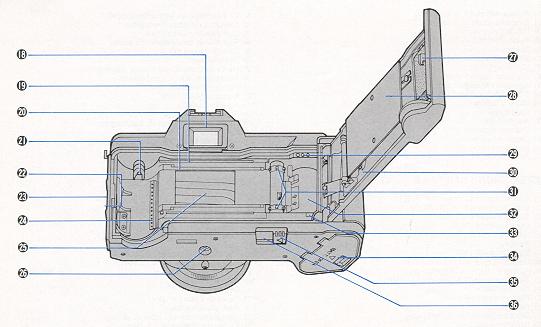
19) Film guide rail
20) Film rail
21) Rewind shaft
|
|
22) Back cover release lever
23) Back cover release button
24) DX film contacts
25) Focal plane shutter
26) Tripod socket
27) Film window
28) Film pressure plate
29) Data back contacts
|
30) Camera back
31) Sprocket
32) Take-up spool
33) Leader index
34) Battery compartment cover
35) Rewind button
36) Rewind switch protection cover
|
SPECIFICATIONS
- TYPE: 35 mm automatic compact motorized SLR camera with
TTL full aperture center weighted average metering, triple programs (instant
stop-down metering), aperture priority AK, manual exposure system, and full
information LCD panel.
- LCD Panel Indication: Liquid Crystal Display indicates
the Exposure mode, Shutter speed. Film speed, Film counter, Self timer
operation, Bulb timer exposure time, Battery check, and Exposure
compensation.
- Picture format: 24x36 mm.
- Lens Mount: Chinon Universal Bayonet mount (K, KA, RK,
mount compatible).
- Mirror: Large swing back quick return mirror.
- Shutter: Electromagnetically controlled focal plane
shutter, Stepless speeds from 8 to 1/2000 sec. on automatic (maximum
operation at AE is 15 sec.), 15 speeds from 8 to 1/2000 sec. on manual
exposure. Electronically controlled automatic and manual exposure.
- Shutter Release: Electromagnetic shutter release with
release lock and provision for cable release.
- Viewfinder: Fixed eye level pentaprism, central split
image with micro prism collar, 18 digital LEDs in three different colors
indicate 1/2000~1/60 sec. (green), 1/30~1 sec. (orange, slow shutter speed
warning), 2~8 sec. (under LED will light up), UNDER/OVER warning (red) three
stage program AE (green), and flash ready signal (red).
- Viewfinder Magnification: 0.87x at infinity with
standard 50 mm lens.
- Dioptric Factor: 1.0 diopter.
- Viewfinder Visibility: 92% vertical and horizontal.
- Exposure Meter: TTL full aperture center weighted
average metering. TTL full aperture instant stop-down center weighted
average remetering for program AE employing one silicon blue cell.
- Exposure Range: +1 EV to +20 EV (F1.4/50 mm, ISO 100).
- Exposure Memory: Built-in AE lock button functions in
aperture priority AE mode.
Auto Setting: ISO 25~5000 with 1/3 EV
increments (for DX coded film).
Manual Setting: ISO 25~5000 for non DX coded film
Exposure Compensation: -4.0 EV to +4.0 EV with 1/2 EV increments (for
DX coded film)
- Programmed AE mode: Three stages available.
Action: The program designed for fast-moving
objects. The lens aperture stays open up to the shutter speed of 1/500 sec.
Between 1/500 and 1/2000 sec. the aperture varies in accordance with the
programmed shutter speed.
Normal: The program designed for general photography.
The lens aperture stays open up to the shutter speed of 1/60 sec. Between 1/60
and 1/2000 the aperture varies in accordance with the programmed shutter
speeds. Creative: The program designed for slow moving
objects or depth of field control. The lens aperture stays open up to the
shutter speed of 1/8 sec. At faster than 1/8 sec., the aperture varies in
accordance with the programmed shutter speed.
- Mode Reset: Built-in mode reset button, to go back to
the basic photography mode. (NORMAL PROGRAM)
- Programmed AE signal: Built-in with flashing program
indication LED when the aperture is set within 4 stops from full aperture
opening. When the aperture is set beyond 4 stops, Program indication LED
will stay on at program AE mode.
- Program AE Curve Information: Program character curve
chart is provided on camera back.
- Manual Shutter Speed Selector: Manual shutter speeds
can be selected by pressing the up/down button while in the "M" mode.
Shutter speeds can be selected in 15 steps from 8 to 1/ 2000 sec.
- Film Advance: Auto winding with built-in micro motor,
selectable shooting mode for single and continuous exposure. Continuous
photos up to 2.5 frames per second. Built-in shutter release lock in main
switch.
- Film Loading: Auto loading with built-in micro motor.
Auto first frame setting by closing the back cover.
- Film Rewinding: Auto rewinding activated by rewind
button with auto-stop system upon completion of rewinding.
- Multiple Exposure: Built-in switch disengages film
advance and counter.
- Self-timer: Electronically controlled, 10 sec.
(self-timer operation time can be set up to 90 minutes) with LED indicator
and LCD panel indicator (subtractive type). Cancellation possible.
- Interval Timer: Interval time can be set up to 90
minutes.
- "B" Bulb Timer: Exposure time for bulb photography can
be set up to 90 minutes.
- Accessory Shoe: Hot shoe type with "X" sync and a
contact for Chinon dedicated flash units.
- "X" Synchronization: "X" flash sync at 1/100 sec. with
Chinon dedicated flash units.
- Slow Synchronization: 1/60 sec. or slower manual
exposure mode.
- Power Source: 4x1.5 V "M" alkaline battery or one 6 V
lithium battery (2CR5 type).
- Power Hold System: 12 seconds in all modes.
- Battery Check: By LCD data panel.
- Accessories: Chinon dedicated flashes, super
multi-coated lenses, deluxe carrying cases and many more.
- Dimensions: 152.5(L)x89(H)x51(D) mm (6"x3.5Nx2")
- Weight: 514 gram (18.14 oz)
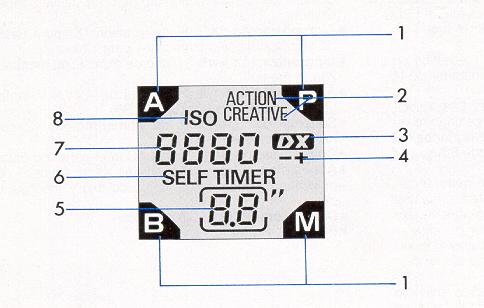
DATA PANEL
The CP-7m is equipped with a large LCD panel that displays important camera
function information.
1 ) Exposure modes
2) Three stage program modes
3) DX film mark
4) Exposure compensation reminder
5) Film counter/self-timer countdown/"bulb" and "interval timer" elapsed
time
6) Self-timer indication
7) Shutter speed/film speed indication
8) ISO mark
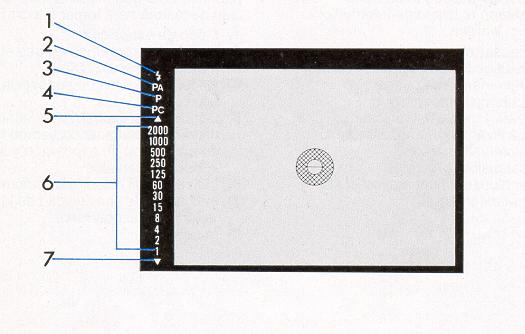
VIEWFINDER
Inside the viewfinder, essential information is displayed by multicolored
digital LEDs.
|
1.) Flash ready LED (red)
2.) Action program (green)
3.) Normal program (green)
4.) Creative program (green)
5.) Over exposure LED (red)
6.) Shutter speed LED (green/orange)
|
7.) Under exposure LED (red) In the viewfinder, shutter speed
LEDs are indicated between as one full stop while shutter speeds are indicated
by one half stops with A or P mode on the LCD panel.
When the shutter speed is set from 2 to 8 seconds, the under exposure LED
lights up, and when slower than 8 seconds, the LED flickers.
SHOULDER STRAP INSTRUCTIONS
- 1. Place the end of the shoulder strap through the camera body lug (Fig.
1).
- 2. Place the end of the strap through the plastic retainer. Pull tight
to secure (Fig 2)
LENS MOUNTING
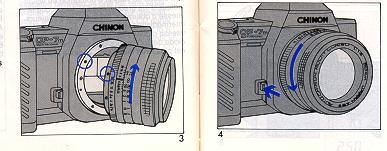
Your CP-7m is equipped with a universal bayonet mount which accepts all
interchangeable lenses
with "K", "KA" or "RK" bayonet mounts.
- 1. To attach the lens, match the red dot on the camera body with the red
dot on the lens (Fig. 3). Insert the lens into the camera body and turn it
clockwise until the lens locks with a click.
- 2. To remove the lens from the camera body, depress the lens lock
release lever, turn the lens counterclockwise as far as it will go, and lift
it up from the body (Fig. 4). Do not remove or attach lens while operating
the camera.
BATTERY INSTALLATION
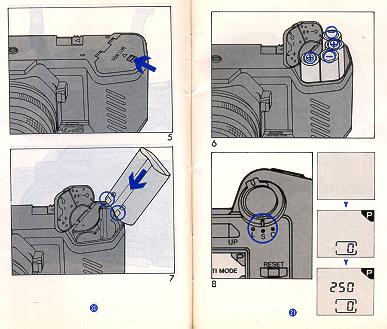
The CP-7m uses four (4) AA size 1.5 V alkaline batteries or a 6 V lithium
battery (2CR-5 type).
- 1. Slide the battery compartment cover lock to open the battery
compartment (Fig. 5).
- 2. Place four AA size 1.5 V alkaline batteries in the compartment with
plus (+) and minus(-) ends aligned as indicated on the cover (Fig. 6). A 6 V
lithium battery (2CR-5 type) can also be used by installing as shown in Fig.
7.
- 3. Close the compartment cover. Set the main switch to the "S" or "C"
position. The exposure mode and frame number will appear in the data panel
(Fig. 8). When the shutter release button is depressed halfway, a shutter
speed will be displayed in the data panel. If no display appears, batteries
are incorrectly installed or too weak to operate the camera. Check that the
batteries are correctly installed or replace all four batteries at the same
time.
NOTE:To prevent damage from battery leakage or bursting, do
not mix batteries of different types, brands or ages. Do not crush or
throw used batteries or subject them to high temperatures.
If the camera will not be used for a long period of time, film and
batteries should be removed.
Performance of batteries decreases as they become colder. Before using the
camera in cold weather make sure to use a fresh set of batteries A spare set
should be carried in a warm pocket, in case you need to change batteries while
shooting. Battery Life
Number of Film Cartridges:
When using a roll of 36 - exposure film, the following data was observed
during laboratory testing.
| Lithium battery (2CR-5) |
Four 1.5 V AA - size alkaline batteries |
| 150 rolls |
80 rolls |
NOTE: Although "AA" type Ni-Cad rechargeable battery can be used, their
performance will be very limited. Make sure that the Ni-Cad battery can be
fitted easily into the CP-7m without undue force.
BATTERY TESTING
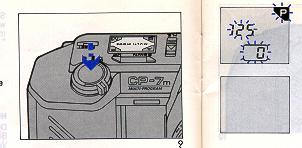
Set the main switch to the "S" or "C" position, and depress the shutter
release halfway (Fig. 9). Fresh batteries should be installed in any of the
following cases. When all displays on LCD data panel blink. When shutter
release button is depressed all the way down, the shutter will not release and
all displays on LCD panel and LED indication in the viewfinder will not light
up.
MAIN SWITCH (S/C Mode Selector)
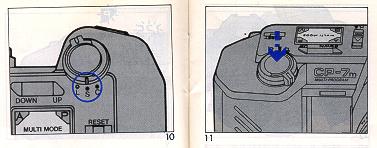
To prevent accidental exposures and to conserve battery power, the main switch
should be set to the "L" position. When the main switch is set to the "L"
position, all the electric circuitry is shut off and the shutter release is
locked. The LCD display panel will be switched off. To operate the camera, set
the main switch to the "S" or "C" position (Fig. 10). S -
Single-frame mode: film is advanced one single frame after each exposure.
C - Continuous mode: film is advanced continuously at up to two and
half frames per second as long as the shutter release button is kept fully
depressed.
SHUTTER RELEASE
The CP-7m features a two-stage electromagnetic shutter release (Fig. 11).
1. When the shutter release button is depressed halfway, the electronic
circuitry (including the LCD data panel and viewfinder LEDs) starts
functioning. The meter and information display remain on for 12 seconds after
you lift your finger from the button
2. When the button is fully depressed, it will trigger the shutter
FILM LOADING
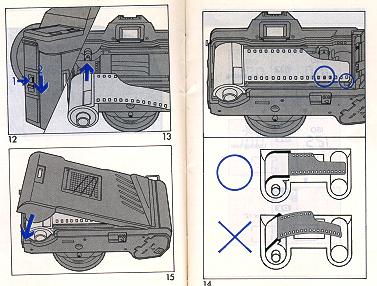
1. Set main switch to the "S" or "C" position.
2. Open the back cover by pressing the back cover release button and
sliding the back cover release lever downward (Fig. 12).
3. Insert a film cartridge into the film chamber with the protruding end of
the cartridge positioned toward the bottom of the camera (Fig. 13).
4. Extend the trimmed end of the film up to the yellow leader index. Make
sure that the lower perforations of the film engage the teeth on sprocket
(Fig. 14).
5. Close the camera back firmly until it locks with a click (Fig. 15).
6. The camera will automatically advance the film to the first frame, and
"1 " will appear in the frame counter in the LCD panel.
If the frame counter still shows "O", open the back cover and re-load the film
properly.
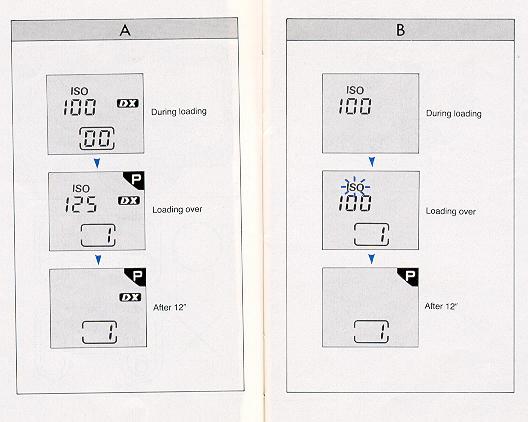
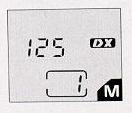
With DX film, ISO number will appear during loading. When loading is
completed, the DX mark and the metered data (shutter speed) are displayed and
the film speed is automatically set. The metered data (shutter speed) remains
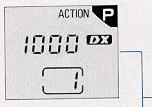
displayed for 12 seconds. picture (A)
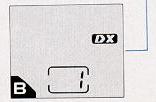
With non-DX film, after loading is completed, the data panel will display the
ISO mark blinking for 12 seconds, indicating to set the correct film speed.—
(B)
SETTING THE FILM SPEED
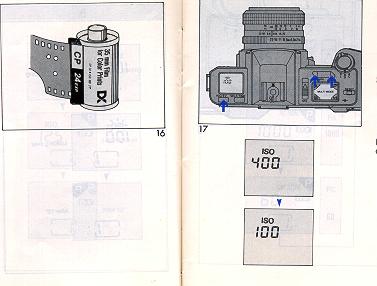
- 1. When using DX-coded film (Fig. 16): The film speed for DX-coded films
is automatically adjusted, and the DX mark appears in the data-panel.
- 2. When using non-DX coded film: While depressing the ISO/EV button,
press the UP/DOWN button to set the film speed (Fig. 17). Applicable range
is ISO 25 to 5000 with 1/3 EV increments. The film speed seeing can be
checked by pressing the ISO/EV button
SETTING THE EXPOSURE MODE
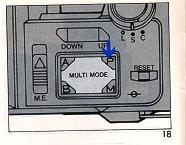
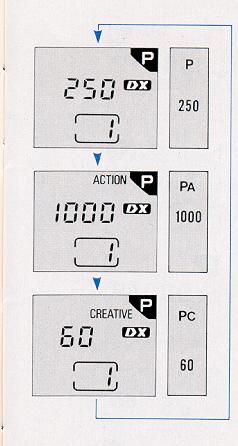
The CP-7m features a three stage programmed AE mode (P -
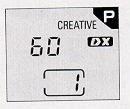
Program, P. A - ACTION, P.C - CREATIVE),
aperture priority (A) mode, a metered manual (M)
mode and bulb (B) mode. To set the exposure mode, simply
press down the desired mode at the corner of the exposure mode selector. One
press on P mode will result in normal "P", another press in "P
- ACTION" and a third press in "P - CREATIVE" (Fig. 18). See
EXPOSURE MODES for further details.
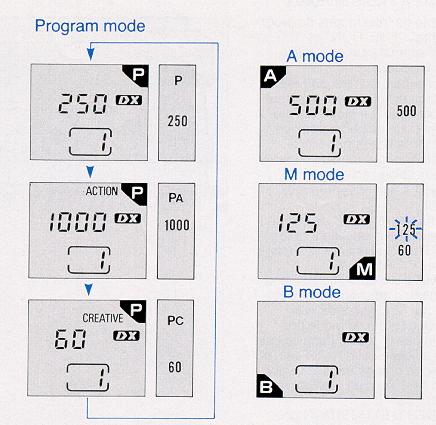
THREE-STAGE PROGRAMMED AE
The CP-7m is equipped with three program modes of normal "P",
"P - ACTION" and "P - CREATIVE". Normal "P"
mode can be used in most cases.
The CP-7m automatically selects the most suitable combination of shutter
speed and aperture for the optimum exposure. The programmed AE mode is ideal
for general picture taking by shooting very quickly and easily, eliminating
troublesome exposure setting according to light conditions.
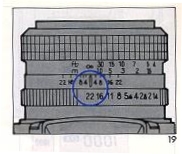
- 1. Set the lens at its minimum aperture (Fig. 19)
- 2. Press the corner of the exposure mode selector at the "P"
position once again to select the "P - ACTION" mode, or
press it again to select "P - CREATIVE" mode if desired.
- When a shutter speed in the data panel blinks and
^ lights up or V blinks in the viewfinder,
it means the program mode is not applicable for the situation.
- If the displayed speed is 1/30 sec. or slower (orange digital LED in the
viewfinder), use of a flash or a tripod is recommended.
- See EXPOSURE MODES for further information on program characteristics
and applicable ranges.
MODE RESET BUTTON
When you want to quickly set the camera to the normal Program
mode from P - ACTION, P - CREATIVE,
A, M or B. simply press and release
the mode reset button.
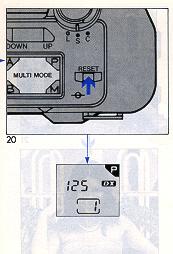
1. The mode reset button pressed and released, exposure mode is set to the
normal Program and "P" is displayed in data
panel and "P" LED lights up in the viewfinder (Fig. 20). Any
exposure adjustment and self-timer are canceled.
2. When the mode reset button is pressed and released, the metered shutter
speed in the normal "P" mode is displayed in the data panel
for 12 seconds. When the mode reset button is pressed and released after the
self-timer is activated the metered shutter speed is displayed in the data
panel for one second: the self-timer is cancelled without exposing a frame.
FOCUSING
At the center of the viewfinder is a split image with microprism collar which
is then surrounded by a ground glass. When the camera is In focus, the image
on three focusing aids becomes sharpest. While observing the subject through
the viewfinder, turn the lens focus ring until the upper and lower split
images match up to form a uniform image (Fig. 21). This split image focusing
is particularly helpful when the subject is dominated by vertical lines. The
microprism is also very helpful; when out of focus; the image on the
microprism will be composed of a collection of asterisks (Fig. 22). These
sparkling asterisks will disappear when the focus is properly set. You can
double check the focus seeing by the image on the ground glass. You can also
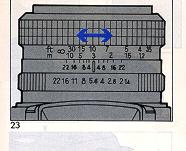
focus indirectly. Actually measure or estimate the distance to the subject and
set the lens focus ring to the appropriate seeing (Fig. 23).
UNLOADING EXPOSED FILM
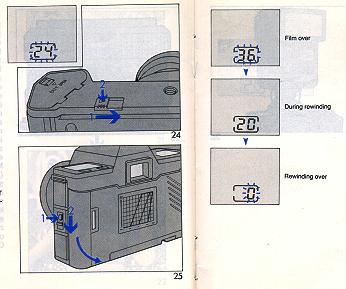
When the film in the camera is fully exposed, the number in the film counter
remains blinking for 12 seconds. All other LCD displays will disappear at this
time.
- 1. Slide the rewind switch protection cover in the direction of the
arrow and push in rewind button to rewind the film (Fig. 24).
- 2. During rewinding, frame number counts backward showing how many
frames are remaining to be rewound.
- 3. After rewinding, "0" appears blinking in the frame counter and
rewinding is automatically stopped.
- 4. Open the back cover and remove the film (Fig. 25). Do not open the
back cover until the motor stops, even if "0" appears in the frame counter.
NOTE: When the motor stops before frame number reaches
"0", do not open back cover. Replace batteries with a fresh set. When
rewinding is completed, "0" remains blinking for 12 seconds. The shutter
cannot be tripped until the rewinding operation is completed.
FLASH PHOTOGRAPHY
The CP-7m is designed with a unique flash system, making flash photography
simple. The CP-7m offers a wide range of uses, such as X sync at 1/100 sec.
with A and M modes, and also slower sync flash photography possibility.
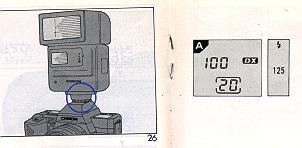
- 1. Mount a CHINON dedicated flash to the camera (Fig. 26). Set the
f/stop indicated on the exposure calculator dial of your CHINON flash to the
corresponding aperture setting on the lens. Set the exposure mode selector
either to the "A" or "M" (faster then
1/125) mode.
- 2. A few seconds after your CHINON flash is turned to the "ON" position,
the Flash Ready light will illuminate. When the flash has reached adequate
power, the camera's shutter speed is automatically set to 1/100 sec. The
flash ready LED (red) and 1/125 sec. LED (green) in viewfinder will light
up, and "100" appears on the data panel. After the shutter release button
has been depressed part way to activate the metering system, release the
shutter to take the picture.
- 3. With the exposure mode set at "A" or "M"
after the picture has been taken and before the flash has recycled, the
camera automatically switches to the automatic exposure metered shutter
speed (A) or manually selected shutter speed (M)
(if under 1/125 sec.) until the flash has once again recycled. In this case
your flash must be set to the "AUTO" position.
- Slow synchronization: If you desire to synchronize at slower than 1/100
sec., set the exposure mode selector to "M". Select the
desired shutter speed by pressing the UP/DOWN button. The shutter will be
released at the selected speed. Set the aperture according to the
information on the display panel of the flash unit.
- When using flash units other than CHINON dedicated units, set the
exposure mode selector to "M" and the shutter speed to 1/60
sec.
SELF-TIMER OPERATION
The CP-7m is equipped with an electronic self timer with a red LED and a
unique "up to 90 minute" setting. Film is automatically advanced one frame
after the exposure is completed.
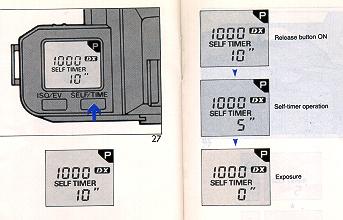 |
1. Press the SELF/TIME button to activate self-timer
for a 10 seconds delay (Fig. 27).
2. Focus the subject and depress the shutter release
bottom The self-timer LED
will start blinking. The frame counter displays the remaining seconds
until the
shutter will be released.
|
To cancel operation: Press the ISO/EV button. After the
self-timer operation has
started, you can cancel it by pressing the SELF/TIME button, however,
self-timer
mode still remains in effect. You can also cancel it by pressing the mode
reset button, but the exposure mode is set to the normal "P" mode after
cancellation.
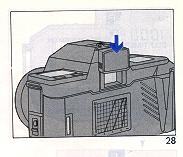
NOTE:
- When utilizing the self-timer in the Program and "A"
modes, it is recommended to block the viewfinder with an eyepiece cover to
prevent extraneous light from interfering with the automatic exposure system
of the camera (Fig. 28).
- If you wish to set the self-timer for a duration for shorter or longer
than 10 sec., press the UP/DOWN button while pressing the SELF/TIME button.
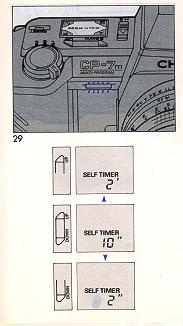
1. Up to 90 minutes can be set with an interval of one second from 0 to
60 seconds and one minute from 1-90 minutes.
2. The self-timer LED starts blinking with 10 seconds remaining prior
to exposure and stays lit at 2 seconds prior to the exposure (Fig. 29).
3. If you wish to see the frame counter during self-timer operation,
press the UP/DOWN button in either end.
EXPOSURE MODES:
I. Three-stage Programmed AE Mode
The CP-7m is designed with a three-stage program, which gives you greater
photographic versatility: select any program based on your photographic
needs (Fig. 30, Table A).
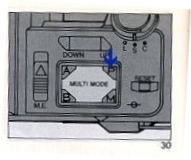
- (1) P (NORMAL PROGRAM) - For photographing general
subjects. Select "P" if you cannot decide whether to use P - ACTION or P -
CREATIVE.
- (2) PA (ACTION PROGRAM) - Minimizes camera shake and
is designed to be used when photographing "hi-speed" (moving) subjects.
Suitable for telephoto lenses.
- (3) PC (CREATIVE PROGRAM) - Gives priority to the
lens aperture, which affects the depth of field. This mode is convenient
when taking picture of hard-to-focus subjects and when using wide angle
lenses.
Programmed AE Signal and Aperture Setting
Unlike other program cameras, the CP-7m functions perfectly with "K"
(even "KA" or "RK") mount lenses even in program mode. Generally, you should
set the aperture at its minimum seeing. Although you can take a perfectly
exposed picture at any aperture setting, the applicable programmed range is
limited. The program AE signal LED is useful to check the lens aperture
seeing for program modes. The programmed AE viewfinder LED for P. PA or PC
in use will "flicker" when the lens aperture is within four stops of the
full maximum aperture. Set the aperture within the range so that the
programmed AE signal LED will not "flicker". On the other hand, if you would
not stop down any further than a particular f/stop, simply set the aperture
ring to the desired aperture.
Metering and Program Applicable Range
Metering range is a range which the exposure meter (a silicon blue cell)
can obtain a properly exposed image. The program applicable range is a range
where the program combination of aperture and shutter is applicable. For
example, using a 50 mm F1.4 lens at ISO 100, the metering range is EV+1
(F1.4, 1 sec.) to EV+20 (F22, 1/2000 sec.), darkened area in TABLE A. The
metering range varies according to film speed.
II. Taking pictures in the A mode
After you have set the exposure mode selector to "A" and
selected the desired aperture, the camera will automatically select the
required stepless shutter speed from 8 sec. to a fast 1/2000 sec. The "A"
mode is convenient for taking pictures at specific aperture settings based
on your individual needs.
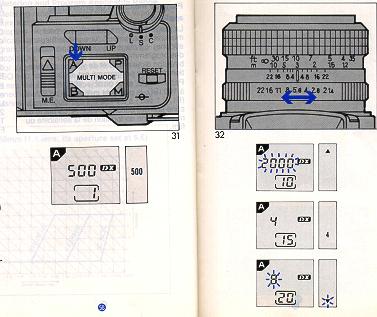
- 1. Set the exposure mode selector in the A position.
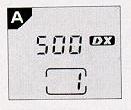
The mode indication "A" and a shutter speed will appear
on the data panel (Fig. 31).
- 2. Set the desired aperture by rotating the lens aperture ring (Fig.
32).
- If the lens F stop or the aperture size is too large for the lighting
conditions, the red over exposure indicator ^ in the
viewfinder will glow, and 2000 on the data panel will flicker. When this
happens, stop down the lens diaphragm by turning the lens F stop ring or
use a film with a lower ISO rating.
- If the displayed speed is 1/30 sec. or slower (orange
digital LED in viewfinder as camera shake warning), use of a tripod is
recommended, or you can increase the shutter speed by opening the lens
diaphragm. Use of a flash unit is also suggested.
- If the computed shutter speed is even longer than 8
sec. (semi-darkness condition), the red under exposure indicator V in the
viewfinder and 8" on the data panel will flicker. Open the lens diaphragm
by turning aperture ring, use a film with a higher ISO rating or use a
flash.
F-Stop Number Guide
The following f-stop settings are general guidelines for
your use.
With ISO 100 film
| Lighting Conditions |
F-Stop Number Range |
Outdoors, sunshine
Outdoors, cloudy
Indoors |
f/8-22
f/2.8-5.6
f/1.4-2.8 |
III. Taking Pictures In the "M" Mode
You can manually control the CP-7m by selecting shutter
speeds and/or apertures individually.
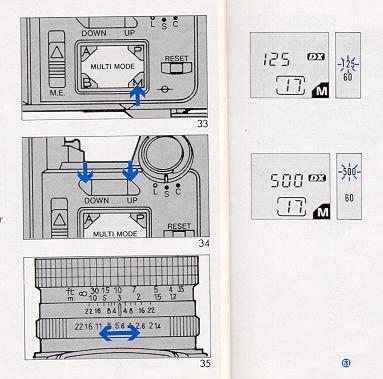
- 1. Set the exposure mode selector in the M
position (Fig. 33).
- 2. Select the desired shutter speed by pressing the
UP/DOWN button (Fig. 34). The shutter speed increases and decreases step
by step. If the shutter speed disappears on the data panel, press the "M"
again or press the shutter release button halfway.
- 3. Select the desired aperture by rotating the
aperture ring (Fig. 35).
- 4. The metered shutter speed will light up and the
selected shutter speed will blink in the viewfinder. Set the shutter speed
and/or aperture so that the shutter speed LED lights coincide in the
viewfinder.
EXPOSURE ADJUSTMENT (P, A MODE)
The camera exposure setting may be affected if there is a
big gap between brightness of a main subject and background. This will
result in under or over exposed pictures. In these cases, you should use the
exposure adjustment system. You can also use the system when you wish to
create a deliberate effect of over or under exposure. You can change the
exposure factor up to four full stops either plus or minus in 1/2 EV
(Exposure Value) increments
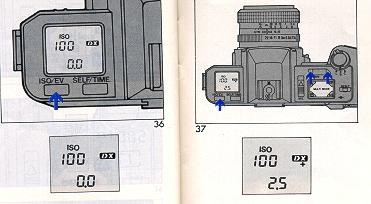
When using DX-coded film
1. Press the ISO/EV button to display ISO number and
exposure adjustment (Fig. 36).
2. While pressing the ISO/EV button, press the UP/DOWN
button to set your film speed to the desired exposure adjustment position
(Fig. 37).
3. Be sure to return the exposure adjustment to "0" after
use.
NOTE: "+" and "-"
symbols indicate over- and under-exposure respectively.
Press the mode reset button to reset the exposure
adjustment to "0".
You can confirm the adjusted value by pressing the ISO/EV
bottom
When using non-DX film
The adjusted value will not be displayed. While pressing
ISO/EV button, press the UP/DOWN button to change the film sped for the
proper exposure adjustment.
Exposure adjustment at ISO 100
| Film speed |
Adjusted value |
ISO 25
ISO 50
ISO 100
ISO 200
ISO 400 |
+2 [EV]
+ 1
0
-1
-2 |
AE LOCK
Under normal circumstances, the CP-7m will produce
perfectly exposed photographs, due to the integrated automatic exposure
circuitry. However, some lighting conditions might occur that could misguide
the system, such as subjects with a very high contrast or strongly backlit
scenes. In such cases, the AE lock (exposure memory) system should be used.
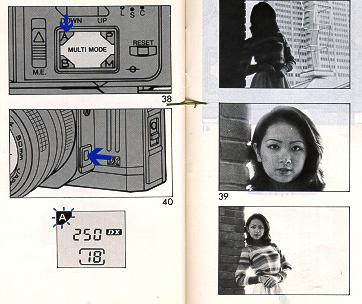
1. Set the exposure mode selector in the "A" position (Fig.
38).
2. Look through the viewfinder and center your subject in
the split image/microprism center spot (Fig. 39). If necessary, approach the
subject and use the tele-photo seeing when using zoom lenses.
3. While pressing the shutter release button halfway,
press the AE lock button (Fig. 40). "A" will blink on the
data panel. The exposure (shutter speed) will be memorized as long as the AE
lock button is pressed.
4. Focus and compose the subject in the viewfinder as you
desire then press the shutter release button all the way to take the
photograph.
MULTIPLE EXPOSURE
The CP-7m is equipped with an unlimited multiple exposure
provision.
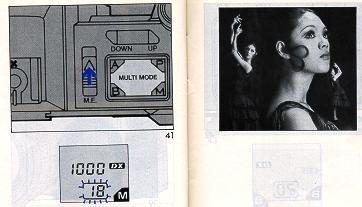
1. Slide the multiple exposure switch in the direction of
the arrow (Fig. 41). The film counter frame on the data panel will blink for
12 seconds after the panel is activated by partial depression of the shutter
release.
2. Release the shutter to take the picture. The film will
not advance and only the shutter will be charged; the film counter will not
advance. You can make unlimited multiple exposures on any single frame.
3. Set the multiple exposure switch to the original OFF
position after use.
NOTE:
After taking a picture, and if the multiple exposure switch is moved to the
OFF position with the film counter frame blinking, film will be advanced to
next frame. After 12 seconds, the panel indicator will stop blinking. After
that time, if the multiple exposure switch is returned to the OFF position,
partial depression of the shutter release button or pressing any one of the
exposure mode selector, the ISO/EV button or the SELF/TIME button will
result in advancing the film one full frame.
BULB OPERATION (B MODE)
When shooting night scenes or long time exposure for more
than 8 seconds duration, use "B" mode. The reflex mirror
will shift to the open (up) position while the shutter release button is
pressed. Use of a cable release and a tripod is recommended for stability to
prevent vibration during exposures.
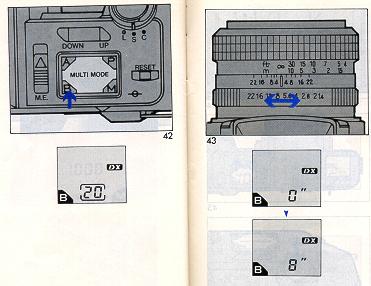
1. Set the exposure mode selector in the "B"
position (Fig. 42).
2. Rotate aperture ring to set the desired f/stop (Fig.
43).
3. Press the shutter release button all the way to start
the bulb operation. Elapsed exposure time is shown in the frame counter
position in seconds up to 60 seconds, and in minute increments from 1 to up
to 90 minutes.
NOTE:
- The maximum exposure time depends on battery capacity.
Using new batteries is recommended for extremely long bulb operation.
- Use an eyepiece cover to prevent unwanted extraneous
light.
-
Time exposure
You can create a time exposure with
an operating time of up to 90 minutes, in seconds up to 60 seconds and in
minutes from 1 to up 90 minute.
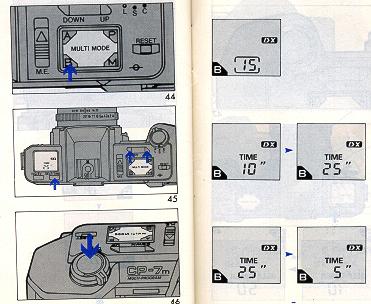
- 1. Set to the exposure mode selector in the "B"
position (Fig. 44).
- 2. While pressing the SELF/TIME button, press the
UP/DOWN button to select the desired length of the bulb exposure (Fig.
45).
- 3. Fully depress the shutter release button to take
the picture (Fig. 46).
- Even after your finger is off of the shutter release
button the shutter mirror will stay open.
- The remaining time is displayed on the data panel.
- To cancel the time exposure time, press the ISO/EV
button if it is before commencing exposure, press the ISO/EV button or
the SELF/ TIME button if it is during operation.
INTERVAL TIMER
The CP-7m features a unique interval timer that can be
set for intervals of up to an incredible 90 minutes.
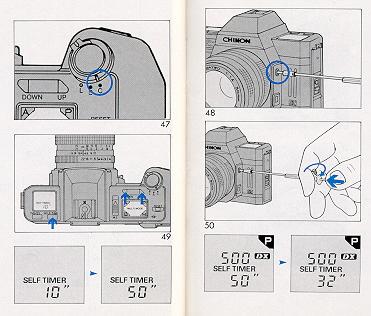
- 1. Set the main switch to the "C"
position (Fig. 47).
- 2. Attach the cable release (optional accessory) (Fig.
48).
- 3. To set interval time (Fig. 49).
- Press the SELF/TIME button. Interval time is
automatically set at 10 seconds.
- While pressing the SELF/TIME button, press the
UP/DOWN button to set the desired interval time.
- 4. Push in the cable release and lock it in place
(Fig. 50). The interval time (subtractive) is displayed on the film
counter on the data panel.
DEPTH OF FIELD
"Depth of field" designates the nearest and furthest
limits of the area that will be sharply defined in the picture in front of
and beyond the subject. Depth of field is controlled by f/ stop ring on the
lens. The larger the lens opening (f/stop), the shallower is the depth of
field. The smaller the lens opening, the greater the depth of field will
become (Fig. 51 ).
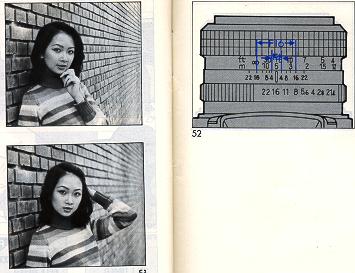
Depth of Field Scale:
The depth of field scale indicates (after focusing) the
approximate area that will be sharp in the picture. Locate on the depth of
field scale the corresponding pair of f/stop figures. The distance between
these two f/ stop figures on the focusing ring will be the area of greatest
sharpness in your picture (Fig. 52).
INFRARED PHOTOGRAPHY
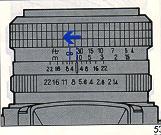
If you intend to take infrared photographs using infrared film and R2 or 02
filter, an extra focusing adjustment must be made. After focusing note the
distance seeing aligned with the focus index, and move that figure over to
the red infrared mark engraved on the lens (Fig. 53). Focus adjustment is
not required when using infrared color films.
NOTE:
Read the instructions packed with the infrared film for further information.
MEMORY STORAGE
The metering display remains on for 12 seconds after the
shutter release button has been depressed (halfway), or the exposure mode
selector, ISO/EV button or SELF/TIME button is pressed once. After 12
seconds have passed, the metering display will disappear. The CP-7m is
equipped with a condenser for memory backup which can store the information
of frame number, film speed, exposure mode, exposure adjusted value and
shutter speed set at M for up to five hours after the batteries are removed
when all displays on LCD data panel comes to flicker (batteries almost
exhausted).
OPTIONAL ACCESSORIES
· Standard Lenses
50 mm t/1.4 multicoated
50 mm f/1.7 multicoated
50 mm f/1.9
· Wide angle Lenses
17 mm t/3.5 multicoated
28 mm f/2.8 multicoated
· Telephoto Lenses
135 mm f/2.8 multicoated
300 mm f/5.6 multicoated
500 mm f/8 reflex type
· Zoom Lenses
28-70 mm f/2.8-4.2 multicoated
MACRO
35-80 mm f/3.5-4.8 multicoated
MACRO
35-105 mm f/3.5-4.5 multicoated
MACRO
35-200 mm f/4-5.6 multicoated
70-210 mm f/4-5.6 multicoated
MACRO
75-200 mm f/4-4.8 multicoated
MACRO
75-300 mm f/5.6 multicoated
MACRO
· Auto Focus Lens
35-70 mm f/3.5-4.5 multicoated
· Accessories
CHINON AUTO "S" series available Filters (ND2X, ND4X, 1A, PL, Y2 49 mm)
Hard rubber eyepiece.
Eyepiece adapter (-3, +1, +3)
Angle finder
Auto extension ring
Bellows Mini copy stand
Cable release (13 inch)
Deluxe carrying case
Wideband Strap with CHINON logo
Eyepiece cover
CARE OF THE CAMERA
Your CP-7m is a precision instrument. Used with care, it
will provide years of service. Protect your camera from dirt, rain, dampness
and excessive heat. Avoid touching the lens. To clean the lens wipe it
gently with a soft lint less cloth or lens tissue. Do not use eyeglass
tissues as they might damage the lens coating.
 ,
M. Butkus, N.J.
,
M. Butkus, N.J.