and historical purposes, all rights reserved.
This page is copyright© by
 , M. Butkus, N.J.
This page may not be sold or distributed without
the expressed permission of the producer
This camera manual library is for reference
and historical purposes, all rights reserved.
This page is copyright© by , M. Butkus, N.J.
This page may not be sold or distributed without
the expressed permission of the producer
If you find this manual useful,
how about a donation of
$3 to:
M. Butkus, 29 Lake Ave.,
High Bridge, NJ 08829-1701
and send your e-mail
address
so I can thank you.
Most other places would charge
you $7.50 for
a electronic copy
or $18.00 for a hard to read Xerox copy.
Back to main Camera Manual site
- - - - - - - - - - - - - - -
CLICK HERE FOR Chinon DP-5 PDF
VERSION FROM THIS HTML PAGE
CONTENTS
|
Description of parts ............................. 2 Specifications .....................................4 1. Attaching the Viewfinder Cap and Strap ..... 7 2. Changing lenses ............................. 8 3. Inserting batteries ......................... 9 4. Battery testing ................................. 10 5. Inserting film ................................... 11 6. Setting the film speed ................... 13 7. Viewfinder information ..................... 14 8. I. Programmed Auto-Exposure (AK) 8. II. Two-stage programmed AE (for advanced use) ..16 9. AE (Automatic exposure) photography ................ 18 10. Manual photography ................... 20 11. Shutter release and release lock ..................... 22 |
12. Holding the camera .................... 22 13. Focusing ................................ 23 14. Rewinding the film ..................... 24 15. AE lock system ........................... 25 16. Exposure compensation system ... 26 17. B (Bulb) setting ............... 27 18. Flash photography ............. 27 19. Multiple exposure photography ....... 31 20. Self-timer photography and 21. Depth of field .................. 33 22. Infrared photography ........... 33 23. Multi-Sound system ............ 34 24. Special accessories .............. 35 25. Proper care of your camera ..... 36 |
INTRODUCTION
Welcome to the exciting world of CHINON Photography!
Your Chinon DP-5 camera is the most sophisticated 35mm SLR available from CHINON. The DP-5 is a true pioneer of Muti-programmed 35mm SLR cameras leads the way in Freedom of Choice with it's versatile "Double-Program" and standard "K"- Mount design. The two-stage programmed AE allows you to shoot fast moving or slow moving subjects to allow maximum versatility with your creative photographic needs. Employing a full information electronic viewfinder with variable intensity LED's, the DP-5 program camera is extremely easy to operate even under the most adverse lighting conditions.
Your DP-5 program camera is designed with built-in electronic auto focus contacts that will permit automatic AF operation when used with the optional Chinon 35 - 70mm AF lens. Total unmanned automatic operation is also possible when further used with the optional Chinon power winders and wireless remote control unit. [Mike: finding these AF lenses are next to impossible]
DESCRIPTION OF PARTS
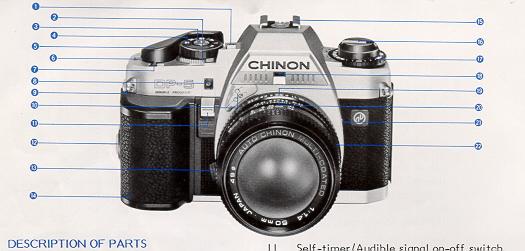 |
1. Manual shutter speed select button/Exposure memory button 2. Program mode selector 3. Shutter release button 4. Exposure mode select dial 5. Film advance lever 6. Exposure counter 7. Multiple exposure lever |
|
8. Self-timer LED
9. Shoulder strap eyelet 10. Auto-Focus electronic contacts 11. Self-timer/Audible signal on-off switch 12. Power grip attachment screw 13. Lens lock release lever 14. Power grip (battery compartment) 15. Accessory flash shoe (hot shoe) |
16. Film rewind knob and back opening knob 17. Film speed dial (ISO/ASA) 18. F stop window 19. Aperture ring Depth of field scale X sync socket Focusing ring 20. Depth of field scale 21. X sync socket 22. Focusing ring |
|
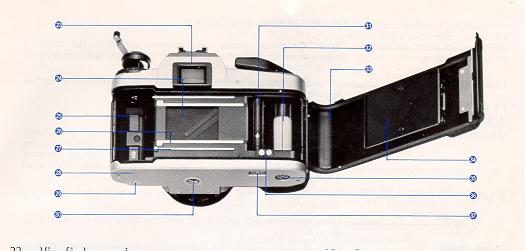
23. Viewfinder eyepiece 24. Metal focal plane shutter 25. Film chamber 26. Film rail 27. Film guide rail 28. Power source contact (with power winder only, PW-610 or 600) 29. Power winder electronic contacts 30. Tripod socket |
31. Sprocket teeth 32. multi-slotted film take-up spool 33. Camera back 34. Film pressure plate 35. Power winder coupler 36. Auto Date electronic contacts 37. Rewind button |
SPECIFICATIONS: CHINON DP-5
TYPE ....... 35mm automatic compact SLR camera with TTL full aperture programmed AE (instant stop down re-metering), Aperture priority AK, and manual exposure system.
LENS MOUNT.......................... Universal bayonet (PENTAX "K"- type) mount with built-in active AF lens contacts (for accessory lens).
FILM FORMAT AND FRAME SIZE ....................35mm film; 24x36mm
SHUTTER ................................ Electromagnetically controlled, vertically moving, metal focal plane shutter, stepless speeds from 30 sec. to 1/1000 sec. on automatic, 14 speeds from 8 to 1/1000 sec. on manual exposure (Viewfinder indication to 8 sec.). Electronically controlled automatic and manual exposure.
SHUTTER RELEASE ............... Electromagnetic type shutter release with safety lock (off) and provision for cable release.
SELF-TIMER ........................... 10 seconds delay with LED (light emitting diode) and electronic sound warning.
VIEWFINDER .......................... Field of view covers 92% horizontally and vertically. Viewing Magnification 0.87X (with 50mm f/1.4 and f/1.7 lenses). 18 LED's indicate shutter speeds (green), over/under exposure (red), slow shutter speeds warning (yellow), flash ready (red), and program AE (green), Aperture visible in viewfinder.
FOCUSING........... Split-image spot in microprism band
EXPOSURE METER.................. TTL full open metering for center-weighted average light reading; employing silicon blue cell.
PROGRAMMED AE MODE .......
Two stages available:
Programmed AE Mode Warning:
Built-in with flashing "PROG" LED, when the aperture is set within 4 stops from full aperture opening. Beyond 4 stops from full aperture opening, "PROG" LED will remain "ON" at program AE mode.
Manual Shutter Speed Selector:
One-touch activation type by pressing the shutter release button half way. Depressing the "M" button, shutter speed starts from 1/125 sec. and goes up with LED indication. Depressing both "M" button and shutter release button, shutter speed goes down from 1/125 sec. with LED indication in viewfinder.
S.C.S.(Shutter Speed Change Signal):
Built-in with audible buzzer signal when the proper exposure is achieved by turning aperture ring.
M.E.S.(Manual Exposure Signal):
Built-in with audible buzzer signal when the proper exposure is achieved by turning aperture ring.
Camera Shake, Over/Under Warning:
Shutter speed slower than 1/30 see, under/aver warning with double audible signal.
EXPOSURE COUPLING RANGE .......EV +I - EV 19 (with ISO/ASA 100 film, 50mm f/1.4 Lens) EV+ 1.5 - EV I9 (with ISO/ASA 100 film, 50mm f/1.7 lens)
FILM SPEED RANGE ............. ISO/ASA 25-3200 with 1/3 EV segment.
"X" SYNCHRONIZATION ........... "X" f lash sync at 1/100 sec.
FLASH TERMINAL .................... X sync. contact
SLOW FLASH SYNC..................1/60 sec. or slower in manual exposure mode.
ACCESSORY SHOE ..................Hot Shoe (with Flash Ready Signal Contact)
Flash Synchro contact
EXPOSURE ADJUSTMENT ....... Built-in, +I EV to - I EV in 1/3 EV increments.
Exposure memory System
FILM ADVANCE ....................... Single stroke film advance lever with 130 winding angle and 25 stand-off, Automatic winding possible by mounting Chinon Autowinder
FILM LOADING...................... Multi-slotted spool type
EXPOSURE COUNTER ............. Additive, automatic resetting
MULTIPLE EXPOSURE ............. Built-in switch which disengages film advance and film counter
FILM REWIND .......................... Film Rewind Crank System
MIRROR ................................... Quick return mirror
BACK COVER ........................... Hinged type, opened by pulling up Film Rewind Knob
POWER SOURCE ................ Three 1.5V "AAA" (AM-4) Alkaline batteries
AUTO-OFF POWER SYSTEM..... 30 sec. in manual exposure mode
BATTERY CHECK ........... Built-in with LED indicator
DIMENSIONS ............................5.35" (W) x 3.46" (H) x 2.01" (D) (body only)
WEIGHT ...................................18.34 oz (body only)
WEIGHT OF STD. LENSES ......... 50mm f/1.4: 7.5 OZ, 50mm f/1.7: 5.9 oz
1. ATTACHING THE VIEWFINDER CAP AND STRAP
Viewfinder Cap
For instructions on how to use the Viewfinder Cap, read the section on Self-Timer Photography and Use of the Viewfinder Cap.
Shoulder Strap
Place the end of the strap through plastic holder and adjust the length of the strap (Fig. 2).
Pass the strap through the metal adjustment buckle to secure (Fig. 3).
2. CHANGING LENSES
Your CHINON DP-5 program camera is equipped with a standard "K"- type bayonet mount which accepts all interchangeable lenses with the "K" bayonet mount.
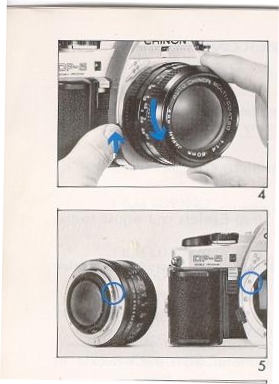
To Remove the Lens from the Camera
2. When the lens has engaged, turn it in the direction of the arrow until it clicks into place. (Fig. 6).
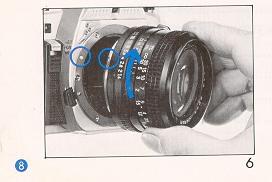
* Indicator (0) on the lens rim shows filter size. For example, 49 (0) indicates a 49 mm filter. Refer to this filter size when purchasing CHINON accessory filters.
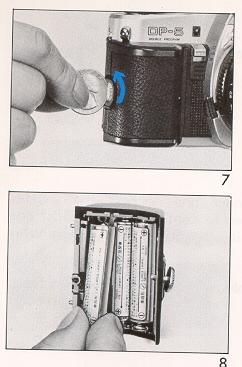
2. When your camera is not used for a long period of time, remove the batteries. If batteries are dead or improperly inserted, the shutter release button will not operate.
3. Generally, in cold conditions, the voltage of the batteries decreases, and this will impair the functioning of the shutter and exposure meter. In these cases, either warm up the batteries or keep a spare set warm in your pocket ready to insert just before shooting.
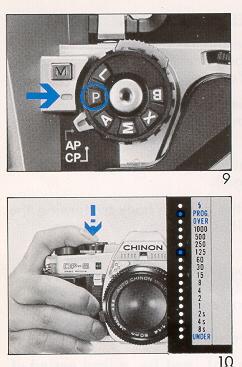
2. Look through the viewfinder and depress the shutter release button halfway down to confirm that at least one of the LED indicators in the viewfinder illuminates (Fig. 10).
3. If nothing illuminates, replace the batteries with a fresh set or check to ensure that batteries are correctly installed.
Battery testing cannot be accomplished with the exposure mode select dial set at the "OFF" or "B" position.
5. INSERTING FILM
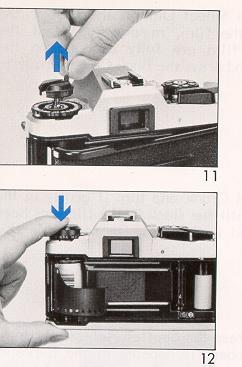
(Always avoid direct sunlight when inserting film.)
2. Insert the film in the Film Chamber with the protruding end of the cartridge positioned to the bottom of the camera. Push the Film Rewind Knob down to its former position (Fig. 12).
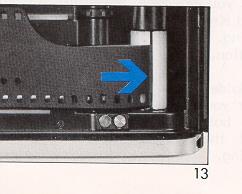
3. Insert the film leader into one of the slits on the Multi-Slot Film Take-up Spool (Fig. 13).
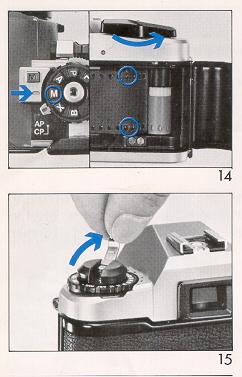
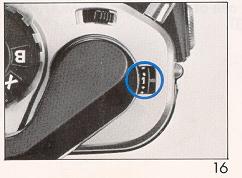
When loading film, set your Exposure Mode Select Dial to "M" or "X" setting, rather than A or P. This procedure will allow rapid advance to the number 1 position on the Exposure Counter. If A (Auto) or P (program) is used during the film loading process, and the lens cap is left on the camera, a delay of up to 30 seconds may occur between depressions of the Shutter Release Button in advancing to the number 1 position. Be sure to set the Shutter Speed Dial back to A or P before taking pictures.
When inserting film in cold conditions, the Film Leader may become hard and brittle. Consider warming the leader in your hand prior to insertion to prevent leader breakage.
6. SETTING THE FILM SPEED
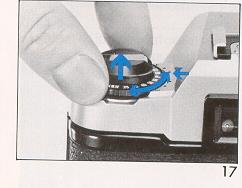
The film speed is the basic element for determining proper exposure, so please be sure to set the film speed correctly. Film speed can normally be found on the film box or the film canister. Pull up the Film Speed Dial and turn the dial to align the appropriate ISO/ASA number with the red index mark (FIG. 17). For example, if the film speed is ISO/ASA 100, set "100" on the Film Speed Dial to the red index mark. Film speeds not appearing on the Film Speed Dial may be set using the click-stop setting between the indicated numbers.
7. VIEWFINDER INFORMATION
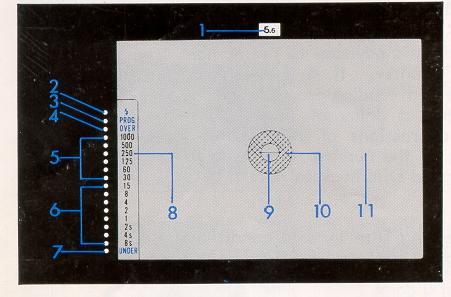 |
1. Aperture 2. Flash ready LED (red) 3. Program AE indicator LED (green) 4. Over exposure LED (red) 5. Shutter speed LED (green) 6. Slow shutter speed LED (yellow) 7. Under exposure LED (red) |
8. Shutter speed scale
9. Split image rangefinder
10. Microprism collar
11. Ground glass
8. I. Programmed Exposure mode ("P" mode)
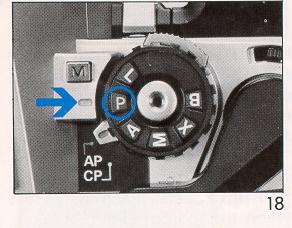
Your CHINON DP-5 program camera automatically selects the most suitable combination of shutter speed and aperture for the optimum exposure. The program mode is ideal for general picture taking and ease of operation, eliminating troublesome exposure settings. The CHINON DP-5 program camera is also equipped with the "DOUBLE" Program mode. The "AP" mode or "ACTION" mode, which selects the fastest practical shutter speed, is recommended in most cases.
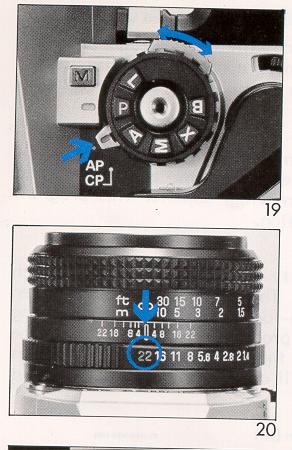
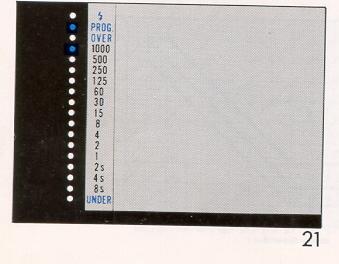
The "PROG" LED indicator (green) in the viewfinder will "flicker" when the lens aperture is set within four stops of the lens full aperture opening. This is to warn you of the limited programmed exposure range. Beyond four stops of full aperture opening, the "PROG" LED indicator will remain illuminated at the programmed mode. Thus, set the lens aperture, so as not to cause the "Programmed AE mode warning LED" to flicker.
8. II. Two-stage programmed AE (For advanced use)
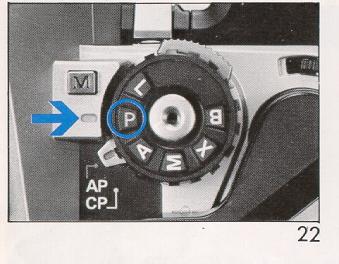
The DP-5 camera is designed with a two-stage program, which gives you greater photographic versatility: select either program mode, based on your photographic needs, with the one-touch lever (Fig. 22).
1. Program AP (Table A)
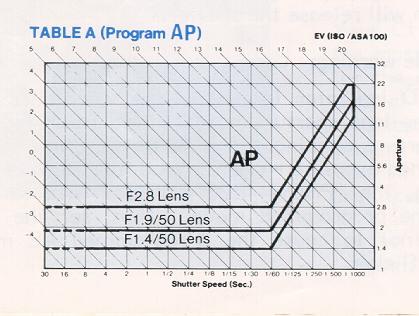
The AP mode selects maximum shutter speed to minimize camera shake, and is designed to be used when photographing "hi-speed" (moving) objects. This program mode allows you to stop action.
2. Program CP (Table B)
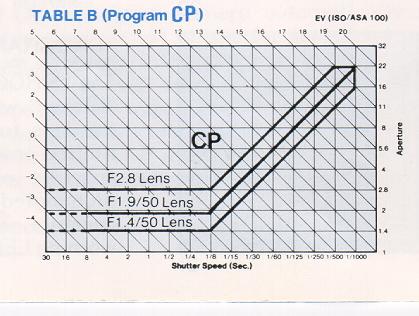
The CP mode gives priority to the lens aperture, which affects the depth of field. This mode is convenient when taking pictures of hard-to-focus objects and when using wide angle lenses. This program mode seeks out the correct exposure with the smallest aperture (lens opening). Therefore you will achieve the greatest in-focus depth to your photos.
3. Programmed AE mode warning and aperture setting. (Table C)
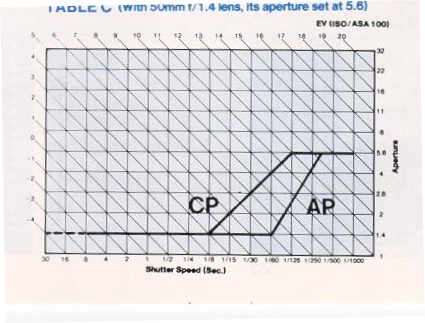
Unlike other program cameras, CHINON DP-5 camera accepts any existing "K" mount lens even in the program mode. Generally, you should set the aperture at its minimum setting (largest number on f-stop aperture ring). Although you can take a perfectly exposed picture at any aperture setting, the applicable programmed range is limited in this connection, thus the program AE mode warning LED is useful to check the lens aperture setting for program mode. The programmed AE Mode warning "PROG" LED will "flicker" when the lens aperture is within four stops of the full opening aperture. Set the aperture within the range so that the warning LED will not "flicker". Follow your own photographic needs; however, in such a case for instance, using the 50mm f 1.4 lens with its f/stop set at 5.6, the camera is controlled by the program characteristics of ft 1.4 through f/5.6, beyond f/5.6, the camera is controlled by the aperture priority automatic exposure mode (See table C).
9. AE (AUTOMATIC EXPOSURE) PHOTOGRAPHY
Operating in the "A" setting, you select the aperture (f-stop on the aperture ring) and the camera will automatically select the appropriate shutter speed. After you have set the Exposure Mode Select Dial to "A" and the aperture ring to the desired f-stop, your CHINON DP-5 camera will automatically select the appropriate stepless shutter speed from 8 sec. to a fast 1/1000 sec. "A" mode is convenient for taking pictures at specify aperture settings based on your individual needs.
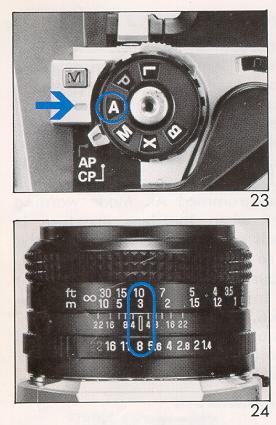
2. Use the F-Stop Ring to set the desired f-stop number against the Index Line (Fig. 24).
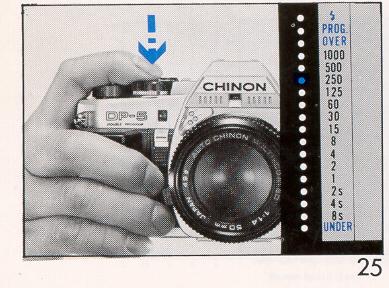
3. When the shutter release button is depressed halfway, the exposure control circuit is energized and will be in the monitoring stage (Fig. 25). You can see the computerized shutter speed displayed in the viewfinder by green and yellow LED's (Fig. 26).
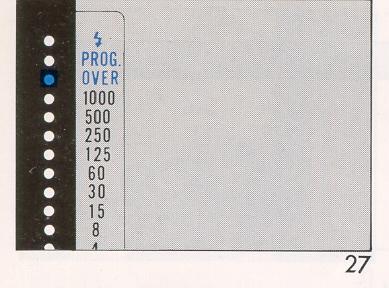
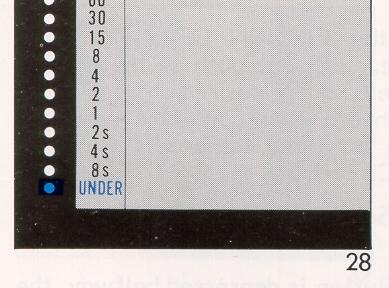
(Fig. 27) or the Underexposure LED (at the bottom of the scale with double audible signal)
(Fig. 28) appears, you should select another f-stop number by turning the lens aperture ring, as the exposure is incorrect.
The following f-stop settings are general guidelines for your use. However, you should remember to follow the LED indicators in your viewfinder for proper exposure.
With ISO/ASA 100 Film
| Lighting Conditions | F-stop number range |
| Indoors | f/1.7 - 2.8 |
| Outdoors, cloudy | f/4 - 5.6 |
| Outdoors, sunshine | f/8 - 11 |
| Beach in mid-summer and snow scenes | f/8 - 11 |
With ISO/ASA 400 Film
| Lighting Conditions | F-stop number range |
| Indoors | f/4 - 5.6 |
| Outdoors, cloudy | f/8 - 11 |
| Outdoors, sunshine | f/16 - 22 |
| Beach in mid-summer and snow scenes | f/22 - |
10. MANUAL PHOTOGRAPHY
You can manually control the CHINON DP-5 when the camera is set to the "M" mode. Just one push of the Manual Shutter Speed Select Button selects the desired shutter speed and the audible signal will be heard when correct exposure is obtained. Furthermore, this program camera is equipped with convenient "Power Hold Circuitry".
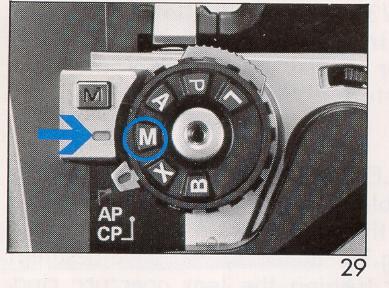
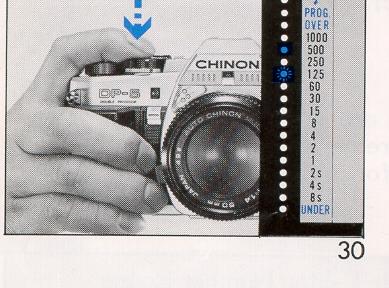
4. When you press both Shutter Release Button and Manual Shutter Speed Select Button, the shutter speed LED indicator decreases step by step. [Mike: you can keep on pressing the M and the speeds will start from the top again.]
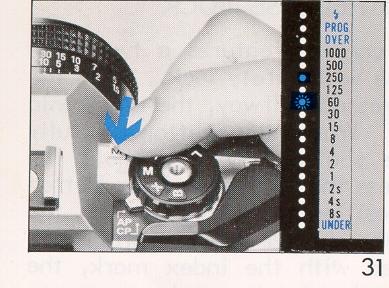
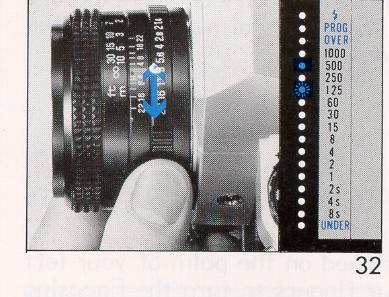
2. For Aperture-preferred exposure setting: Set the required aperture on the lens aperture ring. Change shutter speed until both LED's are matched up (Fig. 32)
1. Power-hold circuitry:
A push of the Shutter Release Button halfway down, the camera circuitry stays on for 30 seconds.
2. S.C.S. (Shutter Speed Change Signal): An audible signal will be heard when the manual shutter speed changes. When the correct exposure (shutter speed) is obtained, a double audible signal is heard.
3. M.E.S. (Manual Exposure Signal): For shutter speed preference, an audible signal is heard when the correct exposure aperture is obtained.
NOTE: At "M" mode, the camera shake and over/under warning audible signals are not operative.
11. SHUTTER RELEASE AND RELEASE LOCK
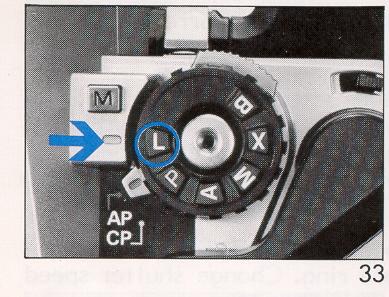
Your CHINON DP-5 program camera features a two-stage electromagnetic shutter release with safety lock. When the Shutter Release Button is depressed halfway, the electronic circuitry starts functioning. When the button is fully depressed, it will trigger the shutter. Always hold the camera steady and gently depress the Shutter Release Button to make an exposure. The position marked " L" on the Exposure Mode Select Dial is the shutter release safety lock position. When this is aligned with the index mark, the batteries are disconnected from the circuitry and an exposure cannot be made (Fig. 33). This position is also used when the camera is not to be used for a long time.
12. HOLDING THE CAMERA
Holding the camera correctly when shooting is very important.
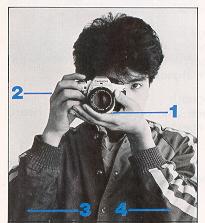
2. The index finger of your right hand should rest lightly on the Shutter Release Button, while your right hand holds the camera body lightly.
3. Your right arm should be in a comfortable position.
* It is important to shoot with the correct body posture, to avoid blurred or tilted shots.
Look through the viewfinder to compose your picture and focus by turning the Focusing Ring. You can focus either by using the center Split-image Spot or the Micro-prism Image Band that surrounds the center circle.
Split-image Focusing
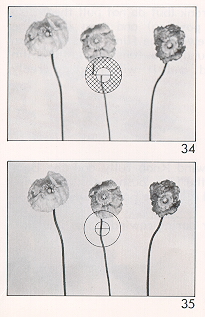
When the split image in the Split-image Spot forms a single image, the subject is in focus (Fig. 34). When not in focus, the top and bottom halves of your subject will not be lined up properly -- they will be "split" a part. This type of focusing is especially helpful if you have a straight vertical line to focus upon.
Mircoprism Focusing
When the subject loses its "shimmering" effect and becomes very sharp, the subject is in focus (Fig. 35).
14. REWINDING THE FILM
(Always avoid direct sunlight when unloading film).
After the last picture on the roll of film has been taken, the Film Advance Lever will stop. Do not attempt to force the lever. [Mike: check the number of exposures taken]
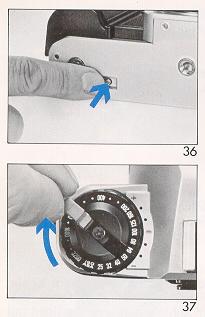
2. Pull up the Film Rewind Crank (but do not pull the entire knob up from its seated position) and turn it in the direction of the arrow to rewind the film. When the film has been completely rewound, the tension of the Film Rewind Crank is released and it will revolve freely (Fig. 37).
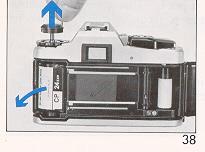
3. Now pull up the Film Rewind Knob fully and the Back Cover will open. Remove the film, push the Film Rewind Knob back into position and close the Back Cover (Fig. 38).
* Never open the Back Cover during rewinding, as light will get in and ruin your film.
This camera has an AE Lock system. Under normal circumstances your CHINON DP-5 program camera will produce perfectly exposed photographs, due to the integrated automatic exposure circuitry. However some lighting conditions might occur that could misguide the system, such as subjects with a very high contrast or strongly back-lit scenes. In such cases, the exposure memory feature should be used.
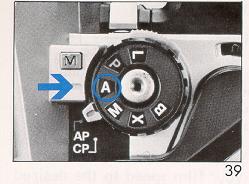
1. Make sure that the Exposure Mode Select Dial is set to the "A" position (Fig. 39).
2. Depress the Shutter Release Button halfway and measure the light on the main part of the subject you want to shoot. This should be done up close to the subject to exclude all unnecessary light from the side or background (Fig. 40).
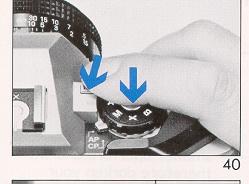
Then press the Manual Shutter Speed Select Button once, which will
instantly memorize the light value of the subject, giving an audible signal
(Fig. 41).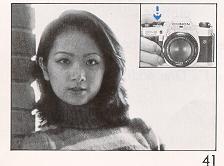
Once the button is depressed, there is no need to hold the Manual Shutter Speed Select Button further as long as the Shutter Release Button remains depressed halfway. The shutter speed indicator (LED) in the viewfinder will stay on, signaling the "memorized" shutter speed as long as the Shutter Release Button is depressed halfway.
3. Compose the picture and shoot by depressing the Shutter Release Button the rest of the way down. The Exposure Memory is then automatically cancelled.
16. EXPOSURE COMPENSATION SYSTEM
Depending on shooting conditions, the camera exposure setting may be affected more by the background light than the light of the subject itself. This will result in under (or over) exposed pictures. In these cases, you should use the Exposure Compensation system. You can also use the system when you wish to create a deliberate effect of over (or under) exposure. You can change the exposure factor up to one full stop either plus or minus in 1/3 EV increments. Pull out and turn the Film Speed Dial to set your film speed to the desired exposure compensation position (Fig. 42).
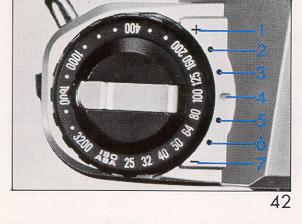
(1) 1 EV over (+)
(2) 2/3 EV over - Items 1 to 3 will give you a larger aperture and will therefore lighten your pictures.
(3) 1/3 EV over
(4) Normal exposure
(5) 1/3 EV under
(6) 2/3 EV under -- These settings give you a smaller aperture and will therefore darken your pictures.
(7) 1 EV under (-)
These settings give you a larger aperture and will therefore lighten your pictures.
Be sure to set your film speed back to the normal position after use.
Exposure compensation of + 1 = One additional f-stop.
17. B (BULB) SETTING
The B setting is used for shooting night scenes or long time exposures.
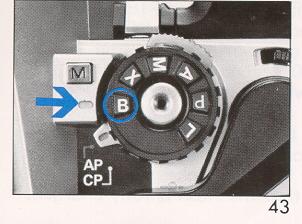
Set the Exposure Mode Select Dial to the "B" position (Fig. 43).
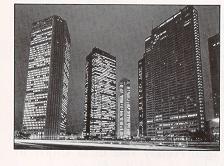
The shutter and mirror will move to the open (up) position while the Shutter Release Button is depressed. Use of a cable release and a tripod is recommended for stability to prevent vibration during time exposures. Your CHINON DP-5 program camera is equipped with a "B" Timer Signal system, which gives audible signals as time passes.
"B" TIMER SIGNAL
For the first 60 seconds, an audible buzzer will be heard every second. After 60 seconds, a longer audible signal will then be heard at intervals of 10 seconds.
18. FLASH PHOTOGRAPHY WITH CHINON DEDICATED FLASH
(See next page if not using dedicated flash).
Your CHINON DP-5 camera is designed with a unique dedicated flash system making flash photography simple.
The CHINON Dedicated Auto Flashes (Auto S-180, S-240, S250, 5-300 and S-480) are dedicated to the DP-5 camera. These dedicated flashes will automatically set the shutter speed on the camera to 1/100 second (the correct shutter speed for flash photography) when the exposure mode select dial is set at "A", "M", or "X". Therefore, you can leave the shutter speed set on "A" while taking flash pictures. Also the Flash Ready red LED light conveniently lights up in the Viewfinder, so that you don't have to take your eye away from the Viewfinder to ensure that the flash is fully charged.
1. Attach the flash unit to the camera Hot Shoe.
2. Set the exposure mode select dial to "A" or "X" position (Fig. 44).
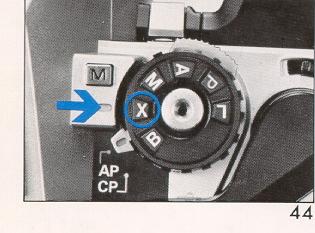
3. Set the f-stop number to the designated lens opening for automatic shooting as indicated on the flash unit. The flash unit will automatically control the amount of light for subjects within the distance range for automatic flash photography.
4. Turn the flash unit's power source switch on, and when the flash is fully charged, the Flash Ready red LED Light in the camera viewfinder will light up, and the Shutter Speed Indicator will show 1/125 sec. and change automatically to the synchronizing speed. Press the Shutter Release Button and shoot.
For further details, please refer to the instructions with the flash unit.
Do not use other makes of flash units that have special signal pins (dedication pins) exclusively for their cameras, as this will result in incorrect exposure and may damage the circuitry of the camera.
If the Shutter Release Button is pressed before the Flash Ready LED Light lights up, the shutter speed will be the one indicated by the Shutter Speed Indicator. [Mike: this will usually make a half exposed picture or under exposed picture.]
The flash ready light and automatic shutter speed change will not operate with flash units not "dedicated" specifically to this camera.
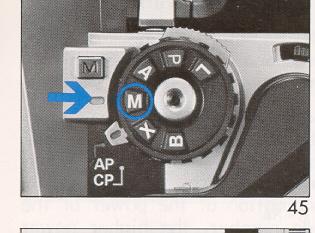
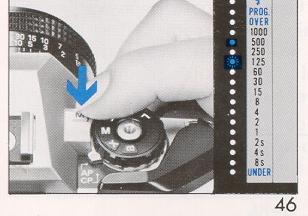
If you desire to synchronize at speeds slower than 1/100sec., set the Exposure Mode Select Dial to the "M" position (Fig. 45). Select the desired shutter speed by depressing the Manual Shutter Speed Select Button. The shutter will be released at the selected speed (Fig. 46). Set the aperture as indicated by the flash unit.
[Mike: this is to allow more of the
ambient light and image appear on the film. You cannot choose a
fast shutter then 1/100. That is the fastest shutter speed the
entire shutter is open to expose the entire frame. Faster shutter
speeds will cut off a portion of the frame. The faster the speed, the
more of the image is cut off. ]
18. A. Flash photography with non-dedicated Automatic flash units
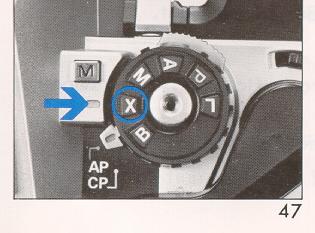
1. Set the Exposure Mode Select Dial to the "X" position (Fig. 47). This sets the correct shutter speed ( 1/100 second) on your camera for flash photography.
2. Set the f-stop number to the designated lens opening for automatic shooting as indicated on the flash unit. (Refer to instructions provided with flash). The flash unit will automatically control the amount of light for subjects within the distance range for automatic flash photography.
3. Turn the flash unit's power source switch on, and when the flash is fully charged, the ready lamp on the flash unit will glow.
4. Press the Shutter Release Button and shoot.
18. B. Flash photography with Manual flash units1. Set the Exposure Mode Select Dial to the "X" position. This sets the correct shutter speed (1/100 second) on your camera for f lash photography.
2. Refer to the chart on the back of the flash (or instruction book) for proper f-stop number. The proper f-stop number can also be manually computed. A guide number is indicated on the flash unit or in the flash instruction book. The guide number is an indication of the power of the f lash. The higher the guide number, the higher power available for the flash. Use the guide number in the following equation to obtain the correct f-stop number, and set that number to the f-stop index line. For example, with a f lash unit with guide number 24 for ASA25, and camera-to-subject distance of 6 feet:
F-Stop number (4) = Guide number (24) (divided by) Camera-to-subject distance (6)
3. Turn the flash unit's power source switch on, and when the flash is fully charged, the ready lamp on the flash unit will glow.
4. Press the Shutter Release Button and shoot.
18. C. X Sync. Socket
Flash photography with electronic flash units not having hot shoe contact.
1. Set the Exposure Mode Select Dial to the "X" position.
2. Connect the sync. cord of the flash unit to the X sync. socket of the camera.
19. MULTIPLE EXPOSURE PHOTOGRAPHY
Multiple exposure is a technique to put more than one exposure onto the same frame. The Multiple Exposure Lever is located in front of the Film Advance Lever. 1. Press the Shutter Release Button to obtain the first exposure.
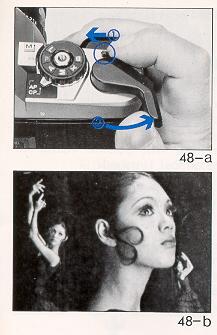
2. Slide and hold the Multiple Exposure Lever to the left (Fig. 48 A).
3. Advance the Film Lever while holding the Multiple Exposure Lever. You can release the Multiple Exposure Lever after you have advanced the Film Lever.
4. Take the second exposure. * If you wish to continue adding exposures to the frame, repeat steps 3 and 4. During this procedure, the Exposure Counter will not advance.
* Better results can generally be obtained by taking subjects that include a large area of darker parts (Fig. 48 B)
* It is suggested that you inform your camera store that you have taken multiple exposures when you take your film for printing, as sometimes they do not print these pictures, mistaking them for accidental double exposures.
20. SELF-TIMER PHOTOGRAPHY AND USE OF THE VIEWFINDER CAP
The self-timer enables you to include yourself in your own photographs.
1. Mount the camera on a tripod or a flat, steady surface.
2. Compose your picture.
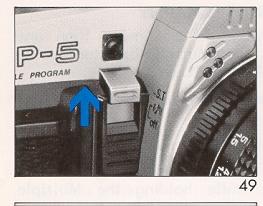
3. Raise the Self-Timer Switch to the upper position and depress the Shutter Release Button (Fig. 49).
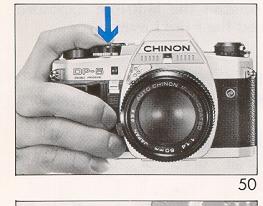
4. The Self-Timer Indicator Light will pulsate with an electronic sound, and about 10 seconds later, the shutter will be released (Fig. 50). Two seconds before the shutter releases, the light will pulsate faster to indicate the 10 seconds are almost finished.
5. If you wish to cancel the self-timer once it has started operating, simply lower the Self-Timer Switch to the normal position.
* When using the self-timer with the "P" or "A" settings or when shooting long-time exposure, use the Viewfinder Cap attached to cover the Viewfinder Eyepiece. This procedure will prevent unwanted light from entering the Viewfinder Eyepiece and causing incorrect exposure.
* Audible Signal ON/OFF Switch
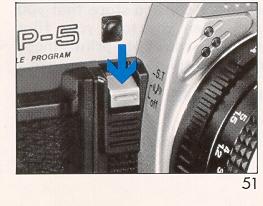
When the Audible Signal ON/OFF Switch (Self-Timer Switch) is pulled down to the lower position, all audible signals of the camera will be eliminated (Fig. 51). This is a helpful feature when you want to take photos with as little noise as possible. Your CHINON DP-5 program camera is equipped with six different audible signals. For more details, see "Multi-sound system".
21. DEPTH OF FIELD
When you focus on a specific subject, an area in front of and behind the subject will appear acceptably sharp in your picture. This area is called the "Depth of Field". This area in focus (or depth of field) changes depending upon the aperture selected. The depth of field can be determined from the depth of field scale. The larger the lens opening (smaller f-stop), the shallower is your depth of field. The smaller the lens opening (larger f-stop), the greater the depth of field will become.
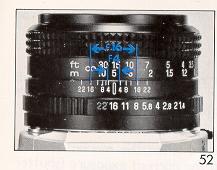
Each lens has a depth of field scale. For example, with the focus ring set at 15 feet and using f/16, the area within the two f/16 marks on the scale (about 8ft to infinity) will be in sharp focus (Fig. 52).
22. INFRARED PHOTOGRAPHY
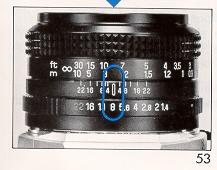
The infrared index mark is a way to correct the focusing point when you use infrared film with red filters.
Since infrared light rays have a longer wave-length than visible light rays, after focusing normally on the subject, you have to set that distance against the infrared index mark.
Taking Infrared Photographs - (Go digital, no IR film made)
1. Attach a red filter, and focus on the subject.
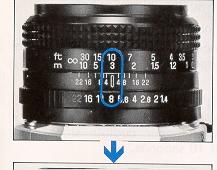
Reset the indicated distance on the lens to the infrared index mark (Fig. 53). According to the instructions enclosed with the film, set the f-stop and shutter speed and release the shutter.
23. MULTI-SOUND SYSTEM
Your CHINON DP-5 program camera provides full information via various buzzer warnings and colorful LED's to simplify the highly sophisticated DP-5 technology.
1. S.C.S. (Shutter Change Signal):
An audible signal will be heard when the manual shutter speed changes at "M". When the correct exposure (shutter release) is obtained, a longer audible signal is heard.
2. M.E.S. (Manual Exposure Signal):
For shutter speed preference at "M", an audible signal is heard when the correct exposure aperture is obtained.
3. B timer signal:
For time exposures at "B" setting; for the first 60 seconds, an audible buzzer signal will be heard every second. After 60 seconds, a longer audible signal will then be heard at intervals of 10 seconds.
4. Camera shake and Under Exposure Warning Signals:
In A or P mode, when the shutter speed is slower than 1/30 sec. or the exposure is not sufficient (under), an audible buzzer warning will be heard.
5. Over Exposure Warning Signal:
In A or P mode, when the exposure is excessive, an audible signal will be heard.
6. Memory Signal:
At "A" mode for exposure memory, an audible signal will be given when the manual shutter speed select button is pressed once to memorize the light value.
7. Self-Timer Signal:
When the self-timer is operated, an audible buzzer will be heard, together with a blinking red LED.
By attaching a CHINON Power Winder to this camera, the film can be advanced automatically so that you can take continuous shots (2 frames per second). This is a great accessory for sports or action photography when rapid sequence photos are desired.
The DP-5 optional power winder system features the "Single Power Source System". When equipped with CHINON Power Winder PW-600 or PW-6 10, the camera's power source is supplied from the power winder. This system is extremely convenient when photographing in cold weather.
* When using a tripod, do not try to force a long screw into the socket. (The screw length should be less than 5.7 mm (1/4 in).
* Do not place the camera near equipment that has strong magnetism such as television or radio.
* Remove the batteries before storing the camera, and keep it in a place free of dust and humidity.
* Do not attempt to disassemble or repair your camera yourself. If service is necessary, bring it to your nearest Chinon dealer.
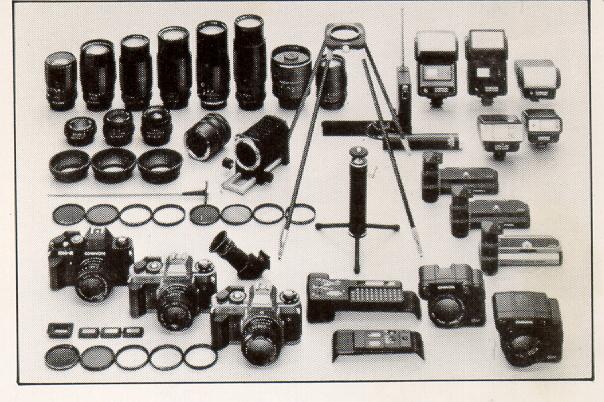
OPTIONAL ACCESSORIES
|
Standard Lenses 50mm f/1.4 multicoated 50mm f/1.7 multicoated 50mm f/1.9 Wide-angle Lenses 28mm f/2.8 multicoated 35mm f/2.8 multicoated Telephoto Lenses |
Auto Focus Lenses 50mm f/1.7 multicoated 35-70mm f/3.3-4.5 multicoated Accessories Power Winder (PW-600, PW-610) INFO BACK (DB-010)
|
|
135mm f/2.8 multicoated 200mm f/3.5 multicoated 300mm f/5.6 multicoated 500mm f/8 reflex type Zoom Lenses 35-lOOmm f/3.3-4.3 multicoated Mac 80-200mm f/3.8 multicoated Macro 70-210mm f/3.8 multicoated Macro 100-300mm f/5.6 multicoated Macro |
INFO BACK 2 (DP-520) AUTO DATE (AD-510) Auto S- 180 f lash Auto S240 f lash Auto S-250 f lash Auto S-300 f lash Auto S-360 f lash Auto S-480 f lash |
|
Wireless Remote Control set for power winder - - Syncro-eye for flash (Slave Unit) Filter (Skylight, UV, Y2, ND4X, PL) Rubber Eyepiece |
Eyepiece Adaptor (-3, + I, +3) Angle Finder Rubber Lens Hood |
|
Auto Extension Ring Bellows Mini Copy Stand Table Tripod Cable Release (13 inch) Remote Control Unit Spare Ring for Mini Copy Stand |
Deluxe Carrying Case Neck Strap Lens Mount Cap Body Cap Eyepiece Cover |