If you find this manual useful,
how about a donation of
$3 to:
M. Butkus, 29 Lake Ave.,
High Bridge, NJ 08829-1701
and send your e-mail
address
so I can thank you.
Most other places would charge
you $7.50 for
a electronic copy
or $18.00 for a hard to read Xerox copy.
This will help me to continue to host this site,
buy new manuals, and pay their shipping costs.
It'll make you feel better, won't it ?
If you use Pay Pal, use the link below.
Use the above address for a check, M.O. or cash.
Back to main Camera Manual page
CLICK HERE FOR A
Chinon Handyzoom 5001
PDF VERSION OF THIS PAGE
TABLE OF CONTENTS
|
Nomenclature 3
Specifications 6
Simplified Guide for Using Your Camera 14
Battery Installation 17
Automatic Film Speed Setting 19
Automatic Film Loading ................ ............... 21
Holding the Camera ................... ............... 23
Viewfinder ................................. 25
LCD Display Panel ...................... 25
Auto Focus Shooting .................................. 27
|
Zooming System ........................ 33
Automatic Film Rewinding .. ...... 37
Self-timer .................................. 39
Flash Photography .................... 43
Bulb Mode ........... 51
Continuous Shooting Mode 53
B L.C. (Exposure Correction) 55
Strap & Case (Optional) 57
Care of the Camera 57
|
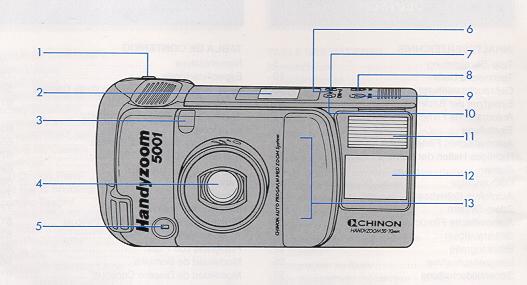
NOMENCLATURE
|
1. Shutter release button
2. LCD indication
3. Self-timer indication LED
4. Lens
5. Exposure metering window
6. Manual rewind bottom
7. Flash mode button
|
8. BLC (Back Light Control) button
9. Spot AF button
10. Self-timer/Continuous button
1 1. Flash
12. Viewfinder
13. Auto focus window
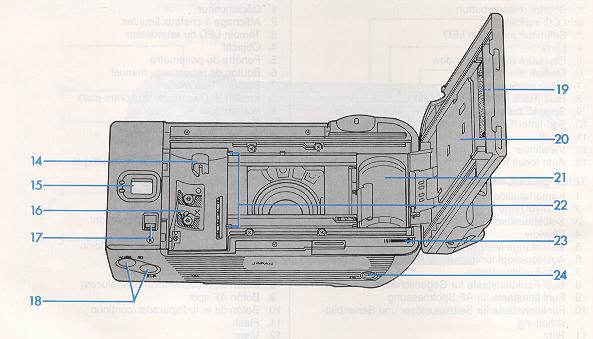
|
|
14. Film rewind shaft
15. Viewfinder eyepiece
16. Film chamber
17. Back cover release button
18. Power zoom button (Tale/Wide)
|
19. Film type window
20. Back cover
21. Take up spool
22. Film guide
23. Film tip mark
24. Tripod socket
|
SPECIFICATIONS
TYPE: 35 mm fully automatic AF zoom compact camera features:
· Built-in AF 35-70 mm zoom lens.
· Automatic picture composing system.
· Multi Auto Focusing system.
· Central Spot AF system.
· Auto Zoom Sensor Flash.
· Flash OFF mode.
· Fill-in flash mode. '
· Auto DX Program AK.
· Full automatic film transport system.
· Single & Continuous advancing modes.
· Built-in LCD information panel.
FILM TYPE: 35 mm films.
PICTURE FORMAT: 24x36 mm.
LENS: Chinon AF ZOOM lens. Focal Length: 35 mm-70 mm. F. number: F/3.7 (wide)-F6.8(tele) Construction: 8 elements in 6 groups. Zooming: 2 way: 1 ) Fully automatic zoom for auto composition. 2) Manual power zoom by zoom switch.
VIEWFINDER: Zoom finder with bright frame.
Magnification: Wide: 0.45x. Tele: 0.86x.
Diopter: -1.0 diopter.
Coverage: 82%.
Indications: Bright frame, Parallax compensation mark, AF mark, AF "OK" LED with close distance warning
(Green: Multi AF, Orange: SPOT AF), Slow shutter warning LED,
Bulb mode signal LED.
FOCUSING: Two way Active Infrared AF with 17 steps: (1 ) Multi-spot AF (3 infrared beams). (2) Central
spot AF (Single infrared AF beam).
AF range: 0.9 m (35.4")--Infinity for both tele & wide.
Focus lock: Possible by depressing shutter release half way (cancellable).
SHUTTER: Stepping motor controlled chargeless shutter.
Shutter speed: 1/4-1/300sec.+Buib.
Release type: Electromagnetic type.
EXPOSURE: Three mode Programmed AE:
1 ) Normal Program AE.
2) Slow shutter program AE.
3) Fill-in flash
Program AE.
Type of photocell: CdS.
EV range (ISO 100): Wide at Normal Program AK: EV 9-EV 17. Wide at Slow Program AK: EV 6-EV 17.
Tele at Normal Program AK: EV 10.8-EV 18.8. Tele at Slow
Program AK: EV 7.8-EV 18.8.
Film speed settings: Automatic for DX films, ISO 25 - 1600. (ISO 25 for non-DX films).
Back light control: Built-in for + 1.5 EV.
FILM TRANSPORT: Fully motorized.
Film loading: Automatic loading with auto advance to 1.
Film advance: Automatic by built-in motor.
Shooting mode: 2 way: (1 ) Single shooting mode. (2) Continuous shooting mode.
Film rewind: Automatic by built-in motor with automatic rewind start and stop mechanism.
Film counter: By LCD; additive for film advancing and reverse counting for film rewinding.
Midroll rewind: Possible by rewind switch.
FLASH: Auto Zoom Sensor flash with flashmatic.
Flash recycling: Fully automatic quick recharging.
Guide No.: Wide: Guide No. 11 (ISO 100/meter). Tele: Guide No. 13 (ISO 100/meter).
Flash effective distance: Wide: 0.9 to 4.2 meter (35.4" 13.8') (ISO 100). Tele: 0.9 to 2.7 meter (35.4"-8.9') (ISO 100).
Fill-in flash: Possible.
Flash OFF mode: Possible.
Recycle time: 3 seconds.
OTHER FEATURES:
Battery check: Yes, with LCD panel indication and shutter lock.
Film type window: Built-in.
Lens cover: Built-in.
Tripod screw: Built-in. Universal 1/4" screw.
Self-timer: Built-in for 10 sec. (electronically controlled).
LCD indications:
· Frame counter with film transport signal.
· Self-timer indication.
· Continuous mode indication.
· Fill-in flash indication (Fill-in flash Program AK).
· Flash OFF indication (Slow Program AK).
· Normal Program indication.
· Battery check indication.
· Flash recycle indication.
Strap: Attachable.
Release lock: Built-in.
Auto Shut Off: Built-in (Approx. 30 sec.).
Power source: User replaceable 2CR5, 6 volt Lithium battery.
Dimensions: 146x70x78 mm (W)x(H)x(D) Weight: 410 9 (14 ounces).
Specifications subject to change without notice.
SIMPLIFIED GUIDE FOR USING YOUR CAMERA
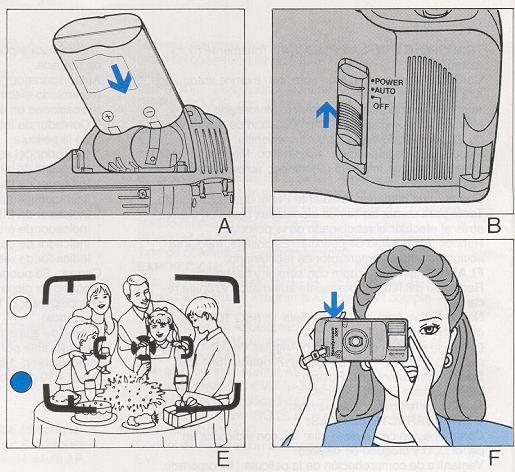
1. INSTALL LITHIUM BATTERY (FIG. A).
2. TURN THE MAIN SWITCH TO THE "AUTO" POSITION (FIG. B).
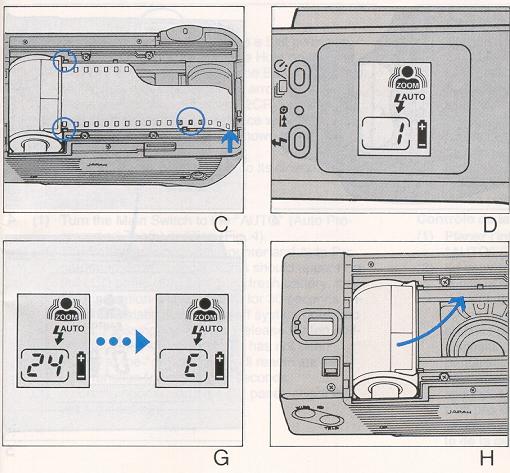
3. LOAD THE FILM CORRECTLY (FIG. C) AND CLOSE THE BACK DOOR.
4. BE SURE THE FRAME COUNTER ON THE LCD PANEL INDICATES "1" (FIG. D).
5. DIRECT THE MULTI AF FRAME TO WARD YOUR SUBJECT (FIG. E).
6. RELEASE THE SHUTTER BY PRESSING THE SHUTTER RELEASE GENTLY (FIG. F).
7. AUTOMATIC FILM REWINDING AT THE END OF THE ROLL. THE FRAME COUNTER WILL
SHOW "E" UPON COMPLETION (FIG. G).
8. REMOVE THE EXPOSED FILM (FIG. H).
BATTERY INSTALLATION
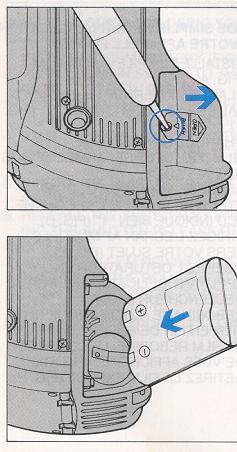
(1 ) Insert a pointed object such as a ball-point pen into the Battery Cover Release Hole on the bottom of the camera and open the Battery Cover by sliding it in the direction of the arrow (Fig. 1).
(2) Place a 6 volt lithium battery (2CR-5) in the battery compartment in accordance with the positive (+) and negative (-) marks shown inside (Fig, 2).
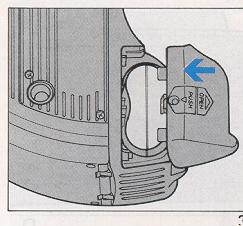
(3) Slide the Battery Cover back to its closed position (Fig 3).
Battery Check
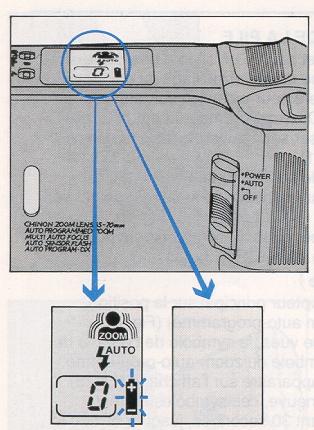
(1 ) Tum the Main Switch to the "AUTO" (Auto Programmed Zoom) position (Fig. 4).
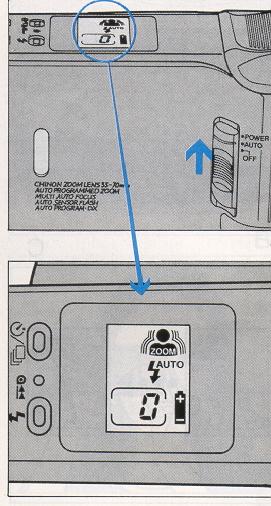
(2) The Battery check, frame counter and Auto Programmed Zoom symbol marks should appear on the LCD panel (Fig. 5). With a fresh battery, the LCD indication should appear for 30 seconds until the automatic power shut-off system goes into effect. Pressing the Shutter Release Button halfway, provided the main switch has not been moved to the "off" position, will reactivate the LCD function for another 30 seconds.
(3) If nothing appears on the LCD panel, check the battery's polarity.
NOTE:
The Battery should be replaced if either of the following conditions occurs:
· The Battery check mark on the LCD panel blinks and the shutter cannot be released.
· Nothing appears on the LCD panel.
Battery life: Approximately 36-24 exposure rolls, using 50% flash (Chinon laboratory testing).
Battery Replacement
The Chinon Handyzoom incorporates a memory back-up capacitor which functions for two to three
hours even without a battery. After that, the film counter will go back to "0" even in the middle of a roll of
film. Therefore, it is recommended to replace the battery as quickly as possible to avoid losing the correct
frame number.
AUTOMATIC FILM SPEED SETTING
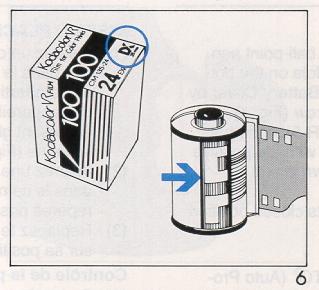
The film speed is automatically set when using a DX coded film of
ISO 25-1600 (Fig. 6). Non DX film will be set to ISO 25. When using reversal film (slide film), use films of
ISO 25, 50, 100, 200, 400, 1000 or 1600.
AUTOMATIC FILM LOADING
Always load and unload your camera in subdued light, and never in direct sunlight.
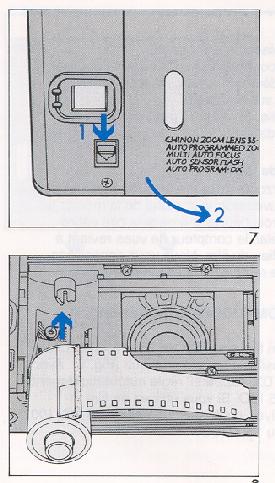
(1 ) Slide the Back Cover Release Button down to open the Back Cover (Fig. 7).
(2) Insert a film cartridge into the film chamber (Fig 8).
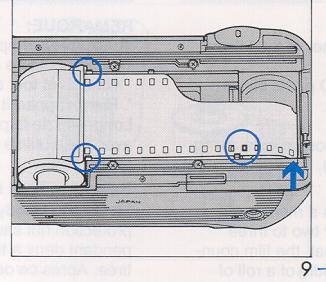
(3) Place the trimmed end of the film on the take-up spool up to the film tip mark. Make sure that the film lies flat between the film guides. Engage the perforation of the film with the teeth of the sprocket (Fig. 9).
(4) Close the Back Cover. The film will automatically advance and "1" will appear on the LCD panel.
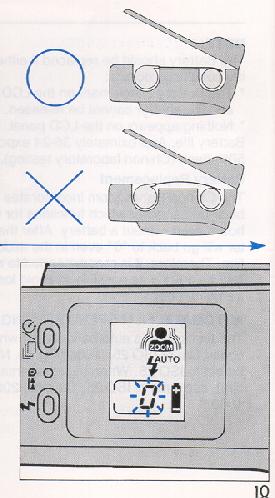
NOTE: If "0" is blinking on the LCD panel, the film did not advance properly (Fig. 10). Open the Back Cover and reload the film. When placing the trimmed end of the film on the take-up spool, the length of the film pulled out from the film cartridge should not be too long or too short relative to the film tip mark. If too much film is pulled out from the cartridge, adjust the film length by pushing the film back into its cartridge so that the trimmed end of the film will be precisely placed at the film tip mark.
Film Window
The Chinon Handyzoom is equipped with a convenient Film Window so that you can confirm what type of film is being used (Fig. 11).
HOLDING THE CAMERA
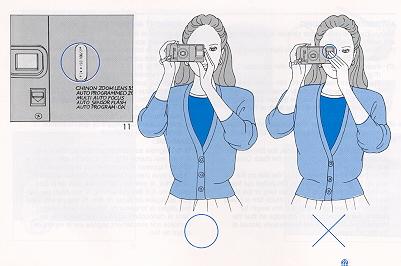
· Hold the camera firmly in both hands with at least one elbow at your side to ensure camera steadiness when taking a picture.
· Do not cover the lens, flash unit, exposure metering window or auto focus windows with your fingers. Always press the shutter release button with a soft touch to prevent camera shake.
VIEWFINDER
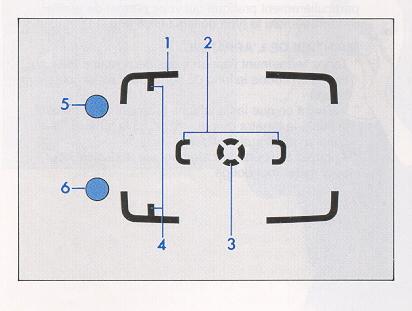
1. Bright line frame
2. Multi AF frame
3. Central spot AF frame
4. Parallax marks
5. Exposure LED (red)
6. AF indicator LED (Two colors, Green/Orange)
NOTE: When taking a picture closer than 1.2 meters (3.9 ft), the image area is indicated by the two parallax marks in the top left and top right corners of the viewfinder. Compose the photograph within the imaginary zone extending from the corner of the parallax marks.
LCD DISPLAY PANEL
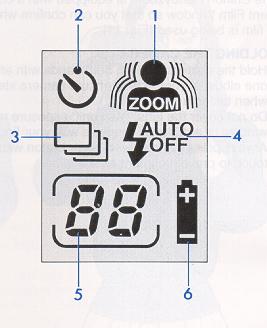
1. Auto Programmed Zoom Composing Mode
2. Self-timer Mode
3. Continuous Shooting Mode
4. Program AE Modes
 AUTO = Normal Program AE
OFF = OFF Flash Program AE
= Fill-in Flash Program AE
5. Frame Counter
6. Battery Checker
AUTO FOCUS SHOOTING
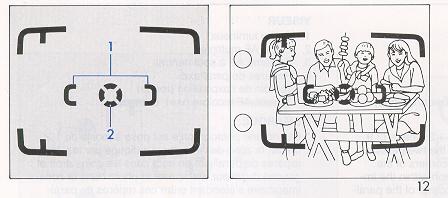
The Chinon Handyzoom is equipped with a unique foolproof multi-spot auto focus system where the optimum focus distance is achieved by measuring several different spots within the range of the Multi AF frame area. In addition, the traditional central spot auto focusing system is also readily available in the Chinon Handyzoom.
1. Multi AF frame
2. Central spot AF frame
Multi AF Mode
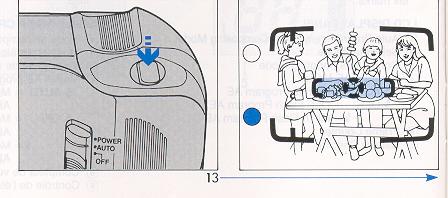
Normally, the camera utilizes the Multi AF mode which is effective for general shooting conditions. When the
subject is positioned off-center, this would require the use of a focus lock for conventional single spot AF
systems.
(1 ) Direct the Multi AF frame to the subject (Fig. 12).
(2) Gently press the Shutter Release Button halfway. The optimum focusing distance is determined by the subject in the Multi AF frame area. The AF indication LED (green) in the viewfinder frame will light up (Fig. 13).
(3) Fully press the Shutter Release Button to take the photograph.
NOTE:
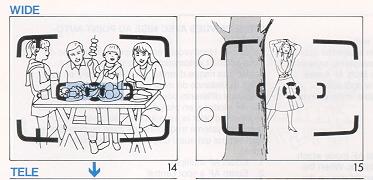
· The effective coverage angle of the multi autofocusing system varies with the lens focal length (Fig. 14), as per the illustration below. In the telephoto lens setting the actual effective coverage angle is wider than the Multi AF frame marks. However, at the wide angle setting, effective coverage will be narrower than the Multi AF frame. Therefore, when taking a photograph of a small subject, it is recommended to point the central Spot AF frame directly at the subject to obtain the best results.
Spot AF Mode
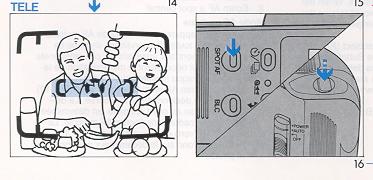
(1 ) Point the central Spot AF frame at the subject (Fig. 15).
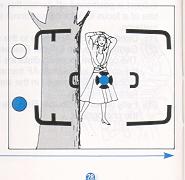
(2) Press the Spot AF Button. While holding it down, press the shutter release button halfway The focus will be locked and the AF LED (orange) on the viewfinder frame will light up (Fig. 16). Your finger can now be lifted from the Spot AF button. The Spot AF mode will remain in effect as long as the Shutter Release Button is kept halfway depressed.
(3) Gently press the Shutter Release Button completely to take the photograph.
Focus Lock System
This feature may be used when the main subject is located "off center" in the viewfinder.
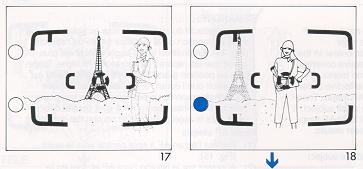
1. Focus on the main subject (by placing the subject in the AF frame) and partially depress the shutter release button. The AF indication LED (green) in the viewfinder will light up (Fig. 17).
2. Hold the shutter release button in the halfway position and recompose the subjects in the viewfinder and fully depress the shutter release to take the picture (Fig. 18).
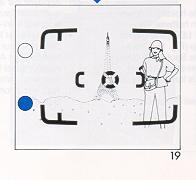
3. This focus lock feature can be cancelled by removing your finger from the release button and can be utilized with either the multi AF or spot AF mode (Fig. 19).
NOTE:
· When a subject is too close to be autofocused, the AF indication LED signal blinks.
ZOOMING SYSTEM
The Chinon Handyzoom is equipped with the world's first Auto Programmed Zoom Composing system that automatically selects an optimum picture composing angle based upon the dates of the subject distance and its position relative to the camera.
A. Auto Programmed Zoom Composing
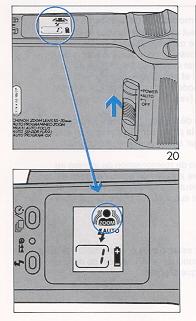
(1 ) Slide the Main Switch to the "AUTO" (Auto Programmed Zoom) position. The Auto Programmed Zoom Composing symbol mark will appear on the LCD panel (Fig. 20).
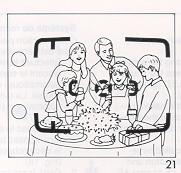
(2) Point the Multi AF frame at the subject (Fig. 21).
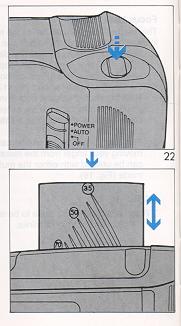
(3) Press the Shutter Release Button halfway and the Handyzoom will automatically set the zoom lens to the correct programmed focal length according to the subject composition (Fig. 22).
(4) Press the Shutter Release Button completely to take the photograph.
NOTE: The Auto Programmed Zoom Composing system is basically designed for portrait picture taking. Therefore, when a picture with a wider perspective, such as scenery, is desired, use of the Manual Power Zooming mode is recommended.
· When the camera is not in use, the Main Switch should be turned to the "OFF" position in order to protect the lens system from accidental damage.
· Never push or twist the lens barrel as this may cause damage to the zoom lens.
· The zoom system will not function while the shutter release button is depressed.
B. Manual Power Zooming
When you prefer to set the zoom range yourself, use the Manual Power Zooming system.
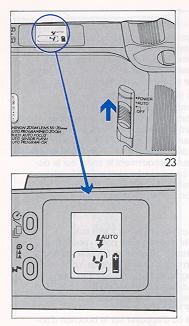
(1) Slide the Main Switch to the "POWER" (Manual Power Zooming) position. The Auto Programmed Zoom Composing symbol mark will disappear from the LCD panel (Fig. 23).
(2) Pressing the Manual Power Zoom Buttons (Tele or Wide) located on the bottom of the camera will change the zoom range (Fig. 24).
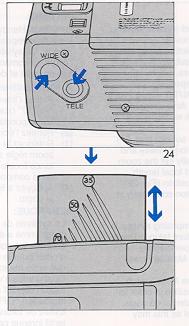
(3) Select the ideal composition by pressing the Manual Power Zoom Button while looking at the subject through the viewfinder.
(4) Press the Shutter Release Button completely to take the photograph.
NOTE: When the camera is not in use, the Main Switch should be turned to the "OFF" position in order to protect the lens system from accidental damage. Never push or twist the lens barrel as this may cause damage to the zoom lens. The zoom system will not function while the shutter release button is depressed.
AUTOMATIC FILM REWINDING
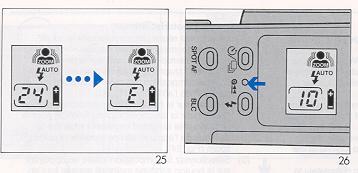
(1) When the roll of film is completed, a delay of from two to three seconds will occur before the
camera automatically starts rewinding the film. During the rewinding, the frame counter on the LCD panel will count backwards.
(2) When the rewinding is completed, the motor will stop automatically and the frame counter on the LCD panel will read "E" (Fig. 25).
(3) Push the Back Cover Release Button down to open the Back Cover and remove the cartridge from the film chamber. Be sure the frame counter shows "E" before opening the Back Cover.
Manual Rewind
If you want to rewind the film before it has been fully exposed, push the rewind button. The camera will then perform as it did under the "Film Rewinding" section (Fig. 26).
SELF-TIMER
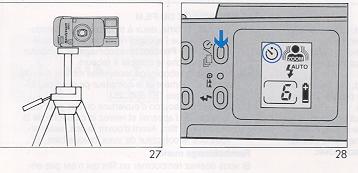
The Self-timer feature allows the photographer to be In the picture.
(1 ) Place the camera on a tripod or other firm support, and direct the AF frame at the subject (Fig. 27).
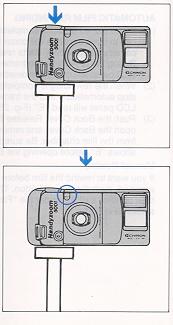
(2) Press the Self-timer/Continuous Button ( ) on top of the camera so that the self-timer symbol mark appears on the LCD panel (Fig. 28).
(3) Press the Shutter Release Button completely to start the self-timer operation. The self-timer indication LED will light up and the picture will be taken in approximately 10 seconds. The selftimer indication LED will initially glow and then will blink for three seconds before the shutter is released.
NOTE:
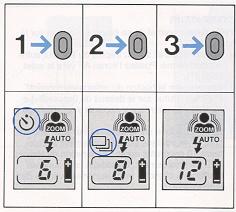
By pressing the Self-timer/Continuous Button ( ), three different picture taking modes can be selected: Normal Shooting Mode, Self-timer, Shooting Mode and Continuous Shooting Mode. Initial pressing of the Self-timer/Continuous Button
( ) will activate the Self-timer Shooting Mode, the second pressing will select the Continuous Shooting Mode and a third pressing will return the Handyzoom back to the Normal Shooting Mode (Fig. 29).
The Self-timer shooting mode will be cancelled and the Handyzoom will automatically go back to the Normal Shooting Mode if the Self-timer has not been activated within 30 seconds.
To cancel the Self-timer during its "count down" press the Self-timer/Continuous Button ( ) once. To cancel the Self-timer Mode before its operation, press the Self-timer/Continuous Button ( ) twice to go back to the Normal Shooting Mode.
When taking a picture of yourself, it is recommended to compose the picture manually by using the power zoom. Othenwise, the Auto Programmed Zoom Composing system will automatically adjust the picture composition without you in the picture
taking area and the optimum composing angle may not be selected.
FLASH PHOTOGRAPHY
The Chinon Handyzoom automatically senses the scene brightness and fires the flash when needed.
Automatic Sensor Flash Mode
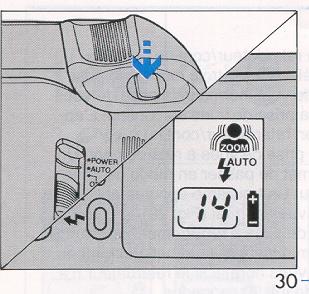
(1 ) When the Shutter Release Button is pressed halfway, the "AUTO" mark and the flash symbol mark ( ) will appear on the LCD panel. If the flash symbol mark on the LCD panel is blinking that means the flash is being charged. You must wait until it stops blinking to take a picture. If the flash symbol mark stays on without blinking, you can immediately take a flash photograph (Fig. 30).
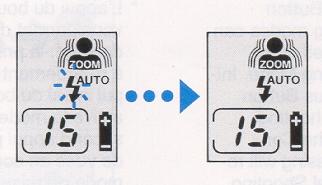
(2) The Flash will be fully charged in about three seconds when using a fresh battery.
NOTE:
The shutter cannot be released until the flash is completely charged.
The flash will be charged even if the shutter release is kept fully depressed. The shutter will be released immediately upon the completion of the flash chargina cycle.
Effective Flash Range
(WIDE)
| ASA 25 |
0 9- 21 m |
3- 7 ft. |
| ASA 50 |
09- 29m |
3- 9.6ft |
| ASA 100 |
0.9- 4.2 m |
3-14 ft. |
| ASA 200 |
0.9- 6.0 m |
3 - 20 ft. |
| ASA 400 |
0.9 - 8.4m |
3 - 28 ft. |
| ASA 1000 |
0.9 - 13.3m |
3 - 44.3 ft. |
| ASA 1600 |
0.9 - 16.8 ft. |
3 - 56 ft. |
Fill-in Flash Mode
If the main subject has less light falling on it than on the surrounding area and background, under expo
sure of the main subject may result. In this case, proceed as follows:
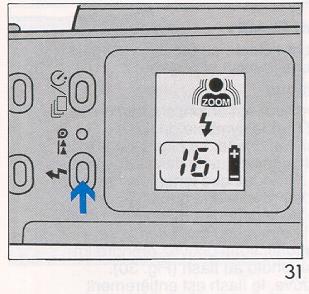
(1 ) The Fill-in Flash mode can be selected by pressing the Flash Mode Button. The "AUTO" mark will disappear from the LCD panel but the flash symbol mark ( ) will remain when this mode is set (Fig. 31).
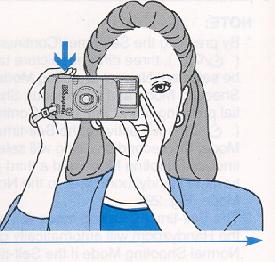
(2) When the flash symbol mark on the LCD panel stops blinking, press the Shutter Release Button to take a fill-in flash photograph (Fig. 32).
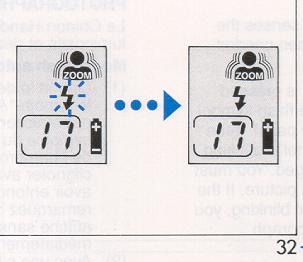
NOTE:
· In the Fill-in flash mode, the Slow Shutter Program AE will be automatically activated. The shutter may be tripped at a timed speed as slow as 1/4 sec. or even slower in the Bulb mode. This slow shutter speed flash synchronization enables beautiful night scenes to be depicted while having the foreground subject flawlessly exposed by the fill-in flash. The use of a tripod is recommended in low light situations when taking fill-in flash pictures to avoid camera shake.
· To cancel the Fill-in Flash mode, press the Flash Mode Button twice to go back to the Normal Shooting mode (sensor flash mode).
· If the shutter is not released within 30 seconds after the fill-in fresh mode has been set, the Fill-in Flash mode will be automatically cancelled and the camera will go back to the Normal Shooting mode.
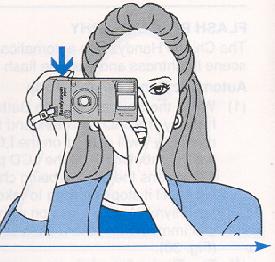
Off-flash Mode
When you do not wish to use flash at all, especially indoors or for dim lighting situations, the Off-flash mode should be activated. Proceed as follows:
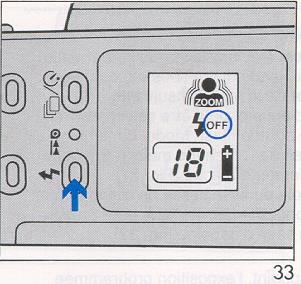
(1) The Off-flash mode can be selected by pressing the Flash Mode Button twice. The "OFF" mark will appear on the LCD panel when it is set (Fig, 33),
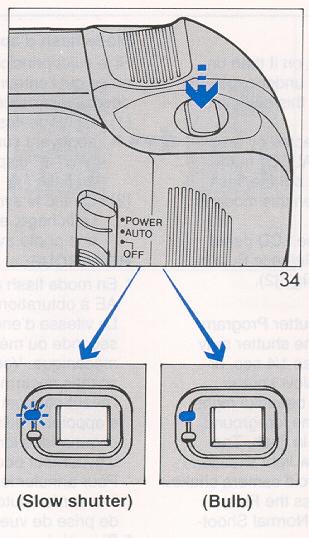
(2) Press the Shutter Release Button halfway and the red LED in the viewfinder frame may blink to signify that the flash would be used if the Offflash mode had not been selected. In brighter lighting conditions, the red LED will not appear If the red LED in the viewfinder frame lights up (under exposure warning), change the shooting mode to Normal with sensor flash. Otherwise, the Bulb mode will be automatically activated and the shutter will remain open as long as the shutter release remains fully depressed (Fig. 34).
(3) Press the Shutter Release Button completely to take the picture.
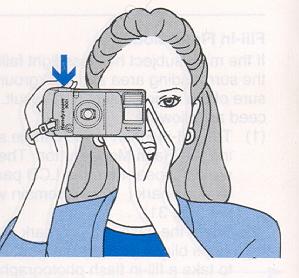
NOTE:
· In this mode, the Slow Shutter Program AE will be automatically activated. The shutter speed may be as slow as 1/4 sec., or even revert to the Bulb mode, depending upon the scene brightness. Therefore, the use of a tripod is recommended for low light situations. To cancel the Off-flash mode, press the Flash Mode Button to return to the Normal Shooting mode (sensor flash mode).
· If the shutter is not released within 30 seconds while in the Off-flash mode, the Off-flash mode will be automatically cancelled and the camera will go back to the Normal Shooting mode.
· For Bulb photography, please refer to the Bulb Photography section.
BULB MODE
In the Off-flash or the Fill-in flash modes in low light ing conditions beyond the AE range, the Chinon Handyzoom will automatically switch itself to the Bulb mode. This setting is extremely advantageous for night scenes.
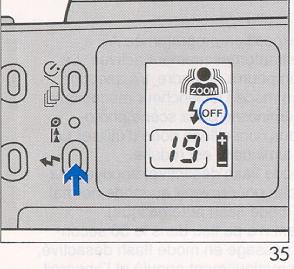
(1 ) Select either the Off-flash or Fill-in Flash mode by pressing the Flash Mode Button (Fig. 35).
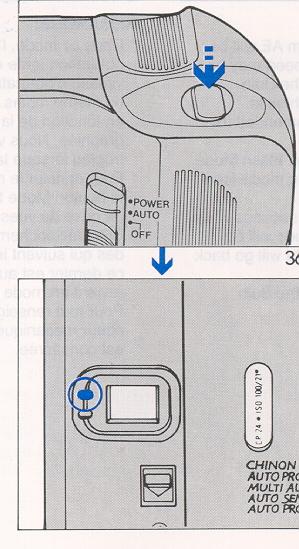
(2) Press the Shutter Release Button halfway and confirm that the red LED in the viewfinder frame
lights up (Fig. 36).
(3) Press the Shutter Release Button completely but very gently to take the photograph. The shutter
will stay open as long as the Shutter Release Button is fully depressed.
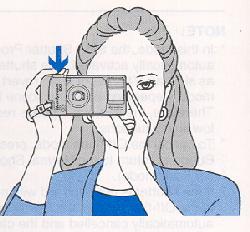
NOTE:
· A tripod must be used for Bulb photography
· In either of the above two Modes, the camera switches itself to the Bulb mode only at a brightness
level of EV 6 or less for wide angle settings and EV 8 or less for telephoto settings.
CONTINUOUS SHOOTING MODE
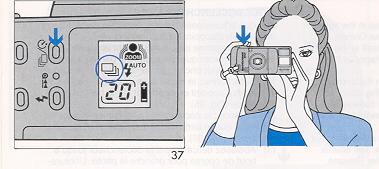
The Chinon Handyzoom has a sequential shooting capability which allows you to shoot continuously as long as the Shutter Release Button is kept fully depressed. In this mode, the camera will focus prior to each shutter release so that even if the subject is moving, proper focusing will always be obtained. The Handyzoom can take pictures as rapidly as one frame per second while in the continuous shooting mode. However, if the camera is set for the Normal Program AE (sensor flash mode) and also the Auto Programmed Zoom Composing mode, flash recycling and auto compose zooming time may be added to the sequential cycle. (1 ) Press the Self-timer/Continuous Button ( ) twice. The symbol mark " " for the continuous shooting mode will appear on the LCD panel (Fig. 37). (2) Press the shutter release button fully to take the photographs. Continuous shooting will take place as long as the Shutter Release Button is completely depressed. NOTE: In the Auto Programmed Zoom Composing mode, the shutter will be released upon the completion of the automatic picture composition.
· In the Normal Program AE (sensor flash mode), the shutter will be released upon the completion of the flash
recycling, if necessary.
· Unlike the Fill-in flash or Off-flash modes, the continuous shooting mode will remain in effect unless it is
cancelled by using the Self-timer/Continuous Button ( ), allowing the Automatic Power ShutOff system to go into effect or sliding the Main Switch to the "OFF" position.
B.L.C.(EXPOSURE CORRECTION)
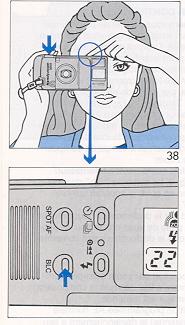
If the main subject has less light falling on it than the surrounding area and background, under exposure of the main subject may result. The Back Light Control compensates for this light imbalance and enables the subject to be properly exposed.
(1 ) Press and hold the BLC button on top of the camera and release the shutter gently to take the photograph. Exposure of the main subject will be automatically corrected (Fig. 38).
(2) To cancel the BLC, lift your finger from the BLC button (Fig. 39). NOTE:
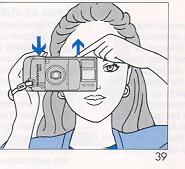
· Be sure to press the BLC button firmly to insure that the exposure correction will be activated. For exposure correction on a subject relatively close to the camera, use of the fill-in flash mode is recommended rather than using the BLC exposure correction.
STRAP & CASE (OPTIONAL)
CARE OF THE CAMERA
The Chinon Handyzoom is a precision instrument. When used with care it will provide years of troublefree service. Protect your camera from dirt, rain, dampness and excessive heat. Avoid touching the lens. To clean the lens, wipe it gently with a soft lintless cloth or tissue. Do not use eyeglass tissues as they might damage the lens coating. Do not open and touch the inside of the camera as possible high voltage in the flash circuitry can be dangerous.
 M. Butkus, N.J.