and historical purposes, all rights reserved.
This page is copyright© by
 , M. Butkus, N.J.
This page may not be sold or distributed without
the expressed permission of the producer
I have no connection with any camera company.
If you find this manual useful,
how about a donation of
$3 to:
M. Butkus, 29 Lake Ave.,
High Bridge, NJ 08829-1701
and send your e-mail
address
so I can thank you.
Most other places would charge
you $7.50 for
a electronic copy
or $18.00 for a hard to read Xerox copy.
buy new manuals, and pay their shipping costs.
It'll make you feel better, won't it ?
If you use Pay Pal, use the link below.
Use the above address for a check, M.O. or cash.
Back to main Camera Manual Site
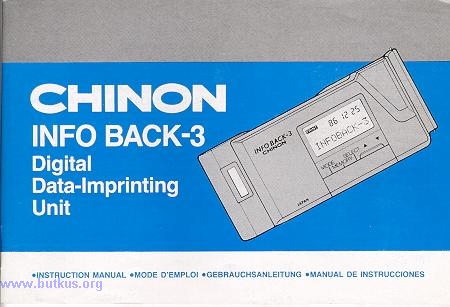
Click here to Chinon Data Back 3
PDF version - better printing
|
TABLE OF CONTENTS NOMENCLATURE SPECIFICATIONS INSTALLING THE BATTERIES
ATTACHING TO THE CAMERA FILM SPEED SETTING DATA IMPRINT POSITION IN THE PICTURE SETTING THE DATE AND TIME |
Changing the order of year/month/day INPUTTING AND CORRECTING DATA DELETING DATA DATA IMPRINTING INTERVAL TIMER SETTING INTERVAL PHOTOGRAPHY |
|
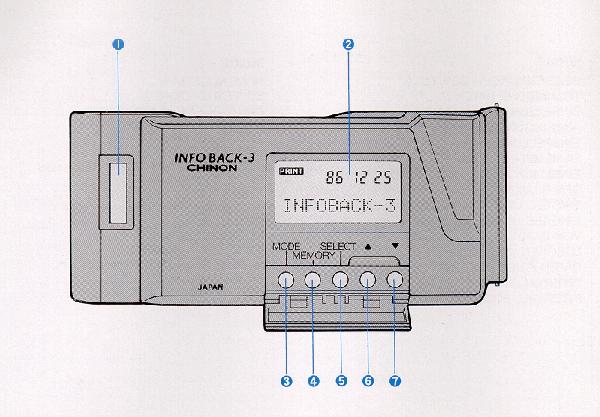
NOMENCLATURE: 1. Film type window 2. LCD window 3. MODE key |
4. MEMORY key 5. SELECT key 6. UP key 7. DOWN key |
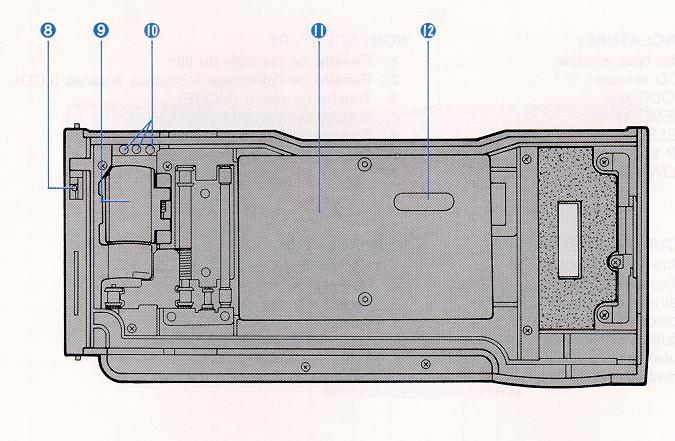
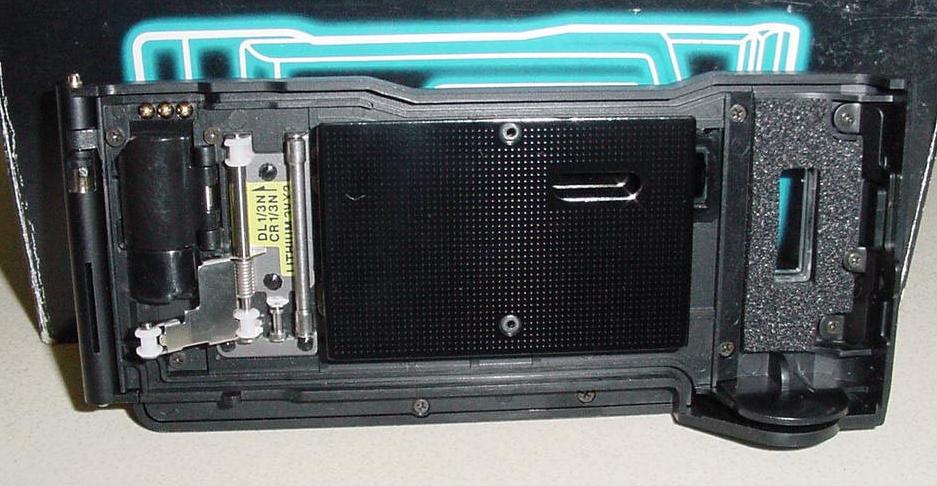
8 Camera back hinge release
9. Battery cover
10. Signal contacts
11. Film pressure plate
12. Imprint slot
SPECIFICATIONS:
TYPE: Digital data imprinting unit with LCD (Liquid Crystal display) for CHINON CP-7m SLR cameras, interchangeable with CP-7m back cover. DATA IMPRINTING: Data will be imprinted simultaneously with the shutter release of the CP-7m. Data is imprinted from the back side of the camera.
FILM SPEED SETTING: Film speed is automatically adjusted according to the ISO setting in the CP-7m body. Two-step switch over at ISO 100 - 320 and ISO 400-1600.
NUMBER OF IMPRINTING CHARACTERS: Up to 10
alpha/numeric characters
including (Heart), & : < + - * /
' . ! ?
IMPRINTING MODES:
1. date and data
2. time and data
3. data
4. date and time
5. no data
6. interval operation control
FIVE FUNCTION KEYS: MODE, MEMORY, SELECT,
UP and DOWN keys.
LCD DISPLAY PANEL: Built-in for data readout.
INTERVAL TIMER MODES:
1. Shutter release for a specific date and time can be set.
2. Shutter release for interval time sequences can be set from 1 second up to 99 hours 59 minutes 59 seconds.
3. Shutter opening in Bulb time mode can be set from 1 second up to 99 hours 59 minutes 59 seconds.
4. Sequence settings can be set for up to 99 exposures.
DATA MEMORY: Can memorize 5 different
data with up to 10 characters with each MEMO.
BATTERY CHECK: Weak batteries will be indicated via flashing LCD readout.
CHECK TIME ERROR: Within +30 seconds monthly.
POWER SOURCE: 2 pcs lithium batteries (CR-1/3N).
BATTERY LIFE: Approximately three years.
SIZE: 134.3(W) x 58.9(H) x 14.6(D) mm (5.29" x 2.32 x 0.57")
WEIGHT: 83 9 (2.9 oz) without battery.
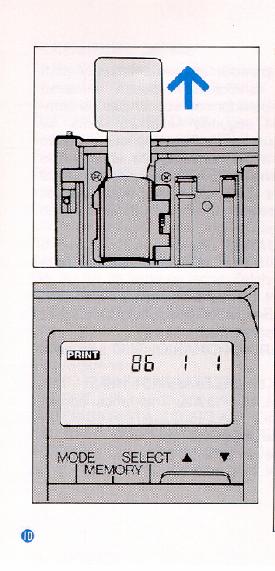 |
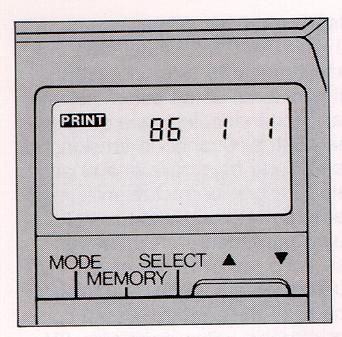
INSTALLING THE BATTERIES 2. "86-1-1" will appear in the LCD window. |
 |
NOTE:
2. When the LCD panel blinks continuously, the batteries should be replaced immediately as they are too weak to operate the INFO BACK-3 properly. |
 |
Replacement of batteries
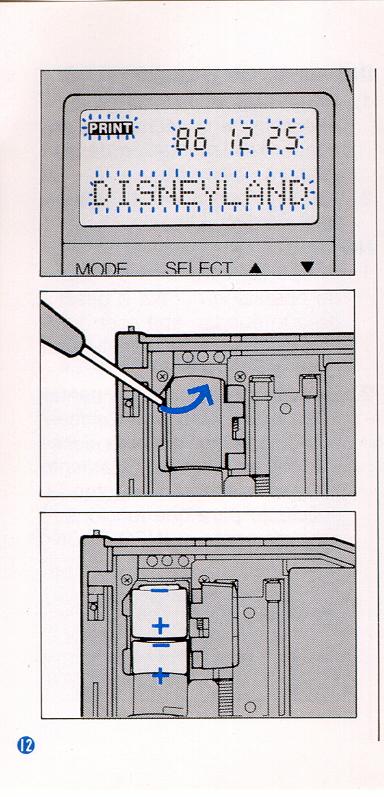
The INFO BACK-3 automatically checks the power voltage when the batteries are installed and whenever imprinting data. When the voltage is too low to operate the unit, all LCD panel indications will blink, Replace the batteries with a fresh set at once (use two of the same kind of batteries such as 3V CR-1/3N, 3V DL-1/3N or 3V 2L76 lithium battery). Installing the batteries
|
NOTE:
Brought back to the normal temperatures, proper performance will resume.
2. Use of the unit at temperatures between -10°C and +50°C (14°F
and 122°F) is recommended for
normal operation of the liquid crystal.
 |
ATTACHING
TO THE CAMERA
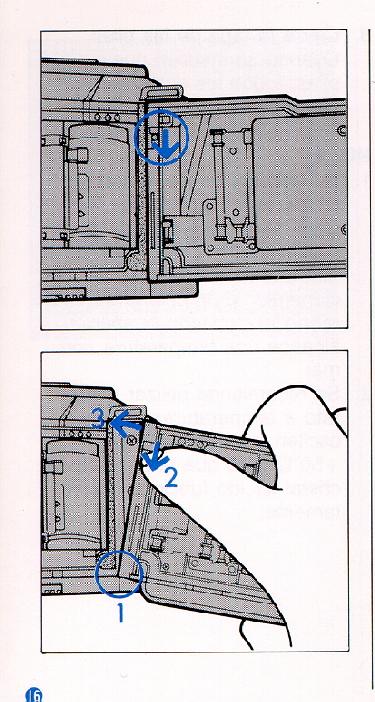
2. To mount the INFO BACK-3 insert its lower shaft into the lower hinge.
Then depress the retaining pin,
|
 |
FILM SPEED
SETTING
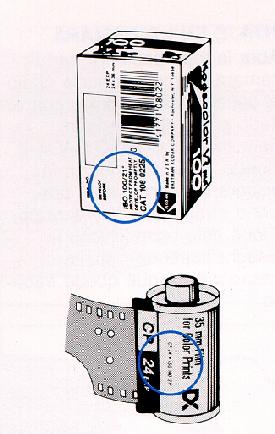
the appropriate imprinting brightness is adjusted automatically as well. 2. When using non-DX film faster than ISO 400, it is suggested that only the "no data" mode be utilized. |
2. When using film with other than ISO 100-1600, the imprinted data
may be faint or blurry.
It is also suggested to use the "no data" mode.
DATA
IMPRINT POSITION IN THE PICTURE
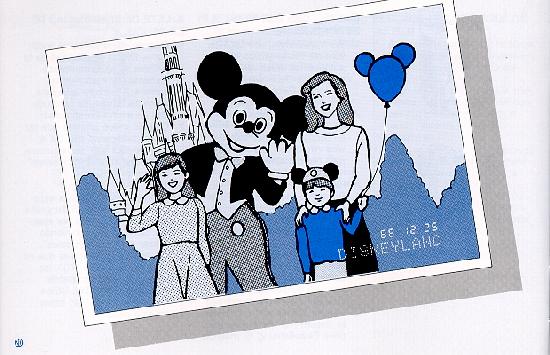 |
The data will be imprinted in the picture as illustrated. |
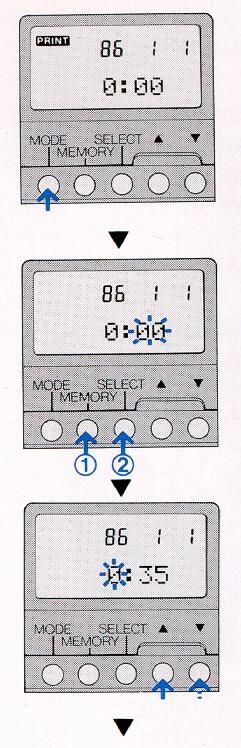 |
SETTING THE DATE AND TIME 1. Press the MODE key to select the imprinting mode of date and time. 3. By pressing the SELECT key, the correctable number changes from "minute"
to "hour",
When the 'minute' is set, it starts counting from 00 seconds of the selected minute. |
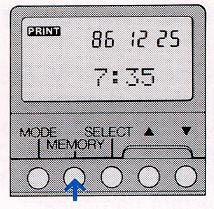 |
5. By pressing the MEMORY key, blinking will stop and PRINT will be indicated.
The INFO BACK-3 is now ready to imprint date and time data. |
 |
Changing
the order of year/month/day
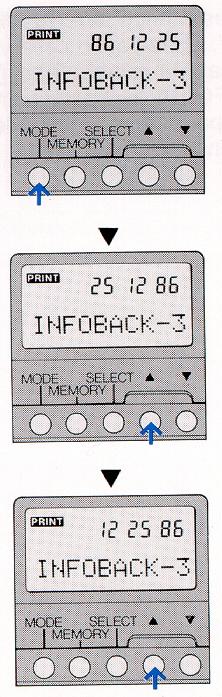
2. Press the (up arrow) key for two seconds. Positioning of the year/month/day
will change
|
 |
NOTE: Changing the order is not possible when in the date-and-time mode.
Changing to and from the 12 and 24 hour timing modes
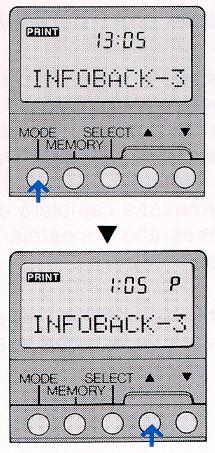
2. Press the ~ key for two seconds. Time will be indicated b, the 12
hour system. |
 |
NOTE:
This operation is not possible when in the date-and-time mode.
INPUTTING AND CORRECTING DATA If data is already stored, it will appear on the LCD panel. If no data is in memory, no read out will appear. 2. Five data memories of up to 10 characters including space can be
input into memory.
3. Press the MEMORY key and "_" will blink, indicating data can be put
where the "_" blinks.
|
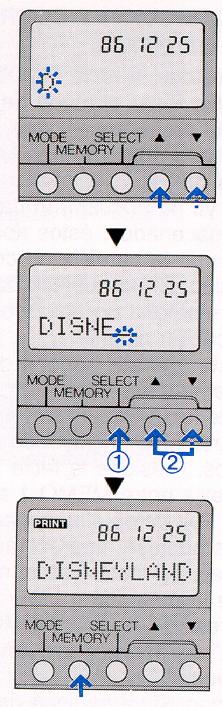 |
4. Press the (up arrow) or (down arrow) key to select the desired
character.
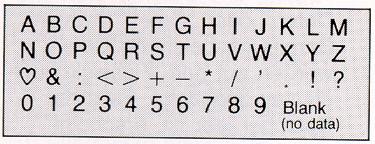
You can choose from A to Z. (heart) to ?, 0-9 and vice versa. Characters available for input (in order):
A B C D E F G H l J K L M N O P Q R S T U V W X Y Z
5. Press the SELECT key, the data input indication "_" (blinking) will
move forward by one space
|
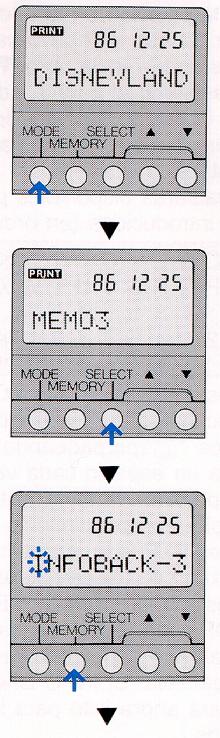 |
6. Repeat procedure #5 above. Up to 10 characters can be input. 7. By pressing the MEMORY key, the blinking will stop and "I" will be
displayed.
The INFO BACK-3 is now ready to imprint data. |
DELETING DATA
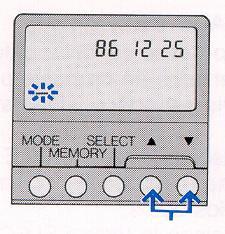 |
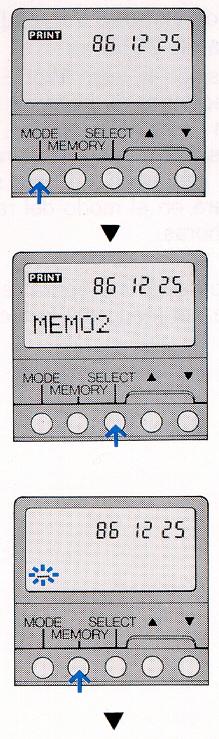
When you want to delete the data stored in the specific MEMO number, follow these steps: |
 |
2. Press the SELECT key to choose the specific MEMO number that you
wish to delete.
3. Press the MEMORY key. 4. Then press both (up arrow) and (down arrow) keys at the same time to delete the data. |
DATA IMPRINTING
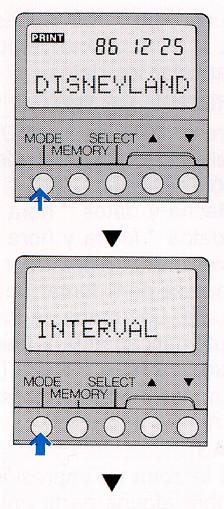 |
1. Press the MODE key to select the desired imprinting mode. " date and data" - " time and data" - "data and date" and "time - no data" 2. Depress the camera's shutter release button to take a photograph.
3. If you do not intend to imprint any data on the film, press the MODE key to display "no data". |
INTERVAL TIMER SETTING
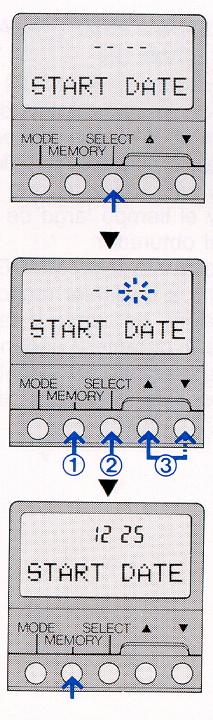 |
When using the interval timer mode, the starting date, starting
time, interval time, the number of pictures to be taken and long release
time can be set.
2. Press again the MODE key for 2 seconds or more to display "INTERVAL". Setting the Start Date 3. Press the SELECT key to display "START DATE". 4. Press the MEMORY key and the number input area will blink.
5. Press the MEMORY key again. The blinking will stop and the starting date will be in the memory. NOTE: This operation is limited to the life of the camera's battery system. The starting date must be set within a month's duration when using a fresh set of either "M" batteries or a 2CR5 type lithium battery in the camera body.
|
Setting
the Start Time
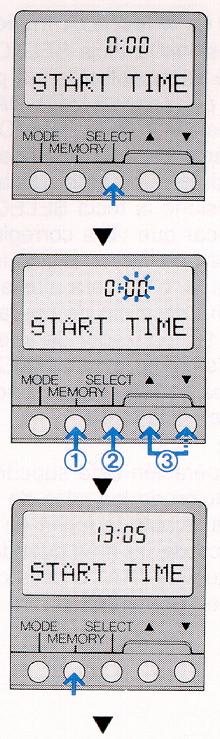 |
6. Press the SELECT key to display "START TIME".
7. Press the MEMORY key and then press the SELECT key to select the
hour and minute.
8. Press the MEMORY key to place the starting time into the memory. |
Setting the Interval Time
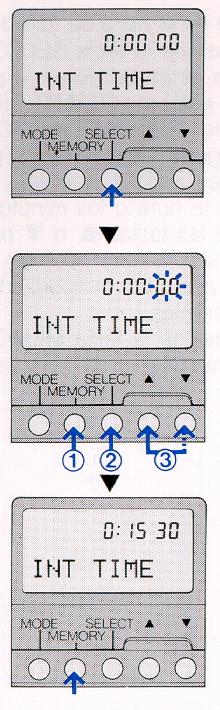 |
10. Press the MEMORY key and then press the SELECT key to select the correct hour, minute or second between exposure. Press the (up arrow) or (down arrow) key to select the desired interval time. 11. Press the MEMORY key to place the selected interval time into the memory. to 99 hours 59 minutes 59 seconds between exposures. |
Setting the Interval Count (number of exposed frames)
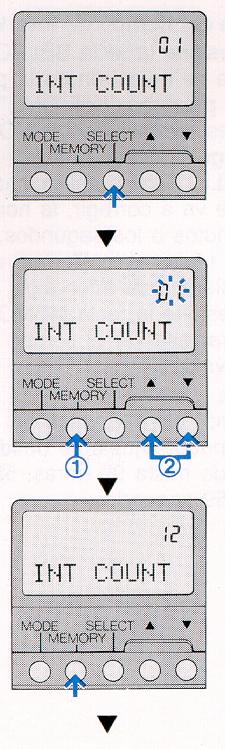 |
13. Press the MEMORY key and then press the SELECT key. And operate
the (up arrow) or (down arrow)
14. Press the MEMORY key to place the frame count into memory. |
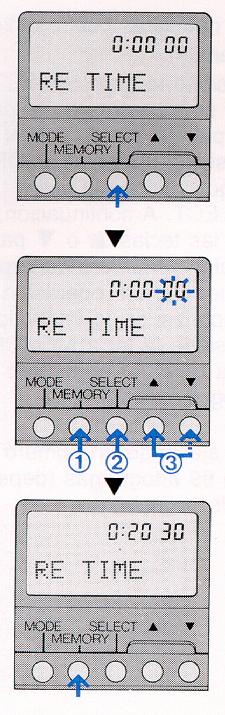 |
Set the camera's exposure mode to the "B" (bulb) position. 16. Press the MEMORY key and then press the SELECT key to set the desired
shutter
17. Press the MEMORY key to place the exposure time into memory.
3. When using the interval time operation in camera modes other than
"B" (bulb)
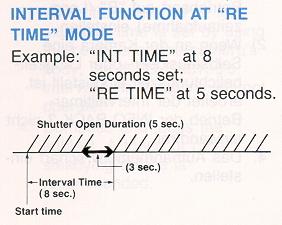
4. The exposure time in "RE TIME" mode must be shorter in duration than
the interval time
|
Setting the Release Time (long exposure mode)
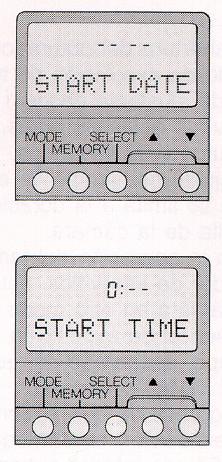 |
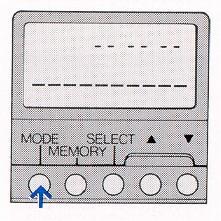
Immediate Starting of the Interval Timer When the interval time mode is to start without delay, set the Start Date and Start Time as follows: 1. Set the Start Date to "- - - -" Or set either position of month or day to "-". 2. Set the Start Time to "0: - -". |
INTERVAL PHOTOGRAPHY
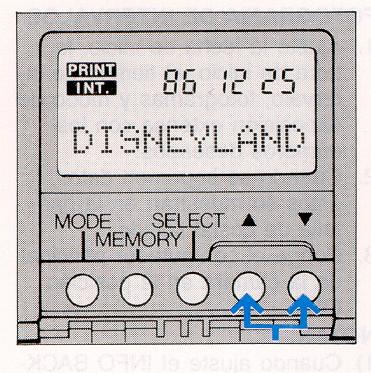 |
2. When imprinted data is desired, the data must be displayed on the LCD panel. 3. Set the camera's main switch to ON.
|
mode to the "B" (bulb) position.
2) When the self-timer or long exposure time is set by using the controls
on the camera's body,
the INFO BACK-3's interval time functions will not
operate.
4. Compose and focus the subject. A tripod or other steadying device is recommended.
operation INT will be displayed.
When data is imprinted, PRINT will blink on the LCD panel for 2 seconds.
NOTE:
2) Do not set "RE TIME" in modes other than the Bulb mode.
3) Do not set "RE TIME" (long exposure time) longer than the "INT TIME" (interval time).
2. Do not use cleaning solution such as lacquer, thinner or MEK, it will dissolve plastic components.
3. To clean the unit, use a soft cloth without any solution.
4. Rough handling may result in damage to the unit.
2. At low temperatures (0°C or below), performance of the LCD may decline.
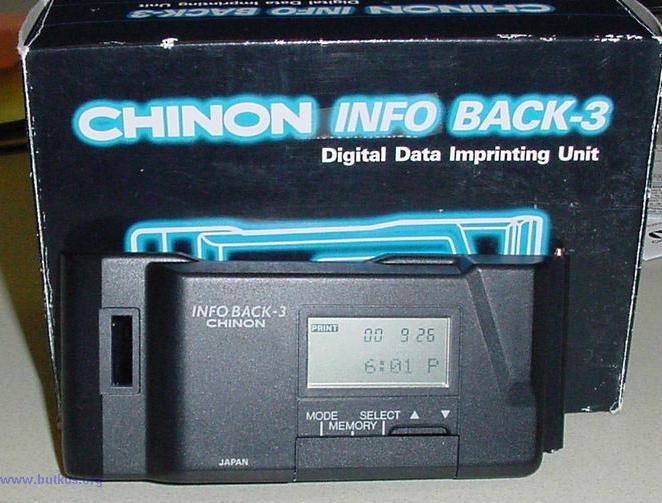
Box and actual front display
Business side of Infoback - 3