Click here for PDF version - better printing
This camera manual library is for reference and historical purposes, all
rights reserved.
This page is copyright © by
, M. Butkus, NJ.
This page may not be sold or distributed without the expressed
permission of the producer
I have no connection with any camera company
On-line camera manual library
This is the full text and images from the manual. This
may take 3 full minutes for all images to appear.
If they do not all appear. Try clicking the
browser "refresh" or "reload button" or right click on the
image, choose "view image" then go back. It should now appear.
To print, try printing only 3 or 4 pages at a time.
If you find this manual useful, how about a donation of $3 to: M. Butkus,
29 Lake Ave., High Bridge, NJ 08829-1701
and send your e-mail address so I can
thank you. Most other places would charge you $7.50 for a electronic copy
or $18.00 for
a hard to read Xerox copy.
This will allow me to continue to buy
new manuals and pay their shipping costs. It'll make you feel better,
won't it?
If you use Pay Pal, use the link below. Use the above address for a check, M.O. or cash.

To Second Section of Contax RTS Manual
The CONTAX RTS is a, highly advanced electronic SIR system camera developed by mutual cooperation of Carl Zeiss, West Germany, and Yashica, Japan. It offers the advantage of the most sophisticated fully automatic through-the-lens exposure control. Designed under the theme of "Real Time" * functional 1 response and disposition of information, it provides such capability in al I fields of photography as could not possibility be expected of other 35mm SLR models.' The New Bayonet Mount also a product of mutual cooperation between Carl Zeiss and Yashica - affords perfect coordination of the optical, mechanical and electronic systems. The exclusive 'Real Time' features are:
1. 'Real Time' LED Shutter Speed Display
By pressing the LED display button before or after film wind, the LED (light emitting diode) in the viewfinder will
come on instantly to display the calibrated or in-between shutter speed ensuring correct exposure in relation with the preselected aperture.
![]() |
2. 'Real Time' Magnetic Release Because this magnetic release trips the shutter through feather-touch fingertip action, camera shake at the critical moment of exposure is effectively prevented. Since, moreover, |
3. "Real Time' 1/2000 sec. Maximum Shutter Speed4.butkus.org
Because your CONTAX RTS features an electronic focal plane shutter with a unique design under which the primary
and secondary curtains uncap to provide starting from the same position, precise shutter speeds can be obtained up to the maximum of 1/2000 sec.
4. 'Real Time' Oft-Hand Controls
Because the magnetic release functions strictly on electrical principle, various types of electrically operated off-hand
controls can be used directly by merely plugging into the camera's release socket. The off-hand controls currently
available include the Infrared Controller Set and Interval Timer.
5. 'Real Time' Motor Drive System
The magnetic release does greatly more than just tripping the shutter. In the final stage of its function, it switches on
the motor drive switch to provide -precise synchronization with the motor drive unit.
Of the two types of motor drive units, the Real Time Winder is a compact unit which can be regarded as standard equipment of your CONTAX
RTS.
6. 'Real Time' T* (T-Star) Carl Zeiss Lenses
-The high performance and extra-high speed design of the Carl Zeiss lenses, featuring the T* (T-Star) multi-layer anti-reflection coating which minimizes harmful glass-to-air reflections and assures 'Real Time color reproduction and
contrast permit the photographer to select comparatively high shutter speed even in subdued
light situations, thus offering new possibilities in 'Real Time'
photography.
| The CONTAX RTS is designed to deliver superb photographic results when mounted with any one of the Carl Zeiss or YASHICA lenses with Contax/Yashica mount. The manufacturer will not be held responsible for pictures of substandard quality when the same camera is used in combination with lenses other than those specified above. |
* 'Real Time' is a computer terminology denoting absence of physical time-lag in disposition of information.
TECHNICAL DATA
Lens Mount: Contax/yashica Mount (three-claw bayonet mount) developed by mutual cooperation of Carl Zeiss, West Germany, and Yashica, Japan.
Lena: PLANER T** f/ 1.4 50mm standard lens composed of 7 elements in 6 groups, interchangeable with a wide range of high performance Carl Zeiss lenses.
Shutter: Electronic focal plane shutter of a unique design (primary and secondary shutter curtains uncap to provide starting from the identical position) * Electronic timing on both Auto and Manual * Shutter speeds continuously variable from LT (4 sec.) to 1/2000 sec. on Auto; 14 click stop settings from 4 to 1/2000 sec. and B on Manual * x sync terminal
Shutter Release: Feather-touch magnetic release *Release socket for cable switch and off-hand controls
Exposure Control: Through-the-lens automatic exposure control with SPD sensor above the viewfinder eyepiece taking center-weighted light reading * Fully automatic exposure through lens aperture preselection (exposure readout on manual operation) * LED shutter speed display in view finder * EV range from EV -1 to 19 (F1.4 at ASA 100) * ASA range from 12 to 3200 * Provision for exposure compensation (scale calibrated from x4 to X, 1/4 in between settings feasible) * Operates on 6V silver oxide or alkaline battery (Eveready 544, Ucar 544, Mallory PX28, Alkaline Eveready 537 or equivalent)
Viewfinder Through-the-lens reflex viewfinder shows up to 92% of the actual picture area * Magnification ratio: 0.87X *
Pentaprism: silver coated and deflection mirror multi-layer coated to ensure maximum brightness of the viewfinder field.
Focusing : screen interchangeable from the lens mount side
Viewfinder Display: 16-dot LED shutter speed display shows calibrated and in-between speeds * Green shutter speed pointer overlaps 'A' setting on Auto and indicates shutter control dial setting on manual *Aperture display shows maximum aperture of the lens in use on the extreme right and f-stop in use in green figure * Exposure compensation tab appears when the exposure compensation pointer is set at any position other than 'X1'
Film Advance: Film advance lever advances film through a single 140 degree stroke or several short ratchet action * Exposure counter resets automatically to start position when the back cover is opened
Film Rewind: Film rewind crank-handle with unique clutch action * White line on top of the knob rotates to indicate proper film advance
Camera Back: Back cover Other Features: Multiple exposure through depression of the film rewind release button. * Mirror
lock lever * LED battery checker display * Depth-of-field preview button *
Direct X contact shoe
with anti-shock provision * Motor drive coupling terminal and film advance coupler4.butkus.org
Size & Weight: 142 x 89.5 x 50mm; approx. 700 grams (body only)
2. Install the battery. 4. Advance the film. 6. Reset the shutter control dial to 'AUTO' setting.
8. Preselect the lens aperture.
9. Compose and secure focus. 11. Hold the camera steady and press the magnetic release. BASIC PROCEDURES OF OPERATION The CONTAX RTS is designed to offer utmost ease and versatility of operation in all fields of photography. As long as the shutter control dial is kept at the 'AUTO' setting, fully automatic exposure is assured under all light conditions,
merely through pre-selection of the lens aperture.
Read the following pages carefully and acquaint yourself with the basic procedure of operation before attempting to take your
first series of photographs.4.butkus.org
MOUNTING AND INTERCHANGING THE LENS To prevent hitches in focusing and exposure control, always make sure the lens is locked properly in its mount.
Lens Interchanging Before removing, make it a rule to place the lens cap over the lens to prevent inadvertent scratching or smearing of the lens
surface. After removing the lens from its mount, cover the rear end with the lens rear cap.
· Avoid direct sunlight when interchanging lenses, particularly in case the camera is loaded with film.
· Set the body cap in the lens mount in case the camera is to be left without it's lens.
The shutter system and the exposure control of your CONTAX RTS will not function unless the battery is properly installed.
2. Install the battery with its minus (-) end facing inside, and close the battery compartment cover.
To check the battery power, press the battery checker button. If the LED battery checker display comes on, sufficient power is
indicated. In the event if fails to come on, replace the battery.
· When the battery power drains to a low level, the LED battery checker display may come on momentarily when the battery
checker button is depressed. In such a case, replace the battery.4.butkus.org
1. After sliding up the rubber eye-cup, open the back cover by pulling out the film rewind knob. As soon as the back cover is
opened, the exposure counter will reset to 'S' (start position).
2. Place the film cassette in the film cassette chamber and push the film rewind knob back to its original position.
· Use a standard 35mm cassette film of 12, 20 or 36 exposure load.
3. Clip the film tip on the take-up spool as illustrated.
· Avoid inserting the film tip farther than is necessary.
6. Press the magnetic release and advance the film, alternately, until the exposure counter registers the figured'
If the white line on the film rewind knob rotates when the film advance lever is manipulated, it means the film is advancing properly.
CAUTION
Avoid keeping the LED display pushbutton depressed when advancing the film. Particularly in case the Real Time Winder is in
use, make it a rule to keep your finger off the LED display pushbutton when making exposure.
To set the film speed, lift and turn the collar around the film speed dial and align the index with the figure corresponding to the ASA or DIN rating
of the film in use.
· Always see to it that the index is set properly in the click stop position. If set improperly, the accuracy of the exposure control will be affected.
ASA/DIN Film Speed Rating
Manipulation of the film advance I ever to advance the film automatically registers count of exposure on the exposure counter.
· The magnetic release will fail to function if the film wind is incomplete. In case it fails to operate, manipulate the film advance I ever
once again to complete the film wind.
How to check the film advance. If, in the course of film winding, the white line on the film rewind knob rotates accordingly, it is an indication that the film is advancing properly.
To Second Section
of Contax RTS Manual
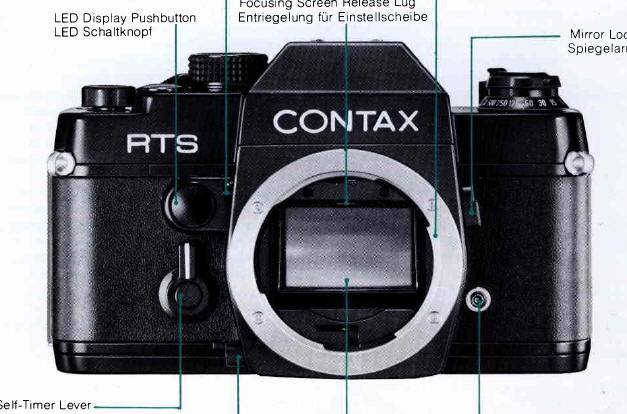
Description - Front
Description - Top
Description - Back
Description - Bottom

1. Mount the lens. Set the lens properly in the mount by matching the red index dot on the lens
barrel with that on the camera body, and give it a right turn until it click
stops into place.
Always use a 6V silver oxide or alkaline battery. Install the battery in the compartment with its minus (-) end in first.
3. Open the back cover and load the film.
Before film loading, turn the shutter control dial off the 'AUTO' setting. Close the back cover after
ascertaining that the sprocket teeth properly catch the perforations along both edges of the film.
By manipulating the film advance lever, advance the film until the exposure counter registers the
figure '1'.
The film can be advanced by one frame through manipulation of the film advance lever in either
one sweeping stroke or several small strokes.


5. Set the film speed dial.
After loading the film properly, lift the collar around the film speed dial and align the index with the figure corresponding to the
speed rating of the film in use.
Turn the shutter control dial and align the 'AUTO' setting with the index on the camera top. When thus adjusted, the green shutter
speed pointer overlaps the 'A' setting of the shutter speed scale in the viewfinder.
7. Align the exposure compensation pointer with 'X1'
Turn the film speed dial and align the pointer with the 'X1' setting. Other settings are for exposure compensation in special
Turn the aperture ring of the lens and preselect the appropriate f-stop. The lens aperture can also be set by rotating the aperture
ring while observing the aperture display in the viewfinder.
While sighting through the viewfinder, turn the


10. Check exposure.
While sighting through the viewfinder, press the LED display pushbutton and check the shutter speed set
automatically in relation with the preselected lens aperture.
When shooting, use the Rubber Eye-Cup to ward off stray
backlight.

After removing the body cap and the lens rear cap, set the lens properly in the mount by matching the red dot on the lens barrel
with that on the camera body. Then, give the lens a right turn until it click stops into place.
To remove the lens from its mount, twist it to the left while keeping the lens release button depressed.


CAUTION
Always use a 6V silver oxide or alkaline battery (Eveready 544, Ucar 544, Mallory PX28, Alkaline Eveready 537 or equivalent).
1. Open the battery compartment cover by turning it with the edge of a coin.
When the battery power declines below the required voltage level, the shutter will fail to operate. Therefore, make it a rule to
check the battery power (1 ) occasionally before shooting and (2) after replacing the battery.

FILM LOADING

Avoid direct sunlight when loading the film.

4. After making sure that the shutter control dial is set at a position other than the 'AUTO' setting, advance the film until the
sprocket teeth properly catch the perforations along both edges of the film. Then, close and press the back cover until it
locks into place.
5. Fold out the film rewind crank-handle and turn it in the direction of the arrow to take up the film slack.

* When folded,

SETTING FILM SPEED
After the film has been loaded properly, set the film speed dial according to the speed rating of the film in use.
The ASA or DIN film speed rating specified on the outer box or in the instruction sheet which comes with the film indicates the degree of light
sensitivity of the film emulsion.

The film can be advanced by one frame by giving the film advance lever one sweeping stroke or several short strokes. In either case, make sure
that the lever is manipulated until it fails to move any further.