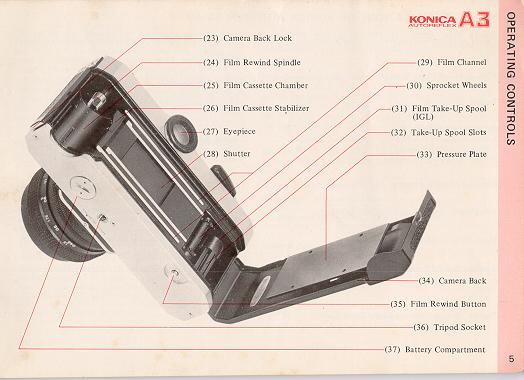
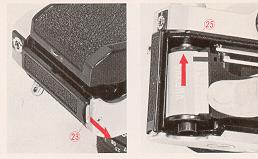
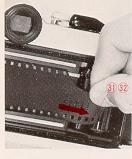
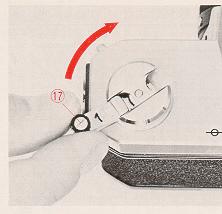
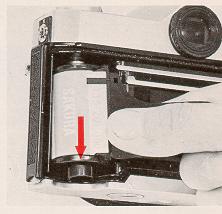
3. Pull out enough film to reach the Take-Up Spool (31). Insert
film end into any slot (32) in the spool. The film will be gripped instantly
as you .
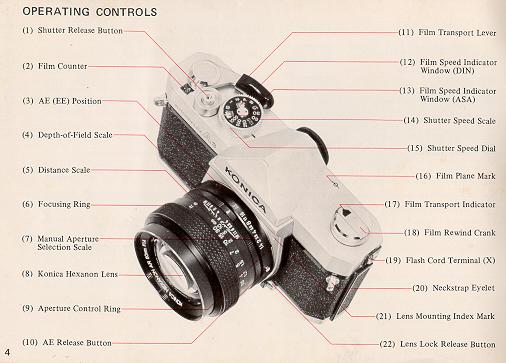
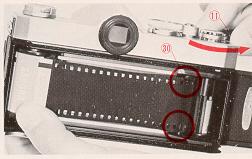
4. Advance the Film Transport Lever (11) one full stroke. Make sure that the
sprocket holes in the film engage the Sprocket Wheel (30) in your camera.
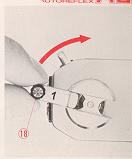
5. Close the camera back. Gently, turn the Film Rewind Crank (18) until
resistance is felt (this takes up the slack of the film within the
cassettes
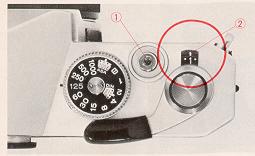
6. Press the Shutter Release Button (1) and operate the transport lever
until the Number I appears in the center of the Film Counter (2).
To Check Film Advance
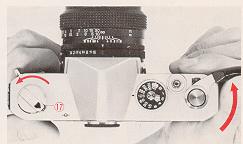
It's easy to make sure your camera is loaded correctly. While operating the
transport lever, watch the Film Transport Indicator (17) to see if it
rotates. If it does, you know that film is going through properly; if it
doesn't it's not.
SHUTTER SPEEDS AND LENS APERTURE
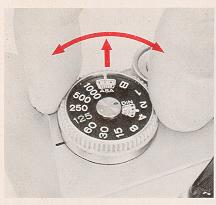
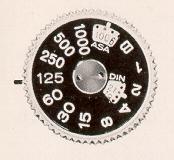
Your Konica Autoreflex-A3 has a metal Copal Square-S focal plane shutter,
with the control dial conveniently located on top of the camera. This unique
shutter is noted for exceptional accuracy even under extremes of temperature
and climate, and is virtually impervious to damage or deterioration in
normal use.
 |
 |
This shutter, because of its exceptionally fast (7.5 milliseconds)
traverse time, permits use of electronic flash at all speeds to and
including l/125th second (this speed is marked in red on the shutter speed
dial). Flashbulbs or flash cubes are synchronized up to l/30th second.
At "B", the shutter remains open as long as the Release Button (I ) is
depressed. (For details on taking Time exposures, see page 30.)
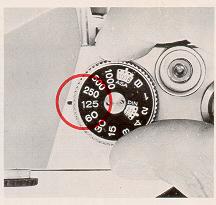
Speeds may be changed at any time, whether or not the shutter is wound. If
your camera will be out of operation for several months, it's desirable to
release me shutter to minimize tension. For anything less than several
months, however this Oration is not necessary.
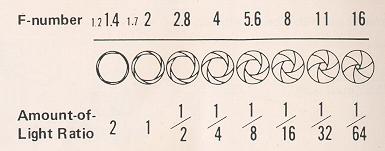
Like your eye, your camera lens has an iris, generally called me
diaphragm. Open it up, and it admits more light; close it down, it
admits less. The amount of light is indicated by f/stops (also
known as "apertures"): f/2.8 admits half as much light as f/2; f/4 admits
one-quarter as much as f/2, and so on.
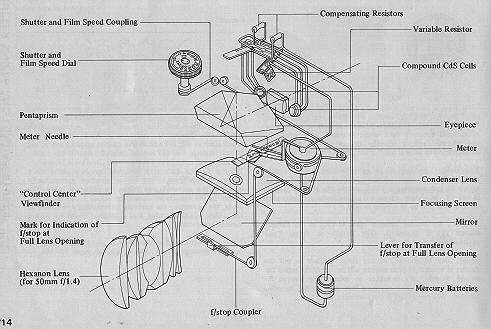
When a Konica Automatic Hexanon lens is mounted on a Konica Autoreflex-A3,
the iris or aperture automatically closes to the correct f/stop
before the picture is taken. The needle in the viewfinder shows the actual
f/stop being set. After the exposure, the aperture automatically re-opens to
me widest position, giving you a brilliant image for easiest viewing and
focusing.
Uncoupled lenses and accessories may also be used with your camera's
metering system. (For details, see pages 15-16).
Automatic Operation:
With a Konica Automatic Hexanonlens on your Konica Autoreflex-A3, just check
the indicator needle in the viewfinder, which shows the exact aperture the
camera is selecting...and shoot! The automatic aperture mechanism sets this
lens opening for you at the moment of exposure-and you can concentrate
on your subject, instead of your camera. This is the decisive advantage
of the Konica Autoreflex system.
Semi-Automatic Operation:
Yet, this amazingly precise instrument actually allows more actual control
of aperture and shutter than most non-automatic cameras, because shutter and
aperture are cross coupled, with easily-seen in-finder readouts to tell you
exactly what your camera's doing at all times. Thus, if you wish to use a
specific lens aperture for maximum (or minimum) depth-of-field, just change
the shutter speed until the aperture you want is indicated by the needle.
With the Konica Autoreflex-A3, you see the exact lens aperture being used at
all times! (Semi-Automatic operation is also possible with uncoupled lenses
and accessories; see page 21.)
Manual Operation:
manual operation is possible at any time, with any ten or accessory:
just move your Hexanon AR lens off the AS (EE) position, dial the desired
aperture, choose your shutter speed and shoot. (The meter indicator
continues functioning for information purposes only.)
"CONTROL CENTER" VIEWFINDER
As long as the Meter Needle (41) is in the white area between the upper (40)
and lower (43) red bands, shoot...your picture will be perfectly exposed!
The upper red band (40) also shows you the maximum aperture of the lens in
use; in the illustration on the opposite page, an f/1.7 lens is on the
camera, so the band rests between f/1.4 and f/2. When you mount a faster or
slower lens on the camera, this band will more up or down to show the new
maximum aperture (and, simultaneously, the new underexposure zone.)
"Your Konica's sensitive through-the-lens meter automatically determines
correct exposure over an exceptionally wide range of lighting
conditions...with ASA100 film, from a subject so dimly-lit it requires an
exposure of 1/2 second at f/1.7 to a scene almost 50,000 times brighter
- so bright it requires an exposure of l/l000th second at f/16! Within
this basic "range" of meter sensitivity, the red band (40) in the viewfinder
remains at a position corresponding to the maximum aperture of your lens
(f/1.7 in the illustration).
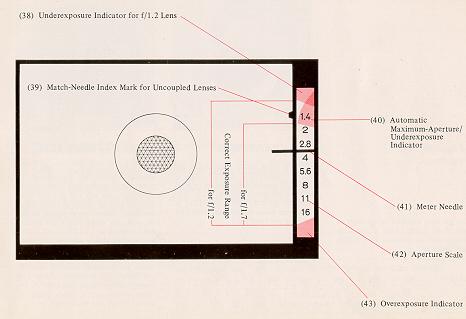
Under certain conditions, the red band (40) will drop below the
maximum-aperture position. For example, with an f/1.7 lens and ASA 100 film,
selecting a shutter speed of one second will cause the red band to drop down
to a position between f/2 and f/2.8. Here, your camera is preventing
incorrect exposure by actually showing you that, with this
film/lens/shutter-speed combination, f/2.4 is the widest lens opening at
which your camera will automatically operate. As always, your photograph
will be perfectly exposed, so long as the Meter Indicator Needle (41) does
not go into the red-band. Thus, with your Konica Autoreflex-A3 you need
never worry about whether or not you're operating within your meter's
"coupling range" - You are, and will obtain a perfectly-exposed
photograph automatically, so long as the meter needle is out of the
red!
Konica's Control-Center viewfinder also shows you:
1) Underexposure Indicator for f/1.2 Lens (38);
2) Complete Aperture Scale (42); and
3) Match-Needle Index Mark for stop-down metering with uncoupled lenses or
accessories (39).
USING AUTOMATIC EXPOSURE CONTROL (AEC)
Full Aperture AEC Operation:
The figures in brackets in the chart at under show actual values of the dots
between marked numbers on the film speed indicator.
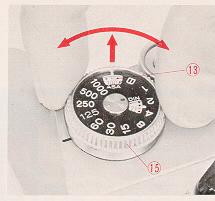
1. Set the Film Speed.
Lift the outer collar surrounding the Shutter Speed Dial (15) and turn it
until the correct ASA number appears in the Indicator Window (13). (The
window marked "DIN" allows use of European films, in the event their ASA
rating is not specified.)
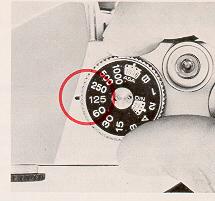
2. Select the Shutter Speed.
For most situations, 1/125th is an excellent choice; it's fast enough to
freeze most action and stop camera movement, and lets you shoot in
most situations with today's film types. Generally, slower shutter speeds
should be used only when there's not enough light to work at 1/125th; faster
speeds are required usually only for extremely fast-moving subjects (racing
cars, sports) or when shotting with telephoto lenses which naturally magnify
possible camera movement just as they magnify the subject. (See page 20 for
other situations in which faster or slower speeds may be desired)
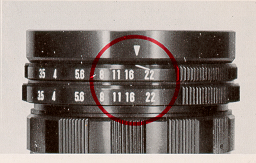
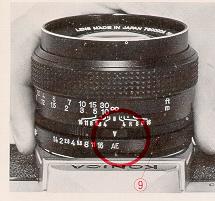
3. Check Aperture Ring.
Make certain the Aperture Control Ring (9) is at the AE (EE) position as
shown. If lens is not on AE(EE) position, your picture will be exposed at
the opening shown on the aperture ring. irrespective of the f/stop indicated
in the viewfinder.
4. Take the Picture!
Aim camera at subject, focus...and shoot. As long as the Meter Indicator
Needle (41) is out of the red under and over-exposure bands, you'll get a
perfectly exposed picture...automatically!
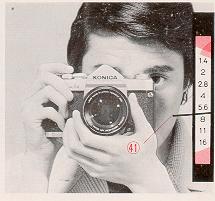
(Note: When using uncoupled lenses or accessories, follow the
instructions outlined on page 21.)
UNDER/OVER-EXPOSURE SAFEGUARDS
If the meter needle goes to the upper red band (shown above for the three
standedLenses), choose a slower shutter speed. If, at the slowest shutter
speed (1 second), the needle's still in the red zone, there's not
enough light to get a perfectlyexposed picture. (Naturally, when using
speeds of 1/30 second or slower, use a tripod or brace the camera on a firm
support if at all possible, and trip the shutter with a cable release.)
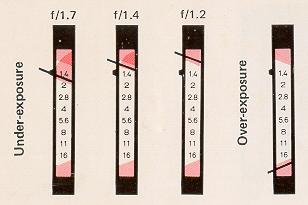
If the needle goes down to the lower red band (as shown in the fourth
example above), there's too much light; choose a faster shutter speed.
When the Automatic Exposure is Not Used ....
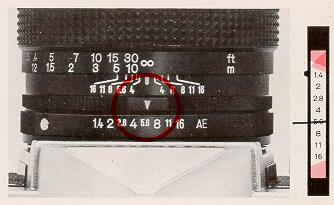
For manual operation, just dial the desired lens aperture on the
aperture ring (f/5.6 is shown above). The meter needle will continue to
indicate the recommended f/stop, but the camera will actually shoot
at the aperture you've set.
SEMI-AUTOMATIC OPERATION WITH UNCOUPLED LENSES/ACCESSORIES
Your Konica's through-the-lens metering system works perfectly even with
non-automatic lenses and accessories, which do not couple to the camera's
automatic exposure mechanism. (Example: Pre-set lenses, mirror lenses,
lenses from other cameras used with Konica adapters, even extension rings or
bellows.) Here's how to use your Autoreflex-A3 in these situations:
1 Set the Film Speed.
2. Select the Shutter Speed.
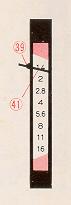
3. Align the Indicator Needle.
Open up (or close down) the lens aperture until the Meter Indicator Needle
(41) lines up with the Stop-down Metering Index Mark (39). (If preferred,
you can also do this by changing the shutter speed instead of the lens
aperture.)
4. Take the Picture!
Remember...this stop-down metering procedure is not needed (and in fact is
not possible) with Konica Automatic Hexanon lenses mounted on the camera
body. Stop-down metering is used only for uncoupled lenses or
accessories.
SEMI-AUTOMATIC OPERATION WITH UNCOUPLED LENSES/ACCESSORIES:
REMINDERS
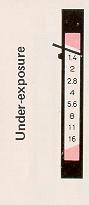
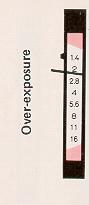
When using the stop-down metering system with uncoupled lenses or
accessories, keep in mind that the f/stopscale in the viewfinder no longer
applies; neither do the under or over-exposure warning bands. If the
needle's above the Index Mark (39) as shown (above, left) there's not enough
light; ff it's below this mark (above, right)there's too much light.
Solution: change lens aperture and/or shutter speed until the needle lines
up with the Index Mark.
In full-aperture metering with Konica Automatic Hexanon
stray light which may enter the eyepiece and reach the meter cells hay
virtually no effect on exposures. In stop-down metering with uncoupled
lenses or accessories, however, such light can have the effect of
incorrectly influencing the meter's reading. Whenever you're using the
stop-down metering system, be sure to place your eye as close as possible to
the eyepiece, to prevent stray light from entering. (A Konica Rubber Eyecup,
available from your dealer, helps here.)
Using Preset Lenses....
Lenses of this type do not automatically close down to the desired aperture;
you turn the aperture control ring by hand to select the desired f/stop.
Still, you can speed up operation considerably by setting both control rings
of these lenses to the smallest f/stop (f/22 in the example shown
above), then turning them together until the meter needle lines up with the
Index Mark in the viewfinder. As soon as it lines up, you're ready to shoot
. . .
HINTS FOR UNUSUAL EXPOSURE SITUATIONS
The through-the-lens metering system of your Konica Autoreflex-A3
provides consistently accurate exposures under an amazing variety of
lighting conditions. In some instances, however, it may be desirable to
compensate for unusual
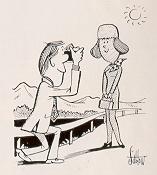 |
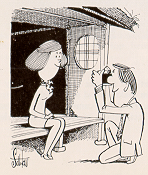
Backlit Subjects:
See how the sun is shining towards the camera in the illustration at the
right? Chances are, the subject will have a much more natural expression
than she would if she had to stare into the sun...but as a result, her
fact is much darker than the rest of the scene as seen by the camera.
Solution walk up to the subject, hold the camera close to the most
important part (her face), press the shutter release halfway
down...and you've "frozen" the meter needle at the correct position.
Holding the release button in place, step back, focus and shoot: the
exposure is actually taken at the aperture indicated when you first
depressed the release, as shown within your Konica's viewfinder.
|
 |
Extremely Dark Backgrounds:
In the illustration at left, a relatively light subject is being
photographed against a very card background. Here again, taking a
"close-up" reading, holding or locking that reading, then going back to
the desired position and taking the picture, will automatically provide
a professional close-up exposure reading and a perfectly-exposed
picture. As soon as you release the shutter button, the meter resumes
continuous operation so there's nothing to set or re-set.
|
Sometimes, of course, it's not possible to approach the subject for a
close-up reading: if this is the case, you can easily compensate by
temporarily re-setting your camera's ASA rating If you're working with ASA
64 film, resetting the film speed to ASA 32 will provide one f/stop(100%)
more exposure; resetting it to ASA 125 will provide one f/stop less
exposure. In extreme cases, lower or higher adjustments will porduce
proportionately greater compensation. Remember, however, to return the ASA
indicator to the actual film speed after you've completed the picture.
Summary: extra compensation as outlined above is suggested
only when the subject is (because of lighting or surroundings) much lighter
or darker than the balance of the scene. In these conditions, the small
extra effort described will reward you with even better exposures.
· Hold the Camera securely - comfortably for your hand
 |
 |
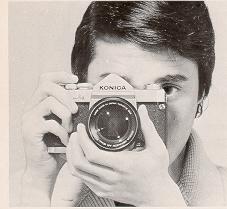
One secret for getting ultra-sharp pictures is to prevent accidental
camera movement. To do this it is suggested that you hold the camera firmly,
as shown in the picture above, cradingthe body of the Autoreflex-A3 against
the face. Depress the shutter release button firmly but gently. Do not punch
the shutter release button but squeeze the exposure off smoothly for
"jar-free" operation.
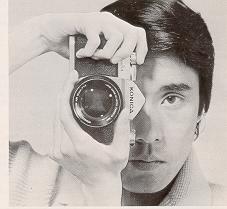
Vertical shots add variety to a series of pictures. They are especially
desirable when making head and shoulder portraits and architectural shots.
Hold the camera as shown above. This position prevents accidentally pushing
the lens release button.
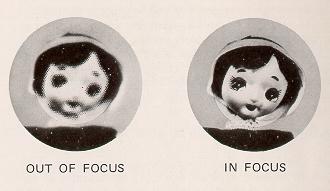
With Microdiaprism Focusing Screen: Turn the Focusing Ring
(6) of the lens until the image within the center of the viewfinder (44) is
sharpest and clearest. (When you're out of focus, this central area -
composed of hundreds of microscopic prisms - appears quite hazy and
unsharp.)
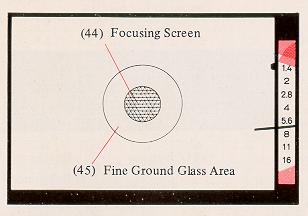
Under almost all conditions, this precision focusing screen works easily and
with great accuracy. However, under certain conditions problems can develop:
here's what they are ... and how to overcome them.
With Microdiaprism... when using 35mm (or shorter) wide-angle lenses, and
lenses slower than f/4.5, or any lens used with substantial bellows
extension, the grid-like pattern in the center of the viewfinder may remain
visible regardless of focusing ring adjustment. (This phenomenon is caused
by the angles at which light rays enter the focusing screen, and does not
indicate any defect in your camera or lens.) Solution: focus by
concentrating on the circular doughnut shaped Fine Ground Glass Areas (45)
around the Microdiaprism. Most people find this easiest to do by starting
out with the lens deliberately thrown out of focus, then turning the
focusing ring very swiftly until the point of greatest apparent sharpness is
reached. If you turn the focusing ring very slowly, your eye will find it
more difficult to determine the point of greatest sharpness.
DEPTH-OF-FIELD CONTROL
Depth-of-Field is the distance between the nearest and farthest objects in
the scene that will be sharp in the finished picture. In practical terms
this means that when you bring an object into sharp focus, objects behind
and in front of this will be rendered more or less sharply as well. For more
Depthof-Field, use a smaller f/stop (for example, f/11 instead of f/5.6).
For less Depth-of-Field, use a larger f/stop (for example, f/4.0 instead of
f/8).
Using Depth-of-Field Scale on Lens:
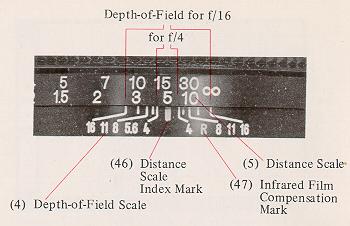
On the Depth-of-Field Scale, f/stop markings identical to those on the
Manual Aperture Scale (7), are repeated to the right and left of the
Distance Scale Index Mark (46). The Depth-of-Field for any focused distance
will be found between any two identical f/stop markings on the
Depth-of-Field Scale. Thus, if the lens is focused at 15 feet and the
picture is to be made at f/16, referring to f/16 on both sides of the scale
tells us that the Depth-of-Field extends from Infinity to about 8 feet. For
maximum Depth-of-Field including Infinity, set the Infinity mark at the
f/stop in use, on the right hand side of the scale.
Film Plane Mark: For certain highly specialized
applications, it is sometimes desirable to place your subject at a specific
distance from the film (focal) plane. Should you wish to do this, measure
the distance from the center-of-interest of the subject (the part you'll
focus on) to the Film Plane Mark "my" (16) atop the camera body.
Infrared Film Compensation Mark: Infrared rays come to a
different focus than visible light rays. When shooting infrared film with
the appropriate filter, focus as usual. Then bring the distance figure
opposite the Distance Scale Index Mark (46) into line with the Infrared Film
Compensation Mark (47).
FILM REWIND AND UNLOAD
After all the pictures on the roll have been taken, the film is rewound into
the cassette prior to removal for processing.
An occasional look at the Film Counter (2) will help keep you posted as to
when you are coming to the end of the roll and prevent your accidentally
tearing the film out of the cassette. If you should come to the end of the
film while the camera is at your eye in shooting position, the Film
Transport Lever (11) will tighten and refuse to advance even ff the shutter
has been released. If this happens do not force it! Instead,
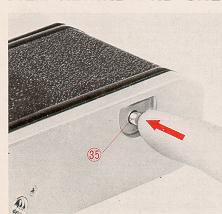
depress the Film Rewind Button (35) and at the same time move the Film
Transport Lever as far as it will go. It will then snap back into its normal
position. Then, just ...
1. Depress the Film Rewind Button (35). Once it is depressed, the button
remains in place.
2. Lift up the Film Rewind Crank (18) and turn it clockwise at moderate
speed in a continuous motion. An arrow on the Rewind Crank indicates correct
direction toward.
3. When tension on the Film Rewind Crank eases, the film has been fully
rewound. You can now open the camera back and remove the cassette by tipping
it towards yourself and letting it drop out of the bottom opening.
The Film Rewind Button returns to its original position once the Film
Transport Lever is again actuated. In addition, the Film Counter
automatically resets itself "S" (Start) as soon as the back was opened ...
so you're ready to load your next roll right away!
FLASH PHOTOGRAPHY
The all metal Copal Square-S focal plane shutter is synchronized for use
with flashbulbs (and flashcubes) or electronic flash. These light sources
are useful for making action stopping photos in dim light. Their high light
output makes it possible to produce negatives that have good Depth-of-Field
too, and an overall sharpness. Flash and electronic flash are also used
outdoors to lighten or fill in deep shadows.
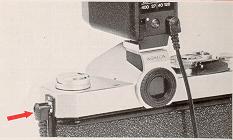
One standard "PC" flash terminal (X) are provided on the side of the
Konica Autoreflex-A3. The "X" flash terminal is Ma for use with electronic
flash units. The Copal Square-S shutter synchronizes these at all speeds to
and including 1/125th second. Flashbulbs or flashcubes are synchronized up
to 1 /30th second.
To mount the Konica Accessory Clip 3, unscrew the eyepiece cover, position
the Accessory Clip atop the camera, fit the eyepiece cover to the Accessory
Clip, and re-attach the eyepiece cover by screwing it on (clockwise).
Determining Exposure for Flash Pictures
Manual settings are required for flash shooting. The AEC system is not
applicable. Exposures are usually calculated on the basis of "Flash Guide
Numbers" furnished by the makers of flashbulbs (and flashcubes) or
electronic flash units. To find the correct f/stop to use, the guide number
is divided by the flashto-subject distance. Thus if the guide number is 110
and the subject is 10 feet away:
If in doubt, refer to the table above as to which shutter speeds are useable
with a specific type of flash illumination. Guide numbers for flashbulbs are
generally printed on the package. Electronic flash guide numbers are
generally furnished by the maker of the unit. Guide numbers are exactly that
- they can serve as guides but all other existing light will affect your
exposures to some extent and you should make allowance in your settings for
intermediate f/stops which also click into place.
When the shutter speed dial is set at "B", the shutter win remain open as
long as the shutter release is held down. As a result, exposures longer than
one second--as long, in fact, as several hours may be taken at
night, or in dimly- lit places where there is no moving subject. If an
exposure of more than several seconds is desired, attach a Konica Cable
Release (available from your dealer) to the Shutter Release Button (1). Set
the shutter speed dial to "B". Press down the cable release "plunger", and
hold it down for as long an exposure time as is desired. When the cable
release plunger is released, the shutter closes.
Manual diaphragm settings must be made when the Copal Square-S shutter is
set at "B". The AEC (AK) setting on the lens is not used. Instead the lens
is set manually at the desired f/stop.
It is necessary that you use a tripod or other support for "B" time
exposures and all other exposures longer than l/30th second. Use of a cable
release will minimize jarring the camera.
ACCESSORIES
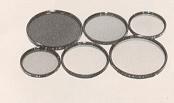
· KONICA Filters
Konica Filters help make more natural looking pictures in black and white or
color. They may also be used to create special effects. They are made with
the same precision as are Konica lenses. Since exposure is read
through-the-lens in the Konica Autoreflex-A3, the filter "exposure factor"
is computed by your Konica automatically.
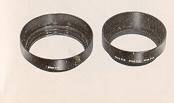
· Lens Hoods
Prevent stray light from striking lens surfaces and causing unwanted
reflections. Each Konica Lens Hood is specifically calculated and shaped to
give maximum protection to the lens on which it is used.
· Eyecup
Large, soft rubber eyecupshields meter, eye from extraneous light, aids
concentration. Prevents metal-to-skin contact in cold weather. Eyecup folds
down for eyeglass wearers.
· Eyesight Correction Lenses
Corrects viewfinder optics to prescription requirements; vastly aids
viewing/focusing comfort, accuracy. +1, +2, and +3 dioptor lenses for
farsighted persons; -1, -2, and -3 for nearsighted persons. Includes Soft
Rubber Eyecup for added comfort, protection,
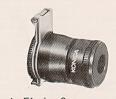
· Magnifier
Precision magnifier attaches to standard eyepiece, provides full 2X
magnification of central finder area, Flips up when not in use. Focusing
optics provide individual diopter correction. Doubles focusing accuracy.
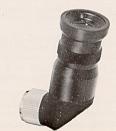
· Angle Finder 3
Attaches to viewfinder eyepiece, enables convenient 45° viewing angle. Shows
entire finder image including aperture scale. Swivels 360° for viewing from
any angle. Individual diopter adjustment
· Close-Up Lens Number 1 (55mm)
Achromatic 2-element formula. Requires no exposure compensation: all camera
controls remain automatic. Permits focusing from 25" - 12" from film frame
with subjects from 9 x 131/2''to 31/zx 5~/4".
· Close-Up Lens Number 2 (55mm)
Achromatic 2-element formula, range from 14" - 10" from film plane. Fills
frame with area from 41/2 x 6~/2" to 2~/2 x 33/4", combined with Number I
close-up lens, focuses from 12" - 8~/2", covers area from 3 x 4~/2" to 2 x
3" (0.5 X--one half actual size).
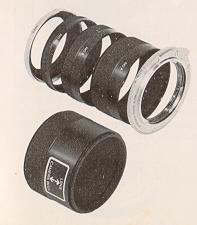
· Extension Ring Set 3
Six-piece Set allows 14 different extensions from 10mm - 88mm; magnification
to 1.88X (almost twice actual size) with standard lens. Supplied with 8mm
camera and body mounting rings, 8mm, 16mm, and 24mm screw-in extension
rings, and 30mm reverse adapter for 55mm - thread lenses. Manual diaphragm
control; stop-down (match-needle) metering. Converts to automatic diaphragm
control with accessory Auto-Ring 2 and double cable release. Does not accept
Macrostand or Slide Copier- 2.
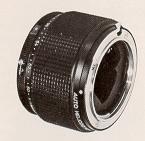
·Auto Helicoid
Automatic, continuously-variable focusing mount enables lO5mm f/4 Auto Macro
Hexanon AR lens to focus from Infinity to 23". Retains full AE (EE) and
automatic diaphragm coupling. May also be used with lO5mm lens and Konica
Auto Bellows for semi-automatic operation with magnifications greater than
1,28X.
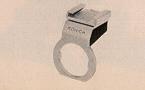
· Accessory Clip 3
For use with cord-type flash-guns. May be left on camera at all times.
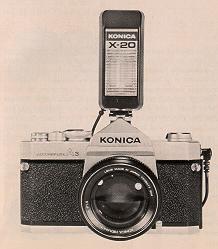
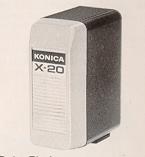
· X-20 Electronic Flash
Exceptionally compact electronic flash for cord ess or cord-type operation.
Guide Number 64 with ASA 80/125 film permits shooting distances to 40 feet
with f/1.7 lens. Up to 400 flashes with four standard AA Alkaline batteries.
· Cube Flash
With PC cord contact. Built-in test circuit with indicator light that shows
when cube is ready to fire. With exposure guide table and case. Use at
1/30th second or slower with A3.
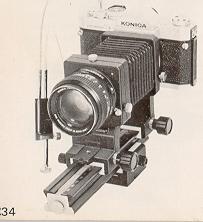
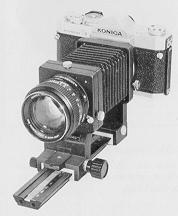
· Auto Bellows with Double Cable Release
Maintains automatic diaphragm operation. Extension Range 47mm - 1 70mm,
magnifications from O.9X - 3.5X with standard lens. Entire front standard
reverses without accessories, retains automatic diaphragm coupling in
reversed position. Geared front and rear focusing controls with positive
locks. Main focusing rail permits moving entire assembly over 114mm range
for focusing at predetermined magnifications ratios. Focusing rail may be
used laterally, for sideways movement of entire assembly over 114mm range.
Locking depth-of-field preview control. European and American-style tripod
sockets. Cable release supplied simultaneously activates lens diaphragm,
body shutter release. Used with stop-down (match-needle) metering. Accepts
accessory Macro Stand, Slide Copier 2.
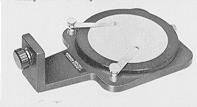
· Macro Stand
For use with Konica Auto Bellows: Positions subject absolutely parallel with
camera and lens. Rotating (75mm diameter) specimen "stage" has hold down
spring clamps to secure subject in desire position. Stage has 18% grey
reflectance factor for correct exposure readings irrespective of subject
size, coloration (exposure readings taken directly from stage). Used at
magnifications Prom O.9X - 2.3X with standard lens. Superb tool for
photography of stamps, coins, insects, any small easily-moved subject.
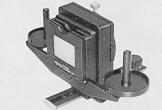
· Slide Copier 2
Attaches to Auto Bellows or Standard Bellows 3, allows same-size or cropped
duplicates of standard 24 x 36rnm or smaller transparencies. Accepts mounted
slides or uncut strips, rolls. 18mm horizontal, 1 2mm vertical shift.
Require special Slide Copier Reverse Ring; auxiliary Reversal Ring to
reverse-mount lens on bellows.
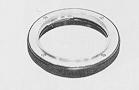
· Slide Copier Reverse Ring
This ring is required for photography with the slide copier and used
together with a lerts reversal ring. The Slide Copier Reverse Ring is usable
at the magnification ratios of 1.4X to 4X with a standard lens (50mm f/1.7).
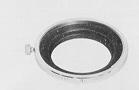
· Lens Reversal Ring (55mm)
Permits reversing all 55mm-thread lenses without reversing front standard of
Auto Bellows and Standard Bellows 3. Required for reverse mounting of lens
with Slide Copier 2, Smm depth.
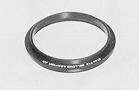
· 57mm f/1.2 Bellows Adapter
For 57mm f/1.2 Hexanon lens only; converts oversize (62mm) barrel to 55mm
front diameter, permits lens reversal with Auto Bellows and Standard Bellows
3. Used in conjunction with Lens Reversal Ring (55mm) to reverse lens with
Slide Copier 2.
· Standard Bellows 3
Precision extension bellows with geared front focusing, extension range 47mm
-1 70mm (0.9X--3.5X magnification with standard lens). Front standard
reverse without accessories for optimum resolution at 1:1 and greater
ratios. Rear standard with lock permits manual movement. Manual diaphragm
control and stop-down (match -needle) metering; converts to automatic
diaphragm control with accessory Auto Ring 2 and double cable release. May
be used with Slide Copier 2; does not accept Macro Stand.
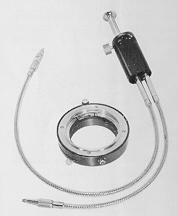
· Auto Ring 2 with Double Cable Release 2
Provides automatic diaphragm control with Standard Bellows 3 or Extension
Ring Set 3 (also retains automatic diaphragm operation when lens is reverse
mounted on Slide Copier 2 with Auto Bellows). Gives additional 14mm
extension for greater magnifications. Cable release has lock for time
exposures
KONICA Lens Mount Adapters
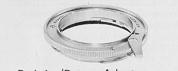
· Exakta/Topcon Adapter 2
Permits use of Exakta-mount lenses with match-needle exposure control.
Retains original focusing range.
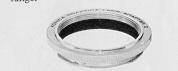
· Praktica/Pentax Adapter
Permits use of Pentax/Praktica-mount lenses with match-needle exposure
control. Retains original focusing
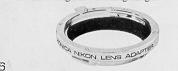
· Nikon/Nikkormat Adapter
Permits use of Nikon-mount lenses with match-needle exposure control.
Retains original focusing range.
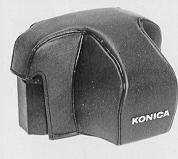
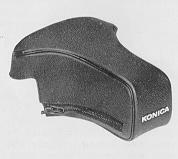
· Hard Case
A new case for AS users who desire the added convenience and protection of a
molded Hard Case complete.
· Front Cover of Semi-Hard Case for 135mm Lens
Usable even when a 135mm, 100mm or 85mm telephoto lens is mounted on the
camera.
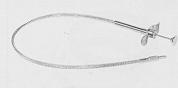
· Cable Release 3
Precision 18" cable release with lock for time exposures. Vinyl clad for
extra durability.
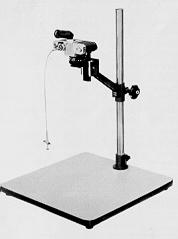
· Copy Stand 2 with Focusing Rail
Oversize 18/ x 19~/~" baseboard; reversible camera arm permits positioning
camera Prom 31" above baseboard to directly atop, for unlimited
magnification capability. Geared focusing rail with lock allows precise
camera movement over 114mm range; focusing rail swivels for copying
wall-mounted material. Baseboard finished in 18% grey reflectance material,
permits exposure readings to be taken from baseboard irrespective of subject
size or coloration.
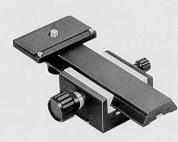
· Focusing Rail
Supplied as standard equipment with Konica Copystand 2, this precision
accessory permits camera movement over a 114mm range. Geared focusing knob
with positive lock to prevent slippage. Particularly valuable in closeup
work with tripod-mounted camera, where it is inconvenient (or impossible) to
move camera or subject directly.
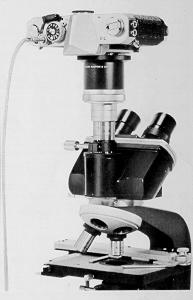
· Microscope Adapter
Uses optical system of microscope in place of camera lens; unlimited
magnification capability. May be used with or without microscope ocular.
Mounting damp fits standard 25mm-diameter microscope ocular tubes. Bayonet
lock ring allows fast, positive camera attach meet. removal.
 ,
M. Butkus, NJ.
,
M. Butkus, NJ.