Konica FC-1
posted 7-20-'03

HTML Translations - German - Italian - French - Spanish - Others
These links will not translate any PDF files

This camera manual library is for reference and historical purposes, all rights reserved.
This page is copyright by , M. Butkus, NJ.
This page may not be sold or distributed without the expressed permission of the producer
I have no connection with any camera company

On-line camera manual library
This is the full text and images from the manual.  This may take 3 full minutes for all images to appear.
If they do not all appear.  Try clicking the browser "refresh" or "reload button" or right click on the image, choose "view image" then go back.  It should now appear.

If you find this manual useful, how about a donation of $3 to: M. Butkus, 29 Lake Ave., High Bridge, NJ 08829-1701
and send your e-mail address so I can thank you.

Most other places would charge you $7.50 for a electronic copy or $18.00 for a hard to read Xerox copy.

This will allow me to continue to buy new manuals and pay their shipping costs.  It'll make you feel better, won't it? 
If you use Pay Pal, use the link below. Use the above address for a check, M.O. or cash.


Click here for PDF version - made from this page

Click here for PDF version - created from manual

Problems opening PDF files or printing problems - click here


TO SECOND SECTION TO THIRD SECTION

Thank you for your purchase of the Konica FC-1. Like its sister model, the FS-1, which is highly reputed, the Konica FC-1 is a shutter speed-priority TTL-AE SLR which is equipped with the world's biggest and most versatile central processing unit (CPU). Incorporating an easy film loading system, it is a perfected camera readily usable even by a photographic layman. With the Konica Auto-Winder F (available for separate sale), it is possible to take pictures in succession at 1.5 f.p.s., giving full play to the performance of the Konica FC-1 .

--Contents--
Nomenclature of Parts ...... 4

Steps for Photographing 8

How to Use the Strap 10

Mounting and Dismounting of Lens 11

Inserting of Battery Cells 12

Battery Check . . . . . . . . .  13

Film Loading 14

Film Transport Flicker ~ 17

Setting of Film Speed Reading 18

Setting Lens to AE 19

Setting of Shutter Speed 19

Training of the Camera 20

Focusing 21

AE (Automatic Exposure) Photography.... 22

Film Rewind 23

LED Information in Viewfinder 24

Under- and Over-Exposure Warnings 26

Warning for Run-down of Battery Cells 27

Selection of Shutter Speed 28

Aperture vs Depth-of-Field 29

Infrared Compensation Mark 29

Manual Photography, 30

Exposure Compensation for

Backlight Photography 31

Photographing with Self-Timer 32

B (Bulb) Exposure 33

Photography with the Auto-Winder 34

Electronic Flash Photography 36

Stopped-down Metering Method 38

Precautions for Use 39

Specifications of the Konica FC-1 40

Accessories 42

Konica Interchangeable Lenses 46

Depth-of-Field Tables 50


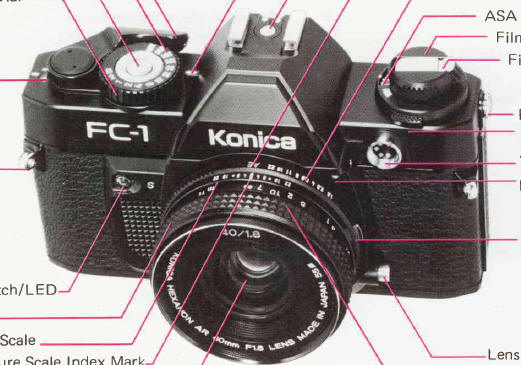
NOMENCLATURE OF PARTS


Auto-Winder for quicker response

Steps for Photographing
1. insert battery cells. (P.12)

2.Load a roll of film. (P.14)

3. Set the film speed. (P.18)4.butkus.org

4. Set the AE position. (P.19)

5. Determine the shutter speed. (P.19)

 
6. Focus the lens. (P.21)

7. Slightly depress the shutter release button and ascertain the correct exposure. (P.22)

8. Frame the subject and release the shutter. (P.20)

9. Wind the film. (P.22)

10. Rewind the film, which has been completely exposed. (P.23)


How to Use the Strap

1 ) Undo the stoppers on the strap.

2) Run one end of the strap through the strap eyelet on one side and secure it; repeat the operation for the other side.

· The strap should be fixed onto the camera in such a way that the mark Konica on the stoppers is visible on both sides.


Mounting and Dismounting of Lens
To install a lens, align the red dot of the lens with the lens mount/dismount indicator (red dot) of the camera body and lightly sink the lens into the camera body. Hold the lens and turn it clockwise until it stops with a clicking sound.

To remove the lens, hold the base of the lens and turn it counterclockwise, while the lens interchange button is kept depressed. Take out the lens when the red dot of the lens comes in line with the lens mount/dismount indicator of the camera body (red dot).

· When the lens is detached, see to it that dust will not come in the camera and lens barrel and the lens surface will not be either scratched or marred with fingerprints. Under any circumstances, do not touch the inner parts of the camera.

Inserting of Battery Cells
1 ) Remove the cover of the battery chamber by turning it counterclockwise with a coin.

2), Turn the cover of the battery chamber upside down, put its edge under the red mark of the battery case and pull up the case to remove the case from the battery chamber.

3) Open the cover of the battery case. Push open the arrow-marked part of the cover using your fingertip.4.butkus.org

· Use four 1.5V alkaline battery cells LR44 or silver oxide battery cells SR44 (Eveready S-76, Mallory MS-76). Absolutely avoid the mixed use of both types of battery cells.

· This camera cannot operate without batteries.

4) Wipe the surface of each battery cell with a piece of dry cloth. Set the four battery cells into position with the "+" plus side up and close the cover.

5) Align the red mark of the battery case with that of the battery chamber and push the case into the chamber until it does not move further. Tightly screw in the cover on the chamber.

· When your camera is not to be used for a long period, take out the battery cells.

· To put battery cells out of the battery case, insert the tip of a pencil into the hole of the lower side and push the battery, and it will come out with ease.

Battery Check
Slightly depress the shutter button while looking through the finder, and you will see the aperture indicator LED on the left-hand side will burn or flicker.
If the voltage of the battery cells has run down, the LED will flicker alternately at the intermediate point between M and f/1.4 and at f/22. The battery cells are serviceable when the indicator lamp burns or flickers at other points.

Film Loading
· The Konika FC-1 uses all standard 35mm 12-, 20-, 24-, 36 exposure film cassettes.

The film loading system of the Konica FC-1 is so designed that a roll of film may be loaded with ease and certainty, as the film is set into the prescribed position the back cover is closed and the film transport lever is locked to transport it to the first frame for exposure.
 
1 ) Pull up the film rewind knob and then pull it with bigger force, and the back cover will open.4.butkus.org 2) Insert a cassette into the cassette chamber and push the film rewind knob down to the original position. If the knob stops halfway, turn it clockwise and counterclockwise, and the knob will go down.


3) Pull out the film while slightly depressing the film outlet of the cassette. Stretch it out until it comes over the roller. Place it on the roller.

For film with a longer leader, pull it out until the first two or three perforations on the upper side make their appearance.

Make sure that the film does not warp and that the film outlet of the cassette is not lifted out.


Push the film leader onto the film channel on the lower side. 4) Push down the back cover and make sure that it is tightly closed.

5) Cock the film transport lever until it does not move further. Repeat this action three or four times until the figure "1" appears in the film counter.
As long as the film transport flicker turns during the course of this action, the film is being transported properly
There is no need to click the shutter during this time.


Film Transport Flicker
If the film is being transported properly, the film transport flicker will turn each time the film transport lever is cocked. This feature makes it possible to ascertain the film wind and its rewind.


Insert the end portion of the film box into the film memo holder located on the back cover to remind you of the film type in the camera. You may also insert a piece of white paper to write notes.


In case you use long-footage film and feed a film cassette, the film in this cassette may be loaded with its tip cut at right angles. For this case, too, follow the previous instruction for loading. Correctly insert the film tip into the film roller.4.butkus.org


Setting of Film Speed Reading
Turn the ASA set dial and align the ASA film speed reading of the film loaded in your camera with the index mark visible in the ASA speed indicator window.

 
Setting Lens to AE
In AE (Automatic Exposure) photography turn the lens aperture ring to the AE position. A safety lock will prevent accidental change.


Setting of Shutter Speed
Turn the shutter speed dial and align the shutter speed reading with the index mark. The dial is so designed that it revolves endlessly as it is manipulated by the tip of the forefinger while the camera is held in you hands. The yardsticks for AE photography are 1/125-1/250 sec. outdoors and 1/30-1/60 sec. indoors with ASA 100 film.


Training of the Camera
To take sharp and beautiful pictures, it is important to accustom yourself to the proper training of your camera so that it will not be jarred when a picture is taken. Tightly hold your camera in your hands and put it onto your face. Keeping tightly to your body the elbow of the arm which holds the camera, train your camera in a stable posture.

· For picture-taking at speeds slower than 1/30 sec., it is advisable to use a cable switch (available for separate sale) and a tripod to prevent the camera from being accidentally jarred.

 
TO SECOND SECTION TO THIRD SECTION