If you find this manual
useful,
how about a donation of $3 to:
M. Butkus, 29 Lake Ave.,
High Bridge, NJ 08829-1701
and send your
e-mail address
so I can thank you.
Most other places would charge
you $7.50 for a electronic copy
or $18.00 for a hard to read Xerox copy.
This will help me to continue to host this site,
buy new manuals,
and pay their shipping costs.
It'll make you feel better, won't
it ?
If you use Pay Pal, use the link below.
Use the above address for a check, M.O. or cash.
Back to main camera manual page
This
camera takes mercury batteries
- see here for non-mercury replacements
Problems
opening PDF files or printing problems
- click here
Click here for
Konica T3 PDF version
made from this page - better
printing
CLICK HERE: Konica T3 PDF
DIRECT SCAN FROM MANUAL
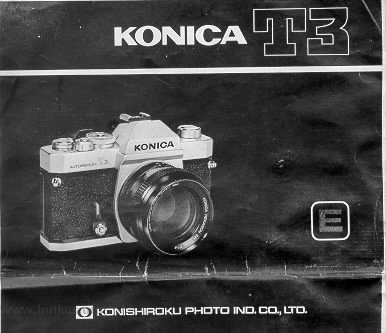
USING YOUR KONICA AUTOREFLEX-T3:
SEVEN BASIC STEPS
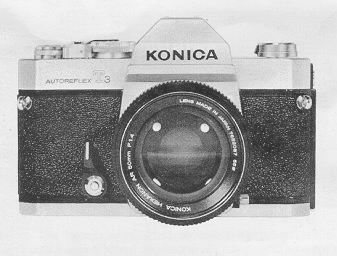 |
1. Insert the two 1.35 Volt mercury photographic batteries supplied with your camera into the compartment at bottom of camera. (This supplies power to the CdS meter.)
2. Load camera. Konica's "Insta-Grip" take-up spool assures trouble-free operation,
3. Set ASA rating required for your film speed.
4. Move Aperture Control Ring to "AK" position ("EE" on some Lenses). |
5. Select desired shutter speed. (For most shots, 1/125th is recommended.)
6. Focus add compose picture in viewfinder.
7. Shoot...as long as the needle in the finder is in the "white" area, you pictures will be perfectly
exposed automatically!

MAJOR SPECIFICATIONS OF KONICA AUTOREFLEX-T3
Camera Type: 35mm TTL (Through-the-Lens metering) AEC (Automatic Exposure Control) SLR (Single-Lens-Reflex)
Film: Standard 35mm 20 or 36-exposure cassettes
Format: 24x36mm
Standard Lens Options:
Konica Hexanon AR 50mm f/1.7 (6 elements, 5 groups)
Konica Hexanon AR 50mm f/1.4 (7 elements, 6 groups)
Konica Hexanon AR 57mm f/1.2 (7 elements, 6 groups)
Minimum Focusing Distance: 17.4" from film plane
Lens Mount: Konica Bayonet (47mm diameter)
Flange/Film Distance: 40.5mm
Aperture Control System: Automatically sets correct f/stop (or fractional f/stop) with all Konica Automatic Hexanon lenses
Shutter: Metallic, vertical-scanning Copal Square-S
Shutter Speeds: Convenient top-mounted selector for all speeds from I second to
l/1000th second plus "B" (for time exposures)
Flash Synchronization: Electronic flash synchronization at all speeds to and including l/125th second; "M" synchronization for all flashbulb/cube types at all speeds to
and including 1/1000th second. Locking PC flash cord terminals; "Hot" Shoe accepts cordless
flash units, incorporates safety circuit breaker.
Self-Timer: Variable delay 4 - 10 seconds. Release lock prevents accidental use. Timer automatically locks up mirror stops down lens diaphragm at the beginning of cycle to
insure ultimate stability at time of exposure.
Viewing System: Parallax-Free Single Lens Reflex System. Coated, eye-level pentaprism shows upright, unreversed image; apparent magnification 0.78X with 50mm lens.
Built-in Eyepiece Shutter shields meter from extraneous light.
Focusing Screens: Standard Konica Microdiaprism screen; optional Konica
Split-image Rangefinder screen.
In-Finder Readouts: "Control-Center" viewfinder shows all vital data at a glance: mode of operation (automatic or
manual); exact shutter speed; exact lens aperture being set
automatically; maximum aperture of lens; under/overexposure ranges; match-needle indicator for semi-automatic operation; meter
coupling range indicator; battery-test
indicator.
Reflex Mirror: Oversize, coated mirror prevents image cutoff in finder even with bellows extensions at 1:1 magnification. Mirror design permits automatic operation even
with extreme wide-angle lenses. Instant-return mirror action prevents image blackout after
exposure.
Exposure Control System: Fully Automatic Exposure Control (AEC) system
detects and sets correct lens aperture (or fractional aperture) automatically, based on
information obtained from dual through-the-lens CdS cells located in pentaprism. Metering system automatically matches
acceptable to match focal length of lens:
provides virtual spot readings with wide-angle lenses, center-weighted readings with standard lenses,
integrating readings with telephoto lenses.
Meter Power Source: Two 1.35 Volt mercury batteries, photographic type (Mallory PX-675,
Ever ready EPX-675, or equivalent). Built-in battery test circuit. Top mounted
On/Off switch conserves energy when meter not in use.
See this link on a Wein Air replacement battery.
Meter Coupling (Sensitivity) Range: 98,304:1 (EV 1.5-EV 18 with f/1.2 lens
and ASA 100 film). Meter coupling range automatically indicated by red flag in
viewfinder,
which shifts if coupling range is exceeded by existing illumination with film type in use.
Film Speed Range: ASA 12-3200 (Equivalent DIN 12 - 36 for European films).
Exposure "Memory" Lock: Memorizes and holds exposure reading to
allow precise meter operation in backlit or spot lit situations; operates via shutter release or
self-timer.
Loading: Konica Insta-Grip Loading (IGL) system uses multi-slotted take-up spool to grip film securely.
Multiple Exposure Control: Allows convenient, foolproof multiple
exposures; spring loaded switch permits winding of shutter without advancing film or
exposure counter.
Shutter-Ready Indicator: Signals Green when shutter has been
wound, Red if not wound.
Unloading: Oversize rapid-rewind crank permits rewinding within seconds; cutaway film cassette chamber allows drop. out cassette removal.
Dimensions: With standard lenses: 5.9" wide, 3.9" high, 3.6" deep. Body only: 5.9" wide, 3.9" high, 1.8" deep.
Weights: Body: 26 oz.
Lenses: 50mm f/1.7: 8.5 oz.
50mm f/1.4: 10.2 oz.
57mm f/1.2: 16.2 oz.
INSERTING BATTERIES; METER ON/OFF SWITCH
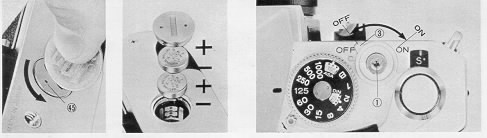
Open Battery Compartment (45) by fuming me cover counter-clockwise as shown. Remove batteries from protective packing (handle them by the edges to keep me surfaces
clean). If the batteries appear to have a thin deposit of dust on them, wipe clean
with a dry cloth.
Insert the two batteries into the compartment, with "+" sides facing up. (For your convenience, +
& - indicators are marked in the compartment.)
After the batteries are in the chamber, replace cover.
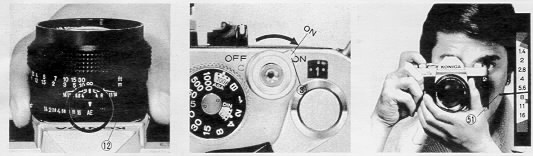
Combined Meter On/Off Switch and Shutter Lock
When not using yow camera, you win extend battery life Generally from one to two years) by turning the Meter On/Off Switch (3) to the "Off' position. (Simultaneously, this
prevents accidental exposures by locking the Shutter Release Button (l).)
When you're ready to take your next picture, turn this switch back to the "On" position: now, the meter and shutter will operate (For extra convenience, operating the
Transport Lever (14) when this switch is in the "Off' position automatically turns it to "On" for you.'
Battery Check
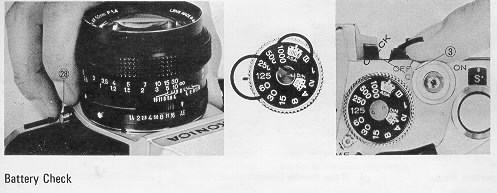
Remove lens by pressing Lens Lock Release Button (28) tuning lens as shown. Set film speed at ASA 100,
shutter speed at 1/125th. Now, turn the Meter On/Off
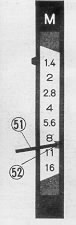
Switch (3) past the "Off" position to the engraved "C" (Check). If the Needle (51) in the viewfinder points to the Battery Test
Indicator (52), your batteries are in good
condition. Additionally, this also provides verification that the meter movement is correctly "zeroed" or
aligned -- an extremely valuable feature.
 |
Generally, it's not necessary to check batteries frequently;
mercury batteries have exceptionally long, stable fife (generally one year or more). It makes sense to check them
(as outlined above) before going on extended trip, or anytime needle movement seems sluggish (or stops) when you're taking pictures.
Prolonged heat and moisture may reduce battery life. Always keep your camera (and any spare batteries) in a cool, dry place. And, when obtaining new batteries, make certain
they are photographic type 1.35 Volt PX-675(Mallory PX-675 Eveready EPX675, or exact equivalent).
Many other batteries are similar in appearance, but the difference in
voltage construction may cause incorrect exposures.
See this link on a Wein Air replacement battery. |
To Remove the Lens from your Camera:
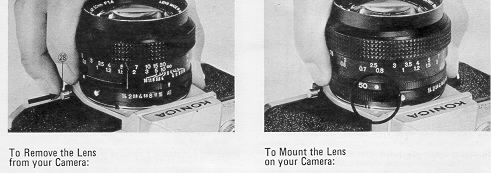
Grip lens securely in one hand. With the other hand, hold the camera body and press the Lens Lock Release Button (28). Holding this in,
twist the lens counterclockwise until
the two Red dots (one on the camera body, mid one on the lens) line up. The lens may now be removed.
Note: When the lens is removed, be sure not to touch the interior of the camera. If the lens will be left off the camera for any length of time, a Konica Body Cap will protect
veer camera from dust and dirt.
To Mount the Lens on your Camera:
Line up the Red dot on the lens with the matching dot on the camera body; the lens win "seat" into the body easily. Now, grip the lens and turn it clockwise gently until it
"clicks" into place. No further adjustments are required!
FILM LOADING
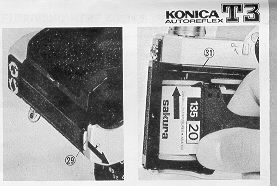 |
Loading your KonicaAutoreflex-T3 is exceptionally fast, accurate, "d foolproof, because of Konica's
Insta-Grip Load take up spool..."other Konica innovation. Here's how:
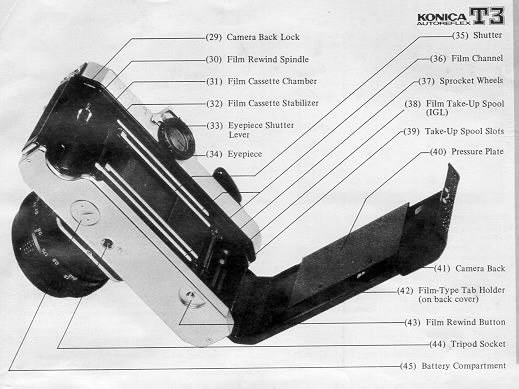
1. Press down Camera Back Lock (29), and swing the back open.
2 Slide the film cassette into the Cassette Chamber (31) as shown above. |
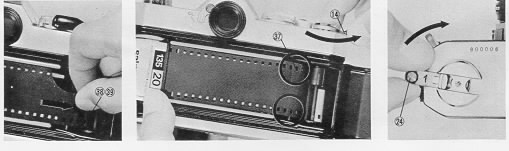
3. Pull out enough film to reach the Take-Up Spool(38). Insert film end into
the slot (39) in the spool. The film will be gripped instantly as you . .
4. Advance the Film Transport Lever (14) one full stroke. Make sure that the sprocket holes in the film engage the Sprocket Wheel (37) in your camera.
5. Close the camera back. Gently, turn the Film Rewind Crank (24) until resistance is felt (this takes up the slack of the film within the cassette).
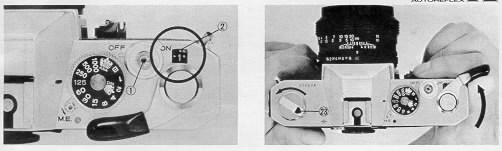
6. Press the Shutter Release Button (1) "d operate the transport lever until the Number I appears in the center of the Film Counter (2).
To Check Film Advance
It's easy to make sure your camera is loaded correctly. While operating the transport lever, watch the Film Transport Indicator (23) to see if it rotates. If it does you know that
film is going through properly; if it doesn't it s not.
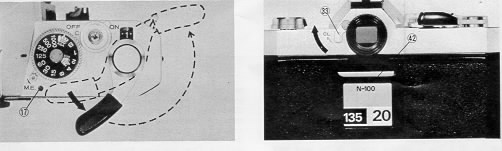
Shutter Ready Indicator
When you haven't used yaw camera for some time, it's hard to remember whether or not the shutter is wound. This easily-seen Indicator (17) tells you at a glance: if it shows
Red, you didn't. If it's Green, you did.. and you're ready to shoot.
Film-Type Tab Holder
After you've loaded your camera, tear off the end of the film carton add insert it here (42);
after unloading, remove the tab. Result: you know at a glance if me camera is
loaded... "and what kind of film is inside.
Eyepiece Shutter
Yow Konica's Automatic Exposure Control system reads the light that it sees when the shutter release is pressed. In ordinary
picture-taking, your eye is placed close to the
eyepiece for viewing; this effectively prevents stray light from influencing the meter reading.
In some situations, you may press the shutter release when your eye is not at the eyepiece. For example, you may be taking close-up photographs with the camera attached to a
tripod or copy stand; or, you may be taking a picture in a crowd by holding the camera above your head, as high as
possible. In such situations, always turn the Eyepiece
Shutter Lever (33) to "CL" (Closed). The shutter now fully covers me eyepiece,
"and no stray light can" enter. After the exposure, return the eyepiece shutter to Open position.
SHUTTER SPEEDS AND LENS APERTURES
 |
Your KonicaAutoreflex-T3 has a metal Copal Square-S focal plane shutter, with the control dial conveniently located on top of the camera. This unique shutter
is noted for
exceptional accuracy even under extremes of temperature and climate, and is virtually impervious to damage or deterioration in normal use.
This shutter, because of its exceptionally fast (7.5 milliseconds) traverse time, permits use of electronic flash at all speeds to add including 1/125m
second (this speed is
marked in red on the shutter speed dial). Flashbulbs or flashcubes of By type may be used at all speeds, including
l/l000th second. |
At "B", the shutter remains open as long as the Release Button (1) is depressed. (For details on taking Time exposures, see page 33.)
Speeds may be changed at my time, whether or not me shutter is wound. If your camera will be out of operation for several months, it's desirable to release me shutter to
minimize tension. For anything less m" several months, however, this precaution is not necessary.
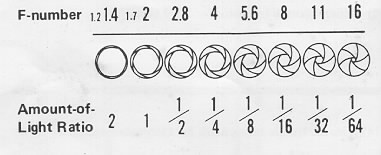
Like your eye, your camera lens has an iris, generally called me diaphragm. Open it up and it admits more light, close it down, it admits less.
The; amount of light b
indicated by f/stops (also known as "apertures"): f/2.8 admits half as much light as f/2; f/4 admits one-quarter as much as f/2, add so on.
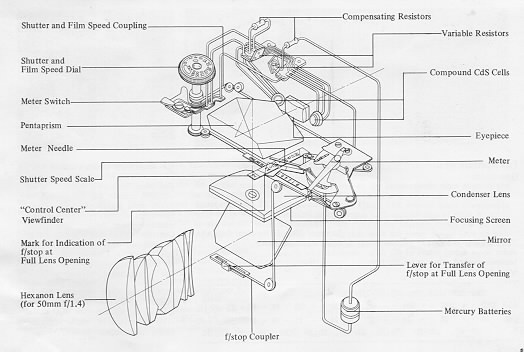
When a Konica Automatic Hexagon lens h mounted on a Konica Autoreflex-T3, the iris or aperture automatically closes to the correct f/stop before the picture is taken. The
needle in the viewfinder shows the actual f/stop being set After me exposure, the aperture automatically reopens to the widest position, giving you a brilliant image for easiest
viewing while focusing.
Uncoupled lenses and accessories may also be used with your camera's metering system. (For details, see pages 17 - 18).
AUTOMATIC AND NON-AUTOMATIC OPERATION
Automatic Operation:
With a Konica Automatic Hexanon lens on your Konica Autoreflex-T3, just check me indicator needle in the viewfinder, which shows the exact aperture the camera is
selecting...and shoot! The automatic aperture mechanism sets this lens opening for you at the moment of exposure-and you can concentrate
on your subject, instead of your
camera This is the decisive advantage of the Konica Autoreflex system.
Semi-Automatic Operation:
Yet, this amazingly precise instrument actually allows more actual control of aperture and shutter than most
non-automatic cameras, because shutter and aperture are cross coupled, with easily-seen in-finder readouts to tell you exactly what your camera's doing at an times. Thus, if you wish to use a specific lens aperture for maximum (or
minimum) depth-of-field, just change the shutter speed until me aperture you want is indicated by the needle. With the Konica Autoreflex~T3, you see the exact lens aperture
being used at ad times! (Semi-Automatic operation is also possible with uncoupled lenses and accessories; see page 23.)
Manual Operation:
manual operation is possible at any time, with any lens or accessory: just move your Hexanon AR lens off the AE (EE) position, dial the desired aperture, choose your
shutter speed...and shoot. (The meter indicator continues functioning for information purposes only.)
CONTROL CENTER" VIEWFINDER
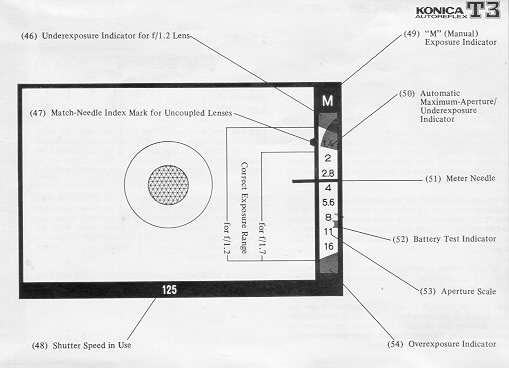
As long as me Meter Needle (51) is in the white area between me upper (50) and lower (54) red bands, shoot...your picture will be perfectly exposed!
The upper red band (50) also shows you the maximum aperture of me lens in use; in the illustration on the opposite page, an f/1.7 lens is on the camera, so the band rests
between f/1.4 and f/2. When you mount a faster or dower lens on the camera, this band win more up or down to show the new maximum aperture
(and, simultaneously, the
new underexposure zone.)
"Your Konica's sensitive through-the-lens meter automatically determines correct
exposure over an exceptionally wide range of lighting conditions...with ASA 100 film, from
a subject so dimly-lit it requires an exposure of 1/2 second at f/1.7 to a scene almost 50,000 times brighter - so bright it requires an exposure of
l/l000th second at f/16!
Within this basic "range" of meter sensitivity, the red band (50) in the viewfinder remains at a position corresponding to the maximum aperture of your lens (f/1.7 in the
illustration).
Under certain conditions, the red band (50) will drop below me maximum-aperture position. For example, with an f/1.7 lens
and ASA 100 film, selecting a shutter speed of one
second will cause me red band to drop down to a position between f/2 "d f/2.8. Here, your camera is preventing
incorrect exposure by actually showing you that, with this film/lens/shutter-speed combination, f/2.4 is the widest lens
opening at which your camera will automatically operate. As always, your photograph will be perfectly exposed, so long as the Meter Indicator Needle (51) does not go into
the red-band. Thus, with your Konica Autoreflex-A3 you need never worry about whether or not you're operating within your meter's "coupling range" - You are and
will obtain
a perfectly-exposed photograph automatically, so long as the meter needle is out of the red!
Konica's Control-Center viewfinder also shows you:
1) Underexposure Indicator for f/1.2 Lens (46)
2) "M" (manual) Exposure Indicator, (49), which appears automatically when your Hexanon AR lens is off
Automatic position (or when uncoupled lenses or accessories are
used);
3) Battery Test Indicator (52)
4) Complete Aperture Scale (53)
5) Exact Shutter Speed in Use (48), and
6) Match Needle Index Mark for stop-down metering with uncoupled lenses or accessories (47).
USING AUTOMATIC EXPOSURE CONTROL (AEC)
Full Aperture AEC Operation:
The figures in brackets in the chart at under show actual values of the dots between marked numbers on the film speed indicator.
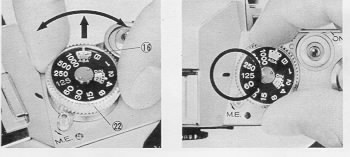
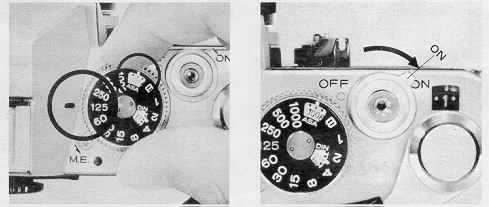
1. Set the Film Speed.
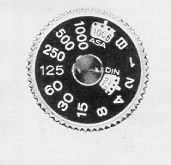
Lift the outer collar surrounding the Shutter Speed Dial (22) and turn it until the correct ASA number appears in the Indicator Window (16). (The window marked "DIN"
allows use of European films, in the event their ASA rating is not specified.)
2. Select the Shutter Speed.
For most situations, 1/125th is an excellent choice; it's fast enough to freeze most action and stop camera movement, and lets you shoot in most situations with today's film
types. Generally, slower shutter speeds should be used only when there's not enough light to work at l/125th; faster speeds are required usually only for extremely fast-moving
subjects (racing cars, sports) or when shorting with telephoto lenses which naturally magnify possible camera movement just as they magnify the subject. (See page 22 for
other situations in which faster or slower speeds may be desired)
3. Check Aperture Ring.
Make certain the Aperture Control Ring (12) is at the AE (EE) position as shown. (If it's not, the "M" signal will appear in the viewfinder as a
reminder that you're on
"Manual" operation.)
4. If the Needle Doesn't Move. .
If the needle in the viewfinder doesn't move, make sure the Meter On/Off Switch (3) is in the "On" position. (If there is still no needle movement check batteries as outlined
on page 9.;
5. Take the Picture!
Aim camera at subject, focus...and shoot. As long as the Meter Indicator Needle (51) is out of the red under and overexposure bands, you'll get a perfectly exposed
picture...automatically!
(Note: When using uncoupled lenses or accessories, follow the instructions our fined on page
23.
UNDER/OVER EXPOSURE SAFEGUARDS
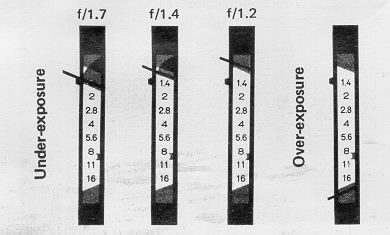 |
If the meter needle goes to the upper red band (shown above for the three standed Lenses), choose a Dower shutter speed. If, et the slowest shutter speed (I second), the
needle's still in the red zone, there's not enough light to get a
perfectly exposed picture. (Naturally, when using speeds of 1/30 second or slower, use a tripod or brace the
camera on a firm support if at all possible, and trip the shutter with a cable release or your Konica's built-in self-timer.) |
If the needle goes down to the lower red band (as shown in the fourth example above), there's too much light; choose a faster shutter speed.
When the Automatic Exposure is Not Used ....
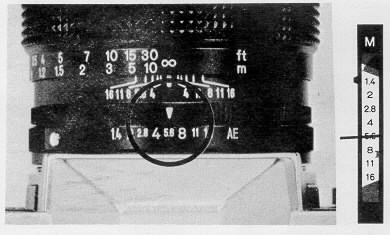 |
For manual operation, just dial the desired lens aperture on the aperture ring (f/5.6 is shown above). The meter needle will continue to indicate the recommended f/stop,
but the camera will actually shoot at the aperture you've set.
|
SEMI-AUTOMATIC OPERATION WITH UNCOUPLED LENSES/ACCESSORIES
Your Konica's through-the-lens metering system works perfectly even with non-automatic lenses and accessories, which do not couple to the camera's automatic exposure
mechanism. (Example: Pre-set lenses, mirror lenses, lenses from other cameras used with Konica adapters, even extension rings or bellows.) Here's how to use your
Autoreflex-T3 in these situations:
1. Set the Film Speed.
2. Select the Shutter Speed.
3. If the Needle Doesn't Move . . .
Make sure the Meter On/Off Switch is "On"
 |
4. Align the Indicator Needle.
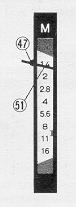
Open up (or close down) the lens aperture until the Meter Indicator Needle
(5l) lines up with the Stop-down Metering Index Mark (47). (If preferred, you can also do this by
changing the shutter speed instead of the lens aperture.)
5. Take the Picture!
Remember...this stop-down metering procedure is not needed (and in fact is not possible) with Konica Automatic Hexanon lenses mounted on the camera body. Stop-down
metering is used only for uncoupled lenses or accessories. |
SEMI-AUTOMATIC OPERATION WITH UNCOUPLED LENSES/ACCESSORIES: REMINDERS
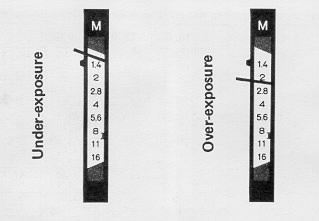 |
When using the stop-down metering system with uncoupled lenses or accessories, keep in mind that the
F/stop scale in the viewfinder no longer applies; neither do the under
or over-exposure warning bands. If the needle's above the Index Mark (47) as shown (above, left) there's not enough light, if it's below this mark (above,
right) there's too
much light. Solution: change lens aperture and/or shutter speed until the needle lines up with the Index Mark. |
In full-aperture metering with Konica Automatic Hexanon stray light which may enter the eyepiece and reach the meter cells have virtually no effect on exposures. In stop-down metering with uncoupled lenses or accessories, however, such light can have the effect of incorrectly influencing the meter's reading. Whenever you're using the stop-down metering system, be sure to place your eye as close as possible to the eyepiece, to prevent stray light from entering. (A Konica Rubber Eyecup, available from your
dealer, helps here.)
Using Preset Lenses....
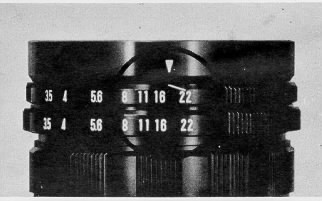 |
Lenses of this type do not automatically close down to the desired aperture; you turn the aperture control ring by hand to select the desired f/stop. Still, you can speed up
operation considerably by setting both control rings of these lenses to the smallest f/stop (f/22 in the example shown above), then turning them together until the meter needle
lines up with the Index Mark in the viewfinder. As soon as it lines up you're ready to shoot . . |
FOCUSING
Two types of Focusing Screen (55) are available for Konica Autoreflex-T3 cameras. While their characteristics differ, camera operation is
virtually identical.
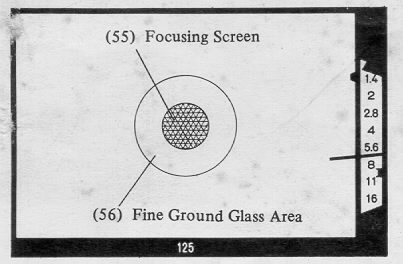
With Microdiaprism Focusing Screen: Turn the Focusing Ring (ll) of the lens until the image within the center of the viewfinder (55) is sharpest and clearest. (When you're out
of focus, this central area - composed of hundreds of microscopic prisms--appears quite hazy and
unsharp.)
With Split-Image Rangefinder Focusing Screen:
Turn Focusing Ring (11) until top and bottom of your subject are seen as a single image in the central area (55). `,When out of focus, the upper and lower halves of the subject
will be distinctly separated from each other.)
Under almost all conditions, this precision focusing screen works easily and with great accuracy. However, under certain conditions problems can develop: here's what they
are... and how to overcome them.
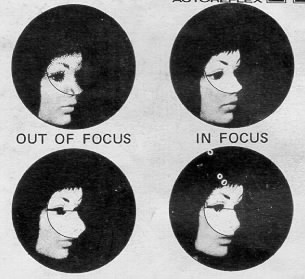
With Microdiapnsm ... when using 35mm (or shorter) wide-angle lenses, and lenses slower than f/4,s, or any lens used with
substantial bellows extension, the grid-like
pattern in the center of the viewfinder may remain visible regardless of focusing ring adjustment. (This
phenomenon is caused by the angles at which light rays enter the
focusing screen, and coos not indicate any defect in your camera or lens.) Solution: focus by concentrating on the circular
doughnut-shaped Fine Ground Glass Area (56)
around the Microdiaprism. Most people find this easiest to do by starting out with the lens deliberately thrown out of focus, then turning the focusing ring very swiftly until
the Point of greatest apparent sharpness is reached. If you turn the focusing ring very
slowly, your eye win fund it more difficult to determime the Poimt of greatest sharpness.
With Split-image Rangefinder... with lenses longer than 300mm, slower than f/4.s, or
any lenses used with extension rings or bellows, the light rays again enter the focusing
screen at extreme angles - and the upper (or lower) half of the rangefinder image may appear to "black outs'.. Solution: use the surrounding fine
ground glass "doughnut" (56)
with such lenses or extension devices. Here also, starting with a deliberated out-of-focus image
and then twisting the focusing ring as rapidly as possible is a technique that
many photographer) and helpful.
DEPTH-OF-FIELD CONTROL
Depth-of-Field is the distance between. the nearest and farthest objects in the scene that win be sharp in the finished picture. In practical terms this means that when you
bring an object into sharp focus, objects behind and in front of This will be rendered more or less sharply as well. For more Depth-of-Field, use a smaller f/stop (for example,
f/11 instead of f/5.6). For less DepUh-of-Field, use a larger f/stop (for example, f/4.0 instead of f/8).
Using Depth-of-Field Scale on Lens:
On the Depth-of-Field Scale, f/stop markings identical to those on
the Manual Aperture Scale (9), are repeated to the right and left of the Distance Scale Index Mark (57).
The Depth-of-Field for any focused distance will be found between any two identical f/stop markings on the
Depth-of-Field Scale. Thus, if the lens is focused at 15 feet and
the picture is to be made at f/16, referring to f/16 on both sides of the scale tells us that the Depth-of-Field extends from Infinity to about 8 feet. For maximum
Depth-of-Field,
including Infinity, set the Infinity mark at the f/stop in use, on the right hand side of the scale.
Film Plane Mark: For certain highly specialized applications, it is sometimes desirable to place your subject at a specific distance from
the film (focal) plane. Should you
wish to do this, measure the distance from the center-of-interest of the subject (the part you'll focus on) to the Film Plane Mark `'
- - " (21) atop the camera body.
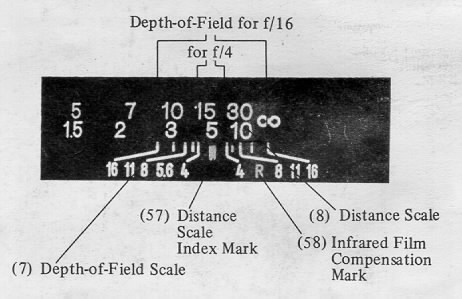
Infrared Film Compensation Mark: infrared rays come to a different focus than visible light rays. When shooting infrared Him with the appropriate filter, focus as usual. Then
bring the distance figure opposite the Distance Scale Index Mark (57) into line with the Infrared Film Compensation Mark (58).
Visual Depth-of-Field Preview:
In normal operation, all Konica Automatic Hexanon lenses remain at maximum aperture until the instant of exposure; after exposure, they return to
the "wide open" position. This greatly simplified viewing and precise focusing, since the image seen in the viewfinder always appears at its' most brilliant. However, it is
sometimes desirable to "preview" your picture as it will actually appear at the taking aperture indicated by the meter.
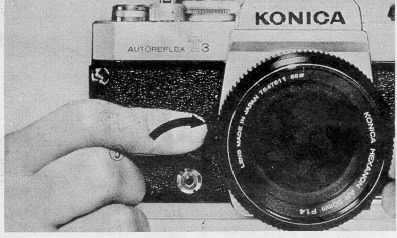
To do this, move the Self-Timer Lever (5) towards the lens. This will cause the lens diaphragm to "stop-down" to the actual shooting aperture as determined by your camera's
AE (EE) mechanism, and you can easily tell whether or not the background win be sharp, whether a branch in the foreground will be visible, and
so on. (Naturally, the image
seen in the finder darkens when closing down the lens.) As soon as you release the Self-Time Lever, it returns to its normal position and the lens re-opens to its widest
aperture.
Warning: DO NOT depress the small button in the center of the Self-Timer control when using the Depth-of-Field Preview facility. This button is used only for the self-timer
function, and should not be depressed when the depth-of-field preview feature is employed.
Self-Timer Operation
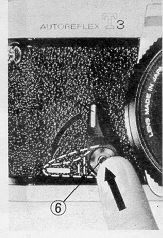 |
After transporting film, depress | the smaD button (6) in the center of the Self-Timer Lever (5); while holding it in, push the lever outwards (away from the lens) until
resistance is felt. When you press the shutter release, the timer win delay exposwe for approximately twelve seconds, during which a soft "whirring" noise is heard. (The
Timer may be set for shorter delays simply by pushing the lever down a lesser distance.) |
Traditionally, the self timer lets you get into your own pictures: however, it has several other applications specifically oriented to SLR photography. Shooting extreme close-ups, for example, it's desirable to
minimize vibration during the exposure as fully as is possible. Here, using the
self-timer will not only release the shutter without jar or shake, it will raise the mirror, and
close down the lens aperture, at the beginning of the cycle--several seconds before the actual moment of exposure. You'll fund it a highly versatile aid to better photography.
Operating tip: use your camera's built-in Eyepiece Shutter to cover the eyepiece when taking pictures with the self-timer. This will insure that the through/-the-lens meter is
not influenced by light entering the camera through the eyepiece
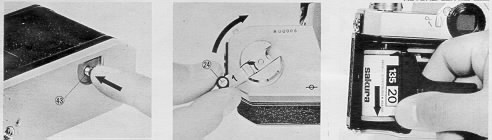
After all the pictures on the roll have been taken, the film is rewound into the cassette prior to removal for processing.
An occasional look at the Film Counter (2) will help keep you posted as to when you are coming to the end of the roll and prevent your accidentally tearing the film out of the
cassette. If you should come to the end of the film while the camera is at your eye in shooting position, the Film Transport Lever (14) will tighten and refuse to advance even
if the shutter has been released. If this happens do not force it! Instead, depress the Film Rewind Button (43) and at the same time move the Film Transport Lever as far as it
win. It will then snap back into its normal portion. Then, just...
1. Depress the Film Rewind Button (43). Once it is depressed, the button remains in place.
2. Lift up the Film Rewind Crank (24) and turn it clockwise at moderate speed in a continuous motion. An arrow on the Rewind Crank indicates correct direction toward.
3. When tension on the Film Rewind Crank eases, the film has been fully rewound. You can now open the camera
back and remove the cassette by tipping it towards yourself and letting it drop out of the bottom opening.
The Film Rewind Button returns to its original position once the Film Transport Lever is again actuated. In addition, the Film Counter automatically resets itself to "S" (Start)
as soon as the back was opened ... so you're ready to load your next roll right away!
FLASH PHOTOGRAPHY
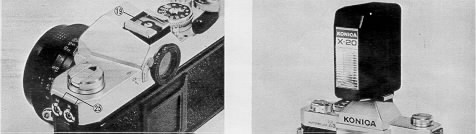
With your Konica Autoreflex-T3 camera, superb flash photography is more convenient than ever before. Either conventional
flashbulbs (and flashcubes) or electronic flash
units may be used, whether they are of cordless or plug-in design and Konica's Copal Square-S shutter enables precise synchronization with electronic flash at substantially
faster speeds (to 1/1 25th second) than many other cameras.
Using Cordless Flash Units:
The Konica viewfinder features an "X" Synchronization "Hot" Accessory Shoe (19). Konica X-20 or X-14 electronic flash units will automatically make contact through this
shoe, and no PC cord is needed. As a special safety feature, electrical current passes through the accessory shoe only when a flash is inserted.
When using cordless flash units in the Hot Shoe, use the 1/125th second shutter speed. (Slower speeds are of course
possible, but their use could create the possibility of unwanted "ghost" or double images (caused by the existing light being recorded by the film). If the Konica Cube Flash
attachment is used in the Hot Shoe, your shutter speed should not exceed l/30th second.
Using Plug-In Flash Units:
Your camera is also equipped with Flash Cord Terminals (25) accepting standard PC-type flash cords. Mount such Rash units either atop the camera with the Hot Shoe, or
with the mounting bracket~supplied with the flash.
For electronic flash, plug the cord into the terminal marked "X", and shoot at a shutter speed of 1/125th second. If the flash is designed for flashbulbs or flashcubes, plug the
cord into the "M" terminal; here, any shutter speed is usable with any flashbulb or flashcube type.
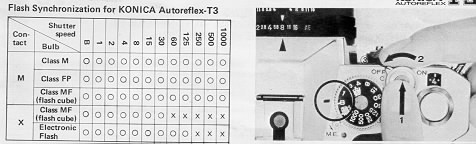
Determining Exposure for Flash Pictures
The brief burst of light from a flashbulb or electronic flash cannot be measured by your through-the-lens exposure meter. Thus, for flash photography always take your Konica
lens off "AK" (EE) position, and set the lens opening indicated by your flash unit's calculator for the film type in
use.
Should your flash not have a calculator dial, determine from the flash instruction manual the correct exposure for a picture at 10 feet for the ASA film speed in use. Multiply
this number by 10, and you have arrived at the "Guide Number". Now, simply divide the camera-to-subject distance (shown by your Konica lens) into this number; the result
is the correct lens opening for the flash-to-subject distance. Example: correct exposure with ASA 80 film at ten feet is f/4. f/4 X 10 = Guide Number of 40. Camera-to-subject
distance is five feet; 40 divided by 5 - f/8. Correct lens opening is f/8.
TIME EXPOSURES
When the shutter speed dial is set at "B", the shutter win remain open as long as the shutter release is hod down. As a result, exposures longer than one second - as long, in
fact, as several hours - may be taken at night, or in dimly-lit places where there is no moving subject. If an exposure of more than several seconds is desired, open the shutter
by pressing the release button and, white holding the release button down, turn the Meter On/Off Switch (3) counterclockwise to the "Off' position: the shutter release button
will then be locked down, and you may remove your finger from the release - the shutter will remain open until the On/Off Switch is returned to "On".
In time exposures, the Automatic Exposure Control system cannot be used, and exposures
are estimated (often doubling successive exposures, as in 2, 4, 8, and Second
exposure times -almost invariably. bracketing exposure, in this, manner win insure that at least one of the photographs
comes out perfectly).
Here, use of a Konica Cable Release win give extra assurance of blur-free results
MAKING MULTIPLE EXPOSURES
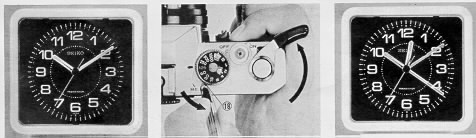
Another way your Konica Autoreflex-T3 lets you explore creative special-effects photography is by making multiple exposures when desired. Your Konica Autoreflox-T3
camera incorporates a Multiple Exposure Lever (18) under the shutter speed dial which enables an
infinite number of different exposures tot be made on a single frame of
film. After shooting the first ogre, press this lever down (counterclockwise) in the direction indicated by the arrow above the letters
"M.E." (Multiple Exposure). While
holding this lever in position, move the film transport lever completely through its cycle; you're now ready to shoot again on the same frame of film. This process may be
repeated any desired number of times. (Naturally, be very careful not to jar or move the camera between exposure, or the frames will not register perfectly.) For extra
convenience, the Multiple Exposure Control Lever may be moved by inserting the tip of a ball-point pen into the recess at the confer of the lever.
When making multiple exposures, allow 1/2 normal exposure for a "double" exposure, 1/3 normal exposure for each shot in a "triple", and so on. This can easily be done by
re-setting your film speed. For example; for a double exposure with ASA 64 film, shoot both exposures at ASA 125.
 M. Butkus, NJ.