If you find this manual
useful,
how about a donation of $3 to:
M. Butkus, 29 Lake Ave.,
High Bridge, NJ 08829-1701
and send your
e-mail address
so I can thank you.
Most other places would charge
you $7.50 for a electronic copy
or $18.00 for a hard to read Xerox copy.
This will help me to continue to host this site,
buy new manuals,
and pay their shipping costs.
It'll make you feel better, won't
it ?
If you use Pay Pal, use the link below.
Use the above address for a
check, M.O. or cash.
Back to main
camera manual page
<<<
IF YOU WOULD LIKE THIS OR ANY PDF FILE
PRINTED, BOUND AND MAILED TO YOU,
SEE THIS OUTSIDE COMPANY'S OFFER
>>>
To PDF version
of this
Pentax H1 - H3 page
To a Word document of this
Honeywell Pentax page
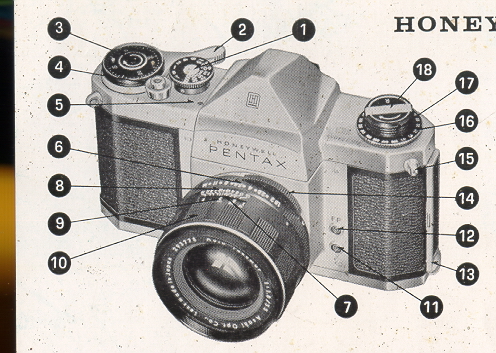 |
1. Shutter speed dial
2. Rapid wind lever
3. Film exposure count 4. Shutter release
5. "Wound" indicator
6. Diaphragm ring
7. Diaphragm and distance index
8. Depth of field guide |
| 9. Distance scale
10. Distance scale ring
11. X flash terminal
12. FP flash terminal
13. Back lock
|
14. Preview lever
15. D-ring book
16. Film type reminder dial
17. Rewind knob
18. Rewind crank |
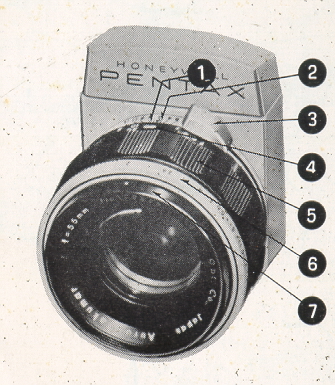 |
1. Distance index
2. Depth of field guide
3. Diaphragm winding lever
4. Distance scale
5. Distance scale ring
6. Diaphragm ring
7. Diaphragm index
|
IMPORTANT...read this First!
1. The "R" on the rewind knob (17) of recent Honeywell Honeywell
camera bodies is green instead of red as on the previous models. Please note
that the Auto-Takumar 55mm f/1.8 fully automatic lens with serial number smaller
than 462500 can not be used correctly on such recent models due to modification
of the Instant-Return Mirror and automatic diaphragm mechanism.
2. When advancing the film, be sure to stroke the rapid wind lever all
the way until it stops.
3. Do not touch the surface of the mirror. If the mirror gets dusty,
use a blower to dust it off, or dust lightly with a good camel's hair brush.
4. It your PENTAX should need repair, don t try to fix it yourself. Take it
to the Honeywell PENTAX dealer from whom you purchased it. Further refer to the
Warranty Policy described on the last page.
 |
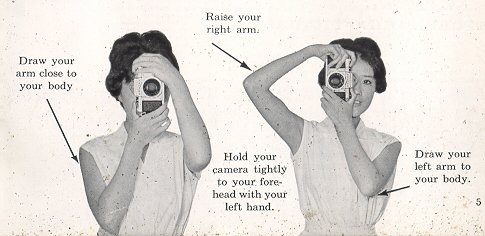
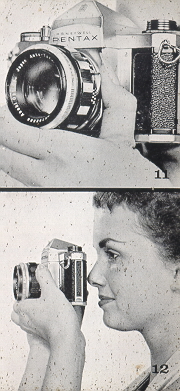
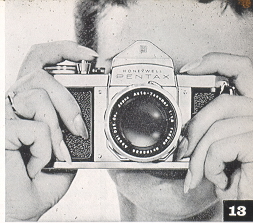
HOW TO HOLD YOUR CAMERA
As a general rule, your camera should be held more firmly by the
left hand which does not release the shutter. If you hold your camera with the
right hand-- the hand which releases the shutter - it may cause movement. Very
often, pictures which are not sharp are due to movement of the camera.
|
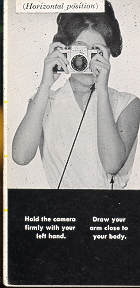
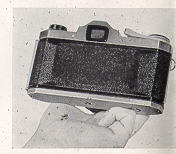
| When you focus with
the camera held horizontally, hold the lens barrel as illustrated in
photograph. Put the camera on the root of your left hand thumb and
little finger. Turn the distance scale ring with your thumb and index
finger.
 |
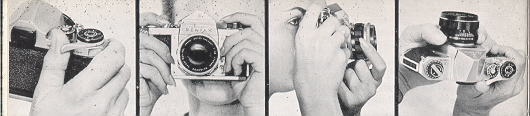
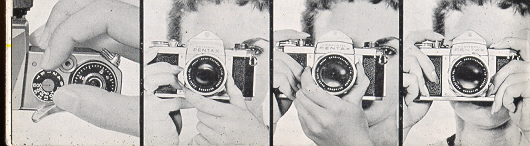
When holding the camera vertically, some people release the shutter. with the
thumb (Photo A), while others release it with the index finger (Photo B).
Position B is more desirable for fast focusing and shooting. With the PENTAX
whether held vertically or horizontally, you can see your subject image through
the taking lens, and this enables you to compose, focus and shoot faster than
with any other type camera.
 |
| 1.
Wind the rapid wind lever.
|
2.
Compose your picture |
3.
To view exact depth of field at-different apertures with the H.3, move
the preview lever to "M" and view your subject while turning the
diaphragm ring. On the h-1, simply turn the diaphragm ring. |
4. Select the F stop you want by setting the diaphragm ring
|
5. Set the
proper shutter speed.
|
6. Set the
H-3's preview lever on "A," or wind the 6 H-1' s diaphragm lever for
full-aperture viewing.
|
7. Focus |
8. Trip the
shutter.
|
 |
FILM LOADING
Avoid direct sunlight when loading your film
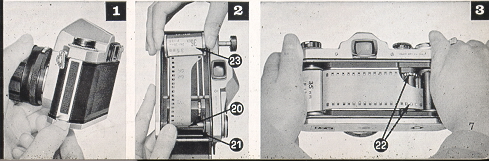
1. Open the back by pulling out the lock [13].
2. Pull out the film rewind knob [17] completely, place the film
cassette into the cassette chamber [23] and push back the rewind knob. Draw out
the film leader and insert it into the slit [20] of the take-up spool [21] If
the slit is not in a proper position to insert the film leader, turn the take-up
spool with your finger.
3. Turn the rapid wind lever [2] and make sure that both sprockets
have properly engaged the film perforations. Close the back and fasten the lock
E]
|
 |
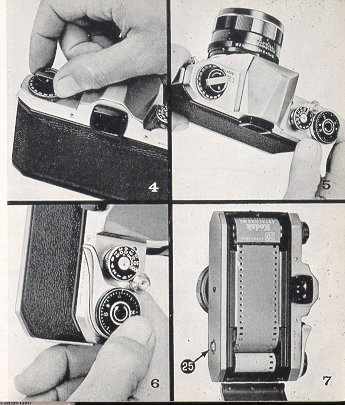
FILM WIND AND REWIND
To wind the film
4. Before turning the rapid wind lever, slowly turn the film
rewind knob clockwise until a slight resistance is felt. This prevents loosening
or warping of the film.
5. The first portions of the film cannot be used for picture
taking as they have already been exposed to light. Generally, two blank
exposures should be made before taking your first picture. Wind the rapid wind
lever until it stops. Watch to see that the rewind knob is turning counter
clockwise. This indicates that the film is moving from cassette to take-up
spool. Trip the shutter and again wind the rapid wind lever. Set the exposure
counter [3] to 0, and trip the shutter again. Your camera is now ready for the
first picture. When winding the rapid wind lever for the first picture, the
exposure counter automatically turns to '1', indicating that the first picture
is ready to be taken.
ALWAYS WIND THE RAPID WIND LEVER COMPLETELY WITH A FULL STROKE.
6. Turn the
exposure counter dial [3] in the direction indicated by the arrow.
DON'T TURN IT IN THE OPPOSITE DIRECTION. After the final picture
on the roll (20 or 36 exposures) has been taken, the rapid wind
lever will not turn all the way as you stroke it. This indicates
that the final picture has been taken on your film.
7. After the final picture has been taken, DON'T open
the back or all exposed frames will be ruined.
|
 |
 |
8.
Unfold the film rewind crank [18]
9. Depress the film rewind release button [25] shown in photograph 7
Turn the rewind crank to rewind the film-into the film cassette. The film rewind
crank permits rewinding at a smooth, even rate. Under some atmospheric
conditions, erratic or too rapid 'rewinding will cause static electricity' marks
on the film. You will feel the tension on the rewind crank lessen as the leader
end of the film slips off take-up spool.
Stop rewinding when
you feel this happen. AVOID DIRECT SUNLIGHT WHEN UNLOADING YOUR FILM. (The
rewind release button [25] will return to normal positions you load your next
film and turn the rapid wind lever.)
10. Open the back, pull-out (he film rewind knob [17] and remove the
film cassette. Bend the leader end of the film to indicate that the film is
exposed and ready ' for development.
|
BRIGHT FIELD
FOCUSING
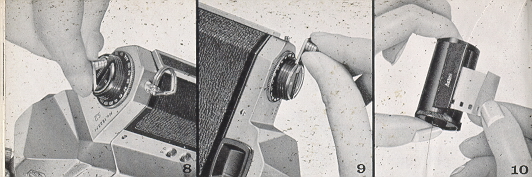
11. With the recent Honeywell Pentax camera with the green "R" marking
on the rewind knob, you can start viewing and focusing before and after winding
the rapid wind lever. When the preview lever [14] on the H-3 is set on "A", the
diaphragm is fully open except for the moment- of exposure.' On the H-l, turn
the diaphragm operating lever to fully open the diaphragm for bright viewing and
focusing.
12. Turn the distance scale ring (Ed on the H-3; ~ on the H-l) until
your subject image is clearly in focus. It is not always necessary for you to
view and focus with the diaphragm fully open. In bright sunlight, you can easily
focus with the diaphragm closed to fl5.6 or fl8, and still observe the depth of
field. It is easier, however; to focus with the diaphragm fully open as your
subject image is much brighter.
|
 |
AUTOMATIC DIAPHRAGM
When the H-3's preview lever is set on "A" (Automatic), the
fully automatic diaphragm is at its largest aperture (f/1.8) at all times,
except for the instant of exposure, no matter what aperture is set on the
diaphragm ring. When you release the shutter, the diaphragm automatically stops
down to the predetermined aperture-and the shutter curtains start traveling
instantly. When the exposure is completed, the diaphragm reopens to maximum
'aperture completely-automatically, and you are ready to compose, focus, and
shoot your next picture. If you wish to visually check exact depth of field
before making the exposure, move the preview lever to "M" (Manual). This stops
the diaphragm to the aperture selected and shows you exactly how much depth of
field will appear in your picture. The preview lever may be moved back to "A"
before- or after making your exposure, or, if you are making pictures in bright
sunlight, it may be left on "M", which permits a constant check of depth of
field.
The diaphragm of the Pentax H-1 is semi-automatic and is opened
to its maximum aperture by means of the diaphragm winding lever. When the
shutter is released, the diaphragm automatically stops down to the preselected
aperture. To fully open the diaphragm again, turn the diaphragm lever each time
before you trip the shutter. You may turn the H-l's diaphragm lever any time -
before or after winding the rapid wind lever, setting the shutter speed, or
focusing. After the diaphragm winding lever of the recent H-1 with the green "R"
marking has been wound to fully open the diaphragm for bright viewing and
focusing, the diaphragm will not be closed down manually to check the depth of
field. Check the depth of field before
winding the diaphragm lever.
 |
You may turn the H-l's
diaphragm ring and change the preselected aperture after
winding the diaphragm lever. For example, you may change the
diaphragm ring setting from f/11 to f,/5.6 after winding the
diaphragm lever; the diaphragm will automatically stop down to
f/5.6 when you trip the shutter.
NOTE: When you do not intend to use your Honeywell Pentax H-l for a
lengthy period of time, turn the diaphragm ring to its smallest aperture (f /22)
to protect its spring mechanism. Don't keep the diaphragm winding lever open. If
it is opened, turn the rapid: wind lever and release the shutter button to
release the spring tension.
|
 |
SHUTTER
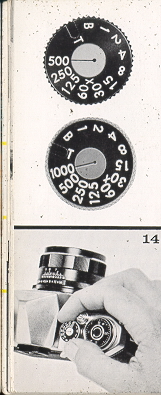
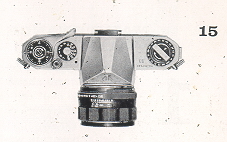
The Pentax H-3 is equipped with the following shutter speeds: T. B.
1,1/2,1/4,1/8,1/15,1/30,1/60,1/125, 1/250, 1/500, and 1/1000 sec. The H-1 has
identical speeds with the exception of 1/1000 sec. On both cameras, only the
figures 1, 2, 4, 8, 15, etc. appear on the shutter speed dial.
Adjustment of shutter speeds
Turn the shutter dial [E clockwise or counter-clockwise as you like, to the
desired shutter speed. The shutter speed may be set either before or after
winding the rapid wind lever. As you wind the shutter by turning the rapid wind
lever, the "Wound" indicator [3] becomes red showing the shutter is wound. The
indicator window blacks out as you trip the shutter button. For use of the X
setting on the shutter dial, refer to page 24.
|
With the
shutter speed dial set on B (bulb) the shutter will stay
open as long as you depress the shutter button. As you
release your finger from the shutter button, the shutter
closes. When a long exposure is desired while using the B
setting, attach a shutter release cable with a locking
device to the shutter button. This will permit "Time
Exposure." With the shutter speed dial set on T (time),
the shutter stays open after the shutter button is
released. To close the shutter, turn the shutter speed
dial in either direction. Unless you turn the shutter
speed dial? the shutter will not close.
CAUTIONS
1. At slow speeds - slower than 1/30 - support your camera rigidly
or use a tripod to prevent movement of your camera.
2. To protect the shutter mechanism, trip the shutter
release before putting the camera out of use for any
extended period. |
 |
MAINTENANCE OF YOUR CAMERA
1. Protect your camera from humidity, salty air and dust. Hot temperatures
above -120°f and low temperatures below - 55°f will affect the shutter
performance. In extremely hot weather, try to keep your camera cool. Never put
it in the glove compartment or on the rear window sill of your car. When
extremely cold, try to keep the camera warm.
2. To remove grit or dirt from the camera body, use a soft brush or a dry soft
piece of cloth. For the lens, use only a spray of air, soft lens tissue, or a
camel hair brush. For the reflex mirror, use a spray of air or a soft camel hair
brush only. Never wipe the mirror or lens surface with cloth.
3. Never use oil in your camera and do not touch the shutter curtains.
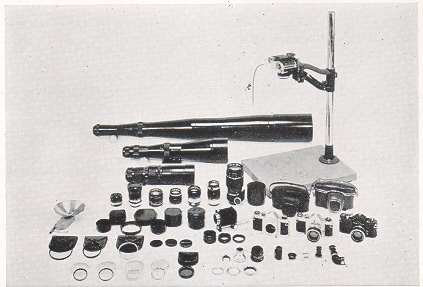 |
COMPETE
SYSTEM OF PHOTOGRAPHY... from -photomicrography to macro
photo . . .
from macro photo to close-up . . .
from close-up
to infinity . . .
with a complete range of accessories and lenses.
|
MAJOR FEATURES OF THE PENTAXH-1 AND H-3
Here's why Honeywell Pentax cameras are the outstanding values in their
field:
Type: Single lens reflex.
Film size: 35mm; 20 or 36 exposures.
Picture size: 24mm x 36mm.
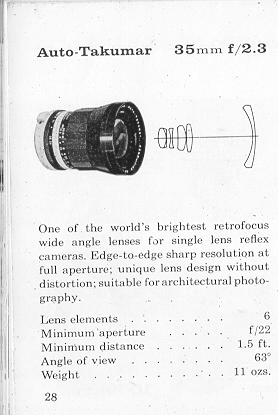
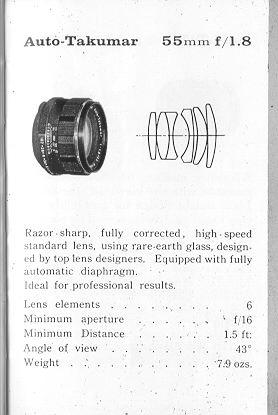
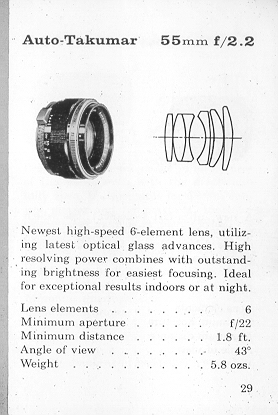
Standard lenses: ~ H-1: Auto-Takomar 55mm f/2.2 with
semi-automatic diaphragm. H-3: Auto-Takomar 55mm f/1.8 with fully-automatic
diaphragm.
Shutter: Focal plane shutter; single, non-rotating
shutter speed dial.
Speeds--H-1: T (Time), B (Bulb), 1,
1/2,1/4,1/8,1./15, 1/30, 1/60, 1!125, 1/250 and 1/500 of a second.
H-3: Same as H-1 with the addition of 1/1000
of a second.
Finder and Focusing: Pentaprism finder with microprism
Fresnel lens brightened ground glass. Life size image viewing and focusing with
standard 55mm lenses.
Reflex mirror: Instant return type.
Rapid film advance: Single-stroke rapid wind lever
transports film and winds shutter.
"Wound" indicator: When shutter is wound, a red disc
appears-in a small window along side the shutter speed dial.
Film rewind: Rapid rewind crank speeds film take-up.
Double exposure: Coupled film "wind set" prevents double
exposure.
Lens moue: - Threaded lens mount for interchangeable lenses
Adaptor rings are available for the use of Leica-type and Asahiflex lenses.
Flash Synchronization: FP and X flash terminals.
Film type: Color coded film type dial with ASA ratings for
color, black and white, and special films.
Accessory Clip: Grooves located on both sides of the
viewfinder window frame accept accessory clip and 90° finder, available as
accessories.
| As shown
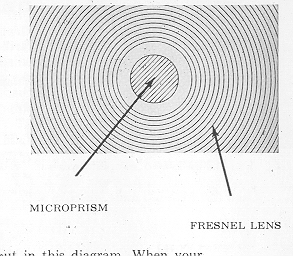
on page 2, Honeywell Pentax cameras have a Fresnel lens
with a-microprism center underneath the ground glass. As
you look through the finder, you will
see that
the Fresnel lens
consists -of many concentric rings which provide the
brightest possible image on the ground glass.
The microprism is the portion pointed out in this diagram. When your subject
is in focus, the image in the microprism will be sharp and perfectly clear. If
your subject is not in focus, the H-3's microprism will break the image. up into
many small dots, much like an engraver's screen, while a number of parallel
diagonal lines will appear in the microprism of the H-l. You can focus on your
subject at any portion of the ground glass of either Pentax model.
|
 |
 |
DEPTH
OF FIELD Depth of field is the range the nearest
and farthest distances which are in focus at different
lens apertures. With the Pentax, you can determine the
depth of field in advance by looking through the
camera's taking lens with the diaphragm stopped down to
the desired opening.
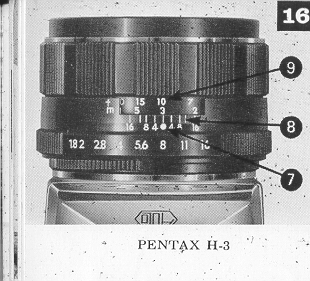
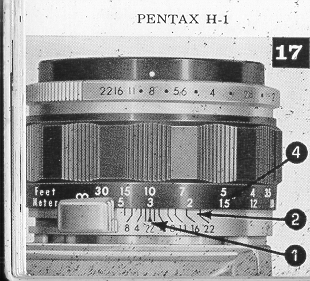
DEPTH OF FIELD GUIDE
If you want to know how great the depth of field is at a certain aperture,
look at the depth of field guide (8,2). In figures 16 and 17 both the H-3 and
H-1 have their distance scales (9,4).set at 10 feet . . . the lens is focused on
a subject 10 feet away. The figures on each side of the distance index (7,1)
correspond to the diaphragm setting and indicate the range of in-focus distance
for different lens apertures. For example, if the lens opening of f/8 is to be.
used, the range on the distance scale ring covered within the figure 8 indicates
the area in focus at that lens opening. You will note from the depth of field
guide that the range from 8 to 14 feet is; in focus. Note that as the lens
apertures change, the effective depth of field also changes. For the depth of
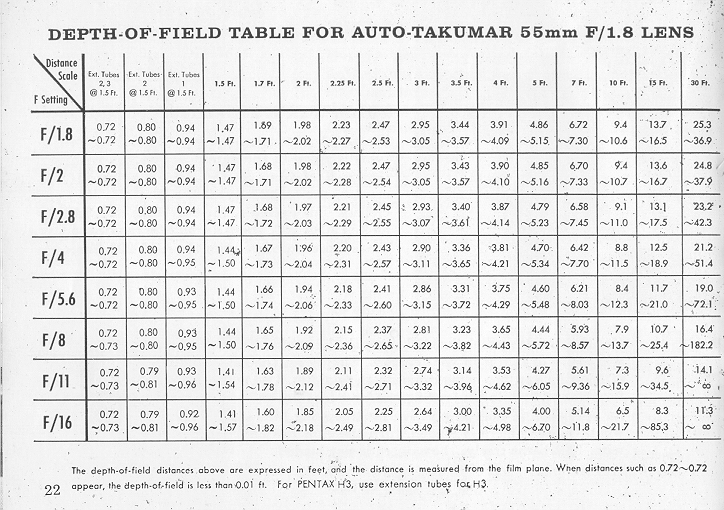
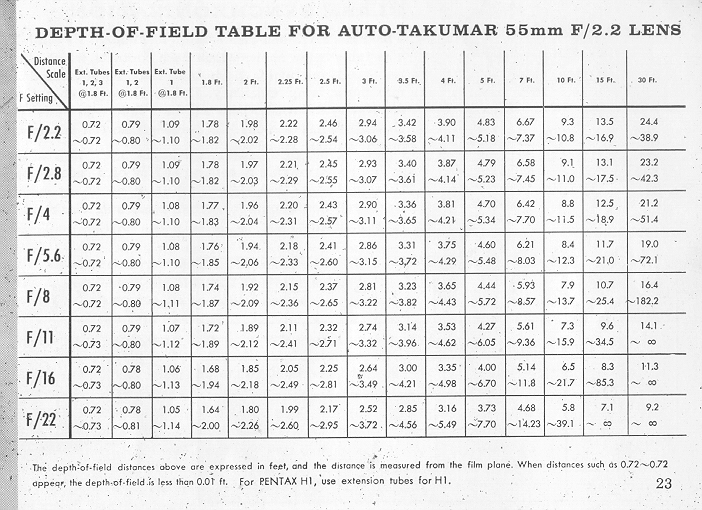
field when using extension tubes,
refer to pages 22, 23.
|
 |
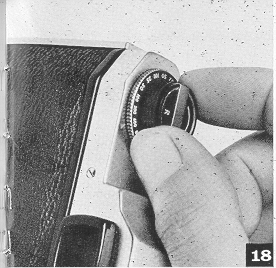 |
FILM TYPE
REMINDER DIAL
The ASA film speed rating of all 35 mm films is given in the data sheet
packed with each roll of film. As the ASA number increases, the sensitivity of
the film also increases. For example, for two films of ASA 50 and ASA 200, the
ASA 50 film requires 4 times more exposure than the ASA 200 film. Use the film
type dial (located beneath the rewind knock) to show
what type of film is in your camera. Simply set the
ASA number of the' film you Are using opposite the
-pointer. Use white figures or black and white film;
red figures for color film; and green figures for
special film, such as positive film, copying film,
etc. To check whether the camera is loaded, turn thy
film rewind. knob clockwise. If it turns freely, the
camera is not- loaded. |
Depth of Field Table for Auto-Takumar 55mm F/1.8 Lens - F/1.8 F/16
Depth of Field Table for Auto-Takumar 55mm F/2.2 Lens - F/1.8 F/22
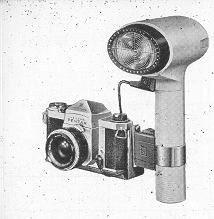 |
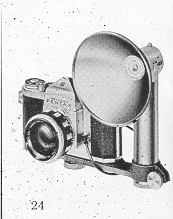
FLASH
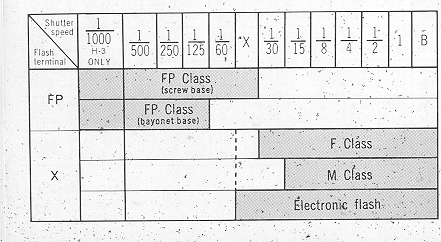
SYNCHRONIZATION The PENTAX has two sets of
terminals--FP and X. The table below shows which
flash contacts, which shutter speed and which flash
bulb maybe combined for maximum lamp efficiency..
Unless these combinations are rigidly followed,
there will be a failure in flash synchronization.
Note the "X" setting between 61) and 30 on the
shutter speed dial.
The speed of this X setting is 1/50 of a second, and this indicates the
highest shutter speed at which Honeywell Strobonars or other electronic flash
units may be used.
|
 |
 |
|
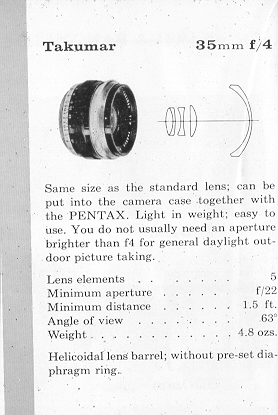
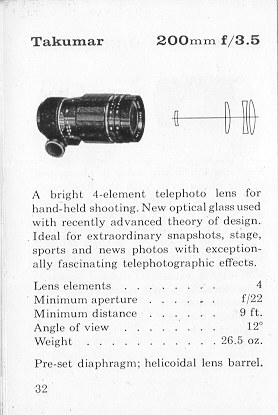
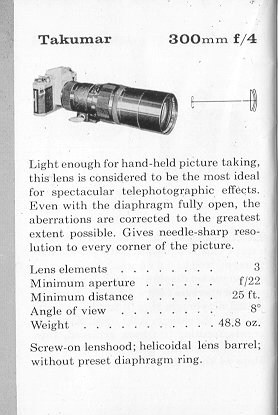
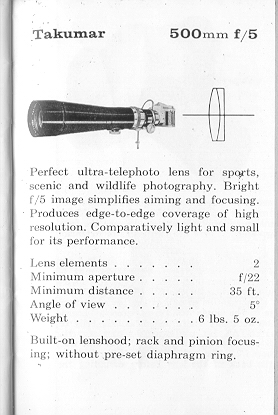
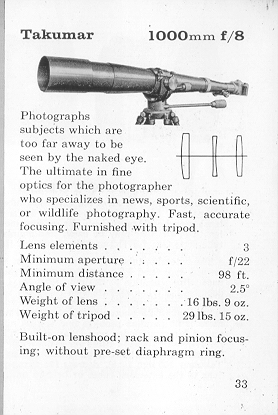
INTERCHANGEABLE LENSES
The PENTAX offers many interchangeable lenses, all of which are widely
respected by professional and amateur photographers for their fine resolution.
The photographic coverage of the various Takamar lenses is illustrated on the
next page. With focal. lengths longer than 55mm, the subject image is seer'
through the viewfinder larger than its life size. Regardless of the lens
selected for the PENTAX,. there is never need for an accessory viewfinder,
ordinarily required for rangefinder type cameras.
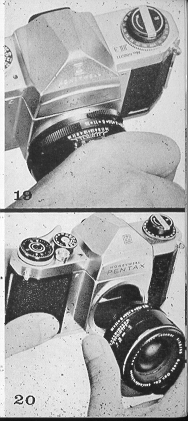
When interchanging lenses, hold the lens by the distance scale ring (A) as shown
in photograph 20. When attaching a lens; filter, or lens hood, do not screw it
too tightly, as you may find it difficult to unscrew.
|
 |
HONEYWELL CLIP-ON METER
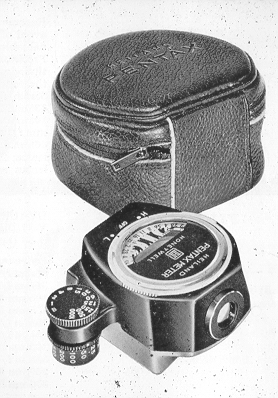 |
Easily
attached to the pentaprism housing of Honeywell
Pentax H-1and H-3 cameras, this meter couples
directly to slotted shutter speed dial and is
extremely. convenient to use. Cadmium sulfite,
cell offers high sensitivity; measures an angle of
only 9°, which results in complete exposure
control. Operates on one 1.3v Mallory 640-R
battery. Complete with battery and leather
carrying case.
See
this link on a Wein Air replacement battery.
|
RESOLVING POWER OF TAKUMAR LENSES
Resolving power of all Takumar lenses is factory-tested by
skilled engineers. There are three types of . tests: microscopic aerial test,
projection test and photographed film test. Resolving power of a lens shown by
LPM (lines per mm ) varies depending upon the method of resolution test. Takumar
lenses have been-tested for resolving power to conform to Asahi standards, which
are higher than those set by J - Japan Industrial Stand-: arcs). All Takumar
lenses bear the seal of the Japan Camera Inspection Institute Which insures the
performance, standards. :
When testing' your lens performance .... Use a slow-speed fine grain film.
Generally, high speed films are grainy and are not suitable for resolution
test. Support your camera on a good tripod. Use a shutter release cable to
prevent movement of the "camera. The definition of the picture on the negative
film may decrease if exposure and developing time are not proper. Time your
exposure and development correctly.
If you do your own developing and enlarging, see that your enlarger uses a
fine quality enlarger lens.: If it is not of a fine quality, your-pictures can
never be sharp no matter what superb lenses are mounted on your camera. Usually,
the diaphragm of the enlarger should be closed down to f/8 or f/11.
 ,
M. Butkus, NJ.
,
M. Butkus, NJ.