This camera manual library is for reference and historical purposes, all
rights reserved.
This page is copyright© by
M. Butkus, NJ.
This page may not be sold or distributed without the expressed
permission of the producer
I have no connection with any camera company
On-line camera manual library
This is the full text and images from the manual. This
may take 3 full minutes for all images to appear.
If they do not all appear. Try clicking the
browser "refresh" or "reload button" or right click on the
image, choose "view image" then go back. It should now appear.
To print, try printing only 3 or 4 pages at a time.
If you find this manual useful, how about a donation of $3
to: M. Butkus, 29 Lake Ave., High Bridge, NJ 08829-1701
and send your e-mail
address so I can thank you.
Most other places would charge you $7.50 for a electronic copy or $18.00 for
a hard to read Xerox copy.
Back to main camera manual page

|
2 Introduction 4 3 Technical features 6 4 Guide to individual parts 10 5 Summary of instructions for automatic operation 19 6 Preparing to take pictures 23 Inserting the battery 25 Checking the battery 27 Inserting the film 294www.butkus.org Preparing to shoot 31 Setting the film speed 33 7 Taking pictures 34 |
Automatic shutter speed control 35 Semi-automatic mode 47 Flash photography 51 Changing the lens 55 Focusing 57 Depth-of-field indication 59 Stop down key 59 Shutter release 61 Locking the shutter release 61 Self-timer 63 Changing the film 65 8 Care of the camera 66 |
With the PRAKTICA BC 1 you have bought a quality miniature SLR camera with fully automatic shutter speed control
in a range between 1/1000 s and 40 s. In addition, the camera's microelectronics make possible photography at fixed
shutter speeds between 1/1000s and 1 s and unlimited shutter speeds with the B setting. The open-aperture TTL
metering means a really bright viewfinder image as a result of the electronic transmission of aperture values from the
lens to the camera.
17 LEDs at the right-hand edge of the viewfinder image provide information on all important shot data and
operations, such as the shutter speed to be expected, underexposure and overexposure, automatic and semi-automatic
operating modes as well as flash readiness with dedicated computerized flash units. In addition, the preselected
aperture setting is visible at the bottom of the viewfinder image. Manual corrections can be made for deliberate
overexposures and underexposures. The PRAKTICA BC 1 is suitable for use with both normal electronic flash units
and computerized flash units.4www.butkus.org
· SLR camera for 24 x 36 mm frame size open-aperture TTL metering system with electronic transmission of aperture
values
· automatic stepless electronic shutter speed control between 1/1000 s and 40 s
· changeover from automatic to semi-automatic mode possible--fixed speed range
from 1/000s to 1s
· indication of shutter speed in viewfinder by LEDs
· indication of overexposure or underexposure
· aperture setting displayed at bottom of viewfinder image
· manual exposure compensation of + 2 exposure factors
· memory locking
· self-timer (approx. 8 s) with starting button
· focusing system comprises Fresnel lens with novel diagonal triple wedge ,microprism ring and ground glass ring
· flash synchronization (approx. 1/90 s) at **** or automatic formation of flash speed in automatic setting with
dedicated computerized flash unit, indication of flash readiness in viewfinder
· viewfinder image shows approx. 95 per cent of picture sides
· PRAKTICA bayonet (flange focal length 44.4 mm, internal diameter 48.5 mm)
· connection for motor winder
· film information holder on rear of camera
· battery condition indication in viewfinder
· power source: 6 V primary battery 4www.butkus.org
· silicon photoelement as light sensor4www.butkus.org
· metering and control range: O-17 EV at 21 DIN and aperture 1.4
· dimensions of body: 138 mm x87.5 mm x49 mm
· weight of body without battery: 530 g
| Click here to see images of parts 1 - 11 | Click here to see images of parts 27 - 34 |
| Click here to see images of parts 12 - 26 | Click here to see images of parts 35 - 43 |
|
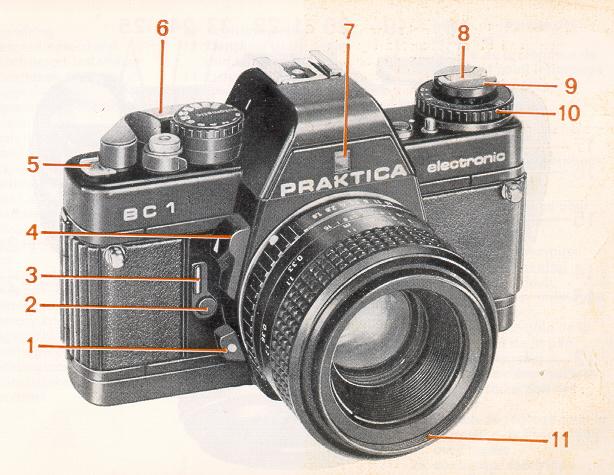
1 Unlocking key 2 Self-timer release 3 Self-timer cocking lever 4 Stop down key 5 Frame counter 6 Cocking lever 7 Aperture value indication 8 Rewind crank 9 Rewind button 10 Film speed setting ring 11 Filter thread 12 Focusing ring4www.butkus.org 13 Depth-of-field scale and infrared spot |
14 Lens positioning mark 15 Lug for carrying strap 16 Release lock with mark 17 Connection for cable release 18 Shutter release 19 Shutter speed/automatic setting knob 20 Hot shoe with center contact 21 Connection for computerized flash 22 Center contact 23 Memory lock and battery check button 24 Compensation unlocking button 25 Exposure compensation knob with marking 26 Flash nipple |
|
27 Aperture setting ring 28 Film cartridge compartment 29 Shutter blades 30 Eyepiece with accessory holder 31 Camera back 32 Film take-up-spool 33 Film sprocket 34 Knurled spool base |
35 Contacts for motor winder 36 Cover for battery compartment 37 Battery compartment locking screw 38 Film information holder 39 Thread for tripod 40 Rewind release 41 Coupling for motor winder 42 Catch for motor winder 43 Eyepiece cover (see page 41) |
This summary is no substitute for a thorough knowledge of all the operating instructions contained in this booklet.
· Insert battery
Note + and--pole markings in battery compartment cover (36).
· Open back
Pull rewind button (9) upwards and the back will open.
· Insert film
Adjust setting knob (19) to **** or a fast fixed shutter speed. Insert film cartridge in cartridge compartment (28),
press rewind button (9) back in, insert the start of the film into the slit in the take-up spool (32) and turn the spool by
the knurled edge (34) towards the center of the camera until the teeth of the sprocket (33) engage in the perforations
in the film. Swing cocking lever (6) as far as it will go to check film travel.
· Close back
· Prepare to shoot
Carry on releasing and cocking until the frame counter (5) indicates frame 1.
· Readjust setting knob (19) to automatic.
· Set film speed
Lift and turn setting ring (10) until the correct film speed is opposite the mark.4www.butkus.org
· Select aperture
Set the desired aperture using the aperture setting ring (27)
· Focus
Triple wedge: object is in focus when its contours and lines flow naturally Microprism ring: when focused
correctly the object is clear and flicker-free Ground glass ring: used with poor lighting (eg for close-ups); image
should appear clear and sharp.
· Release shutter
Depress shutter release (18) slightly; the camera's automatic system starts to work and an LED
shows the shutter speed. If the speed suits the subject, release the shutter; if not, alter the aperture.
· Film change
Depress rewind release (40), fold out rewind crank (8) and turn in the direction of the arrow. When turning becomes
easier the film has been completely rewound. Pull the rewind button (9) all the way up to unlock the back and then
remove the film cartridge.
· Lens change
Press unlocking key (1), turn lens anticlockwise as far as it will go and remove. Insert the lens so that the red
markings are opposite one another and turn clockwise till it locks.
Inserting the battery
![]() |
A 6 V source is required to power the whole electronic system. It may be an alkali manganese, silver oxide or lithium
battery.4www.butkus.org
Under normal conditions, a fresh battery lasts for about 2 years. To insert the battery, turn the locking screw (37) of the battery chamber cover (36) counterclockwise until the cover can be opened. Wipe the contacts in the battery chamber and those of the fresh battery with a dry cloth. Press the plus pole of the battery against the spring contact (polarity marks on battery chamber cover) and tip the battery in. Close and lock the cover.
|
Checking the battery
![]() |
The shutter must be cocked. Press shutter release (18) and then memory button (23). If the LED indication is bright
the battery still has a sufficient power reserve. When the battery is used up the LED goes out. In B and
|
Special attention should be paid to the battery and contacts. Frequent checks are advisable, cleaning when necessary.
The battery is sensitive to low temperatures and should be suitably protected. When the camera is not being used for
lengthy periods the battery should be removed from the camera.
![]() |
Opening the back Pull the rewind button (9) up as far as it will go to unlock the back. Open the back completely, the frame counter (5) will automatically return to the starting position. Insert the film cartridge into the cartridge compartment (28). Press the rewind button (9) back in all the way, turning it if necessary. Inserting the film |
Insert the start of the film at least 1 cm into the slit in the take-up spool (32). Then turn the spool by the knurled base
(34) towards the middle of the camera through about one revolution. The teeth of the film sprocket (33) must engage
in the perforation in the film. Check that the film is running properly by carefully operating the cockier' lever (6).
![]() |
Closing the back Preparing to shoot |
![]() |
Setting the film speed Lift film speed setting ring (10) and turn until the film speed value used is opposite the mark.
|
Automatic shutter speed control
In automatic mode the PRAKTICA BC1 operates automatically in a stepless shutter speed range from
1/1000 s to 40
s. The shutter speed is electronically controlled in line with the lighting conditions, the selected aperture and the film
speed. LEDs at the edge of the viewfinder indicate the controlled shutter speed. Where the shutter speed range is
exceeded this is indicated by OVER and UNDER. The TTL metering automatically takes into account all factors
influencing the exposure such as focal length of the lens, filter and extensions. If lenses with the M 42 x 1 PRAKTICA
thread are used with an adapter, light metering is automatic at working aperture.4www.butkus.org
![]() |
Aperture selection
|
The choice of aperture can also be made according to the desired depth-of-field
(foreground, mid-ground, background) and by taking into account the speed information
in the viewfinder (danger of blurring). See also the section on depth-of-field indication. A small aperture means a large
depth-of-field, a large aperture a correspondingly smaller depth-of-field.
![]() |
Automatic exposure indication Set shutter speed knob (19) to automatic. The electronics are switched on by slight pressure on the shutter release (18). In the viewfinder image the shutter speed calculated by the automatic system is shown by an LED display. If it appears unsuitable for the subject, it can be corrected by selecting another aperture. LEDs are allotted to selected speeds between 1/1000s and 8 s, with intermediate settings being indicated by the simultaneous lighting of two adjacent diodes. Shutter speeds between 8 s and 40 s are indicated by the permanent lighting of the UNDER LED, while speeds outside the 1/1000s to 40 s range are indicated by the flashing of the LED at OVER or UNDER. In this case the shutter is set for 1/1000s or 40s. If shutter speeds of 1/15s and slower are formed, the use of a tripod or other steady surface is recommended.4www.butkus.org |
![]() |
Shutter release
|
If the cycle needle to be broken off prematurely with a very long shutter speed (eg after an accidental shutter released, the shutter speed SE sting knob (19) should briefly be turned to B. If the camera is not held at eye level during automatic operation (eg with tripod shots), the eyepiece cover (43) which comes with the camera should be pushed into the holder (30).