|
Praktica BCA Posted by Alex Albu 12-19-'02 HTML Translations - German
- Italian
- French
- Spanish
- Others This is the full text and images from the manual.
This camera manual library is for reference and historical purposes, all
rights reserved. If you find this manual useful, how about a donation of $3 to: M. Butkus,
29 Lake Ave., High Bridge, NJ 08829-1701 This will allow me to continue to buy new manuals and pay their shipping
costs. It'll make you feel better, won't it? |
|
|
| The PRAKTICA BCA you now own is a reliable SLR camera offering latest technical features and guaranteeing ease of operation as well as
excellent sharpness. Enjoy it.
Pease follow the instructions contained herein. Improper camera handling may result In damage not covered by our guarantee. Further development of the PRAKTICA BCA may lead to minor deviations from the details given here. Single lens reflex camera for frame size 24X 36, through-the-lens light metering with open aperture, electronic aperture value transmission4www.butkus.org Manual compensation of exposure data in the range of ± 2 exposure factors -- viewfinder image shows approximately 95 per cent of the picture sides -- electronic flash synchronization at 1/60s -- PRAKTICA bayonet (flange focal length 44.4 mm, inner diameter 48.5 mm) -- self-timer (about 8 s delay) with release button -- connection for motor winder -- film information holder on camera back battery condition indication in viewfinder - power source: 6 V primary battery 4www.butkus.org -- light sensor: CdS photo resistor -- metering and control range: 1 ... 19 EV -- dimensions of body: 138 mm x 87 mm x 49 mm -- weight (body without battery): 520 g |
![]() |
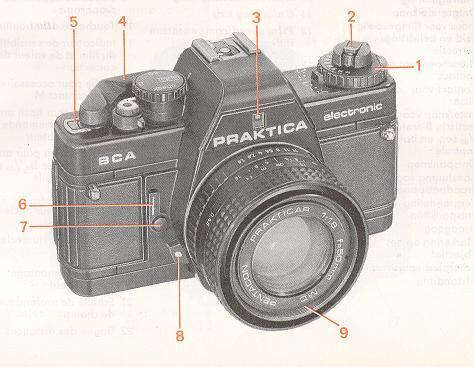
1. Film speed and compensation dial
2. Rewind button with crank 3. Window for aperture indication 4. Cocking lever 5. Frame counter 6. Self-timer cocking lever 7. Self-timer release button 8. Lens unlocking key 9. Filter thread |
11 unlocking key4www.butkus.org
12 Film speed/compensation index
![]() |
13. Hot shoe with center contact
18. Release lock 19. Lug for carrying strap
21. Depth-of-field scale
|
![]() |
23. Eyepiece with accessory holder
24. Shutter 25. Film cartridge compartment 26. Film sprocket4www.butkus.org
|
![]() |
29. Battery compartment lid with locking screw
30. Contacts for motor winder 31. Catch for motor winder 32. Coupling for motor winder 33. Rewind release 34. Thread for tripod 35. Film information holder |
![]() |
Inserting the battery A 6 V source is required to power the whole electronic system. It may be an alkali-manganese, silver oxide or lithium battery. Four button cells
(e. g. LR 44) kept in a battery sleeve (identification no. 961 363) may also be used.
|
![]() |
Checking the battery Lift the mode selector (15) and turn it to ,,check" (the shutter must be cocked). The battery still has a sufficient power reserve when the red LED lights up at symbol or the green LED at 1000/60 and no other LED lights up after a check time of 2 to 3 s. Reset the mode selector (15) to "auto" after the check.
|
![]() |
Opening the back Pull the rewind button (2) up as far as it will go to unlock the back. Open the back completely; the frame counter will automatically return to the
starting position. Insert the film cartridge into the cartridge compartment (25). Press the rewind button back in all the way, turning it if
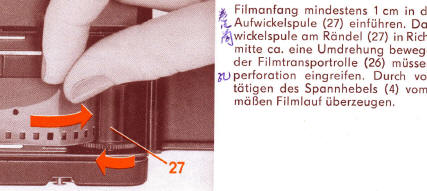
necessary.4www.butkus.org Insert at least 1 cm of the film leader into the slit of the take-up spool (27). Then turn the spool by the knurled base towards the middle of the camera through about one revolution. See that the teeth of the film sprocket (26) engage in the perforation of the film. Check that the film is advanced properly by carefully operating the cocking lever (4). |
![]() |
Loading Before loading, set the mode selector (15) to "60" as a slow shutter speed may be formed in the "auto" position. The cocking lever can be operated only when the shutter cycle is completed. Do not use force. A slow shutter speed can be cut short by changing from "auto" to "B". It may also be formed in the "auto" position when the shutter is released without a lens mounted on the camera. Closing the back Press the middle of the lock side of the back against the camera body until the lock is heard to engage. |
![]() |
Preparing to shoot The cocking lever (4) can be swung out a little way without starting film
winding. This "ready" position increases handling reliability when taking rapid
picture sequences. Swing the cocking lever as far as it will go, return and
press the shutter release (16). Repeat this procedure until the automatic frame
counter (5) indicates frame 1. When the film is properly advanced, the rewind button (2) is seen to rotate when the cocking lever (4) is operated. |
![]() |
Setting the film speed Press the unlocking key (11) and turn the dial until the ISO/ASA film speed as indicated on the film pack matches the index (12). See also the ISO
/ASA and DIN film speed table on page 26. The flap from the film pack can be put into the film information holder (35) as an additional aid to the
memory. Automatic shutter speed control In the "auto" mode, the PRAKTICA BCA operates automatically in a stepless shutter speed range from
1/1000s to 1s. The shutter speed is
electronically controlled in line with the lighting conditions, the pre-selected aperture and the film speed.4www.butkus.org |
The LEDs on one side of the viewfinder image indicate the controlled shutter speed (when the shutter is cocked). The speeds between 1/1000 s and
1/60 s are indicated by a green LED and those between s and 1/30 and 1s by a yellow one. A red LED at symbol
indicates that the
mode selector has been set to "B". Overexposure causes a red LED to light up at symbol
, underexposure
results in one lighting up at symbol
.
The centre-weighted TTL metering takes automatically into account all factors influencing the exposure such
as focal length of the lens, filter and extensions. The light is metered with the aperture fully opened. The
value of the pre-selected aperture is electronically simulated and so transferred into the camera. The
automatic stop-down system makes the lens diaphragm stop down to the set aperture only for the time of the
exposure.
If lenses with the M 42x1 PRAKTICA thread are used with an adapter, the light is automatically metered at working aperture (stopped down).
![]() |
Operating range The automatic exposure system of the camera operates at full aperture within the ranges specified in the table on page 33. These ranges depend on the film speed. The operating ranges are restricted when the light is metered at working aperture.
|