Praktica BX 20
This camera manual library is for reference and historical purposes, all rights reserved.
This page is copyright by ,  M. Butkus, NJ.
This page may not be sold or distributed without the expressed permission of the producer
I have no connection with any camera company

On-line camera manual library
This is the full text and images from the manual.  This may take 3 full minutes for all images to appear.
If they do not all appear.  Try clicking the browser "refresh" or "reload button" or right click on the image, choose "view image" then go back.  It should now appear.
To print, try printing only 3 or 4 pages at a time.

Back to main on-line manual page

If you find this manual useful, how about a donation of $3 to: M. Butkus, 29 Lake Ave., High Bridge, NJ 08829-1701
and send your e-mail address so I can thank you. 
Most other places would charge you $7.50 for a electronic copy
or $18.00 for a hard to read Xerox copy. This will allow me to continue to buy new manuals and pay their shipping costs.  
It'll make you feel better, won't it?
 If you use Pay Pal, use the link below. Use the above address for a check, M.O. or cash.

CLICK HERE TO FOR A PDF VERSION OF THIS PAGE


 TO SECOND HALF

Introduction

Technical features

Guide to individual parts

Preparing to take pictures

Inserting the battery

Checking the battery

Opening the back

Inserting the film

Closing the back

Preparing to shoot

Setting the film speed

Taking pictures

Automatic shutter speed control

Preselecting the aperture

Automatic mode, indication

Shutter release

Locking the metered value

Exposure compensation

Semi-automatic mod e

Holding the camera

Flash photography

Changing the lens

Focusing4www.butkus.org

Depth-of-field indication

Infrared photography

Release button

Locking the release button

Self-timer

Changing the film

Care of the camera


With the PRAKTICA BX 20 you have bought a high-quality 35 mm SLR camera that combines ease of operation with a versatility ideal for any kind of creative work.
The shutter speeds are automatically controlled within the range from 1/1000 s to 40 s.(seconds)
In addition, the camera's microelectronics permit the use of fixed shutter speeds between 1/1000s and 1s as well as unlimited shutter speeds with the B setting.  TTL light metering with open aperture and, thus brightest viewfinder image is made possible by the electronic transfer of the aperture setting from the lens to the camera.

The PRAKTICA BX 20 is also equipped with a system which, if a dedicated computerized flash unit is used on the camera, measures the light coming in from the flash unit, makes a split second evaluation, and closes the shutter as soon as the right amount of light has struck the film. It goes without saying that conventional electronic flash units can be plugged onto the camera as well.  Manual corrections of the automatically controlled shutter speeds are possible for the purpose of deliberate overexposures and underexposures.

LEDs on both sides of the clear and bright viewfinder image indicate the shutter speed to be expected, limits, mode of operation (automatic or semi-automatic), memory function, exposure compensation and flash readiness including the O.K. signal for dedicated computerized flash units.  The bottom of the finder image provides information on the preselected aperture and whether the shutter is cocked or not.  The PRAKTICA BX 20 accepts an auto winder and the wide range of PRAKTICA accessories.4www.butkus.org

FEATURES

· SRL camera for a frame size of 24mm x 36mm open-aperture TTL metering system with electronic aperture setting transfer
· automatic electronic shutter speed control (stepless) in the range from 1/1000 s to 40 s
· change-over from automatic to semi-automatic mode possible; fixed speed range from 1/1000 s to 1 s
· electronic TTL metering system for flashes and correct dosage of light for dedicated computerized flash unit, X     synchronization (approx. 1/100s)
· flash readiness indication (and "flash O.K." signal) in viewfinder image
· LED information on expected shutter speed in viewfinder
· indication of overexposure or underexposure
· aperture setting displayed at bottom of viewfinder image
· shutter cocked " information
· manual exposure compensation of + 2 exposure factors, indication of compensation by red LED at,, + a
· locking of metered value and indication there of by green LED at "AEL" - (automatic exposure lock)
· self-timer (approx. 10 s) with starting button serves also as stop-down lever for depth-of-field checking
· focusing system comprises Fresnel lens with innovative diagonal triple wedge, microprism ring and ground glass ring
· viewfinder image shows approx. 95 per cent of picture sides
· PRAKTICA bayonet (flange focal length 44.4mm internal diameter 48.5 mm)
· connection for motor winder
· film information holder on camera back
· indication of battery condition in viewfinder
· power source: 6V primary battery 4www.butkus.org (e. g. PX281Mallory)   (Webmaster: a note stuck inside the manual states 4-LR44, 4-SR44 [Silver Oxide batteries - longer lasting] or PX28 battery [basically two SR-44 batteries in one cell] also a note about a new battery holder). All of these are common batteries available in large department stores or camera stores.
· silicon photo element as light sensor
· metering and control range: 0-17 EV at 100ASA and aperture 1.4
· dimensions of body:141mm x 88mm x 49mm
· weight of body without battery: 510 g


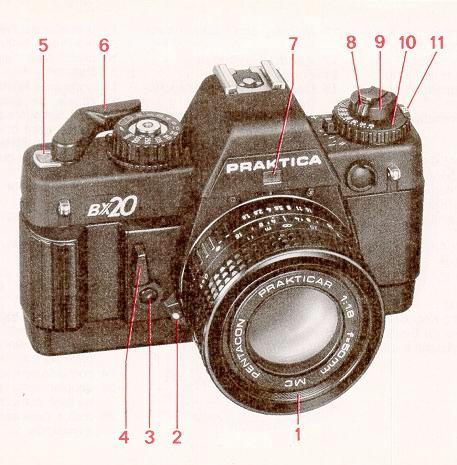
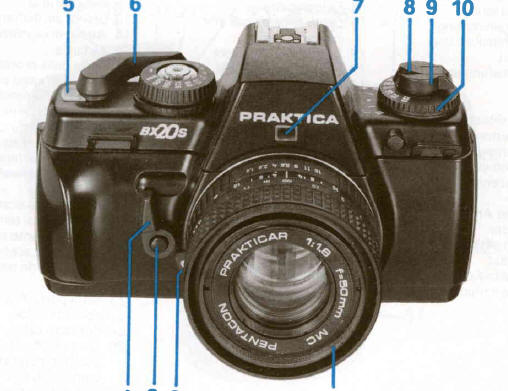
Guide to individual of parts

1. Filter thread

2. Unlocking key

3. Self-timer release

4. Self-timer cocking /ever (anticlockwise) stop-down lever for depth-of-field checking

5. Frame counter

6. Cocking lever

7. Window reflecting aperture setting into viewfinder

8. Rewind crank

9. Rewind button

10. Film speed dial

11. Unlocking key for film speed dial

12. Memory and battery check key

13. Aperture setting ring

14. Focusing ring

15. Depth-of-field scale and infrared index


16. Lens positioning mark

17. Lug for carrying strap

18. Rewind release

19. Index for automatic mode

20. Shutter release lock

21. Shutter speed dial for "auto" and fixed shutter speeds

22. Shutter release with socket for cable release


23. Hot shoe with center contact

24. Center contact

25. Coupling point for computerized flash unit

26. Indicator of exposure compensation with index

27. Camera back4www.butkus.org

28. Film take-up spool

29. Film sprocket

30. Shutter blades

31. Film cartridge compartment

32. Eyepiece with accessory holder


33. Memo holder 

34. Lid of battery compartment 

35. Tripod socket 

36. Guide way for motor winder 

37. Coupling for motor winder 

38. Catch for motor winder 

39. Contacts for motor winder 

40. Mark (for insertion of battery compartment lid)

Inserting the batteries

A 6 V source is required to power the whole electronic system. It may be an alkali-manganese, silver oxide (SR) or lithium battery.
Webmaster:  On the left is an example of two PX-28 batteries from a Ricoh manual.  This is how the batteries should go looking down at the camera.  Not sure where the positive marks are on the body so this could be backwards.  If using 4-SR44 batteries you should have two bumps going in one direction and two in the opposite.

Four button cells (e. g. LR 44) in a battery case (order no. 961 363) will also do. (the bumps on the batteries are the negative sides, the two bumps should go in the same direction)4www.butkus.org

Under normal conditions, a fresh battery lasts for about 2 years. To insert the battery, push the battery compartment lid (34) in the direction of the arrow and swivel it out Wipe the contacts in the battery compartment and those of the fresh battery with a dry cloth. Press the plus pole of the battery against the spring contact (polarity marks in the battery compartment) and tip the battery in. Close the lid and let it click in.


The contacts of the battery and in the compartment should be checked from time to time, and cleaned if necessary. Low temperatures have an adverse effect on the battery; it should therefore be suitably protected in cold weather.

If the camera is not used for an extended period, the battery should be removed.

Checking the battery
The shutter must be cocked. Press shutter release (22) and then memory key (12). If the LED indication is bright the battery still has a sufficient power reserve. When the battery is spent, the LEDs on the right side of the viewfinder image will go out The battery condition can not be checked in the B and setting.

Opening the back
Pull the rewind button (18) up as far as it will go to unlock the back Open the back completely the frame counter (5) will automatically return to the starting position.

Inserting the film
Before the film is inserted the shutter speed dial should be set to a fast fixed shutter as otherwise a slow shutter speed may be formed in the "auto" mode. The cocking lever is blocked until the shutter has completed operation. Do not use force!  An undesired slow shutter speed that may have formed in the "auto " mode can be cut short by changing from "auto" to B. Such a slow speed is also obtained in the "auto" mode when the shutter is released without a lens being connected to the camera.4www.butkus.org


Put the film cartridge into the cartridge compartment (31). Press the rewind button (9) back in all the way; turning it if necessary. Insert the film leader at least 1 cm into the slit in the take-up spool (28). Carefully operate the cocking lever until the teeth of the film sprocket (29) engage in the film perforation.. Swing the cocking lever fully out and let it return. Release the shutter.


Closing the back

Press the middle of the lock side of the back against the camera body until the lock is heard to engage.4www.butkus.org


Preparing to shoot
The cocking lever (6) may be swung out a little way without starting the winding procedure. This readiness position increases the handling reliability when taking rapid picture sequences. Swing the cocking lever as far as it will go, return and press the shutter release (22). Repeat the procedure and continue to do so until the automatic frame counter (5) indicates frame 1.

Information on whether the shutter is cocked or not is given at the bottom of the viewfinder image:

* aperture reflected into viewfinder appears red -shutter is not cocked

* aperture reflected into viewfinder is colorless -shutter is cocked

Proper film advance can be checked by making sure the rewind button (9) rotates as the cocking lever (6) is moved.

If you shoot with a winder attached to the camera refer to the instructions for use of the PRAKTICA winder made by VEB PENTAGON DRESDEM We shad not be liable to you for damage caused by using a winder of different make.

Setting the film speed
Press the unlocking key (11) and turn the film speed dial (10) until the film speed given on the pack (ASA value) matches the index of the compensation indicator (26). The flap from the film pack can be put into the memo holder (33) as an additional aid to the memory.
Automatic shutter speed control
In the "auto" mode, the PRAKTICA BX20cperates automatically in a stepless shutter speed range from 1/1000 s to 40s. The shutter speed is electronically controlled in consideration of the lighting conditions, the preselected aperture and the film speed.

LEDs at the edge of the viewfinder indicate the controlled shutter speed. Should the shutter speed range be exceeded, OVER or UNDER is indicated.

The TTL metering system automatically takes into account all factors influencing the exposure such as focal length of the lens, filters and extensions.

If lenses with the 42x1 PRAKTICA thread are used with an adapter, light metering is automatic at working aperture.4www.butkus.org

Preselecting the aperture
The desired aperture is set against the mark on the lens by fuming the aperture setting ring (13). The set aperture is displayed at the bottom of the viewfinder image.
If lever (4) is moved in the direction of the arrow, the diaphragm is stopped down to the aperture set, and the depth of field can be assessed in the viewfinder.


Automatic mode, indication
Set the shutter speed dial (21) to "auto". The electronics are switched on by slight pressure on the shutter release (22). In the viewfinder image the shutter speed calculated by the automatic system is shown by an LED display. If it appears unsuitable for the subject, it can be corrected by selecting another aperture. LEDs are allotted to selected speeds between 1/1000 s and 8 s, with intermediate values being indicated by the simultaneous lighting of two adjacent diodes.4www.butkus.org

TO SECOND HALF