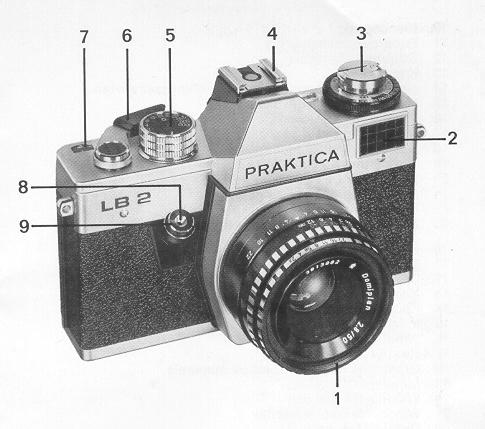
Praktica LB2
This camera manual library is for reference and historical purposes, all rights
reserved.
This page is copyright by
, M. Butkus, NJ.
This page may not be sold or distributed without the expressed
permission of the producer
I have no connection with Chinon Co., Japan
On-line camera manual library
This is the full text and images from the manual. This
may take 3 full minutes for all images to appear.
If they do not all appear. Try clicking the
browser "refresh" or "reload button" or right click on the
image, choose "view image" then go back. It should now appear.
To print, try printing only 3 or 4 pages at a time.
If you find this manual useful, how about a donation of $3 to: M. Butkus, 29 Lake Ave., High Bridge, NJ 08829-1701 and send your e-mail address so I can thank you. Most other places would charge you $7.50 for a electronic copy or $18.00 for a hard to read Xerox copy.
Control Parts of the PRAKTICA LB 2
In this text the above mentioned reference numbers are bracketed.
1. Filter socket
2. Photoelectric cell 3. Rewind knob
4. Accessory shoe
5. Knob for setting shutter speeds
6. Cocking lever
7. Exposure 8. Wire release socket4www.butkus.org
9. Shutter release
11. Distance setting ring
12. Depth-of-field scale
13. Knob
14. Knurled graduated fir: 15. Index for ASA values
16. Window
for ASA dial
17. Rewind crank
18. Graduated ring with aperture numerals
19. Index for DIN values
20. Window for DIN dial
21. Window for meter
needle 22. Center flash contact. 4www.butkus.org 23. Exposure speed index
25. Rewind catch
26. Cartridge chamber
27. Metal-blade focal-plane Putter
28. Film transport sprocket
29. Supporting piece
30. Take-up spool
31. Marking point for inserting the film
32. Wire bracket
34. Rewind release knob
We wish you every success in working with this modern reflex camera. You own a camera which has a novel metal-blade
focal plane shutter the
special features of which are high time stability and short synchro speeds for electronic flash exposure. The
built in external exposure meter
guarantees you proper determination of Opening the camera back
Inserting the film
If the film tends to strong warping, bring one wire bracket to rest on the film by turning the milled flange of the spool. Depress rewind
knob (3) again and turn it somewhat, if necessary.
Closing the camera back
Preparation for the exposure
Light metering
Setting the shutter speed
setting intended for slow-speed exposures. Shutter remains open as long as the shutter release is being depressed (green) intended for taking subjects of low brightness. Use of a tripod is recommended; (white) for taking subjects of unobjectionable brightness. Rotate knob (5) until the desired numeral stands opposite the orange
triangle. Intermediate values cannot be set!
Focusing on the circular Depth-of-field indication
Releasing and cocking the shutter
Attention! If more exposures have been made than indicated on the film packet, at the end the cocking lever might not be
swiveled around
completely. Don't apply force! Rewind the film.
Exchanging lenses
Flash exposures
The use of flash bulbs
The use of electronic flash units
Please follow these Instructions for Use carefully. Improper handling of the camera may cause damage for which we can accept no liability.
10. Diaphragm setting ring

24. Ocular mount with fitting for accessories
33. Tripod socket
Pull rewind knob (3) upwards
Insert the film cartridge. The wire brackets (32) should not stand upwards. Should this happen to be the case, rotate the milled flange of
the spool. Pull the leading edge of the film to the green mark (31) and push it from above below the supporting piece (29). The teeth of
the film transport sprocket should engage with the perforation of the film.
On the side of its locking means, press the camera back firmly on the camera body. It locks automatically.
The cocking lever (6) has an idle stroke of about 15° so that it can be moved from its resting position into readiness for action. (Easy grasping for
serial shots.) Swing the cocking lever (6) around as far as it will go, move it back again, and depress shutter release button (9). Repeat these
operations and then cock the shutter once more.
By turning knob (13), set the indices (15) and (19), reap. to the speed of the film loaded in the camera.
How to proceed for light metering: Direct your camera to the subject. Attention! Don't cover the window of photoelectric cell (2)! Bring the meter
needle in window (21) to rest in the center of the circular mark by rotating the outer knurled graduated ring (14). So the diaphragm numerals
(graduated ring 18) stand opposite the shutter-speed values.

The combination most suitable for your subject to be taken is then transferred to the diaphragm setting ring (10) of the lens or to the shutter-speed
setting knob (5) (e.g.: aperture f/8--shutter speed '/125s sec.).
If the meter needle cannot be centered in the circular mark, the luminous density of the subject to be taken is off the operating range of your exposure
meter.
Symbol
![]()
intended for pictures to be
B
2 sec. to 60 sec.
1 sec. to'/15S sec.
(orange color) intended for
1/25 sec. to1/1000 sec.
Setting the diaphragm numeral
Set the diaphragm numeral on diaphragm setting ring (10) to the mark of the lens mount. On lenses with automatic pressure diaphragm (ADP) the
aperture remains fully open, and only when the shutter is released it will close to the set value. In the PRAKTICA LB 2 the diaphragm opens
immediately after the shutter has run down. Certain lenses permit manual stopping down of the diaphragm for evaluation of the depth of field in the
viewfinder. According to lens design this can be made by pressing the manual stop down key (left-hand illustration on page 22) or by changing the
diaphragm selector from A (automatic) to M (manual) (right-hand illustration on Dane 22).


Signal
Image-brightening
Fresnel lens Microprism screen
Circular ground glass area
Focusing
Focusing is possible as to the microprism screen of circular ground glass
area.
Focusing on the microprism screen
The correct sharpness is set when the image becomes visible clearly and free from fuzziness within the microprism screen.

Turn the distance-setting ring until the subject appears clearly and distinctly within the circular
ground glass area. This is also the focusing method
for macro- and microphotography as well as when lenses
The limits of the depth-of-field range can be read from the depth of-field scale (12) for the relevant aperture. Example: 3 m at f/8 aperture zone of
sharpness between 2 m and 6 m For evaluation of the depth of field in the viewfinder refer to section "Setting the diaphragm". For infrared
exposures the focusing point has to be slightly modified. Set the determined distance value opposite the infrared point.
Before releasing the shutter, please note the following:
1. If the signal is visible in the left viewfinder, the camera is not ready for exposing. Swivel the cocking lever (6) to its stop.
2. For shutter speeds of 1/15 sec. and slower tripod and cable release should be used. Depress the shutter release (9) steadily --never with a
jerk--past the soft-running limit. After the exposure the shutter has to be cocked to make the camera ready for taking again.
Changing the film
Take into consideration the number of exposures (12, 20, or 36 frames) which can be made with the loaded film, and observe this number on the
exposure counter. When the film has been exposed, depress rewind release knob (34) (it locks in). Fold the rewind crank (17) out of the rewind
knob (3) and rotate it not too quickly in direction of the arrow (indicated on crank 17). Termination of rewinding becomes noticeable by greater
resistance and subsequent ease of actuation. Pull the knob upwards to its stop. Unlock camera back. Film cartridge can be removed.
All lenses provided with the international PRAKTICA M 42 x 1 thread can be applied.
(Pentax screw mount) You take hold of the lens body and unscrew it by turning it to
the left. Installation is by turning it to the right to its stop.
Flash bulbs as well as electronic flash units can be synchronized. Push the flash unit with its
center contact onto the accessory shoe (4). Set the
relevant symbol for the flash unit used, "bulb image" or
on the shutter-speed setting knob. Flash units fined with a synchro cable are connected with the
flash socket in the accessory shoe of the PRAKTICA LB 2 by means of an adapter piece. Take into consideration the guide number of the flash unit,
particularly when determining diaphragm or distance values. For this purpose use the calculating dial on the flash unit.4www.butkus.org
If bulbs for short flash duration are used, set to the g: symbol as to a shutter speed longer than
1/30 sec. The ignition circuit is only closed while the
shutter runs down.
Synchronization is by setting to the
symbol which corresponds to a shutter speed of about Is sec. Longer


Maintenance and care of the Camera
Unobjectionable functioning of the highly valuable precision instrument depends very largely on proper handling and careful maintenance. Protect the
camera against shock, impact, and moisture.
Further development of the PRAKTICA LB 2 may lead to slight alterations of the details given in this booklet.