This camera manual library is for reference and historical purposes, all
rights reserved.
This page is copyright by
, M. Butkus, NJ.
This page may not be sold or distributed without the expressed
permission of the producer
I have no connection with Chinon Co., Japan
On-line camera manual library
This is the full text and images from the manual.
If you find this manual useful, how about a donation of $3 to:
M. Butkus,
29 Lake Ave., High Bridge, NJ 08829-1701
and send your e-mail address so I can
thank you.
Most other places would charge you $7.50 for a electronic copy or $18.00 for
a hard to read Xerox copy.
We wish you all success with this modern reflex camera. You own a camera with the novel metal-blade focal-plane shutter for maximum shutter
speed stability and minimum synchronization for electronic flash photography. The camera is fitted with a
through the-lens light metering system for a
coupled determination of shutter speed, diaphragm numeral, and film speed. Metering is on the
center-weighted method and gives pictures true to the
subject.
Before you start snapping away happily will you please read these Instructions for Use carefully. You will avoid trouble with the camera and
disappointments with the pictures.
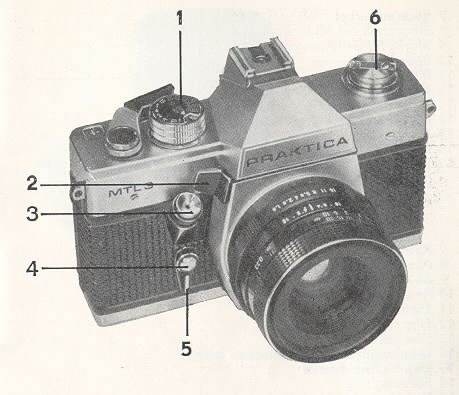
Control Parts of the PRAKTICA MTL 3
|
1. Shutter speed setting knob 2. Metering key 3. Shutter release with cable release 4. Self-timer release knob 5. Self-timer cocking lever 6. Rewind button 7. Rewind release 8. Accessory shoe with center contact
|
![]() |
![]() |
9. Shutter speed mark 10. Rapid wind lever 11. Exposure counter 12. Film speed mark 13. Film speed dials 14. Diaphragm operation selection switch 15. Depth-of-field scale 16. Focusing ring4www.butkus.org 17. Diaphragm setting ring |
|
18. Rewind catch 19. Cartridge chamber 20. Metal-blade focal-plane shutter 21. Film sprocket 22. Support 23. Take-up spool 24. Film loading mark 25. Wire brackets |
![]() |
![]() |
26. Eyepiece mount with accessory adapter
28. Battery compartment with battery 29. Tripod thread 30. Flash socket |
In the following instructions the numbers of the above elements are put in parentheses ( ).
![]() |
![]() |
|
Opening the camera back
|
|
| Closing the back.
The back locks automatically when you press it to the camera body. at the latch side. |
![]() |
![]() |
Cocking and winding Rapid wind lever (10) has a dead stroke of about 15 deg. till the mechanism engages. This makes for safety at series exposures. Swivel lever (10) to its stop, move it bock and depress shutter release (3). Repeat the process and finish up by cocking the camera again. The automatic exposure counter (11) will now read exposure 1. |
![]() |
Film speed setting
|
Shutter speed setting
| Symbol f | for electronic flash photography (about 1/125sec) |
| Setting B | for time exposures; the shutter remains open as long as the shutter release is depressed |
| 1 sec. to 1/15 sec. | (orange) for low light photography; a tripod is needed |
| 1/30 to 1/1000 | (white) for satisfactory light photography |
Rotate shutter speed dial (1) till the desired speed matches the orange
triangle.
Diaphragm setting
![]() |
Set the desired diaphragm number on diaphragm setting ring (17) of the lens opposite to the mark on the lens mount. When lenses with automatic pressure diaphragm (ADB)-are used, the diaphragm remains fully open and closes to the set value only when the shutter release is pressed. The diaphragm opens in the same instant the shutter has run down. By changing the diaphragm operation selection switch (14) from A (automatic operation) to M (manual operation) or by actuating the metering key (2) it becomes possible to check the depth of field already on the viewfinder image. | ![]() |
Automatic exposure control system
There are two modes of light metering:
1. Metering by altering the diaphragm numeral at the lens with pre-selected shutter speed (being the preferred method for general objects in
satisfactory light).
2. Metering by altering the shutter speed with pre-selected diaphragm numeral (being recommended for low light photography with a certain depth of
field required).
Metering at pre-selected shutter speed
Set the shutter speed, press metering key (2). Turn diaphragm setting ring (17) until the meter needle, visible in the viewfinder, will have
centered to
the circular mark. When the needle stands in the + range, an overexposure will be obtained while its position in the --range will result in an
underexposure. The diaphragm opens and closes on rotating the diaphragm setting ring correspondingly thus compensation between subject
brightness and the combined shutter speed, diaphragm, and ASA/DIN settings is performed.4www.butkus.org
Metering at pre-selected diaphragm number
Set the diaphragm numeral, press metering key (2). Turn shutter speed
dial (1) until the meter needle visible in the viewfinder will have centered to the
circular mark. When the needle stands in the + range, an overexposure will be obtained while its position in the--range will result in an
underexposure. Don't set any intermediate shutter speeds between the indexed positions. Should you not succeed in attaining a perfect balance, you
can make a precise correction by the diaphragm setting ring which may, of course, be set to intermediate values, too.
Metering with lenses without automatic diaphragm system
How to control:
Set the diaphragm to its smallest diaphragm number - focus the lens--balance the system by stopping down.
Functional range of the automatic exposure control system
Outside of the range of the Table below the metering system is switched off. The meter needle is in rest position below the circular mark in the minus range. Metering cannot be made with the
"B" or symbol f .
| ASA | min. and max speeds | ASA | min. and max times | |
| 12 to 16 | 1 to 1 1/25 | 200 - 330 | 1/4 to 1/1000 | |
| 20 - 32 | 1 to 1/250 | 400 to 660 | 1/8 to 1/1000 | |
| 40 - 65 | 1 to 1/500 | 800 to 1300 | 1/15 to 1/000 | |
| 80 | 1 to 1/1000 | 1600 | 1/30 to 1/1000 | |
| 100 - 165 | 1/2 to 1/1000 |
|
1. Signal 2. I mage brightening Fresnel lens 3. Circular ground glass area
|
4. Pair of metering wedges
5. Microprism screen 6. Meter needle with circular mark |
Focusing
Focusing is possible as to metering wedges, microprism screen, or circular
ground glass area.
![]() |
Focusing on the measuring wedges
Turn the distance setting ring until defined outlines of the picture parts will stand opposite to one another. |
Focusing on the microprism screen
Maximum sharpness is attained when the image in the microprism screen is clear and does not flicker. Don't use the
ground glass Fresnel
for focusing.
Depth-of-field scale
![]() |
The depth of field attained with a certain diaphragm setting can be read on scale (15). Example: Distance 3 meter, diaphragm numeral 8, depth of field extends from 2 metes to 5 meters.4www.butkus.org For checking the depth of field on the viewfinder image, too, depress metering key (2), set selection switch (14) to M and the switching lever (of PANCOLAR 50 mm fl1.8) to its lower position, resp, Infrared photos require a slight correction in focusing; let the determined distance meet the infrared mark on the lens. |
Releasing and cocking
![]() |
Please note before pressing the shutter release:
|
Self-timer
![]() |
Cock the shutter. Turn lever (5) upwards to its stop. Press release (4)--the self-timer will now run for about 8 seconds. Do not cock the shutter while the self-timer runs. |
Film changing
![]() |
Observe the exposure counter for the number of pictures you can take with the film in your camera (12, 20 or 36 exposures). After the last exposure press rewind release (27) (it locks). Tilt the folding rewind crank (7) out of rewind button (6) and turn it not too fast in the direction of the arrow (indicated on crank (7). You will feel the end of rewinding by a somewhat increased resistance with subsequent easy running. Pull the rewind button up to the stop, the camera back being thus released, and take the cartridge out. |
Note. Should you have exposed a few more frames than specified on your film packing it might be possible that the rapid wind lever can only be
turned partially. Do not use force in this case but rewind the film.
Lens changing
![]() |
Any lenses having the international M 42 x 1 PRAKTICA thread can be applied. Grip the lens body and unscrew it in counterclockwise direction; screw in the other lens in clockwise direction to the stop. 4www.butkus.org |
Flash photography
![]() |
This camera has been designed for synchronization of flash bulbs and electronic flash units. Flash units provided with a
center contact are pushed
into accessory shoe (8). Connect flash units fitted with synchro cable and flash contact with flash socket (30). Set the symbol (
f or 0) of the relevant
type of flash unit on the shutter speed dial. The firing circuit is only closed as long as the shutter is running down.
|
The use of flash bulbs
![]() |
For fast burning flash bulbs the speed dial is set to the symbol or 0 to a shutter speed longer than 1/30 sec. |
The use of electronic flash units
![]() |
These will be synchronized at setting to the symbol t which corresponds to a shutter speed of about1/125 sec. Longer shutter speeds can be set. |
Battery replacement
![]() |
The automatic exposure control system is powered by a PX 625 mercury oxide element or a corresponding type of 1.35 Volt rated voltage.
|
Care of the camera
Operation according to instructions and proper care are essential preconditions for
trouble free function of this high-precision instrument. Protect it
from shocks, blows, dust, and moisture, clean cartridge and spool compartments, film track and camera back with a soft brush in suitable intervals.
Do not exert any pressure onto the shutter blades and do not touch them with your fingers. Dust the mirror with a soft brush only if absolutely
necessary. Don't clean the camera with organic solvents, such as spirit, varnish thinner or the like. The camera will work unobjectionably within the
temperature range of +40 °C to -10 °C. Above and below this range for some reasons the mechanical and electrical and
electronically functions may
fail. If the camera e.g. undergoes sudden changes in temperature, condensate will form which will cause damages by corrosion.
Special attention should be paid to the battery and its contact points. Check them in short intervals and clean, if necessary.
Since the battery is susceptible to low temperatures, protect it against cold and remove it from the camera when not being used for some
time.
The PRAKTICA MTL 3 is selectively delivered with or without self-timer.4www.butkus.org
Please observe the recommendations contained in this booklet and remember, as far as reading is concerned, that repetition is the mother of
wisdom. Handling the camera carelessly or contrary to instructions may lead to damages which, we regret to say, are not covered by our guarantee.
Our consistent efforts to improve our products may lead to some slight deviations of the PRAKTICA MTL 3 from the present details.