HTML Translations - German
- Italian
- French
- Spanish
- Others
These links will not translate any PDF
files
On-line camera manual library
This is the full text and images from the manual. This
may take 3 full minutes for all images to appear.
If they do not all appear. Try clicking the
browser "refresh" or "reload button" or right click on the
image, choose "view image" then go back. It should now appear.
To print, try printing only 3 or 4 pages at a time.
If you find this manual useful, how about a donation of $3
to: M. Butkus, 29 Lake Ave., High Bridge, NJ 08829-1701
and send your e-mail
address so I can thank you.
Most other places would charge you $7.50 for a electronic copy or $18.00 for
a hard to read Xerox copy.
![]() |
CLICK HERE TO REMOVE COLORED BACKGROUND |
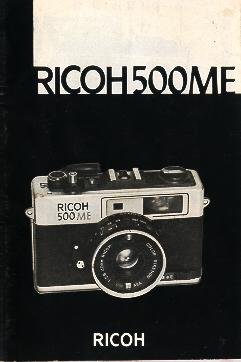
PARTS
|
1) Exposure Counter 2) Film Advance Check Window 3) Shutter Release Locking Lever 4) Shutter Release Button 5) Battery Check Button 6) Self-timer4www.butkus.org 7) Photocell 8) Film Speed Dial 9) Film Speed Indicator 10) ME (Multi Exposure) Switch |
![]() |
|
11) Distance Scale Ring 12) Shutter Speed Dial 13) Auto/Manual Dial 14) Strap Eyelet 15) Film Rewind Lever |
|
16) Film Loaded Indicator 17) Hot-shoe 18) Film Advance Lever 19) Viewfinder 20) Film Rewind Shah 21) Film Chamber 22) Positioning Hole 23) Battery Compartment Lid 24) Tripod Socket 25) Sprocket
|
![]() |
|
26) Film-Rewind Release Button 27) Film Take-up Spool 28) Winder Coupler 29) Back Cover |
INSERTING THE BATTERY
· Inserting the battery incorrectly will result in incorrect exposure.
1 ) Push open the Battery Compartment Lid (23) in the direction of the arrow (Fig. 1).
2) Insert the battery as shown in the polarity diagram in the Battery Compartment Lid. (Fig. 2)
* Use one of the following kinds of mercury battery: JIS H-C Mallory PX 675 Eveready EPX 675 or equivalent
CLICK HERE FOR FIGURES 1 - 6
CHECKING THE BATTERY
1) Press the Battery Check Button (5) (Fig. 3).
2) If the Exposure Meter Needle in the viewfinder is within the Battery Check Marks, the battery is in working
condition. (Fig. 4).4www.butkus.org
* The life of a mercury battery is approximately one year under normal usage. Be sure to change the battery after
one year has elapsed. (Change it on your birthday as a sure reminder.)
* If the needle does not move, the battery is worn out, and must be replaced.
* It is dangerous to disassemble or burn mercury batteries.
* When the camera is not in use for a long period of time. remove the battery
INSERTING THE FILM
· Avoid direct sunlight when loading the film.
1 ) Pull the Film Rewind Knob ( 15) fully until the Back Cover opens (Fig. 5).
2) Insert the film into the Film Chamber (21) and push the Film Rewind Knob back into position (Fig. 6).
3) Insert the film leader into the Film Take-up Spool (27) (Fig. 7).
4) Take up the slack in the film by winding the Film Advance Lever ( 18). and check that the film perforations are
fully engaged on the upper and lower sprocket teeth (Fig. 8)4www.butkus.org
5) Close the Back Cover (29} firmly and it will lock automatically.
Turn the Film Rewind Lever (15) in the direction of the arrow to take up the rest of the slack in the film (Fig. 9).
6) Press the Shutter Release Button (4) until the number '1' appears in the Exposure Counter ( 1). As long as the
Film Rewind Knob turns counterclockwise as you wind the film. the film is advancing correctly (Fig. 10).
CLICK HERE FOR FIGURES 7 - 12
FILM LOADED INDICATOR
When the film has been loaded into the camera. the Film Loaded Indicator (16) will show red (Fig. 11).
FILM ADVANCE CHECK WINDOW
As you advance the film, the Film Advance Check Window (2) will show red (Fig. 12).
SHUTTER RELEASE LOCKING LEVER
When you return the camera to its case. or if you do not use it for a while, turn the Shutter Release Lock Lever (3)
so that the white dot appears.
The Shutter Release will then be locked into position (Fig. 13).
* When attaching any supplementary shutter release available on the market. the shutter release button will be in
the locked position. Before shooting, be sure to unlock the shutter release.
CLICK HERE FOR FIGURES 13
- 18
SETTING THE FILM SPEED.
· It is important to set the film speed (ASA/DIN correctly for the meter to function properly -
1 ) Turn the Film Speed Dial so that the ASA/DIN number of the film you are using appears in the Film Speed
Indicator (9) (Fig. 14).
* A mistake in setting the film speed will result in incorrect exposure.
* Set the Film Speed Dial (8) to a click-stop position as a mid-way position may result in an incorrect exposure.4www.butkus.org
SHOOTING ON AUTOMATIC
1 ) Turn the Auto/Manual Dial (13) and set the "A'' (Auto) against the red mark. When You set the dial to "A'', the correct f-stop is automatically
selected according to the brightness of the subject (Fig. 15).
SHUTTER SPEED
1 ) After setting the Auto/Manual Dial ( 13) to ''A". set the Shutter Speed Dial against the red mark. according to the brightness of the subject (Fig. 16).
SHUTTER SPEED TABLE
| SUBJECT | SHUTTER SPEED |
| Very bright day. snow or beach scenes. Fast moving objects. |
1/500 sec. |
| Bright day - outdoor. Moving objects. |
1/250 sec. - 1/125 sec. |
| Cloudy day - outdoor. Bright indoor. By a window. |
1/60 sec. |
| indoor Twilight scene. |
1/30 sec. - 1/15 sec. |
| Night | 1/8 sec. 'B' |
* The 'B' setting is very useful for shooting long exposure night scenes.
* This table is for ASA 100/DIN 21 film.
CLICK HERE FOR FIGURES 13 - 18
LOOKING THROUGH THE VIEWFINDER
![]() |
A) Parallax Correction Marks Indicator |
1 ) As you look through the viewfinder. the f-stop is indicated on the right. As long as the Exposure Meter Needle (H) is between f/2.8 - f/16. a
correctly-exposed picture can be taken (Fig. 17)4www.butkus.org
* When you use the 'B' setting the exposure meter is not activated and the Exposure Meter Needle (H) does not register
FOCUSING
1) The image inside the yellow diamond in the center of the frame looks off-set like a double image (Fig. 18).
2) When you turn the Distance Scale Ring (11). the faint image will move. When the double image resolves itself into a single image,
the subject is in sharp focus. (Fig. 19).
Composing The Picture
Keep the subject within the Bright Frame outline (B) in the viewfinder.
For close up shots of up to 1m (3.3ft). keep the subject within the parallax Correction Marks (A).
CLICK HERE FOR FIGURES 19 - 24
SHOOTING ON MANUAL
Skillful and interesting shots can be taken by using a combination of the f-stop and the shutter speed on a Manual setting.
When shooting on Manual. the letter 'M" appears in the viewfinder. (Fig. 20)4www.butkus.org
* To obtain sharp focus in both the foreground and the back-ground. set the f-stop between f/11 and f/16.
* If you want to blur the back-ground. set the f-stop between f/4 and f/2.8.
1) Turn the Auto/Manual Dial to set the desired f-stop number against the red mark. (Fig. 21)
2) Turn the Shutter Speed Dial so that the Exposure Meter Needle (G) in the viewfinder is set to your chosen f-stop (Fig. 22).
* Always change the shutter speed according to the f-stop.
REWINDING THE FILM
· Avoid direct sunlight when unloading the film.
1) Push the Film Rewind Release Button (26) so that it locks into position (Fig. 23).
2) Pull out the Film Rewind Lever (15) and turn it in the direction of the arrow (Fig. 24).
3) When the film is fully rewound. the Film Rewind Lever will revolve freely.
4) Pull the Film Rewind Lever out fully to open the Back Cover (29) and remove the film.
* If you take more exposures than are indicated on the film, the Film Advance Lever may jam in a mid-way positron.
In this case. the Film Rewind Release Button may not stay locked in position when you push it. Keep the Film Rewind Release Button
pressed in while you rewind the film.
* Never open the Back Cover while rewinding the film. If you do so. the film will be exposed to the light and your pictures ruined.
* Do not push the Film Rewind Release Button while shooting. as this may cause double-exposure.
CLICK
HERE FOR FIGURES 25 - 30
FLASH PHOTOGRAPHY
When shooting night or indoor scenes. the Exposure Meter
Needle (H) in the viewfinder may stay in the Underexposure Zone.
In this case you should use a flash unit (Fig. 25).
1) Attach the flash unit to the camera Hot-shoe (Fig. 26).
2) Set the shutter speed to 1/125 sec. (Fig 27)4www.butkus.org
3) Set the f-stop according to the camera -to -subject distance .
The Guide Number is indicated on the flash unit. The correct f-stop can be calculated from the equation below:
| F-stop = |
Guide Number (GN) |
|
f-stop camera-to-subject distance (m) |
* Please use a Hot-shoe type flash unit.
* There is a ready-reference f-stop table on the flash unit. Please use it to obtain the correct f-stop easily.
* If you use an automatic flash. you don't have to adjust f-stop each time regardless the distance.
USING THE SELF-TIMER
The Self-timer can be used for commemorative occasions etc.. when you want to include yourself in the picture.
1) Turn the Self-timer Lever fully in the direction of the arrow (Fig. 28).
2) From the time the Shutter Release Button is pressed, the Self-timer Lever starts moving. There is a time-lapse of approximately 10
seconds before the shutter is released.
* Once the Self-timer has been set. it cannot be cancelled.
CLICK HERE FOR FIGURES 25 - 30
MULTI-EXPOSURE
More than one exposure can be put on a single frame.
USING THE MULTI-EXPOSURE SYSTEM
1) Take a single shot.
2) Slide the ME (Multi Exposure) Switch (10) in the direction of the arrow without advancing the film. (Fig. 29).
3) Select and compose the subject for the second shot and release the shutter.
* When shooting a multi exposure. be sure not to touch the Film Advance Lever. as this may cause the frame to slip out of position.4www.butkus.org
Tips For Better Results
Better shots can generally be taken by selecting subjects with a large area of dark background for the first shot.
SHOOTING WITH SP WINDER
By simply attaching a SP winder (sold separately) to the camera, you can enjoy the facility-of continuous shooting.
(Fig. 30)
PROPER CARE OF YOUR CAMERA
* When using a tripod with a long thread length (more than 5.7 mm), be careful not to forcibly screw in the thread further than the
depth of the socket.
* Always keep the lens clean. To clean the lens, gently wipe it with a lens cleaning paper or a soft clean and lintless cloth.
* Do not wipe the camera body with chemicals. such as benzine. thinner. etc use only soft cloth or cotton
swab sprinkled lightly with alcohol on the camera body.
* Never expose your camera to excessively high or low temperature for an extended period of time. In extremely hot climates, do not
leave your camera inside closed automobiles during the daytime or indirect sunlight.
* Protect your camera from dust, dirt. water. rain, dampness, salt air and rough handing.
* When your camera is not used for an extended period of time. remove the batteries and store it in a dry and cool place.
* Do not attempt to disassemble or repair your camera yourself. If service is necessary, get in touch with your dealer or authorized
Ricoh service station.
MAJOR SPECIFICATIONS OF RICOH 500ME
Lens: 40 mm Color Rikenon f2.8 lens 3 groups. 4 elements
Shutter: Mechanical shutter Speeds B 1/8. 1/15, 1/30. 1/60. 1/125. 1/250 and
1/500
Exposure Meter: CdS exposure meter, fully automatic control and manual override, ASA 25-800 (DIN15-30). EV6-17
(ASA100/DIN21), One 1.3V mercury battery (JIS H-C. Mallory PX675, Eveready EPX 675 or equivalent).
Viewfinder: Bright frame viewfinder with parallax correction mark. superimposition rangefinder patch. f-stop scale, exposure meter needle. over and underexposure zones, Battery check mark. "M" for manual operation also visible in viewfinder Magnification 0.49X, Coverage of actual picture area 85%.
Film Loading: Multi-slip easy loading
Film Advance: Single stroke film advance lever Automatic winding possible by mounting Ricoh SP winder
Film Rewind: Easy-to-operate crank lever
Film Counter: Additive, automatic resetting
Flash Synchronization: Hot shoe (Cordless direct-contact accessory shoe)
Self-timer: Built-in
Filter Size: 46 mm screw-in type
Other Feature: Multi-exposure device, Shutter release lock, Battery checker,
Film advance signal window, Film ''loaded'' (or empty) signal window
Dimensions: 111 (width) x 71 (height) x 55 mm (depth) (4.4x 2.9x 2.2 in.)
Weight: 380g. (13.40 oz.)