Ricoh L 108
Time / Date imprinter
posted 8-10-'03
This camera manual library is for reference
and historical purposes, all rights reserved.
This page is copyright© by  .
M. Butkus, NJ.
.
M. Butkus, NJ.
This page may not be sold or distributed without
the expressed permission of the producer.
I have no connection with any camera company.
On-line camera manual library.
Back to main on-line manual page
If you find this manual
useful,
how about a donation of $3 to:
M. Butkus, 29 Lake Ave.,
High Bridge, NJ 08829-1701
and send your
e-mail address
so I can thank you.
Most other places would charge
you $7.50 for a electronic copy
or $18.00 for a hard to read Xerox copy.
This will help me to continue to host this site,
buy new manuals,
and pay their shipping costs.
It'll make you feel better, won't
it ?
If you use Pay Pal, use the link below.
Use the above address for a check, M.O. or cash.
CLICK HERE FOR A Ricoh L-1089 PDF
VERSION OF THIS PAGE
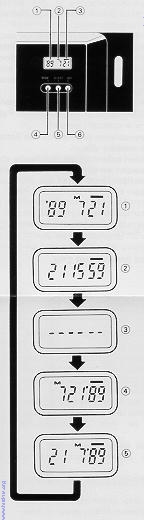 |
(1) Display panel
(2) Month indication
(3) Imprint mark
(4) Mode selector button
(5) Selector button
(6) Set button
Imprinting mode
Examples of date imprinting
(1)1989 July 21st
(2) 21st 15:59
(3) No imprinting
(4) July 21st, 1989
(5) 21st July, 1989 |
Nomenclature of the date imprinting feature
The date imprinting mode can be divided into 5 types; date, time, and no imp
printing.
Selecting imprinting mode
Each time the Mode selector button is pressed, the display changes
as shown below.
(1) Date (Year/month/day)
(2) Time (Day/hour/minute)
(3) No imprinting
(4) Date (Month/day/year)
(5) Date (Day/month/year)
Checking imprinting
After shooting, the imprint mark-- flickers in the display panel
for a few seconds" coeds for correct imprinting. The mark and the letter "M" are
not imp printed on the picture.
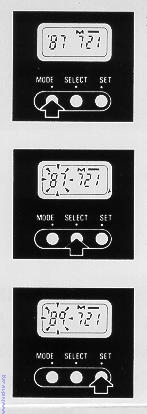 |
Resetting the date and time -
(1) Each time the Selector button is pressed, the flashing digits
change in the order of year, month, day, hour, minute and colon (:).
(2) When the digits to be reset flash, press the Set button until
the desired digits appear When the Set button is kept pressed, the
digits change rapidly.
Accurately setting seconds
(1) Press the Mode selector button for Time display mode.
(2) Press the Selector button so that the colon (:) flickers.
(3) Press the Set button according to the radio or telephone time signal. The
time count starts from 0 seconds.
· It is recommended that the second digits be adjusted after adjusting the
minute digits.
|
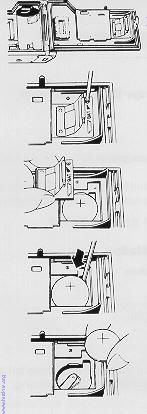 |
Battery Replacement -
(1) Open the back cover
(2) Remove the screw from the date feature battery compartment
cover with a small (+) screwdriver
(3) Remove the battery compartment cover holding the roller section.
(4) Insert the screwdriver tip into the slot on the side of the battery, and
lift up the battery.
(5) Load the new battery with the side marked (+) facing upwards. Then, close
the battery compartment cover using the (+) screwdriver. (Use lithium battery
CR2025. The service life is about 3 years )
· When the battery is exhausted, the imprinted digits become faint. At that
time, replace the battery.
· Do not open the date battery compartment lid except when replacing the
battery.
· Keep the battery out of reach of children. If a child swallows the battery,
contact your doctor immediately
|
