RICOH MIRAI 105
This camera manual library is for reference
and historical purposes, all rights reserved.
This page is copyright
© by

.
M. Butkus, NJ.
This page may not be sold or distributed without the
expressed permission of the producer.
On-line camera manual library.
If you find this manual
useful,
how about a donation of $3 to:
M. Butkus, 29 Lake Ave.,
High Bridge, NJ 08829-1701
and send your
e-mail address
so I can thank you.
Most other places would charge
you $7.50 for a electronic copy
or $18.00 for a hard to read Xerox copy.
This will help me to continue to host this site,
buy new manuals,
and pay their shipping costs.
It'll make you feel better, won't
it ?
If you use Pay Pal, use the link below.
Use the above address for a check, M.O. or cash.
Back to my main camera manual page
Ricoh Mirai 105 PDF
- - Direct from manual -
-
Click here for Ricoh Mirai 105 PDF version
made from HTML Page - better printing
(WEBMASTER: I don't do much for the "point and shoot" cameras. A lot of the images are just scans of the pages
If the images are too small, look at the PDF file made from this page.
You can ZOOM a PDF file.
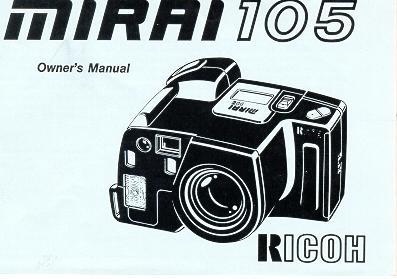
Thank you for purchasing the Ricoh MIRAI 105. The MIRAI 105 is a totally new
one-hand-grip camera in the full-size 35 mm format. It is equipped with a
38—105 mm auto zoom lens, and of course, focus is fully automated.
Furthermore, the camera is extremely compact and easy-to-use, with features that
give added flexibility including, Fill-in Flash, ESP metering capabilities, a
high-magnification zoom viewfinder (which is coupled with the zoom lens),
multi-exposure, and a continuous shooting mode.
Although it is essentially a lens-shutter type camera, the MIRAI 105 offers
performance equal to that of a regular SLR camera. With the MIRAI 105, everyone
can enjoy photography, from snapshots and portraiture to advanced techniques.
Before using the camera, please study this owner's manual carefully with the
MIRAI 105 in front of you, so that you can get the very best performance and
longest service life from your new camera.
Preparations before taking pictures ...3
Loading batteries ...4
Checking the batteries ...5
Taking photographs I ...6
Loading the film ...7
Taking photographs ...10
Unloading the film ...14
Taking photographs ....15
Using the focus lock ...16
Taking a continuous series of shots ...17
Using the self-timer ...18
Macro photography ....20
Photographing distant objects ... 22
Exposure compensation ...23
Using the RESET button ...24
Taking photographs III ...25
Flash auto photography ... 26
Flash OFF mode When you don't want the flash to fire ...
27
|
Using fill-in flash ...28
Taking photographs IV ...30
Auto-zoom photography ... 31
Multi-exposure photography ...33
Remote Control socket ...35
To take better photographs ...36
Zoom lens ...37
Autofocus (AF) ... 39
Exposure ...41
Viewfinder displays ... 44
LCD panel and mode buttons ...46
Using the accessories ...48
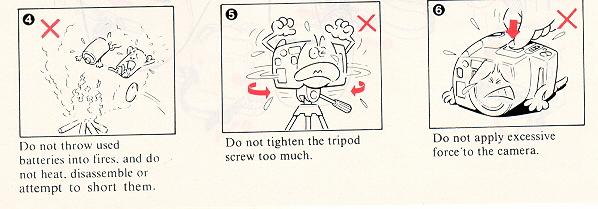
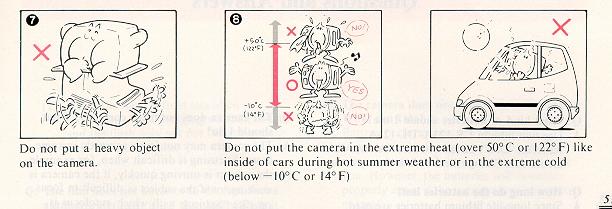
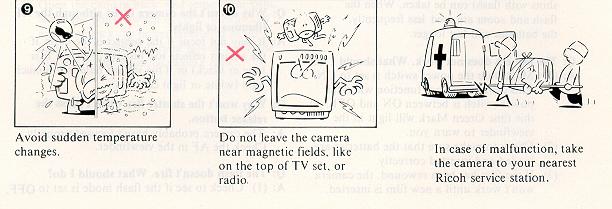
Care and Storage ...50
Questions and answers ... 52
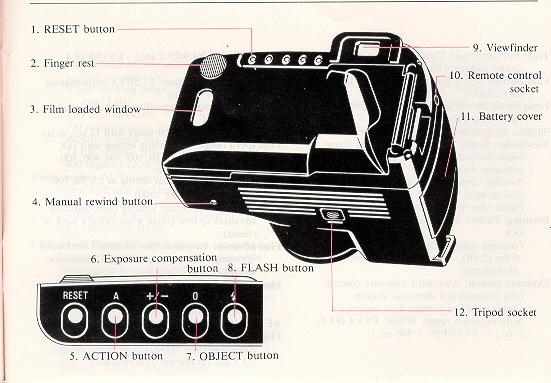
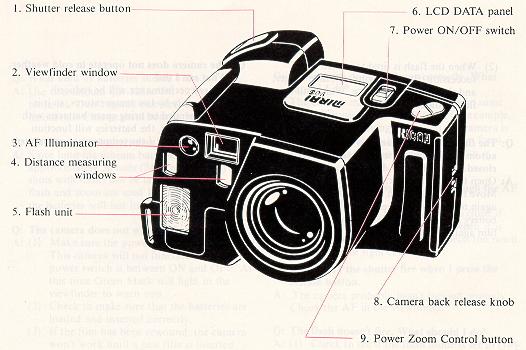
Description of controls ...54
Specifications ...56
|
Preparations before Taking Pictures
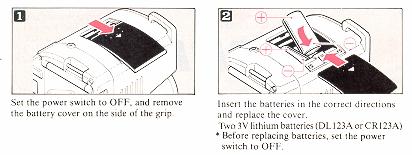
Loading Batteries
Do not use incorrect batteries or mix new and old batteries at the same time.
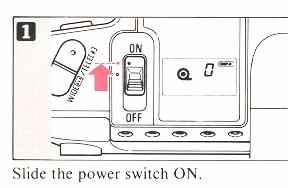
Checking the Batteries
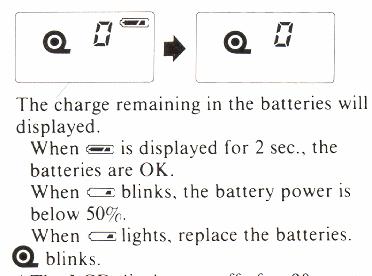
* The LCD display cut-off after 90 sec. to conserve battery power.
When the power switch is set to OFF. the lens zooms to the WIDE position.
Taking Photographs I
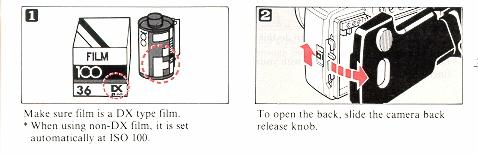
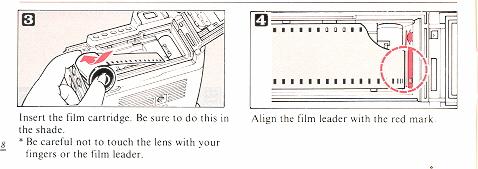
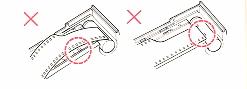
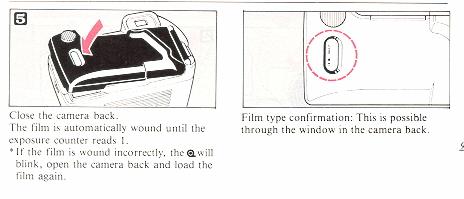
Loading the Film
Taking Photographs
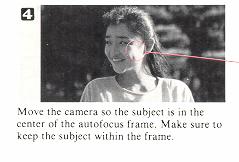 the red line goes to the
"autofocus frame"
the red line goes to the
"autofocus frame"
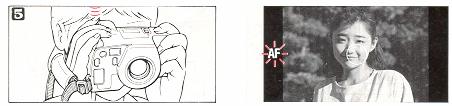
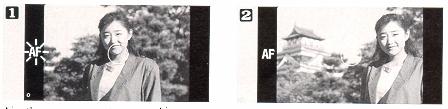
Press the autofocus button halfway to focus
The button can be pressed in two steps; autofocus operates when the button
is pressed to the first of these steps. When the subject is in forcus the
AF lights in the viewfinder.
When the AF blinks, try focusing again because the subject is not in focus.
* The shutter cannot be released with the "AF" blinking.
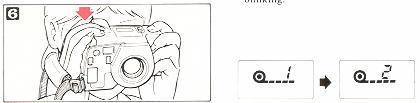
Press the shutter release button fully. Immediately after the shutter
is released, the film is automatically wound by one frame, and the exposure
counter advances one frame.
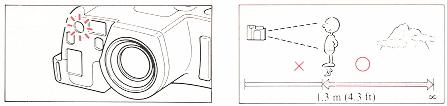
In low light conditions: the red AF Illuminator is activated automatically
to determine the correct focusing distance. (Maximum operating distance:
approx. 4 m (13 ft). Shooting range: Autofocus operates with
the subject at a distance of 1.3 M (4.3 ft.) to INFINITY. When the subject
is closer than 1.3 m (4.3 ft.) AF will blink in the viewfinder, and the shutter
will not be released.
However, the shutter may sometimes be released erroneously when the subject
is extremely close to the camera.

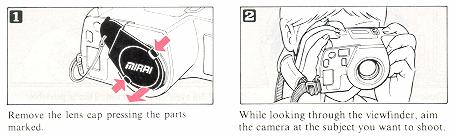
When using a combination strap, be carful that the neck strap or strap of
the lens cap does not obstruct the lens or flash. Do not cover lens with your
fingers.
Unloading the Film
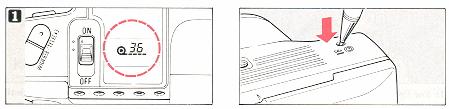
When you reach the end of the film, it is automatically rewound. Press
the rewind button to rewind the film before you have completely shot the roll.
* The final reading of the exposure counter prior to rewinding may be ore
than the number of exposures specified for the film.
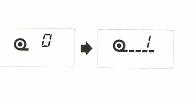
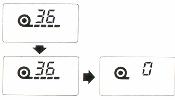 When rewinding is
completed, the sound of the motor operating will stop and the (film icon) will
blink. * Once the winding is finished, the film must be removed before any
other operations are possible.
When rewinding is
completed, the sound of the motor operating will stop and the (film icon) will
blink. * Once the winding is finished, the film must be removed before any
other operations are possible.
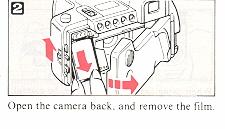
Taking Photographs II
Using the Focus Lock
The MIRAI 105 is provided with various functions that add greater
versatility to photography. In this section, the operation of each of the
camera's various features will be described, explaining how to use them most
effectively.
* Mode buttons cannot be cancelled after being set, even if the power is switched off.
Be careful when changing the mode used for shooting. Use the reset button to return to the normal shooting mode.
Aim the camera to center your subject within the autofocus frame.
Press the shutter release button lightly to lock the focus on the subject you
want. When focused, AF will light in the viewfinder. Maintain the
pressure on the shutter release button, re-aim the camera to obtain the required composition.
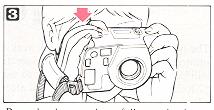
* When the focus is locked, the exposure is also fixed (AE lock).
Press the shutter release fully to take the photograph.
Taking a Continuous Series of shots
You can shoot continuously at'::a: speed of 1.3 frames (1 frame every approx.
2.5 seconds when the flash is used. Refer to page 26 for the flash working range when in the continuous shooting model
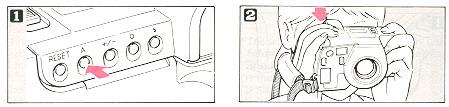
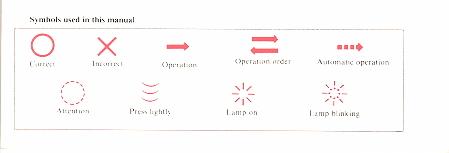
Press the ACTION button so that the mode (three boxes) indicator on the LCD panel starts blinking.

The camera will shoot repeatedly as long as the shutter release button is depressed.
* The focus and exposure will be locked to the settings corresponding to the first frame of the series' so be careful when shooting a moving subject or other
subject where light levels and subject distance varies.
Using the Self-timer
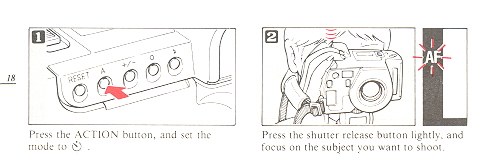

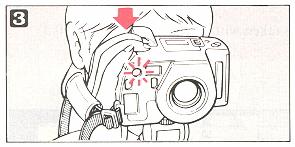
Press the shutter release fully to start the self-timer. The AF Illuminator
lights. The shutter will fire in 12 seconds. The AF Illuminator will start
blinking 2 seconds before the shutter is released. After use, press the ACTION button to cancel the mode.
*The self-timer can be cancelled at any time before the shot is taken by performing any of the following operations:
(1) Pressing the ACTION button
(2) Sliding the power switch to OFF
(3) Pressing the RESET button
To avoid incorrect exposure in the self timer mode, ensure that strong light does not enter through the viewfinder.
Macro Photography
Macro Photography allows photographs to be taken with the subject as close as - 1 m (2.6 ft) to the camera.
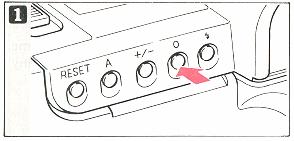
Press the OBJECT button and set the mode to - flower - blinks.
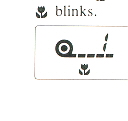
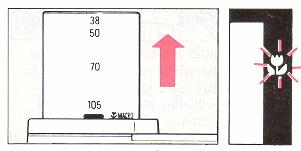
The lens zooms to the full telephoto position, and -flower- will be
indicated in the viewfinder. At this time, the field of view slightly shifts
towards the lower left of the viewfinder to compensate for the parallax condition in macro photography
(See p. 44).
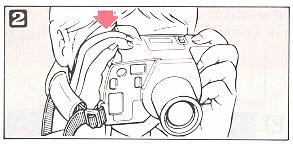
Press the shutter release button. * In macro photography, zooming is not possible.
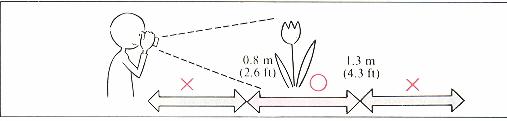
Shooting range: Macro photography is possible when the subject is at a
distance of from 0.8 m (2.6 ft) to 1.3 m (4.3 ft) from the front surface of the
lens. When the subject is out of this range "AF" will blink in the
viewfinder, and the shutter can not be released. However, the shutter can
sometimes be released incorrectly when the subject is extremely close to the camera.
Photographing Distant Objects
When shooting in this mode, the focus is fixed at infinity.
Use this position when shooting fireworks in a night sky, clouds, mountains, etc., for optimum sharpness on distant subjects.
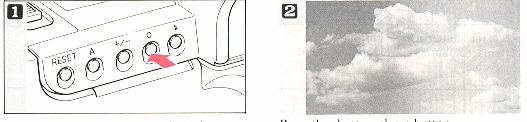
Press the OBJECT button and set the mode to - mountains- will blink.
Press the shutter release button.
* In the - mountain- mode, the shutter is released even though
"AF" does not light.
Exposure Compensation
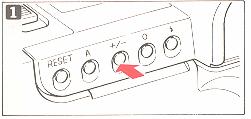
To control the exposure, press the + / button until the desired compensation value is indicated.

The compensation varies between—1.5 EV and + 1.5 EV in steps of 0.5 EV every time the button is pressed.
The compensation indicator on the LCD panel will blink to show the selected compensation.
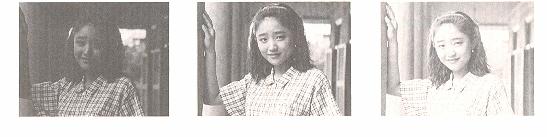
(1) - 1.5EV
(2) + or - 0EV
(3) + 1.5EV
Using the RESET button
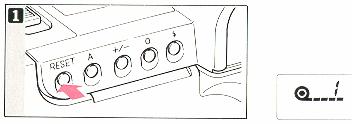
If you have made a mistake in setting -any controls, etc., press this
Reset: button to return to the standard shooting mode.
The continuous shooting, macro mode, distance mode, M.E. and exposure
compensation modes, the flash (lighting bolt) and flash off (lighting bolt with OFF) and the auto zoom will be released.
Then the standard mode will be set.
Taking Photographs III (Flash Photography)
The MIRAI 105 has an extended range of flash functions
Flash Auto Photography
In the flash auto mode, the flash fires automatically in low light condition and when the subject is backlit. This is the normal operating mode.
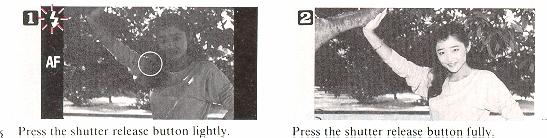
lights in the viewfinder to inform you that the flash is ready to fire.
Press the shutter release button fully. If the button is pressed before the (lighting bolt) lights, the flash won't fire.
Make sure the (lighting bolt) is lit before taking the picture.
* After the film is wound, it takes approx. 3.5 see to charge the flash.
Shooting range guide
| ISO |
WIDE |
TELE |
| 100 |
4.3 feet - 13 feet |
4.3 feet - 13 feet |
| 400 |
4.3 feet - 26.2 feet |
4.3 feet - 26.2 feet |
Flash working range in the continuous shooting mode
| ISO |
WIDE |
TELE |
| 100 |
4.3 feet - 9.8 feet |
4.3 feet - 9.8 feet |
| 400 |
4.3 feet - 19.7 feet |
4.3 feet - 19.7 feet |
Flash OFF Mode
When You Don't Want the Flash to Fire
Use this mode in a museum, etc., where flash photography is prohibited, or
when you are shooting night scenes and you don't want the flash to fire.
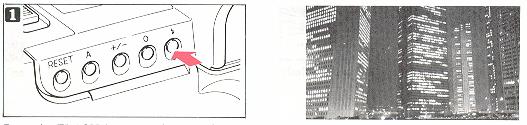
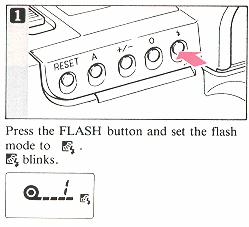
Press the FLASH button and set the flash mode to OFF. (lighting bolt OFF)
blinks. The shutter speed can be extended up to 2 sec. .
* In low lighting conditions, the shutter speed may be slow. Use a tripod,
etc., to prevent shaking the camera.
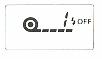
Using Fill-In flash
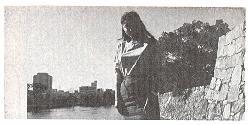
Example A: With backlighting, the person's face, etc., will be too dark.
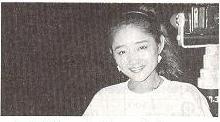
Example B: When shooting a night scene, etc., which includes the background,
only the person in the foreground can be shot.
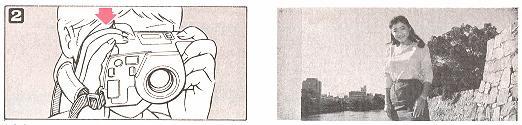
Make sure that the mark "AF" lights when the shutter release button is depressed halfway.
Then, press the shutter release button full.
Example A: By using the Fill-in flash mode, he subject will be properly lit by the flash.
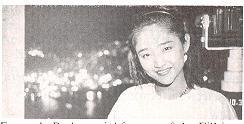
Example B: A special feature of the Fill-in flash mode is the ability to
shoot exposure' as slow as 2 seconds to capture the background while the flash lights the subject.
* In the slow synchro mode, the shutter speed becomes slow. Use a tripod,
etc., to prevent the camera from shaking.
Taking Photographs IV
The MIRAI 105 has the functions which rank with those of an AF SLR camera such as auto zoom and double-exposure.
In this section, photography techniques using those advanced techniques will be explained.
Auto Zoom Photography
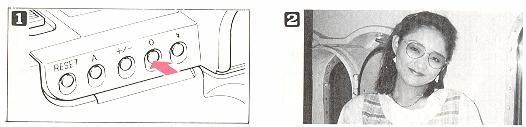
Press the OBJECT button to set the mode to close person or far person icon.
* In Auto-zoom mode it is not possible to use the zoom button.
Press the shutter release button. The zoom operates automatically, and the shutter will be released.
When shooting a portrait of a person above the waist, the close person icon should be set (blinks when set).
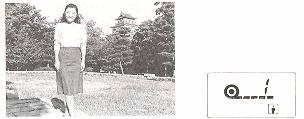
For the person's whole body to fill the picture the full person icon should be set (blinks when set).
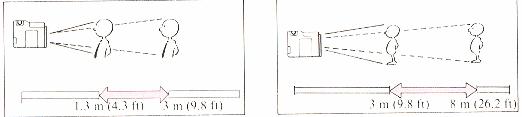
Working distances:
With close person icon shoot the subject in the range of 1.3 - 3 m. (4.3 ft—9.8 ft)
With full person icon shoot the subject in the range of 3 m (9.8 ft) 8 m (26.2 ft)
* Outside the ranges shown in the illustrations on the above the person may not have the specified size in the photograph.
Multi-exposure Photography
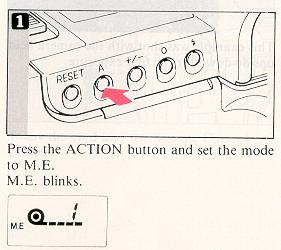
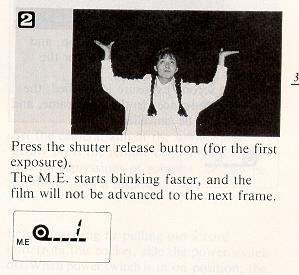
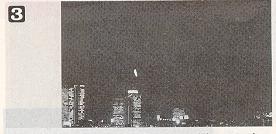
Determine the required composition, and press the shutter release button (for the second exposure)
When the second exposure is finished, the film will be advanced to the next frame, and the M.E. will be canceled.
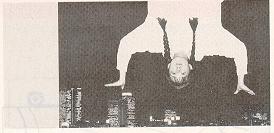
This example was shot with the camera held upside down for the first exposure.
Remote Control Socket
This camera is equipped with a Remote Control Socket. A 50 cm
electronic cable release cord and a 10-meter extension cord, are available from Ricoh as options for use in remote control photography.
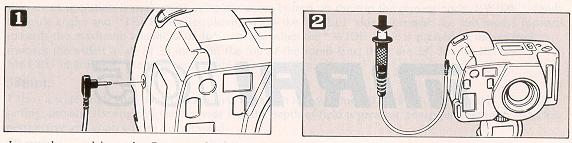
Insert the cord into the Remote Control Socket.
Set the camera, aim at the subject and gently press the remote control switch. The natural expressions of subjects can now be captured from a distance.
* Before inserting or pulling out a cord into/from this socket, side the
power switch off. When power switches in on position, the shutter might accidentally be released.
To Take Better Photographs
If you want to take more satisfactory photographs and master more advanced
photographic techniques, it is essential to fully understand the various
mechanisms in the camera and their functions. When you understand the operations
described up to this point, read this section to learn the more advanced
techniques necessary to make
full use of the MIRAI 105.
Zoom Lens
The MIRAI 105 is equipped with a 38—105 mm zoom lens. A zoom lens is a lens
whose focal length changes when part of the lens moves. In the case of the MIRAI
105, any focal length between 38 mm and 105 mm can be selected. The user,
without moving, can change the composition by zooming and, with the lens set the
telephoto position, can select a single person in a crowd. In this way, the
MIRAI 105 makes extremely flexible photography possible and is equivalent to a
camera with a number of interchangeable tense. In practice, zooming can add
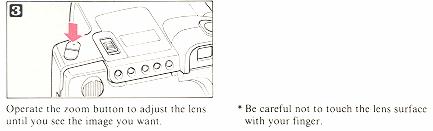
immense pleasure to photography. The zoom operation is performed using the zoom
button on the top the camera body. "WIDE" stands for wide-angle, and "TELE" for
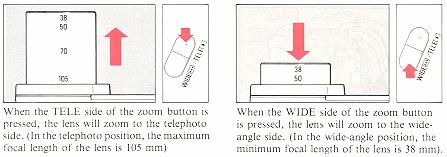
telephoto. When the "TELE" side is pressed, the lens moves forward towards the
maximum telephoto of 105 mm and when the "WIDE" side is pressed, it moves back
towards the widest angle of 38 mm. On the top of the zoom lens, there are 38,
50, 70, 105 and MACRO indications; use these as a guide when zooming.
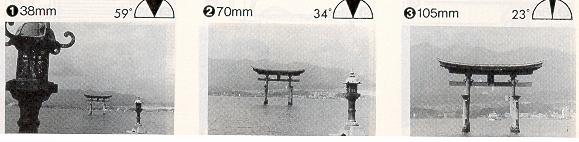
38mm:
This is a wide-angle shot which means that the zoom lens was moved back into
the camera. With this
setting, because the angle of view is wide and the depth of field is
greatest, sharp photographs with clear
perspective and contrast can be obtained.
50 mm:
The image is almost the same as that seen with the naked eye. At 50 mm, you
can take a great portrait
of 2 people or other subjects that would not look natural in a wide
angle shot. With this focal length, many
photographs can be taken over a wide range of applications, from snapshots
and portraits to landscapes.
85 mm or more:
When the lens is set to the maximum focal length of 105 mm, magnification
is approximately three times greater than at 38 mm and you will be able to
obtain genuine telephoto photographs. In contrast to wide-angle shots, the
perspective is narrow, and the depth of the field becomes more shallow. Because
the depth of field is not so great, objects in front of or behind the subject
being photographed will be out of focus; make use of this in composing your
photographs. Try taking close-ups with the telephoto setting. The telephoto lens
is especially useful for sports photography and taking photographs of animals
without disturbing them. Telephoto can make snapshots and portraits more
interesting by using its shallow depth of field. When taking telephoto shots, be
sure to hold the camera securely so that it does not shake.
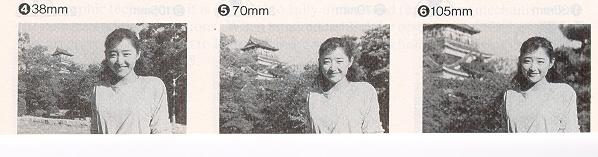
The three pictures (( 1), (2) and (3)) on the left are examples taken with
the photographer zooming while standing still
and the pictures clearly illustrate the differences obtained with different
settings The three pictures on the right are
examples of when the dimensions of the subject are not changed. From these
examples, you can easily see the
difference in the relation between the subject and the background.
Angle of view:
This is the shooting and viewing angle of the lens, you zoom to adjust the
composition, in your
photograph. When the angle of the view is greater (WIDE), the wide angle
view is seen. When the angle
is narrower, you have shifted to wards the telephoto (TELE).
Depth of field:
This is the range within which objects will be in focus. Outside this range,
nearer to the camera or
further from it, objects will be out of focus. The shorter the focal length
of the lens and or the larger the
"f" number, the greater the depth of field.
Autofocus (AF)
he Autofocus (AF) mechanism automatically adjusts focus. With it, the camera
measures
the distance to a subject and adjust the lens so that the subject is in
focus. In the MIRAI 105,
focusing is done by a newly-developed "Phase-Difference" detection system.
In this system,
light from the subject is picked up by a special sensor and any
inconsistencies (phase
differences) in the image are used by a microprocessor chip to calculate the
best focus setting.
Since the lens used in the MIRAI 105 is very accurate, correct focusing is
even more accurate
and accomplished by just aiming the lens at the subject. When there is no
light reflected
from the subject, for example in a dark room, focusing is performed using a
beam of light
from the camera (the AF-illuminator).
Autofocus is designed so that the object in the center of the picture frame
is correctly
focused. However, sometimes you may want a subject that is not in the center
of the frame to
be in focus; for such cases, the MIRAI 105 is also equipped with a focus
lock mechanism. 39
For example, when your subject is at the edge of the picture frame, not in
the center, first
move the camera slightly so that the subject is in the center of the
autofocus frame, then
press the shutter release button halfway to focus. While keeping the button
pressed, recompose the picture, and press the button fully. (See "Using the
Focus Lock'' on p.l6). By doing this, photographs with any required composition
can be taken. In addition, at the time the focus is locked, the exposure is also
determined automatically and locked (AE lock).
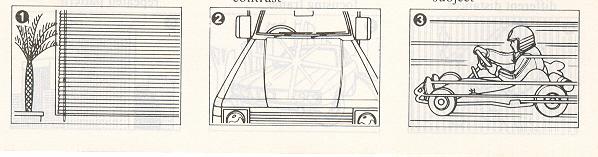
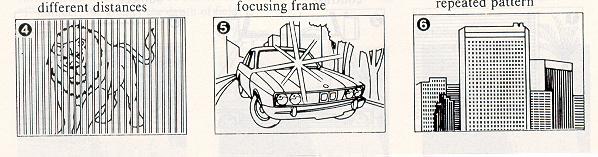
Subjects with which autofocus is difficult Although the MIRAI 105 can focus
in almost any situation, there are certain conditions, such as those illustrated
below (on the left), in which it may not be possible to obtain the correct
focus. The AF in the viewfinder will usually blink to warn you during these
conditions; however, in situations (4), (5) and (6), the green AF in the
viewfinder may light even though the lens is incorrectly focused. In any of
these situations. you can try focusing on a subject at a similar distance and
then, using the focus lock.
Exposure
Programmed exposure:
One of the basics of photography is exposure. Exposure refers to the amount
of the light which strikes the film. The correct amount of the light, or correct
exposure is controlled according to the film speed (indicated on the film
package, such as ISO 100 or ISO 200), the shutter speed and aperture. Many
cameras are now equipped with a programmed exposure function so that the correct
exposure can be obtained easily without any guess-work or previous photography
experience. With programmed auto exposure, the camera automatically sets the
most suitable combination of "f" stop and shutter speed for subjects at any
brightness level. As a result, the correct exposure will be obtained almost
immediately. It's an automatic exposure system that means you'll never miss the
opportunity to take a photograph. All the photographer has to do when holding
the camera is to concentrate on aiming it correctly and press the shutter
release button. For example, when you change from a dark to bright subject, the
camera adjusts itself to maintain the correct exposure. Anyone can take
photographs without worrying about making a mistake.
Program chart:
The chart shown here is a program chart when the focal length is 38 mm and
105 mm. When the subject is brighter than EV 11 for wide-angle shots and EV 12
for telephoto shots, the aperture and shutter speed change simultaneously. When
the subject is darker. the aperture opens fully and the shutter speed changes.
Naturally the program takes any zoom setting into consideration and sets the
aperture and shutter speed which are most appropriate for every shot. So that
camera shake is less of a problem. the shutter speed will not be — slower than
1/40 sec. for wide-angle shots and 1/100 sec. for telephoto shots. When the
subject is darker and requires a slower shutter speed. the flash fires
automatically: in the fill-in or flash-off mode. stays open for as long as
needed-up to a long 2 sec. automatically.
Multi-exposure:
'Multi-exposure" refers to a technique in which images are superimposed by
releasing the shutter twice without
advancing the film.
In the case of the MIRAI 105, you can easily take double exposures by
pressing the ACTION button. By doing this,
even when the shutter is released, the film won't advance to the next frame
until the shutter has been released for the
second exposure. We recommend combined use of exposure compensation and the
Hash for applications of this type.
Exposure compensation:
With the MIRAI 105, the exposure can be compensated from -1.5 EV to + 1.5 EV
in 0.5 EV steps, by simply pressing the exposure compensation button marked + /
- . For instance, when shooting a back lit subject that's too far away for the
flash to be effective, the exposure should be compensated to the positive side
(more light) so the subject doesn't look too dark in the photograph. When the
background is dark and details can't be seen and only the subject is bright, the
exposure should be compensated to the negative side (less light).
Viewfinder Displays:
The MIRAI 105 has a viewfinder system which minimizes parallax and which is
coupled with the zoom lens at every setting. This viewfinder is different from
those used with conventional compact cameras, employing a system that shows a
corrected and magnified image using the real image obtained through the lens.
This high-performance viewfinder shows about 85?o of the image that will appear
in the photograph, which makes it extremely similar to the viewfinder of an SLR
camera. This means the viewfinder shows exactly what will appear in the
photograph. The viewfinder's high magnification is made possible by newly
developed optical technology. The image in this viewfinder is large, bright and
clear making this camera still easier to use.
Parallax in macro photography:
In macro photography, with the camera very close to the subject, the image
seen in the viewfinder of a conventional compact camera and the actual image on
the photograph sometimes seem very different. To avoid this, the viewfinder
frame of the MIRAI 105 is adjusted by the camera according to the subject's
distance, minimizing any actual photograph. In this case, the autofocus frame is
not in the center of the viewfinder, so the focus lock function should be used
for accurate autofocus.
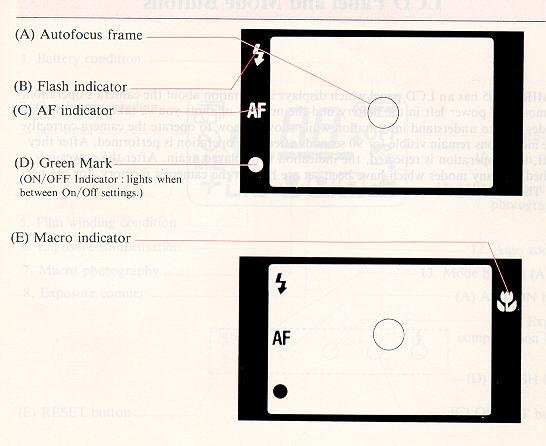
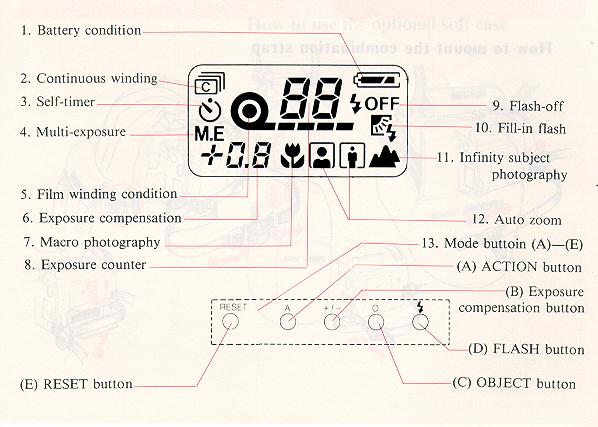
LCD Panel and Mode Buttons:
The MIRAI 105 has an LCD panel which displays information about the camera's
operation, the amount of power left in the battery and the number of shots
you've taken. This display provides easy to understand information while showing
how to operate the camera correctly. These indications remain visible for 90
seconds after each operation is performed. After they go out, if an operation is
repeated, the indication is displayed again. After the power is switched off,
any modes which have been set are held in the camera's memory, for use next
time. The following information is displayed.
Using the Accessories
Questions and Answers:
Q: What kind of batteries should I use?
A: Use two lithium CR-123A/DL-123A batteries. Don't install one new battery
with an old one. Change them both at the same time.
Q: How long do the batteries last?
A: Since long-life lithium batteries are used, approximately 30 rolls
(24-exposure, half the shots with flash) can be taken. When the flash and zoom
are used less frequently, the batteries will last longer.
Q: The camera does not work. What should I do?
A: (1) Make sure the power switch is set to ON. This camera will not
function when the power switch is between ON and OFF. At this time Green Mark
will light in the viewfinder to warn you.
(2) Check to make sure that the batteries are loaded and inserted correctly.
(3) If the film has been rewound, the camera won't work until a new film is
inserted.
Q: The camera does not focus correctly. What should I do?
A: The camera may not focus correctly in some cases. Focusing is difficult
when, for example, the subject is moving quickly, if the camera is shaking, or
if the subject is difficult to focus on (See" Subjects with which autofocus is
difficult" on p. 39)
Q: Why doesn't the camera focus although the AF Illuminator lights?
A: It may not focus if the subject is too close, if the subject reflects too
little light (when it is blue or black) or if the subject reflects too much
light (white or light colored).
Q: Why won't the shutter fire when I press the release button.
A: The camera probably hasn't focused properly. Check the AF in the
viewfinder.
Q: The flash doesn't fire. What should I do?
A: (1) Check to see if the flash mode is set to OFF.
(2) When the flash is fired too often in succession,
flash charging will take longer, and the Rash may not fire. Wait until the flash
indicator lights
Q: The film does not advance to the first frame automatically even when the
camera back is closed. What should I do?
A: Open the camera back, and remove the film. Move the power switch to OFF,
then to ON again to check the power remaining in the battery; if there is
sufficient power, insert the film again and close the camera back.
Q: The camera does not operate in cold weather. What can I do?
A: Battery performance will be reduced temporarily by low temperatures, so
it is recommended to bring spare batteries with
you. However, the batteries will function properly again if the temperature
returns to normal.
Specifications:
Type: Full-automatic 35mm autofocus lens-shutter camera with built-in Zoom
lens
Film format: 35mm standard DX coded film (24 x 36mm)
Lens: Ricoh 38—105mm F4.5-6 lens with 12 elements in 11 groups
Shutter: Programmed electronic shutter
Viewfinder: Kepler type 0.46-1.2x bright frame 56 zoom-finder (with
autofocus frame, AF
indicator, flash indicator, macro indicator)
Parallax compensation system in macro photography
Finder view-field: 85 degrees of actual picture field
Focusing: Passive autofocus system with focus lock
Focusing range: 1.3m (4.3ft)—~ (infinity) 0.8m (2.6ft)—1.3m (4.3ft) in macro
photography
Exposure control: Automatic exposure control with programmed electronic
shutter
Center-weighted average light metering
Auto exposure range: WIDE: EV3.4 (F4.5, 2sec.) -
EV17(F16. 1/500 sec.)
TELE: EV4.4(F6.2 sec.)- EV17(F18.4. 1/400 sec. )
Exposure compensation: + or - l.5EV Compensation possible ( 1 /2 step)
Exposure counter: Progressive type, displayed in LCD panel
Self-timer: Electronic self-timer with 12 sec. delay
Film speed range: Automatic setting with DX coded film ISO(25, 50, 100,200,
400, 800 1600, 3200) with color negative film (Actual setting at 25, 50, 100,
200, 400, 800, 1600, 3200)
Film loading: Automatic loading (automatically advances to first frame when
camera back is closed)
Film advance: Automatic film winding Continuous shooting mode advances film
1.3 frames-per second.
Film rewind: Automatic film rewind (automatic rewind activated at the end of
film, automatic rewind stop)
AF illuminator: Automatic actuation in low light
Flash: Built-in zoom flash Recycling time: SINGLE MODE: approx. 3.5 sec. (at
normal Temperature)
Continuous Mode: approx. 2.5 sec. (at normal temperature)
Flash working range: WIDE: 1.3m(4.3ft) - 4m(13.1h)
TELE: 1.3m(4.3ft)—4m( 13.1 ft) with ISO 100 negative color film
WlDE: 1.3m(4.3ft)—8m(26. 2ft)
TELE: 1.3m(4.3ft) 8m(26.2ft) with ISO 400 negative color film
Flash modes: AUTO (automatic flash activation in low light and backlight) FILL-IN (forced activation,
slow-synchro possible with longest shutter speed of 2 sec.) OFF (activation stop)
LCD panel: Shows film load, advance and rewind; Exposure Count, Continuous Shooting mode,
Multi-Exposure mode, Self-timer, Exposure Compensation, Battery Condition, Flash mode,
Macro mode, Auto zoom/object mode, Infinity mode.
Special features Auto zoom/object mode, Infinity mode, Macro mode, Multi- Exposure mode,
Continuous shooting mode, Electronic Cable Release
Socket, Tripod Socket.
Battery check: Displayed in LCD panel
Power source: Two 3V lithium batteries (DL 123A or CR 123A) (replaceable)
Dimensions: 132(W)mm x 79(H)mm x 92(D)mm (5.2" x 3.1" x 3.7~) (excluding
protrusions)
Weight: 600g (21.20z) (without batteries)
Specifications and design are subject to change without notice.