Ricoh RZ-770
This camera manual library is for reference
and historical purposes, all rights reserved.
This page is copyright
© by

,
M. Butkus, NJ.
This page may not be sold or distributed without the
expressed permission of the producer.
I have no connection with any camera company.
On-line camera manual library
Back to main on-line manual page
If you find this manual
useful,
how about a donation of $3 to:
M. Butkus, 29 Lake Ave.,
High Bridge, NJ 08829-1701
and send your
e-mail address
so I can thank you.
Most other places would charge
you $7.50 for a electronic copy
or $18.00 for a hard to read Xerox copy.
This will help me to continue to host this site,
buy new manuals,
and pay their shipping costs.
It'll make you feel better, won't
it ?
If you use Pay Pal, use the link below.
Use the above address for a check, M.O. or cash.
CLICK HERE FOR A PDF
VERSION OF THE Ricoh RZ-700 PAGE
CONTENTS
Locating the Controls ......................11
Main Features ....................... 12
Before using ............................... 12
Attaching the Strap ........................... 12
Inserting the battery ............................12
Power Switch and checking the battery ..... 13
Loading the film ....................................... 13
Setting the film speed .................................14
Holding your camera ..................................14
Viewfinder ................................................. 14
Zooming the lens ........................................ 14
Auto-focus shooting ................................... 15
Pre-focus Shooting ........ ............................. 15
Auto film rewinding .......................................16
Flash photography .......................................16
Red Eye Reduction Mode ' ...........................17
Flash-Off Mode ............................................17
Using the self-timer ...................................... 18
(Optional) Databack settings .........................18
Proper care of your camera .......................... 20
Major specifications . ................................... 21
We are most gratified that you have selected a RICOH camera. Before using
your camera, please be sure to read these instructions carefully.
LOCATING THE CONTROLS
(1) Photocell
(2) Self-timer LED
(3) Zoom Button
(4) Film Counter
(5) Manual Film Rewind Button
(6) Shutter Release Button
(7) Strap Holder
(8) Battery Compartment Cover
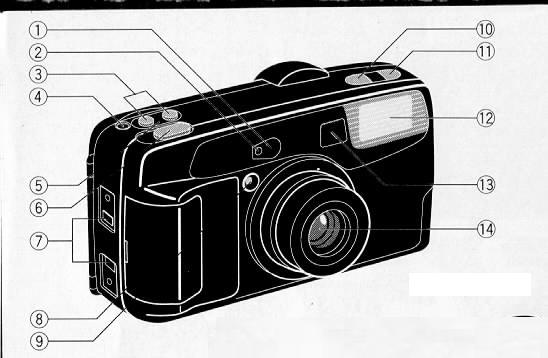
(9) Red-eye Reduction Lamp
(10) Self-timer Button
(11) Flash-off Button
(12) Built-in Flash
(13) Viewfinder Window
(14) Lens
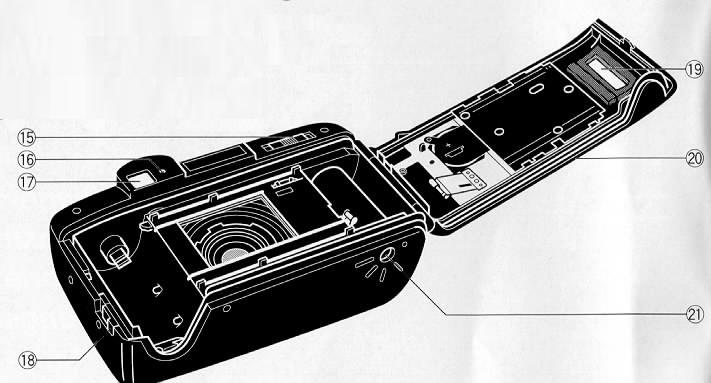
(15) Power Switch
(16) AF/Flash Monitor
(17) Viewfinder
(18)Back Cover Latch
(19) Film Loaded Window
(20) Back Cover
(21) Tripod Socket
Images for figures 1- 64 and examples 1- 8
Click and print each individual page if needed
MAIN FEATURES
· Fully automatic easy operation
· Light and compact with built-in 35-70 mm zoom lens
· Red Eye Reduction mode
· High power sensor flash
· Flash-off capability
BEFORE USING
--A fast film such as ISO 400 is recommended to prevent blurriness and to
obtain a longer flash range.
-- Do not hold the camera by the lens.
-- Before taking important pictures (at weddings, on trips abroad, etc.) test
the camera and learn how it works.
CAUTIONS
--This camera has a high voltage circuit. Because it is dangerous, do not
attempt to take the camera apart.
--If the built-in flash does not operate, do not touch the internal parts of
the camera, as it contains a high voltage circuit. Take the camera to the shop
where it was purchased, or to your nearest Ricoh service center.
ATTACHING THE STRAP

1. Run the strap through the camera's strap holder. (Fig. 1)
2. Pass the strap through the buckle as in Fig. 2.
INSERTING THE BATTERY
The camera will not operate unless the battery is installed. It is important
to make sure that the battery is installed correctly.
1. To open the Battery Compartment Cover, first slide it in the direction
of the arrow using a coin, etc. (Fig. 3)
2. Insert the 3 volt lithium battery (CR-123A or DL1 23A), checking that +
and--on the banpry are aligned according to polarity diagram inside the battery
compartment. (Fig. 4)
3. Close the Battery Compartment Cover in the direction of the arrow, and
push it down. (Fig. 5)
Recommended. Replacement 3 V Lithium Batteries Include:
Lithium battery (3V)
Panasonic CR-1 23A
Duracell XL DL-123A
POWER SWITCH & CHECKING THE BATTERY POWER SWITCH
Each time you slide the Power Switch in the direction of the arrow, it
switches from OFF, ON, and vice versa. (Fig. 6)
The lens moves from the Storage Position to the Wide Angle Position, and the
camera sets everything automatically.
CHECKING THE BATTERY
* If the battery voltage is insufficient, the shutter may not release or the
film may not advance completely. In the following cases, replace the battery: 1
) Turning on the Main Switch, zoom lens doesn't move to the "Wide" position.
2) While pressing the Flash OFF Button, press the Shutter Release Button
halfway.
If the AF/Flash Monitor next to the viewfinder blinks, it is necessary to
replace the battery.
LOADING THE FILM
Always avoid direct sunlight when loading the film.
1. Push the Back Cover Latch Downward to open. (Fig. 7)
2. Load the film cassette into the Film Chamber and pull out enough film
leader to extend past the mark of the film tip index.
(Fig. 8, 9)
* If there is any dust on the inside lens surface, use a blower to blow the
dust away.
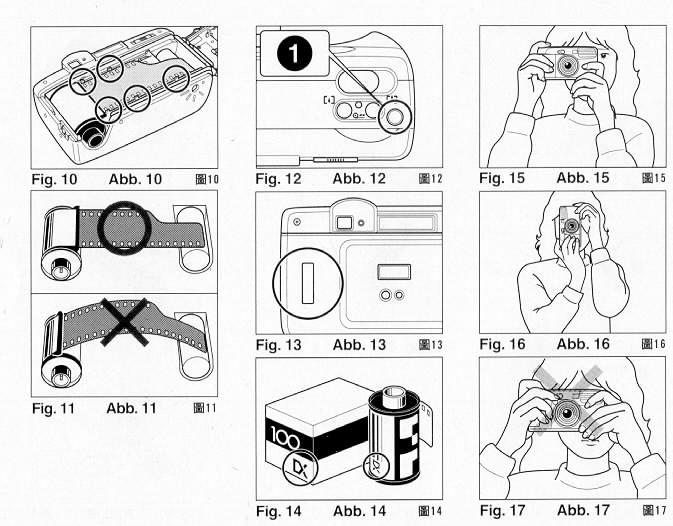
3. Make sure the film stays within the Film Guides and lies flat. (Fig.
10,11)
4. Press the Back Cover shut so that the Back Cover Latch returns to its
original position. The film is automatically advanced until number "1" appears
in the Film Counter. (Fig. 12)
5. If number 1 does not appear in the Film Counter, the film has not advanced
properly. Reload the film by following steps 1--4 shown above.
* The shutter will release even H the film has not been loaded properly.
Therefore, make sure "1 " is displayed in the Film Counter before shooting.
* Whether there is film in your camera or not can be confirmed by the Film
Loaded Window. (Fig. 13)
* You can confirm that the Film-Wind or Rewind is working properly by
observing the Exposure Counter.
SETTING THE FILM SPEED
DX-coded film cassettes have black-and-silver patterns corresponding to film
speeds that the camera reads and automatically sets. Your camera accepts DX
films with speeds ranging from ISO 100 or 400. (Fig. 14)
* To increase flash shooting range, use higher speed film such as ISO 400.
When using DX-coded films, setting the film speed is not necessary. Your
camera automatically sets the correct film speed.
When using a film without a OX code, your camera will automatically set
itself to ISO 100.
When the film speed is more than ISO 400 set to ISO 400. When it is less than
ISO 400, set to ISO 100.
HOLDING YOUR CAMERA
1. Always use both hands to steady your camera. (Fig. 15)
* When holding the camera vertically always position it with the flash at the
top. (Fig. 16)
* Be careful not to place your fingers over the lens, flash or photocell.
(Fig. 17)
* If the camera moves during the exposure, the whole picture will be blurred.
To help insure sharp pictures, hold the camera steadily and properly.
VIEWFINDER
(Fig. 18)
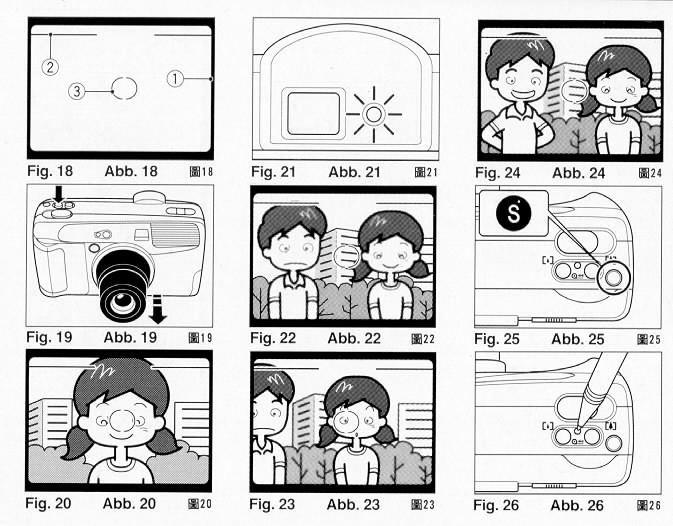
(1) Field of View Frame
The subject (such as people or scenery) you wish to photograph should be
contained within this frame.
(2) Parallax Correction Marks
When taking a picture of a subject that is between 1.2 m-1.5 m (4 ft.-4.9
ft.) away from your camera the subject should be positioned within these marks.
Anything outside the marks will not be included in the picture even if you can
see it through the viewfinder.
(3) Auto Focus Mark
The Auto-Focus system focuses automatically on any subject that appears
within this AF mark.
ZOOMING THE LENS
The built-in 35-70 mm zoom lens lets you get closer to your subject without
changing your position. This lets you easily select the composition that best
suits your subject.
To zoom the lens, just press either of the zoom buttons (Fig. 19) until your
subject is framed properly.
* When zooming the lens, keep your fingers away from the moving lens
components.
AUTO-FOCUS SHOOTING
1. Set the subject you wish to take within the Auto Focus Mark in center of
the Viewfinder. (Fig. 20)
2. When you press the Shutter Release Button halfway, the AF/Flash Monitor
will light up. (Fig. 21) Focus and exposure are locked.
3. Gently press the Shutter Release Button down to take the picture. The film
will advance automatically as soon as the shutter has been released.
* The shutter will not release when the AF/Flash Monitor is blinking, as the
flash is charging during this time.
* Avoid pressing the Shutter Release Burton too abruptly to avoid camera
shake or possible misoperation.
* There may be rare cases when accurate focusing is difficult or impossible.
(For instance, with dark subjects that do not reflect light well, glossy
subjects, or subjects taken through glass.) In these cases, it is best to use
the Pre-Focus technique (see next section) to "lock" the focus on a more
"normal" subject at the same distance. While holding focus, turn your camera
back to the original subject and shoot. (See PRE-FOCUS SHOOTING for more
details.)
* The minimum shooting distance of this camera is 1.2 m (4 ft.). However, the
shutter will release even if you are closer than this distance. Blurred pictures
are more likely to occur in telephoto (70 mm), so be careful when taking
pictures.
PRE-FOCUS SHOOTING
When the subject you wish to focus on is not located within the Auto-Focus
Frame or is difficult to focus on, you should use pre-focus shooting.
When the subject is not within the Auto-Focus Frame:
1. If you want to photograph two or more people, there may be cases where
none of your main subjects can be within the Auto-Focus Frame in the center of
the Viewfinder. If you release the shutter then, only the background will be in
focus, and the people, who are the main subject, will be out-of focus. (Fig. 22)
2. Move the camera to one side so that one of the subjects is within the
Auto-Focus Mark. Press the Shutter Release Button halfway so that the
AF/Flash monitor lights up. Keep holding your finger halfway down on the Shutter
Release Button. (Fig. 23)
3. Now return the camera to its original position so that your main subjects
are in the Field of View Frame again, and press the Shutter Release Button fully
to take the picture. (Fig. 24)
When the subject is difficult focus on:
1. When you are photographing subjects that are difficult to focus on (such
as a black dog, glossy surface or behind glass, Insubstantial matter, such as a
flame or smoke. Non-reflective objects, such as hair. Very small objects.), find
another subject at the same distance from the camera. You can prefocus on that
subject in the same way as described above.
* When you remove your finger from the shutter Release Button, the pre-focus
setting is cleared, so that you can pre-focus again as many times as you wish.
AUTO FILM REWINDING
1. After the end of the film has been reached, the film is automatically
rewound.
2. You will see the film rewind by returning film counter.
3. When the film is fully rewound, the motor stops automatically and "S"
appears in the Film Counter Window, you can now open the Back Cover to unload
the film. (Fig. 25)
* If you wish to rewind the film before the end of the film is reached, push
the Manual Film Rewind Button with a pen, etc.
(Fig. 26)
* Don't open the Back Cover and remove the film forcibly before ending the
film, it may cause the malfunction of the winding mechanism.
* Be careful not to touch the inner lens with your fingers or the edge of
film.
FLASH PHOTOGRAPHY
1. If additional light is required, the built-in Flash automatically
activates.
* Recommended Flash Shooting Range
(ISO 100)
Wide-angle: 1.2 m-about 3.9 m (4.0 ft.-12.9 ft.)
Telephoto: 1.2 m-about 2.1 m (4.0 ft.-6.9 ft.)
(ISO 400)
Wide-angle: 1.2 m-about 7.8 m (4.0 ft.-25.7 fl.)
Telephoto: 1.2 m-about 4.2 m (4.0 ft.-13.8 ft.)
* To increase shooting range, use higher speed film such as ISO 400.
2. When the Flash is still charging, the Green AF/ Flash Monitor will blink
fast and the shutter will be locked. Wait until the Green AF/Flash Monitor turns
on in order to use the flash.
RED EYE REDUCTION MODE

Minimizing the Red-Eye Effect
Selecting this mode makes it possible to minimize the red-eye effect that
sometimes occurs when taking portrait photographs with flash. This makes it easy
for anyone to take natural-looking portraits of people.
1. Slide the Power Switch to the Red-eye Reduction mode, then press the
Shutter button gently. (Fig. 27) The Red-eye Reduction Lamp will light. After a
brief delay, the flash will fire, and the shutter will be released. The entire
sequence will take about one second.
* Be sure to hold the camera still after pressing the Shutter Release Button
until the full cycle is complete and the shutter is released.
* You may wish to advise your subjects to wait until the above operation is
complete.
FLASH-OFF MODE
This mode forcibly prevents automatic firing of the flash, thus allowing
available light photography in museums, churches, etc. where flash photography
is prohibited.
While pressing the Flash OFF button, press the Shutter Release Button. (Fig.
28)
* In dim light, the camera's Shutter speed will be automatically reduced.
Take particular care in Telephoto (70 mm) Mode. To prevent a blurry picture,
hold the camera steadily and press the Shutter Release Button gently.
* To prevent blurry pictures from slow shutter speeds, we recommend the use
of a tripod.
USING THE SELF-TIMER
1. While pressing the Self-timer Button, press the Shutter Release Button.
The Self-timer LED on the front of the camera will light for approximately 7
seconds. Then, the LED will blink for about 3 seconds to indicate that the
shutter release soon. After a total of about 10 seconds have elapsed, the
shutter will release. (Fig.29)
2. When the self-timer begins, focus and exposure are locked.
* The self-timer will not operate while the flash is charging.
* If you wish to cancel the self-timer once it has started, slide the Power
Switch to "OFF".
Using the Self-timer for Flash Photography:
When the Self-timer Button is pressed the Flash Unit will work automatically
if there is insufficient light.
Using the Self-timer without flash
If you wish to shoot without the flash, keep both the Flash OFF button and
the Self-timer button pressed when pressing the Shutter Release Button.
(OPTIONAL) DATABACK SETTINGS
Nomenclature of the date imprinting feature (Fig. 30)
(1) Display panel
(2) Month indication
(3) Imprint mark
(4) Set button
(5) Mode/Select button
Imprinting mode - Examples of date imprinting (Fig.31)
(1) 1995 August 26th
(2) August 26th, 1995
(3) 26th August, 1995
(4) 26th 15:59
(5) No imprinting
Selecting imprinting mode
Each time the Mode/Select button is pressed, the display changes as shown
below. (Fig. 31)
(1) Date (Year/month/day)
(2) Date (Month/day/year)
(3) Date (Day/month/year)
(4) Time ( Day/hour/minute)
(5) No imprinting
Checking imprinting
After shooting, the imprint mark "PRINT" blinks in the display panel for a
few seconds for correct imprinting.
The mark and the letter "M" are not imprinted on the picture.
Resenting the date and time
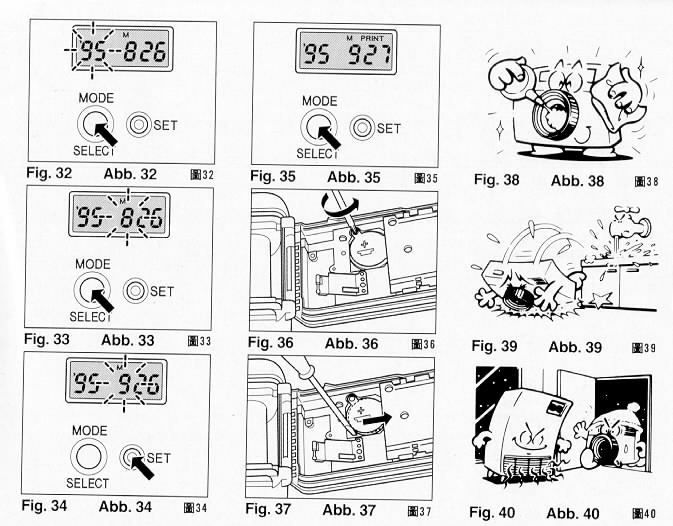
1. Press and hold the Mode/Select Button for more than 2 seconds until the
year digits flash. (Fig. 32)
2. When the Mode/Select Button is pressed, the flashing digits change in the
order of year, month, day, hour and minute. (Fig. 33)
3. When the digits to be reset flash, press the Set Bunon until the desired
digits appear. When the Set Burton is kept pressed, the digits change rapidly.
(Fig.34)
4. When you have finished resetting the date and time, press the Mode Button.
The Print mark appears in the display panel. (Fig. 35)
Battery Replacement
1. Open the back cover.
2. Remove the screw from the databack battery compartment cover with a small
(+) screwdriver. (Fig. 36)
* Use a pointed instrument to slide the battery in the direction of the arrow
to the dotted line position, to push it out. (Fig.37)
3. Load the new battery with the side marked (+) facing upwards. Then, close
the battery compartment cover using the (+) screwdriver. (Use lithium battery
CR2025. The service life is about 3 years.)
* When the battery is exhausted, the imprinted digits become faint. At that
time, replace the battery.
* Do not open the date battery compartment lid except when replacing the
battery
* Keep the battery out of reach of children. If a child swallows the battery,
contact your doctor immediately.
Notes the date imprinting feature
* At temperatures of below 0°C (32°F), the battery performance deteriorates.
The date imprinting feature may not function correctly and imprinting may become
impossible.
* When the battery is replaced, the display panel sometimes displays the
wrong digits. Reset the degits for correct indication.
* The date is sometimes illegible if it is imprinted on the following
objects.
(1)"Warm"-colored objects, such as red, yellow, orange, etc.
(2) 0bjects with details similar in size to the imprinted date (gravel,
leaves, etc.)
(3) Bright objects such as the sky, a white wall, etc. * Imprinting is not
possible during the following modes.
(1 ) Print off mode
(2) Reset mode
PROPER CARE OF YOUR CAMERA
* If there is dirt on the lens and in the camera body, do not attempt to
remove it with your fingers. Use a blower to blow the dust away, or wipe the
surface gently with camera lens tissue or a soft cloth. (Fig. 38)
* Camera malfunction can be caused by impact, humidity, salt etc. After using
the camera at the beach or places where there is salt spray, high humidity or
chemicals, wipe it off carefully. (Fig. 39)
* Take care not to expose the camera to sudden changes in temperature, as
that may cause condensation on the lens and film or inside the body, or other
malfunctions. (Fig. 40)
* Do not expose the camera for a long period of time to extremely high
temperatures, such as in your car or on the beach, as this may ruin your film,
or cause other malfunctions. (Fig. 41 )
* When using a tripod, do not try to force a long screw into the socket. The
screw length should be less than 5.7 mm (1/4 inch). (Fig. 42)
* Do not place the camera near equipment that has strong magnetic fields such
as a television or radio. (Fig. 43)
MAJOR SPECIFICATIONS
Type:
Fully automatic 35 mm autofocus lens shutter camera with
built-in zoom lens
Lens:
35 mm f5.0-70 mm f9.5 zoom lens 6 elements 5 groups
Focusing:
Active type auto focus 1.2 m (4 fl.)-inf.
Shutter:
Programmed Electronic shutter: 1/5-1/250 sec.
Selftimer:
Electronic type with LED indicator. Operating delay approx.
10 sec. 7 see LED lights and 3 see LED blinks
Viewfinder:
Real image zoom viewfinder Mag. x 0.33-0.58, Field of view
about 83%
Exposure Adjustment:
Programmed AE with CdS cell Coupling range
EV8.0-15.0 (ISO 100)
Film Speed:
ISO 100, 400. Compatible with DX code system.
Flim Load/Wind/Rewinding:
Ricoh auto-load system. Automatic 1st frame
set. Automatic film rewind at the end of film. Mid-roll rewind is possible.
Exposure Counter:
Mechanical, Additive
Built-in Flash:
Electronic flash automatically activates in dim light
Flash off possible
Red eye reduction by lamp
Flash Range:
ISO 100 Negative film
(Wide) 1.2 m-3.9 m (4 fl.-12.9 fl.)
(Tele) 1.2 m-2.1 m (4 ft.-6.9 ft.)
ISO 400 Negative film
(Wide) 1.2 m-7.8 m (4 ft.-25.7 ft.)
(Tele) 1.2 m-4.2 m (4 fl.-13.8 fl.)
Flash Recycle time:
About 7 sec.
Power Source:
3 V lithium battery x 1. CR1 23A or equivalent
Dimensions: 126 mm
(W) x 69 mm (T) x 44 mm (D), 5.0 in. (W) x 2.7 in.
(H) x 1.7 in (D)
Weight:
270 q (9.5 oz.) without battery