This camera manual library is for reference and historical purposes,
all rights reserved.
This page is copyright by
, M.
Butkus, NJ.
This page may not be sold or distributed without the
expressed permission of the producer
I have no connection with Chinon Co., Japan
On-line camera manual library
This is the full text and images from the manual.
This may take 3 full minutes for all images to appear.
If they do not all appear. Try
clicking the browser "refresh" or "reload button" or right click on the
image, choose "view image" then go back. It should now appear.
To print, try printing only 3 or 4
pages at a time.
If you find this manual useful, how about a donation of $3 to: M. Butkus, 29 Lake Ave., High Bridge, NJ 08829-1701
Back to main camera manual page
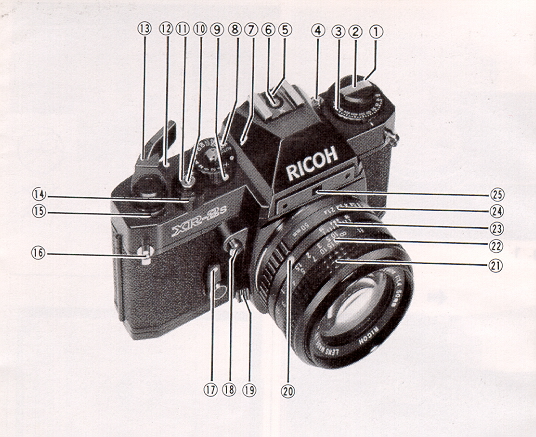
DESCRIPTION OF PARTS
1. Film Rewind Knob/Back Cover Lock Release Knob
2. Film Rewind Crank
3. Film Speed Dial (ASA)/Exposure Compensation Dial
4 Film Speed Lock Button
5. Flash Ready Signal Contact
6. Hot Shoe/Flash Contact4www.butkus.org
7. Shutter Speed Index Line
8. Shutter Speed Dial
9. Automatic Exposure Lock Button
10. Cable Release Socket
11. Shutter Release Button
12. Shutter "ON-OFF'' Index Mark
13. Film Advance Lever
14. Battery Check Ring
15. Exposure Counter
16. Neck Strap Eyelet
17. Self-timer Lever
18. Depth of Field Preview Button
19. Lens Release Lever
20. Lens Locator Node
21. Focusing Ring
22. Distance Scale4www.butkus.org
23. Depth of Field Scale
24. F-Stop Ring
25. Aperture Relay Port
26. Sprocket Teeth
27. Multi-exposure Button
28. Multi-exposure Lock Lever
29. Viewfinder Eyepiece Blind Lever
30. Viewfinder Eyepiece <<< update - I have been told a Olympus or Pentax eyecup and other accessories will work on XR cameras >>>
31. Flash LED
32. Film Rail
33. "X" Flash Terminal
34. Film Rewind Shaft
35. Film Chamber
36. Battery Compartment Cover
37. Tripod Socket
38. Winder Contacts
39. Shutter Release Connection
40. Film Rewind Release Button
41. Winder Coupler
42. Positioning Hole
43. Film Take-up spool
44. Back Cover
45. Film Pressure Plate
46. Microprism-image Band
47. Split-image Spot
48. Exposure Meter Needle
49. Shutter Speed Indicator
50. Battery Power Check Zone
51. Aperture Readout Window
We are most gratified that you have selected the XR-2s which we are sure will give you many delightful! years of picture-taking pleasure.
The XR-2s is a 35 mm fully automatic electronically controlled exposure system (aperture-priority) SLR camera which assures you of superb optics and outstanding mechanical performance and reliability and which will justify your choice for years to come.
Before Using Your XR-2s
Please read this instruction booklet carefully and familiarize yourself with the equipment and its features thoroughly. Your pleasure in using your XR-2s will be greater if you know your camera properly.
If you press a shutter release button without batteries in the camera, a mirror will stay up. Therefore. please do not forget to insert batteries into the camera first.
The built-in through-the-lens CdS exposure metering system of your XR-2s
operates on power activated by two 1.5V LR-44 alkaline batteries. which
are supplied together with your camera.
|
1. Remove Battery Compartment Cover (36) by unscrewing it counterclockwise
with a coin (Fig. 1)
2. Place the two batteries into the compartment with the plus (+) side down, as illustrated in the battery holder of Battery Compartment Cover (36) (Fig. 2). Make sure that the batteries are correctly placed. If incorrectly placed, Exposure Meter Needle (48) in the viewfinder will not move at all. |
3. Replace Battery Compartment Cover (36) by screwing it clockwise until it stops but do not force.4www.butkus.org
* Before loading, wipe off the surfaces of the batteries with a clean and dry cloth to ensure they are free of fingerprints or stains.
* When your camera is not used for a long period, remove the batteries and keep them in a cool, dry place.
* The batteries will last for about half a year in normal use.
* The batteries may explode if disposed of in fire.
Check the power of the silver-oxide batteries after loading them.
![]() |
1. Turn Battery Check Ring (14) clockwise until it stops (Fig.
3)
2. If Exposure Meter Needle (48) in the viewfinder swings into Battery Power Check Zone (50), the batteries have sufficient power (Fig. 4).
|
3. If Exposure Meter Needle (48) does not move or stays below Battery Power Check Zone (50), the batteries must be replaced. For replacement, use two new Mallory MS76, Eveready S76 or equivalent.
Your XR-2s is designed to accept any standard 35 mm color or black and white film roll in cartridge. (12, 20, 24 or 36 exposures).
|
1. First of all, press Shutter Release Button (11) to see that the
shutter has been released.
(Refer to "METER/SHUTTER ON/OFF CONTROL''). 2. Pull up Film Rewind Knob (1) until Back Cover (44) snaps open (Fig. 5). Then, pull it out all the way to allow for insertion of the film cartridge. |
3. Swing open Back Cover (44) and place a film cartridge into Film Chamber (35) (Fig. 6).
|
4. Push down Film Rewind Knob (1) to its original position by turning Film Rewind Crank (2) clockwise or counterclockwise so that Film Rewind Shah (34) engages the film cartridge and that the film cartridge is seated in place (Fig. 7). 5. Draw the film leader across the camera back and insert it into one of the slits of Film Take-up Spool (43) (Fig. 8). To bring the slit into a convenient position, rotate Film Take-up Spoof (43) in the direction of arrow with your finger. |
|
6. Rotate Film Take-up Spool (43) by advancing Film Advance Lever (13) to take up any slack in the film and check to see that the film tip is firmly hooked onto Film Take-up Spool (43) (Fig. 9) and that sprocket holes on the film are fully engaged on Sprocket Teeth (26) (Fig. 10). |
7. Close and press Back Cover (44) firmly until it snaps shut.
![]() |
8. Advance Film Advance Lever (13) two or three times, after depressing Shutter Release Button (11) each time, until the number "1" is opposite the index line in Exposure Counter (15) (Fig. 11), because the first portions of the film can not be used for picture taking as they have already been exposed to light and two or three blank exposures should be made before taking your first picture. Now it is ready for your first picture. |
Tips for Better Results
* As you advance the Film Advance Lever (13), the Film Rewind Knob (1) will simultaneously rotate counterclockwise indicating that the film is advancing properly.
* When making blank exposures with Shutter Speed Dial (8) set at ''AUTO'', set F-Stop Ring (24) to the smallest f-stop (the largest lens opening) so that you can make next blank exposure quickly, otherwise a slower shutter speed will be result which could be an annoyance.
Each type of film, color or black and white. has its own sensitivity to light. This sensitivity is assigned by a numerical value described as an ASA rating (U.S.A. Standard) or a DIN rating (Europe and most other countries). In most cases. both ASA and DIN ratings are imprinted on the film package, as well as the data sheet packed with the film and the film cartridge itself. The higher the film speed rating. the more sensitive the film is to light: that is, less light is required for a proper exposure. The film speed. therefore. is an important element in insuring that the through-the-lens metering system of your camera determines the correct shutter speed and f-stop combinations for a given lighting situation.
|
1 Depress Film Speed Lock Button (4) (Fig. 12) and rotate Film
Speed Dial (3) until the ASA number of your film is exactly opposite the
index line and click stops. For example. if the film is ASA 100. make the
correct setting at ''100" (Fig. 13).
2 Take your finger off Film Speed Lock Button (4) to lock the film speed setting in the camera. |
* Each time a film with a new film speed rating is loaded in you camera. the film speed must be set to assure accurately expose photographs,
* The scale represents the relation between ASA and DIN number is illustrated
on the inside of Back Cover (44)4www.butkus.org
(Fig. 14).
Film Advance Lever (13) controls shutter release "LOCK-UNLOCK' to protect your camera from accidental shutter release when not taking pictures and Shutter Release Button (11) controls exposure meter
"ON-OFF" to avoid unnecessary depletion of the batteries.
![]() |
1. When Film Advance Lever (13) is moved to "ON" position (Fig
15). Shutter Release Button (11) is unlocked.
2 When Shutter Release Button (11) is pressed half way down, the electric circuit is switched on and Exposure Meter Needle (48) in the viewfinder starts to move. |
* To prevent unnecessary consumption of the batteries, do not press Shutter Release Button (11) often.
* The Film Advance Lever can be set at two angles in click stage positions. Choose the one suitable for your own shooting style.
The shutter controls the length of time the light is allowed to strike the film. The speed at which the shutter opens and closes is measured by the numbers on Shutter Speed Dial (8). In automatic exposure operation, correct shutter speed is set automatically.
* Simply turn Shutter Speed Dial (8) until the desired shutter speed is set opposite Shutter Speed Index Line (7).
(1) "AUTO" stands for AUTOMATIC. Setting the dial at "AUTO'' makes the
camera ready for
automatic exposure control.
(2) The numbers 1000, 500 etc. to 2 stand for 1/1000 sec., 1/500 sec., etc. to 1/2 sec.
(3) The numbers 1, 2, 4, stand for 1 sec., 2 sec., and 4 sec.4www.butkus.org
(4) This button locks the dial at 'AUTO" setting. When you move the
dial off AUTO", press the button
and rotate the dial.
(5) "X" stands for mechanical shutter for the speed of 1/90 sec.
This setting is used when the
batteries have not sufficient power or taking picture
without batteries. Flash photography is also
possible at this setting.
(6) "B" stands for Bulb. The "B" setting is used for long night exposure
using street lights or
electric signs as a light source, or under poor
lighting conditions when flash can not be used.
When set at "B", the shutter will remain open as
long as Shutter Release Button (11) is depressed
(preferably by a cable release).
Tips for Better Results
* Shutter Speed Dial (8) does not revolve between "AUTO" and ''B"
* When Shutter Speed Dial (8) is set at "B" or "X", set the desired
f-stop and expose
manually because metering with the built-in exposure
meter is not possible.
* When making extremely long time exposure at "B" setting, remove the
batteries to
avoid unnecessary consumption of the batteries.
The lens opening determines the amount of light entering the lens and exposing the film. The smaller the f-stop (f/2.0, f/2.8 etc.), the wider the lens opening and the greater the amount of light entering the lens. The larger the f-stop (f/16, f/11 etc.), the smaller the lens opening and the smaller the amount of light entering the lens. As the lens opening is moved from F/16 to f/11, the amount of light entering the lens is doubled As the lens opening is moved from f/2.0 to f/2.8, the amount of entering light is cut in half (Fig. 17).
Tips for Better Results
|
* Rotate F-Stop Ring (24) until the desired f-stop is opposite the aperture index line (Fig. 18). Click stops are provided to prevent accidental movement from the setting made. |
* If necessary, you may set F-Stop Ring (24) between two f-stops.
Automatic Exposure
Your XR-2s has a built-in through-the-lens full aperture CdS exposure meter coupled to aperture-priority automatic exposure control system which selects and sets correct shutter speed automatically for correct exposure.
Set the camera to "AUTO"
|
1. Turn Shutter Speed Dial (8) until the "AUTO" is set opposite Shutter Speed Index Line (7) (Fig. 19). Shutter Speed Indicator (49) in the viewfinder indicates "A"", showing that the camera is set for automatic exposure control (Fig. 20). |
Preselect the aperture
Exposure checking
|
3. After moving Film Advance Lever (13) to "ON" position. press Shutter Release Button (11) lightly half way down until the Exposure Meter Needle (48) begins to move. The Exposure Meter Needle (48) in the viewfinder indicates the shutter speed you will be shooting at. ["1000" is 1/1000 sec., "125" is 1/125 sec., "4" is 1/4 sec., " 1 " is one full second and " 2'' is 2 seconds.]. If the needle goes above "1000" (Fig. 21), close down the aperture until the needle moves below "1000". If the needle goes below "B.X." (Fig. 22), open up the aperture until the needle moves above " B.X.". |
Tips for Better Results
* Coupling range of the exposure control for ASA 100 film is from 2 sec. at f/1.4 to 1/1000 sec. at f/11 (EV O ~ 17) (Fig. 23).
* The shutter speed is automatically determined at any speed within the range of approx. 8 sec. to 1/1000 sec., according to the lighting conditions of your subject.
Manual Exposure
Manual exposure setting is used when taking flash photography or when you wish to preselect the shutter speed.
2. Move Film Advance Lever (13) to "ON' position.4www.butkus.org
3. Hold your camera, look at your subject through the Viewfinder Eyepiece (30) and press Shutter Release Button (11) lightly half way down.
|
4. While keep pressing Shutter Release Button (11) half way down. rotate F-Stop Ring (24) and align Exposure Meter Needle (48) with Shutter Speed Indicator (49) (Fig. 25). F-Stop is visible through Aperture Readout Window (51) . If Exposure re Meter Needle (48) goes above Shutter Speed Indicator (49), this means overexposure: select a faster shutter speed or a smaller lens opening. On the contrary, if the needle goes below Shutter Speed Indicator (49), this means "underexposure": choose a slower shutter speed or a larger lens opening. |
Tips for Better Results
The dial is used when exposure compensation (intentional over- or under-exposure) is necessary in AUTOMATIC EXPOSURE operation. In unusual lighting conditions, the desired effect or the correct exposure will not be obtained in the final picture and exposure compensation is necessary.
* Lift up the outer ring of Exposure Compensation Dial (3) and rotate it until the index line on the ring is opposite the corresponding number (+2. +1. - 1. - 2) and click stops (Fig. 26).
When the light is behind the subjects Set the dial at + 1 or +2.
* Do not set Exposure Compensation Dial (3) between marked numbers, but at a click stop in accordance with indicated numbers only.
Since you are viewing through the lens, there is no parallax problem.....
What you are viewing in the viewfinder will exactly appear in your picture. This enables you to determine the exact composition of your subject before pressing Shutter Release Button ( 11). Even when you shoot close-ups, there is no danger of accidentally cutting off a portion of your subject. To assure the sharpest possible pictures, your XR-2s has a three way focusing screen with diagonal Split-image Spot (47), Microprism-image Band (46) and Fresnel field, and you can select three way focusing according to your subject.
1. Look into Viewfinder Eyepiece (30) to compose your picture.2. Split-image Focusing is helpful for the subject with either vertical or horizontal lines.
Rotate Focusing Ring (21) until the split image in Split-image Spot (47) forms a single image. When it is out of focus, your
subject is split into two parts (Fig. 27).
3. Microprism Focusing is good for the subject which lacks clear vertical or horizontal lines.Rotate Focusing Ring (21) until the image in Microprism-image Band (46) appears sharp (Fig. 27).