Ricoh XR-P Multi-program
an on-line users manual

HTML Translations - German - Italian - French - Spanish - Others
These links will not translate any PDF files

This is the full text and images from the manual.
This may take 3 full minutes for all images to appear.  If they do not all appear,
try clicking the browser "refresh" or "reload button".

This camera manual library is for reference and historical purposes, all rights reserved.
This page is copyright by , M. Butkus, N.J.
This page may not be sold or distributed without the expressed permission of the producer
I have no connection with Chinon Co., Japan

If you find this manual useful, how about a donation of $3 to: M. Butkus, 29 Lake Ave., High Bridge, NJ 08829-1701
Most other places would charge you $7.50 for a electronic copy or $18.00 for a hard to read Xerox copy.  


This will allow me to continue to buy new manuals and pay their shipping costs.  It'll make you feel better, won't it? 
If you use Pay Pal, use the link below. Use the above address for a check, M.O. or cash.

Back to main camera manual page

TO SECTION TWO

Table of Contents:

PARTS OF THE CAMERA

MOUNT THE LENS

INSERT BATTERIES:

INSERT THE FILM

SET THE FILM SPEED

INDICATIONS IN VIEWFINDER

HOW TO HOLD YOUR CAMERA

PROGRAM AE PHOTOGRAPHY

FOCUSING

REWIND THE FILM

SELF-TIMER PHOTOGRAPHY

FLASH PHOTOGRAPHY

APERTURE-PRIORITY AE PHOTOGRAPHY

SHUTTER BIAS PROGRAM AE PHOTOGRAPHY

MANUAL PHOTOGRAPHY

TV MODE

EXPOSURE COMPENSATION

AE LOCK

FLASH PHOTOGRAPHY WITH RICOH FLASH UNIT OTHER THAN 300P

FLASH PHOTOGRAPHY WITH "NON-DEDICATED" FLASH UNITS

FLASH IN DAYLIGHT

DEPTH OF FIELD

B (BULB) SETTING

MULTIPLE EXPOSURE PHOTOGRAPHY

INTERVAL TIMER PHOTOGRAPHY

VIEWFINDER LIGHTING

POWER ON-OFF SWITCH

MEMO HOLDER

INFRARED MARK

XR WINDER 2

XR DATA BACK

DIOPTRIC LENSES

RELEASE GRIP

P MOUNT ADAPTOR

CARE OF BATTERIES

CARE AND STORAGE OF YOUR CAMERA

SPECIFICATIONS
 

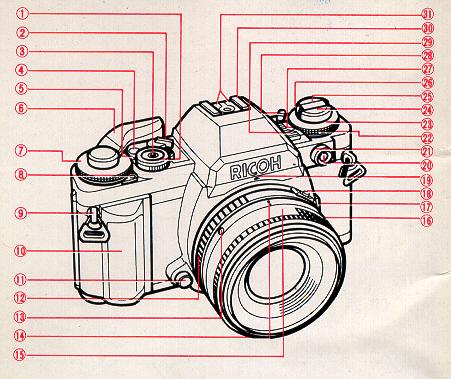
PARTS OF THE CAMERA

1. Program Selector
2. Power ON-OFF Switch
3. Shutter Release Button
4. Exposure Counter
5. Shutter Speed Index Line
6. Film Advance Lever
7. Shutter Speed Dial
8. Multiple Exposure (ME) Lever
9. Strap Eyelet
10. Removable Hand Grip
11. Lens Release Button
12. F-Stop Ring
13. Lens Locator Mounting Node4www.butkus.org
14. Depth of Field Scale
15. Focusing Ring
16. Flash Synchro Terminal
17. AE Lock/illuminator Button
18. P Lock Button
19. Aperture Relay port
20. Self/lnterval Timer Button
21. Self/lnterval Timer
22. Film Speed Dial
23. Exposure Compensation Dial
24. Film Rewind Knob/Back Cover Lock Release
25. Film Rewind Crank
26. Film Speed Index Line
27. Exposure Compensation Index Line
28. Beep Switch
29. Illuminating Window
30. Hot Shoe
31. Flash Control Contacts


32. Viewfinder Eyepiece
33. Film Rewind Shaft
34. Film Chamber
35. Battery Compartment Cover
36. Motor Drive Contacts
37. Tripod Socket
38. Winder Contact
39. Film Rewind Release Button
40. Hand Grip Release Button
41. Winder/Motor Drive Coupler
42. Winder Positioning Hole
43. Memo Holder4www.butkus.org
44. Back Cover
45. Film Pressure Plate
46. Film Take-up Spool
47. Sprocket
 

MOUNT THE LENS

1. Pull the back lens cap to remove it from the lens. (Fig. 3)

2. Pull off the body cap. (Fig. 4)

3. Align the red dot on the camera with the red dot on the lens and mount the lens on the camera. (Fig. 5)


4. Turn the lens in the arrow direction until it clicks into place. (Fig. 6)


* To remove the lens, turn the lens in the arrow direction with the Lens Release Button depressed. (Fig. 7)

* The conventional K mount lens can be used as aperture-priority and manual but cannot be used for programmed AE photography.

* Proper performance of camera may not always be guaranteed with lenses other than Ricoh. For best results, use a Ricoh original equipment lens.4www.butkus.org


SET LENS AT "P" POSITION

1. Turn the F-Stop Ring while P Lock But ton is pressed. (Fig. 8)

2. Set it to the locking "P" position as shown for programmed automatic exposure photography. (Fig. 9)

* To unlock "P", turn the F-Stop Ring while P Lock Button is depressed.
 

INSERT BATTERIES:
1. Slide the Battery Compartment Cover in the arrow direction with your fingernail to open. (Fig. 10)
2. Place batteries in the battery compartment according to (+) and (-) shown inside the battery compartment and close the compartment cover. (Fig. 11 )


Batteries for use 
* Four alkaline 1.5V batteries (LR44): Lasting about six months under normal use.
* Four silver oxide 1.55V batteries (SR44): Lasting about one year under normal use.
* Two lithium 3V batteries (CR-1 /3N): Lasting about one year under normal use.
* Refer to "CARE OF BATTERIES" also CHECK CONDITION OF BATTERIES


1. Turn the Power ON-OFF Switch ON. (Fig. 12)
2. Batteries are in good condition, when a liquid crystal display such as a Shutter Speed Indicator appears in
the finder. (Fig. 13)

 
* The BAT (battery low warning) blinks in the finder to warn against their failure when capacity of batteries drops below proper operating level. Change batteries as soon as possible. (Fig. 14)


INSERT THE FILM  

2. Insert the film in the Film Chamber and push the Film Rewind Knob down to the original position. You may have to rotate the knob slightly to push it down completely.4www.butkus.org


3. Insert the film leader in the slit on the Film Take-up Spool.

(Do not expose the film to direct sunlight when inserting the film.)
1. Pull up the Film Rewind Knob until the Back Cover snaps open.

 
4. Advance the Film Advance Lever to wind the film round the Film Take-up Spool. Check that the sprocket holes on the film are fully engaged on the Sprocket Teeth.


5. Close the Back Cover, unfold the Film Rewind Crank and turn it gently in the arrow direction until any slack is taken up.
6. Advance the film and press the Shutter Release Button a few times until "1" appears in the Exposure Counter. The film is properly advanced if the Film Rewind Knob rotates when the Film Advance Lever is stroked to advance the film.
When inserting the film in a cold place, the film leader may be hard and become brittle. Warm the film leader with your hand in such conditions.4www.butkus.org


* 1/125 second shutter speed is automatically selected until "1" appears in the Exposure Counter. This is a convenient device that prevents a long shutter speed when film loading with the lens cap on.


SET THE FILM SPEED
1. The film speed (ISO/ASA) shown on the film package must be set to the Film Speed Index Line. 2. Pull the Film Speed Dial and turn it to set to the index. (Fig. 21 )

INDICATIONS IN VIEWFINDER
(1) Matte Surface
(2) Microprism Band
(3) Split-image Spot
(4) Exposure Adjustment
(5) AE Lock
(6) Manual
(7) Program Mode
(8) TV Mode
(9) Overexposure
(10) Shutter Speed Indicator
(11) Flash Ready/Correct Auto Flash Indicator
(12) Shutter Speeds
(13) Slow Shutter Speed Range
(14) Long Time Exposure
(15) Underexposure
(16) Bulb4www.butkus.org
(17) Battery Low Warning Signal
(18) Programmed F-Stop Number
(19) Aperture Setting


HOW TO HOLD YOUR CAMERA

(Good position for photography)

(1 ) Lightly put your right-hand forefinger on the Shutter Release Button and hold the camera body with other fingers.

(2) Make your right arm comfortable.

(3) Cradle your camera in your led hand and hold it so that the Focusing Ring can be easily turned with fingers.

(4) Brace your led elbow to your body and put the camera to your face. Look through the viewfinder to
compose your picture. (Fig. 23)

It is important to practice correct shooting position to avoid blurred or tilted pictures.


PROGRAM AE PHOTOGRAPHY

In program AE photography, the camera automatically selects the f-stop number and the shutter speed according to subject illumination. Programs are best for general photos of figures or scenery. Special- shooting etc., can be done using the XR- P's multitude of override options. Please keep in mind however that for most shooting you can just focus and snap.

 
1. Turn the Power ON-OFF Switch ON. (Fig. 24)
2. Set the Shutter Speed Dial to "A". (Fig. 25)
3. Set the lens to "P". (Fig. 26)


4. Set the Program Selector to "P". (Normal Program Setting) (Fig. 27)4www.butkus.org

* PA (Action Program Setting) is used for taking fast moving subjects as in sports photography.
* PD (Depth Program Setting) is used for scenery pictures or close-up shots which will bring both the foreground and background into sharpest possible focus.
* P (Normal Program Setting) is used for general snap shots.

* Refer to "applications'' for other shooting modes.
* Refer to "Applications" for further details.


FOCUSING (fig 28, 29)
5. Look through the viewfinder and turn the Focusing Ring to focus. You can focus either by using the Split Image or Microprism.

Split image focusing
When the split images in the Split-Image Spot form a single, clear image, the subject is in focus.

Microprism Focusing
When the subject loses its "shimmering" effect and becomes very sharp, the subject is in focus.


REWIND THE FILM

(Do not expose the film to direct sunlight when unloading the film.)

1. Push the Film Rewind Release Button. The button stays locked in position (Fig. 30)

2. Unfold the Film Rewind Crank and turn it in the arrow direction. When the film has been completely rewound, the tension of the Film Rewind Crank is suddenly released and turns freely. (Fig. 31)

3. Open the Back Cover and unload the film. (Fig. 32)

* Never open the Back Cover until film rewinding is completed. Immediately close the Back Cover to save some of your shots if the Back Cover is opened by mistake during or before rewinding.

* If you wind the film beyond the set number of frames, the Film Advance Lever may get stuck mid-stroke. The Film Rewind Release Button will not stay depressed in. If this occurs. re-wind the film while holding the Film Re-wind Release Button pressed down.


SELF-TIMER PHOTOGRAPHY

The self-timer is used to include yourself in party pictures or commemorative shots.


1. Advance the film.

2. Set "10" in the Self position on the Self/lnterval Timer to the index line. (Fig. 33)

3. Press the Self/lnterval Timer Button. The Self-Timer Indicator Lamp blinks and the self-timer audible beep is heard. In 10 seconds, the shutter is automatically released. (Fig. 34)

4. After shooting is completed, turn the Self/lnterval Timer OFF. (Fig. 35)

* Use the Viewfinder Cap attached to the strap to cover the Viewfinder Eyepiece when using the self-timer in modes, other than "Manual" to avoid incorrect exposure due to incident-light from the Viewfinder Eyepiece. (Fig. 36)4www.butkus.org

* Set "O" in the Self position to the index line to release the shutter instant, when the Self/lnterval Timer Button is pressed. This serves as a handy "Left Hand" shutter release. (Fig. 37)

* B (Bulb) setting is not available where the Self-Timer is used.

 
* To cancel the self-timer after it is set, press the Self/lnterval Timer Button again or turn the Self/lnterval Timer OFF.


 TO SECTION TWO