and historical purposes, all rights reserved.
This page is copyright© by
 , M. Butkus, NJ.
 This page may not be sold or distributed without
the expressed permission of the producer
I have no connection with any camera company
This camera manual library is for reference
and historical
purposes, all rights reserved.
This page is copyright© by
, M. Butkus, NJ.
This page may not be sold or distributed without
the expressed permission of
the producer
I have no connection with any camera company
On-line camera manual library
If you find this manual useful,
how about a donation
of $3 to:
M. Butkus, 29 Lake Ave.,
High Bridge, NJ 08829-1701
and send your e-mail
address
so I can thank you.
Most other places would charge
you $7.50 for
a electronic copy
or $18.00 for a hard to read Xerox copy.
This will
help me to continue to host this site,
buy new manuals, and pay their shipping
costs.
It'll make you feel better, won't it ?
Back to main camera manual page
Voigtlander Vitessa with Light Meter
Another Vitessa, direct scan
Voigtlander VINTESSA Gebrauchs-Anleitung

Better "Pictures - faster and easier
Your VITESSA is a 35 mm camera made on new constructive principles which
has been "built into your hands". You will very quickly realize just how much
the simplified handling will help you in obtaining better pictures.
But even the VITESSA cannot manage entirely without some technical advice, and
so we recommend you first of all to study these instructions carefully and to
make yourself familiar with all the controls before taking your first pictures.
And please don't forget that a camera of this high quality is an instrument
of the finest mechanical precision. Even though it is of very robust build it
still wants to be treated with care and understanding. It will thank you with
wonderfully fine and sharp pictures over many years.
Voigtlander VOIGTLANDER A.G. BRAUNSCHWEIG
YOU WILL FIND: ON PAGE:
| LOADING |
Removing the Back - Inserting the Cartridge Setting Film Counter and Film Indicator Closing the Back - Opening the Front Doors Preparing the Film for Exposing |
5-6 7 |
| SETTING THE CONTROLS |
Aperture or Stop - Shutter Speed Rangefinder Zone Focusing |
11-13 |
| EXPOSURE |
Combi-Plunger - Shutter Release - Automatic Lock... Single Shots - Rapid Sequence Shots Time Exposures |
17 18-19 20 |
| UNLOADING |
Closing the Camera . Rewinding the Film - Changing partly exposed films.. |
|
| APPENDIX |
Practical Hints Speed-Synchronized Flash Flash Case "Kontur" View-Finder Filters - Lens Hood - Close-Up Lenses Aperture and Depth of Field Care of Camera and Lens |
24 |
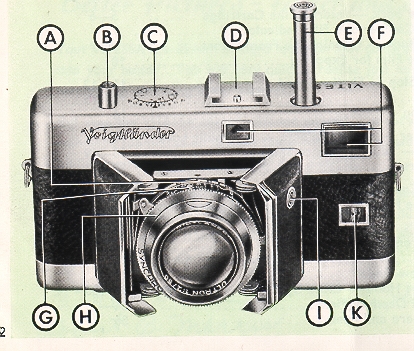 |
FRONT VIEW - Front
doors open
A. Aperture Scale |
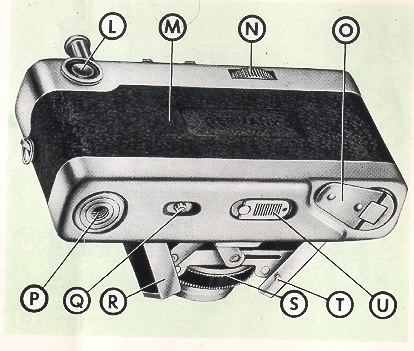 |
BACK VIEW - Front
Doors Open
L. View- and Rangefinder Eyepiece |
 |
INTERIOR - Front
Doors closed
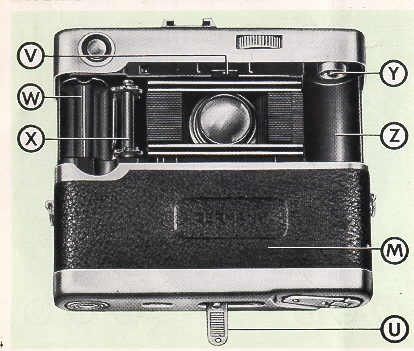
M. Camera Back (Removed) |
REMOVING THE-BACK
|
|
|
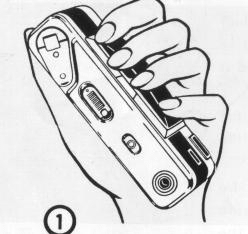
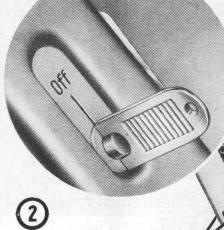
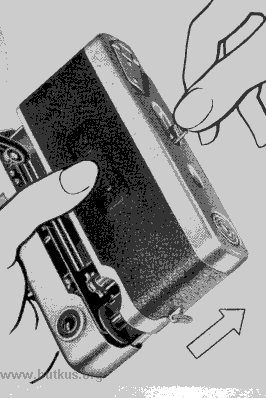
| Hold the camera in your left hand, with the four fingers lying against the lower edge of the front doors 10. Lift up the latch and give it a quarter turn so that it points to "Off" (2) , grip the latch and pull the camera back off the body (3), using your left thumb which lies against the back to help in pushing it off. |
|
INSERTING THE CARTRIDGE
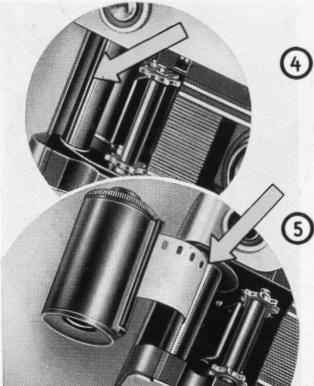 |
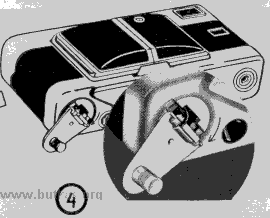
Turn the film transport shaft by the cogs until the slit in the take-up spool next to it faces upward (4). |
Now push the tongue of the film as far as possible into the slit of the spool.
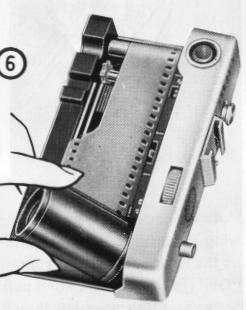
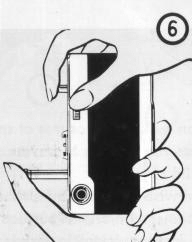
The upper edge of the film must touch the inside of the upper rim of the spool (5). Now pull the cartridge across the transport shaft and the film aperture and insert it in the film chamber (6).
SETTING FILM COUNTER AND FILM INDICATOR
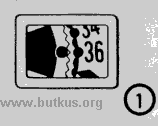
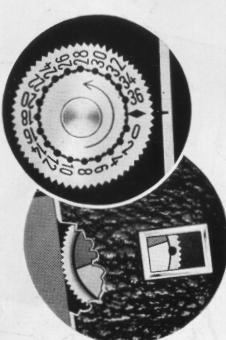
  Turn the milled edge of the film counter disc in the direction of the arrow until the. mark is opposite the index line on the body (9). |
Finally, set the film indicator in the back (10). To avoid errors later on, decide from the start on the colour marks you propose to use for the different films, and make a note of them. |
 |
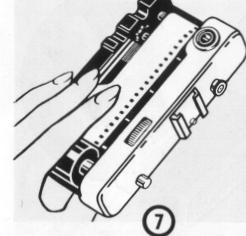
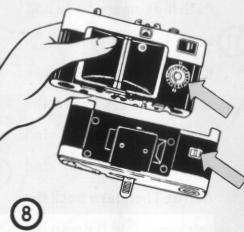
| Hold the camera with your left hand to stop the cartridge from dropping out (7) and turn it over (8). |
CLOSING THE BACK
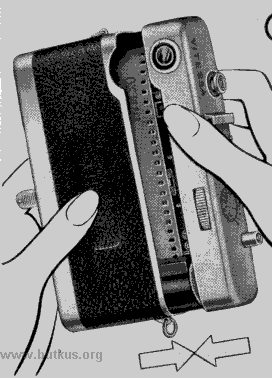 Push the camera body and back together again (11). |
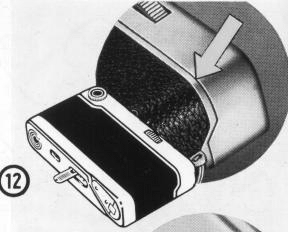 If the back will not close completely (12), move the latch and the open rewind crank slightly to and from (13).
|
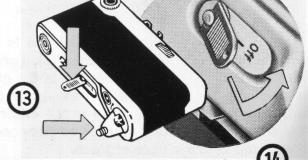 Then turn back the latch and fold it down (14). Only now is the camera fully closed and light tight. |
OPENING THE FRONT DOORS
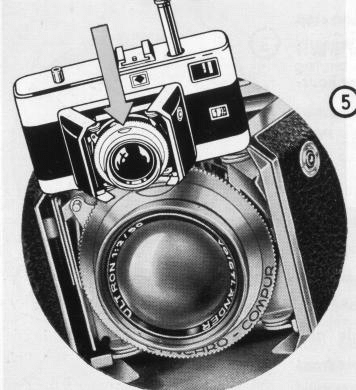
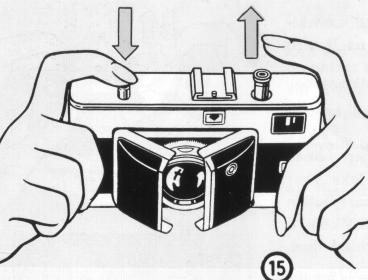 Hold the camera in both hands, point it slightly downwards, and press the release button (15). The two doors will spring open and expose the shutter and lens. The fully open camera appears as shown in illustration. |
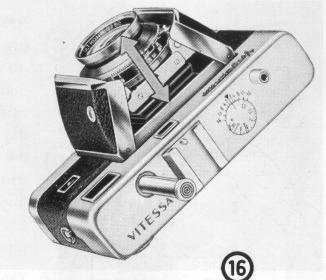 |
Caution: It is advisable to use the left index finger for braking slightly the movement of the combi-plunger as it slides out at the same time. If the lens does not come forward all the way, gently pull one of the front doors outwards. |
PREPARING THE FILM FOR EXPOSING
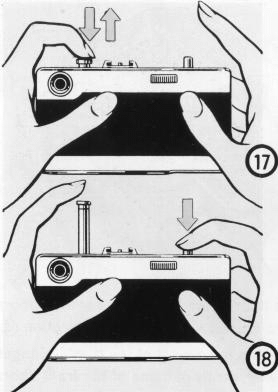 |
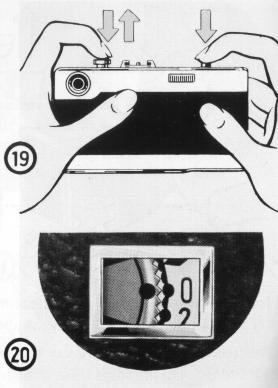
Press down the combi-plunger
as far as it will go and allow it to spring up again. Press down the
release button and keep it depressed is. Work the combi-plunger once
more 19. Now take your finger off the release button and push down the
combi-plunger for the third time. |
The film is now ready for the first exposure and
the film counter shows "0" From now on it will show the number of exposures
you have made.
SETTING THE APERTURE
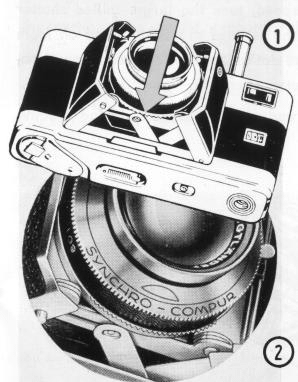 |
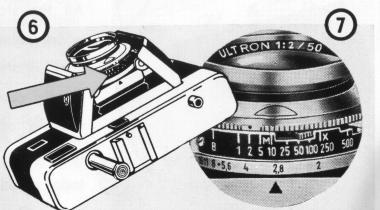
To set the aperture or stop turn the semi-circular wheel underneath the shutter housing ® and (. It is best to use your index finger. |
All the stops on the scale which rotates during setting
click into position opposite the tip of the A mark ®, making accidental changes
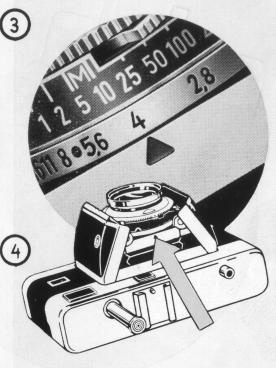
impossible. The scale and index mark are visible from above (4).
SETTING THE SHUTTER SPEED
 |
To set the shutter
speed, turn the large, milled shutter speed ring Ts. All the settings
are easily read off from above ©. Set the red dot on the shutter speed
ring opposite the required shutter speed (ill. (7)= 1/2 sec). |
The shutter has already been tensioned during loading (see p. 10).
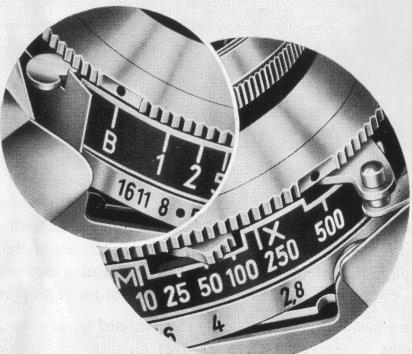 |
The figures on the shutter speed
scale stand for fractions of a second, except for the "1"/ which means
one second. Intermediate speeds can be set EXCEPT between '/,o and 1/25
second, and between 1/250 and 1/500 second. |
At the extreme left is the "B" setting for time exposures 80; at this setting the shutter remains open so long as the release is kept pressed down. At the extreme right is the setting for 1/500 second (9) . This can only be set before tensioning the shutter.
THE VIEW- AND RANGEFINDER
 |
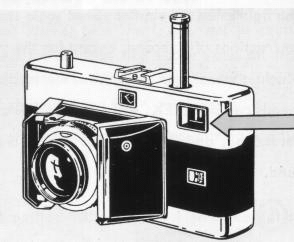 |
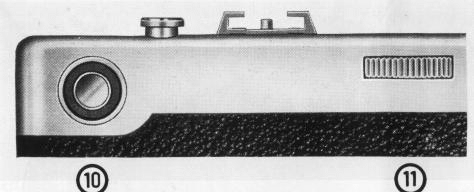
| The precision finder of the
VITESSA is a combined viewfinder and rangefinder. Through the large
eye-piece on the left (10) you see the bright picture area with
the focusing diamond in the centre. The milled focusing wheel is
at the right (11) . The viewfinder is automatically compensated for parallax and shows the correct picture area at all distances, including close-ups (3.3 to 7 feet). |
Make sure that your fingers are clear of the left-hand front window when using the finder. Finger prints on this window can also affect the focusing efficiency of the rangefinder. |
SETTING THE RANGEFINDER
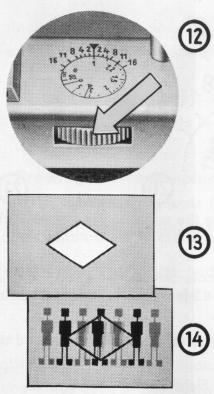 |
Hold the camera in shooting
position. Put your right thumb on the milled wheel 12. Bring your
eye right up to the eye-piece of the finder so that you can see
all the four corners of the image. Make sure you are looking straight
through the centre. As long as the rangefinder is incorrectly focused
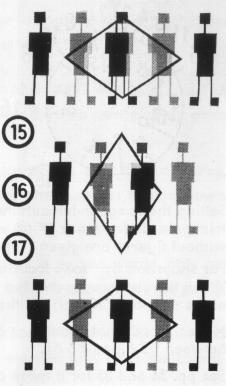
the focusing area 13 shows a double image of the subject .. Now
turn the focusing wheel until the double images in the focusing
diamond (ill. 1s for a horizontal and 16 for an upright example)
coincide and fuse into one sharp image 17. The lens is now focused
on exactly the correct distance. Note: With horizontal pictures watch the vertical lines of the subject; for upright views focus on the horizontal lines. |
 |
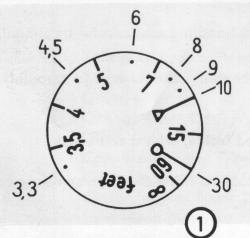
Setting the rangefinder automatically moves the focusing scale as well.
Above the scale, in the centre is the triangular index mark  (18) to which points exactly to the focused distance. The values of the
distance settings without figures are given on page 35.
(18) to which points exactly to the focused distance. The values of the
distance settings without figures are given on page 35.
For snapshots by "zone focusing" without using the rangefinder the distance
scale carries two special marks. When the distance is set at the
 mark (10 feet) (19), everything between 8 and 15 feet will be sharp; when
set at the ( ) mark (30 feet) (20), the zone of sharp focus extends from
15 feet to 00 (infinity).
mark (10 feet) (19), everything between 8 and 15 feet will be sharp; when
set at the ( ) mark (30 feet) (20), the zone of sharp focus extends from
15 feet to 00 (infinity).
Note:
Good light conditions are necessary for these settings and the aperture has to be set at the red dot between f/5.6 and f/8 (21).
See pp. 34 and 35 for a more detailed explanation of "Aperture and Depth of Field".
COMBI-PLUNGER . SHUTTER RELEASE . AUTOMATIC LOCK
A single finger pressure on the combi-plunger transports the film by one frame (automatically lifting the film pressure plate), tensions the shutter, counts the exposures and releases the shutter lock.
Always press the combi-plunger down as far as it will go. If this is not done it will lock itself in the lower third of its way and will only free itself after being pressed down completely once again.
Pressing the combi-plunger several times without making any exposures will do no harm. With the longer speeds
(1/2and 1 second) always wait for the shutter mechanism to run down fully before working the plunger again.
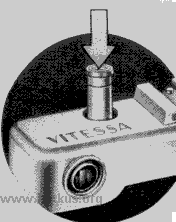
Always press the release button down in one gentle movement and never
jerk it - you would only get blurred pictures. The release button is threaded
inside to take a cable release for time exposures (see p. 20).
The automatic shutter lock prevents double exposures as well as blank (unexposed)
frames. The shutter is tensioned only after a previous exposure; equally,
the release button can be worked only after the combi-plunger has been pressed
down.
SINGLE SHOTS
 |
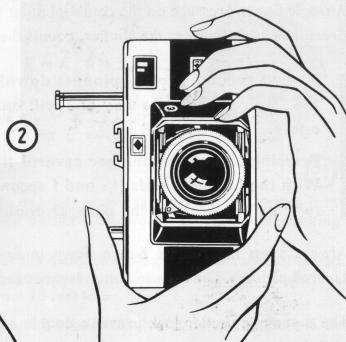 |
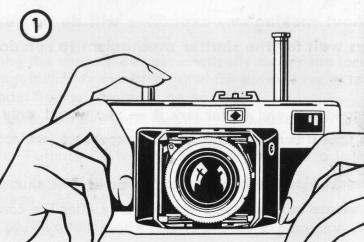
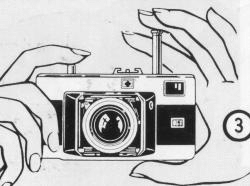
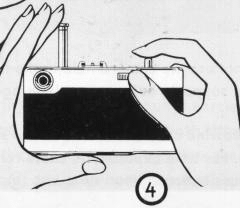
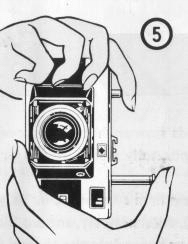
We recommend holding the camera
as shown in the illustrations. With horizontal pictures (1) use
the index finger of your right hand to release the shutter, but
use the thumb for upright (2) pictures. After exposing, put the camera down and with your thumb press down the combi-plunger as far as it will go. |
RAPID SEQUENCE SHOTS
 |
 |
 |
 |
TIME EXPOSURES
 |
 |
 |
When making exposures at speeds slower than 1/25 second, you should not
use the camera held in the hand, unless you happen to have exceptionally
steady hands or when you can support your arms or lean against a solid object.
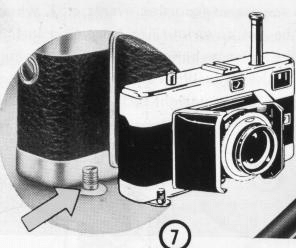
Otherwise the camera must have a firm support. One way is to fold the rewind
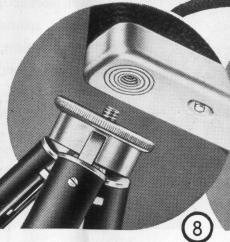
crank outwards and to stand the camera on a level surface (7). Alternatively,
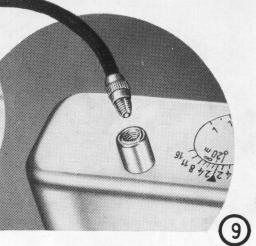
mount it on a tripod (8). For time exposures a cable release with locking
device is useful; this screws into the thread inside the release button
(9).
CLOSING THE CAMERA
|
|
|
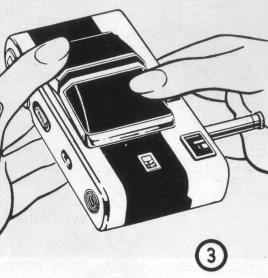 |
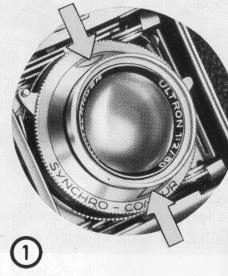
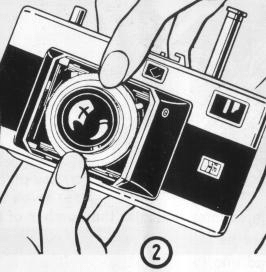
The front cover of the shutter carries two red pressure marks (1). To close the front doors, hold the camera in both hands, press with both thumbs simultaneously on the two marks (2) and push the shutter and lens into the camera body. Then close the camera by folding down the two doors until they engage with an audible click (3) and push home the combi-plunger. Finally press the release button down to its first pressure.
UNLOADING THE CAMERA
|
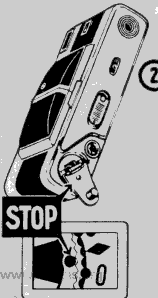
When the film counter indicates the number of the last exposure (1) or the combi-plunger cannot be fully depressed (2), the whole film has been exposed and has to be rewound into the cartridge in this way: |
 |
|
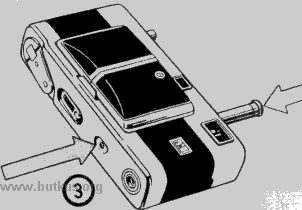
Close the front doors, depress the rewind button on the underside of the camera once quickly (no constant pressure), and at the same time press home the combi-plunger (3). Unfold the rewind crank (4) and turn it in the direction of the arrow until the film counter dial stops moving. Now pull the camera back off in the way described previously and take out the cartridge. |
|
| CHANGING PARTLY EXPOSED
FILMS
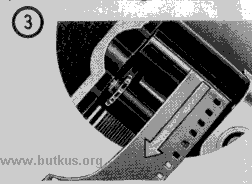
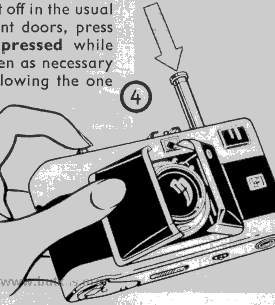
If you wish to exchange a partly exposed film for one of a different type (e. g black-and-white for colour), first make a I note of the number of exposures already made (1). Then rewind the film in the normal way but stop winding immediately the film counter ceases to rotate (2). Now open the camera back and remove the cartridge. When reloading the partly exposed film, start off in the usual manner (3). Then half open (4) the two front doors, press down the release button and keep it depressed while pushing the combi-plunger down fully as often as necessary until the film counter shows the number following the one you noted down (5). |
|
|
|
|
|
|
 |
 |
PRACTICAL HINTS
• If the beginning of the film is not properly anchored on the take-up spool,
it may slip out and will not be advanced on pressing the combi-plunger.
To check: Unfold the rewind crank and let it hang down. Hold the camera
horizontally to see whether the crank turns when you work the plunger. If
it does not move, the beginning of the film has slipped out and must be
fixed afresh to the take-up spool after opening the camera back (see page
6).
• Deliberate double exposures (e. g. for trick shots) are quite easy, despite
the automatic double exposure lock. Proceed as follows: After the first
exposure depress the rewind button, let go, and then fully push in the combi-plunger.
This tensions the shutter without advancing the film, and you can make a
second exposure. Then work the combi-plunger as already described.
If in doubt about the correct exposure, expose black-and-white film generously;
a certain amount of overexposure does not matter much. Underexposure, however,
always gives poor results. With colour film, exposure must be accurate;
use an electric exposure meter at all times.
SPEED-SYNCHRONIZED FLASH SHOTS
| The SYNCHRO-COMPUR makes possible flash shots of moving subjects at any shutter speed, including '/500 second. You can use the flash as the sole light source or else combine it with daylight or artificial light. With against-the-light shots you obtain excellent illumination of the shadow areas. All flash units on the market, including electronic flash, can be used with the shutter. Light-weight guns can simply be pushed into the accessory shoe; larger ones are mounted on a bracket which is screwed into the tripod bush and kept at the left-hand side of the camera (see. ill.). |
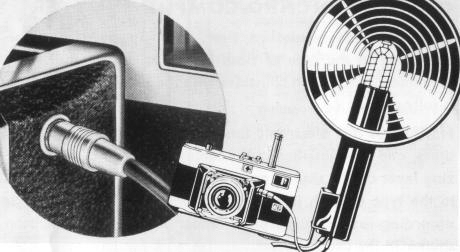 |
The flash lead which connects the flash gun with the camera carries on one end a round plug which is inserted into the sunk socket in the left-hand front door. The other end has the plug for the flash gun. This is often a safety plug with one thin and one thick pin which can be connected only in the correct way.
THE SETTINGS ON THE SYNCHRO-COMPUR SHUTTER
| Synchronization, exposure
time, and aperture must be set according to the type of flash in
use to ensure that the peak brightness of the flash coincides with
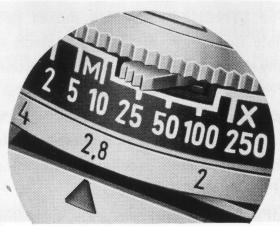
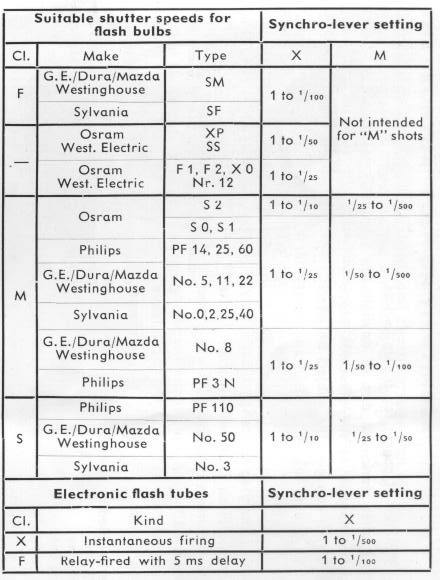
the instant when the shutter is fully open. Flash bulbs and electronic flash tubes vary in their firing delay times, and are classified in the table on the right. The synchronizing lever on the shutter must be set to either X or M, according to the type of flash in use (see ill.). Then set the shutter speed according to the values given under X and M and tension the shutter in the usual way. |
 |
For setting the correct aperture look up the so-called "guide numbers",
which will be found in the instructions supplied with all types of flash.
The correct aperture number will be found by dividing the respective guide-number
by the distance in feet between the camera with flash and the subject. (Aperture
= Guide-Number / Distance)
X-Setting
The contact closes at the moment when the shutter is fully open.
M-Setting
The contact closes a short time-corresponding to the firing delay of class
M bulbs - before the shutter begins to open.
Electrical Data - Click here for chart of Flash Bulb Settings
 |
The flash contact
will carry the firing current of all types of electronic flash tubes.
With flash bulbs it will carry a temporary load of 10 amps at 24
volts, thus allowing simultaneous firing of several bulbs connected
in parallel. The longest permissible exposure time in this case
is '/,o second. Caution: The flash contacts must never be used to fire bulbs from 110 or 220 volt supply mains. To avoid wiring up the leads the wrong way round, get an electrician to fix the cable to the flash gun in the first instance, since the outer pole of the flash socket is earthed. |
| The use of flash has become a matter of course
for the up-to-date amateur photographer, not only after dark, but
also in daylight. A flash bulb can give useful illumination to the
often too black shadows of against-the-light shots; it can give
the subject an effect of sunlight on a dull day, enable you to take
hand-held snapshots with insufficient natural light, and so on.
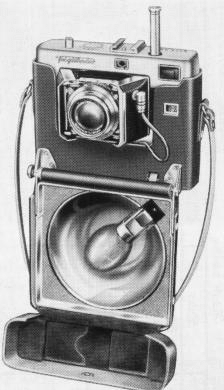
To save you the inconvenience of carrying a flash gun separately, Voigtlander have created for you a Flash Case which carries in the smallest possible space both your camera and your flash gun. When you open the case and have inserted the lamp and done the setting you are immediately ready to use the flash gun because you can leave the flash lead connected to the camera even with the case closed. Please ask your dealer for the detailed prospectus. |
 |
THE "KONTUR" PUSH-ON VIEWFINDER
| Quicker sighting of moving subjects and clearer presentation of pictorial scenes - those are the invaluable advantages of the KONTUR viewfinder. The large eye-piece of /s inch diameter gets rid of all the former viewfinder troubles, particularly for spectacle wearers. |
Keep both eyes open while sighting the subject.
The eye watching the subject directly will see it in its natural size and
brightness, while the eye looking into the finder sees the frame outlining
the picture area. You will see the two separate impressions as one single
picture in your normal field of view.
A dotted line indicates the parallax error with close-ups from 3.3 to 6.6
feet.
Caution: Never allow direct sunlight to
reach the eye-piece of the finder.
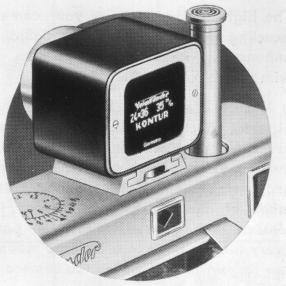
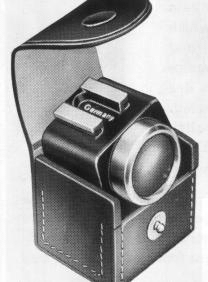
Push the KONTUR finder into the accessory shoe from the front of the camera and push it back as far as it will go.
FILTERS - LENS HOOD
| The high-efficiency lens of
your camera will satisfy your most exacting demands for superb definition,
but you can greatly enhance the mood of your pictures and obtain
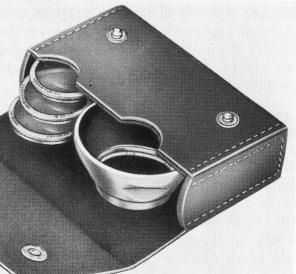
special effects with the help of filters. It is surprising how often you can attain pictorial effects with these simple aids which are quite unobtainable without them, and they should not be missing from any photographer's equipment. Voigtlander Filters are made of massive, spectroscopically tested, glasses and ground absolutely parallel. Every filter is fitted in a bayonet mount and can remain in position on the camera when this is closed. |
 |
The lens hood is indispensable for against-the-light
shots and those taken with artificial light, for it screens the lens from
all stray light. It also serves to protect the lens from raindrops in bad
weather conditions.
The Leather Case for Accessories fits on the strap of the camera case and
can take three filters and the lens hood.
|
VOIGTLANDER FILTERS |
|
|
Type and Exposure Factor |
Effect |
|
Slight correction, for outdoor shots with short exposures, action and snapshots. Use when the sun is low in the sky |
|
Universal filter for landscapes and other outdoor work: indispensable for snow |
|
Lightens green in landscapes. Counteracts the green deficiency of pan-red films. Recommended for artificial light portraits |
|
A powerful filter which absorbs a great deal of blue light. Reduces the atmospheric haze of distant views. Lightens yellow, red, and green |
|
Absorbs ultra-violet rays at high altitudes and by the sea. Counteracts the undesirable blue cast with colour film |
|
For using artificial light type colour film in daylight or with daylight type artificial light (electronic flash). Special instructions are enclosed with every filter. |
CLOSE-UPS WITH SUPPLEMENTARY LENSES
Do not miss this highly interesting branch of photography which, unfortunately, so many amateurs neglect. Large-scale pictures of flowers, butterflies, and other small animals, small "objects d'art" etc. may yield effects of extraordinary beauty. With the help of Voigtldnder Focar Lenses you can, moreover, excellently copy pages of a book, stamps, or small pictures. Care, however, is recommended in portraiture, as perspective may easily appear distorted in this case.
The effect of the Focar lenses is that they shorten the focal length: this permits the camera to be brought much nearer the subject. Thus the subject is reproduced on a much bigger scale.
With the Voigtldnder Focar lenses you have three close-up ranges at your disposal, viz:
FOCAR 1 (1.25 Diopters) from 2' 71/2" to 1' 5 1/2"
FOCAR 2 (2.25 Diopters) from 1' 5' 1/2" to 1'
FOCARS 1 and 2 combined (3.5 Diopters).... from 11'/4" to 8'/4"
FOCUSING TABLE
|
Distance scale on camera set to |
Plane of sharp focus when using |
||
|
Focar I |
Focar 2 |
Focars 1f- 2 |
|
|
00 |
2' 7'/2" |
1' 5'/2" |
11'/4' |
|
2' 6 1/4" |
1' 5" |
11" |
|
2' 5 '/4" |
1' 4 3/4" |
11" |
|
2' 3" |
1' 4" |
10' /2" |
|
2' 1 '/2" |
1'3,/d' |
10'/ ' |
|
2" 1/2" |
1 3" |
10'/a" |
|
1"11'/." |
1'2'/a" |
10" |
|
1111" |
1'2'N' |
10" |
|
1110" |
1'2" |
9'/u" |
|
1'8'/Q |
11'/2' |
9'/z |
|
1'8" |
1'19' |
|
|
1' 7" |
1' 1 " |
9", |
|
1'6" |
1"/z' |
8'/!' |
|
1' 5'/2" |
1' |
8'/e" |
HOW TO USE THE FOCAR LENSES:
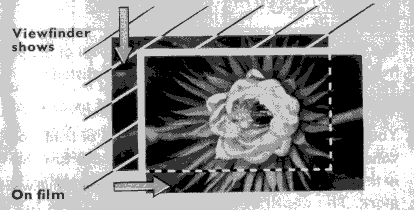 |
With close-ups the viewfinder image does no longer correspond to the area reproduced, but is shifted upwards and to the left (parallax - see ill. below). With the FOCAR 1 the difference is up to 1/8, with the FOCAR 2 up to 1/4, and with the FOCARS 1 and 2 combined up to 1/2, of the viewfinder area. |
APERTURE AND DEPTH OF FIELD
The iris diaphragm regulates the amount of light which reaches the film, and
thus controls the exposure as well as the depth of field. Note that the aperture
becomes smaller as the aperture number becomes larger, and vice-versa. Going
from one number to the next, the exposure time required is always doubled or
halved respectively. For example:
| Aperture | f/2 | f/2.8 | f/4 | f/5.6 | f/8 | f/11 | f/16 |
| Exposure (e. g.) | 1/500 | 1/250 | 1/100 | 1/50 | 1/25 | 1/10 | 1/5 second |
The "depth of field" of a picture is that part of the photographed area which
is still reproduced fully sharp in front of, and behind, the actual focused
distance.
Note: Large aperture = small depth of field; small aperture
= great depth of field.
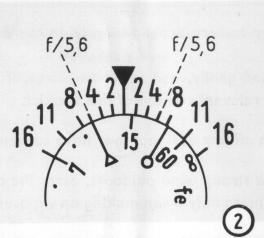
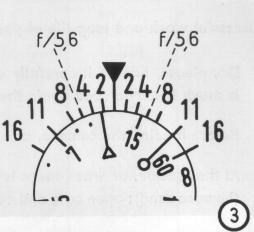
You can read off the extent of the depth of field from the focusing scale and
the depth of field indicator. The values of the unnumbered distance settings
are shown in illustration (. After focusing the V mark points to the exact subject
distance. Two series of aperture numbers are arranged symmetrically on either
side of the mark.
The depth of field then extends from the distance shown by the figure opposite
the selected aperture number on the left to the distance opposite the identical
aperture number on the right.
 |
 |
 |
• For Example, if you have focused on 14 feet, the depth of field scale shows
that at f/2 everything will be sharp from about 13 to 16 feet, at f/4 from about
12 to 20 feet, at f/5.6 from about 10 to 25 feet, at f/8 from about 9 to 30
feet, at f/11 from about 8 to 60 feet, and at f/16 from about 7 feet to 00 (infinity)
T.
• To find the most suitable settings for aperture and distance for a given depth
of field, set the limits of the sharp zone required opposite two equal aperture
numbers. For instance, for a depth from about 7 to 30 feet, illustration ® shows
that you have to stop down to f/11. The indicator then automatically shows the
required distance setting.
CARE OF CAMERA AND LENS
Successful work and long life of your camera depend largely on correct handling
and careful treatment.
• Do, please, handle it carefully and gently, and never use force. If anything
should not go smoothly, it is much better to read again the relevant sections
of this booklet.
• Before loading the camera, clean off any dust that may have collected inside,
with a soft brush.
• At the seaside, or when there is a strong wind outdoors, carry the camera
in its closed ever-ready case (beware of sand); open case and camera only when
making an exposure.
• You must avoid finger prints on the lens because they spoil definition. The
windows of the view- and rangefinder must also be kept clean, otherwise you
will find it difficult to focus correctly.
• The lens is coated even on the outer surfaces (anti-reflection layer). It
may be cleaned with a very soft brush, or a piece of soft, clean, linen. Grease
spots may be removed by gentle dabbing with a wad of cotton wool moistened in
medicinal alcohol or ether.
| ACCESSORIES FOR THE VITESSA | ||
| Designation Art. Nr. | ||
| Yellow Filter G 1 (light)
in Bayonet Mount Yellow Filter G 2 (medium) do Green Filter Gr do Orange Filter Or do Ultra-Violet Filter UV do Conversion Filter Type A do Close-Up Lens Focar 1 do Close-Up Lens Focar 2 do |
125/21 125/22 125/26 125/28 125/29 125/27 125/23 125/24 125/20 90/094 125/19 335/36 90/104 90/083 90/122 |
|
| Lens Hood (Metal in
Push-On Mount) Accessory Case |
||
| for Filters, Focar Lens and Lens Hood | ||
| Flash Case | ||
| KONTUR Viewfinder | ||
| Camera Ever-Ready Case in Brown Hide with Carrying and Neck Strap |
............. | |
| Leather Case for KONTUR
Finder Neck Chain, Brass, Chromium-Plated |
||