If you use Pay Pal, use the link below.
Use the above address for a
check, M.O. or cash.
<<<
IF YOU WOULD LIKE THIS OR ANY PDF FILE
PRINTED,
BOUND AND MAILED TO YOU,
SEE THIS OUTSIDE COMPANY'S OFFER >>>
Click here for
Camera Manual site
CLICK HERE TO CONTINUE TO
COSINA 107-SW PDF MANUAL
COSINA 107-SW Mode D'Emploi
COSINA 107-SW istruzioni per l'uso
COSINA 107-SW Manual de Instrucciones
CLICK HERE TO CONTINUE TO PDF MANUAL
MADE
FROM THIS HTML FILE

Congratulations on your selecting of COSINA 107SW. This
is lens interchangeable super wide-angle camera with TTL exposure metering function.
The camera is lens interchangeable via L-mount, yet is lightweight and compact.
Attaching 15mm/f4.5 or 25mm/f4 lens onto this camera, you can enjoy easy-to-take
snap-photography, landscape, etc.
Description of Parts
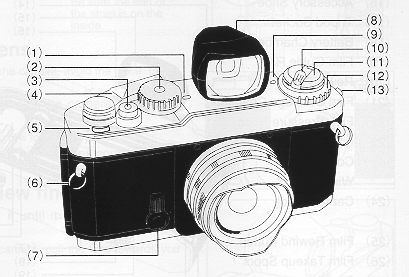 |
(1 ) Shutter Speed Index
(2) Shutter Speed Dial
(3) Shutter
Release Button
(4) Film Advance Lever
(5) Frame Counter
(6)
Neck Strap Eyelet
(7) Self-timer Lever
(8) View Finder
(9)
Film Speed Index
(10) Film Rewind Crank
(11 ) Film Rewind Knob
(12) Film Speed Selector Dial
(13) Synchro Contact
|
 |
(14) LED Lamps
(15) Viewfinder
Eyepiece (16) Accessory Shoe
(17) Tripod Socket _
(18) Battery Chamber Lid
(19) Film Guide Rails
(20)
Rewind Fork
(21 ) Film Cartridge Chamber _
(22) Film Pressure
Plate
(23) Film Cartridge Confirmation Window
(24) Camera Back
(25) Film Rewind Button
(26) Film Take-up Spool
(27) Film Sprockets |
 |
Attaching Neck-strap
Attach the neck-strap to
the camera as illustrated right:
Attaching
detaching Lens
To detach or attach the lens from
/ to
the camera, avoid the place under direct sunshine.
1.Align
the lens mount screw with that of the camera, then, turn the lens clockwise.
Pay attention not to tighten the lens screw too strongly.
2.To detach the lens from the camera, turn the lens counter-clockwise.
Attaching/detaching View finder
Attach the view
finder by inserting it until it firmly clicks on the camera's accessory
shoe.(16)
When detaching the lens from the camera, pull the lens
towards you straightly not to turn it forcibly.
|
 |
Inserting Batteries
1.Turn the battery chamber lid (18) counterclockwise using a coin
or something similar.
2.Two LR44 type alkaline batteries or two SR44 type silver batteries
are used with camera.
3.Place the batteries so that both positive(+)sides are at the bottom
of the compartment.
4.Turn the battery chamber lid clockwise until it close firmly.
Battery Check
1.Move the film advance lever (4) to the ready position.
2.Lightly press the shutter release button(3). Now the exposure metering
system is switched on. When one of three LED lamps (·,
 or
or
 ) lights, then battery condition is satisfactory. lf no lamp lights,
the batteries need replacing or have been loaded incorrectly.
) lights, then battery condition is satisfactory. lf no lamp lights,
the batteries need replacing or have been loaded incorrectly.
|
3. Renew both batteries as necessary.
4.When not
using of the camera, always return the film advance lever to the original
position to prevent accidentally releasing the shutter.
Caution: Keep batteries away from infants and small children.
In case a battery is accidentally swallowed, call a doctor immediately as
the material inside the batteries can cause serious problems.
 |
Loading Film
1. To open the camera back(24), pull Film rewind knob (11) out. When
the back cover opens, the frame counter(5) automatically resets to "S".
2. Insert the film cartridge into the film chamber so that the projecting
end of the film cartridge is downward. Do this in a place away from
direct sunlight.
3. Fold out and lift up the film rewind crank(10). Then rotate the
crank carefully while push in it down lightly until the film locks on
the film rewind fork(20).
4. return the film rewind knob to its original position.
5. Insert the film leader into the groove of the film takeup spool
(26) and place it so that the film perforations engage with the spool
teeth.
6. Check that the film perforations engage properly with the teeth
of Film sprockets (27) and the film slides smoothly along the film guide
rails (19) by operating lightly the film advance lever (4) to advance
the film.
|
Caution: Do not touch the shutter curtains.
7.Turn the film rewind crank gently in the direction
of the arrow to properly tension the loaded film. Stop turning the crank
when it becomes stiff, and return the crank to its original position.
8.Gently close the back cover and push it until
it clicks.
 |
9. Advance the film a couple of
frames, pressing the shutter release button each time, until the frame
counter indicates "1" between 0 and 2. (1n this case, the film advance
lever should be at the ready position, because the shutter release is
interlocked when the lever is in the stored position). |
The film rewind knob rotates each time the film is advanced
showing that the film is advancing properly.
When
advancing the film, wind the film advance lever slowly and secure until the
film is fully transported to the next frame.
FILM SPEED SETTING
 |
1.Filmspeed in indicated on the outside of film package, in the film
instructions or on the film cartridge.
2.Set Film speed Selector Dial (12) so that Film speed index(9) indicates
the value on Film speed Selector Dial corresponding to the film used.
For example, if film speed shown on the film is ISO 100/21 , set the
Film speed Selector Dial to the 100 on the dial matches with the index.
3.Click points are provided at each step of film speed on the Film
speed Selector Dial. When setting the film speed, make sure that it
clicks.
|
Exposure Setting (shutter speed priority)
 |
1. Place the film advance lever (4) in the ready position and turn
the shutter speed dial so that the indicator white line aligns with
the desired shutter speed value. Then if the dial is set at the intermediate
positions of the index, shutter speed will be incorrect. Be sure that
the dial clicks at the position where the white line aligns with the
desired value.
2.With brighter subjects, fast moving subjects or with the higher
value film speed of the film used, it is recommended to use higher shutter
speeds.
3.Recommended shutter speed with ISO 100/21 film under typical situation
is as below:
4.To monitor exposure, lightly press the shutter release button (3)
and turn the aperture ring until the green · mark lights.
|
When the red left arrow
mark lights, it means over exposure. So turn the aperture ring in the direction
of greater f/value. It the red right arrow
mark lights, it means under exposure, so turn the aperture ring to a smaller
f/value.
Note: Outside the exposure metering range
of your camera (EV 4 to EV19), the exposure meter will not function properly
and the green LED indicator may come on indicating incorrect exposure.
Subject
Stationary subject in subdued Light
Indoors in normal conditions
Outdoors on a fine day
Seaside in midsummer
Mountain area with
snow
Fast moving subjects |
Shutter speed
1~1/15
1/30~1/60
1/ 125~1 /250
1/500~1/2000
1 /500~
1/2000
1/500~1/2000 |
Exposure Setting (aperture priority)
1.Place the film advance lever (4) in the ready
position and turn the aperture ring until the index on the lens barrel indicates
the desired f/value.
2.The suitable aperture value
changes according to the brightness of the subject, the depth-of-field desired
or filmspeed of the film in use, and typical settings of the aperture with
ISO 100/21 film are as below.
3.Click points are
provided each step of filmspeed on the Filmspeed Selector Dial. When setting
the film speed, make sure that it clicks.
 |
3.To monitor the exposure, lightly
press the shutter release button (3) and turn the shutter speed dial
until the green · mark lights. If the red left arrow
mark lights, turn the shutter speed dial to the higher shutter speed
setting and if the red right arrow
mark lights, then turn the shutter speed dial to the lower shutter speed
setting.
When the green ·
mark lights at intermediate positions between click, first set the dial
at a click on either side and make fine control by operating the aperture
ring afterwards. |
Note: Outside the exposure metering range of your camera
(EV 4 to EV 19), the exposure meter will not function properly and the green
LED indicator may come on indicating incorrect exposure.
Subject f/value
Indoors in normal conditions F/4 to F/5.6
Outdoors on a cloudy day
F/4 to F/8
Outdoors on a fine day
F/8 to F/11
Seaside in midsummer
F/11 to F/16
Mountain areas with snow
F/11 to F/16
 |
Composition
1.Look at the subject through the view finder.
·As the viewfinders lens is separated from
the cameras shooting lens, the actual shot image through the camera
lens may differ from that seen through the viewfinder depending on the
distance to the subject ( as illustrated right). When shooting the subject
is at near distance, pay much attention so that the subject is within
the frame.
Focusing
This camera is provided the wide-angle lens offering a
greater depth of field.
Turn the distance ring of the lens
until it aligns with the approximate distance to the subject on the
distance index. |
Depth-of-field
 |
1. When you are focusing on a given
subject, objects in the foreground and background will appear acceptably
sharp in the picture. The range in which all objects appear acceptably
sharp in the picture is called "depth-of-field."
2. To obtain the depth-of-field range at different aperture
settings, the depth-of field scale is used.
The distance
covered by the range between pairs of the same f/stops on the depth-of-field
scale as the f/value used is the depth-of-field. To obtain the actual
distance values of the depth-of-field, read the values within the range
of the focusing scale.
3.For instance, when
the lens is focused on a subject at a distance of 1 m with the aperture
set at f/8 the depth-of-field can be obtained by using the depth-of-field
scale as follows: the values on the distance scale corresponding with
the f/values shown on the depth-of-field scale are approximately 0.5m
and infinity respectively. This means that all objects within the range
between 0.5m and infinity distance can be reproduced acceptably sharp
in the picture with the aperture set at f/8. |
 |
Holding Camera
1. Hold the camera in
the palm of the left hand so as to turn the lens focusing ring easily
with fingers.
2. Hold the camera body lightly by and place your right fore finger
lightly on the shutter release button.
3. Press your left elbow lightly against your body and look
through the viewfinder eyepiece (15) to 'steady the camera against your
face. Then relax your right arm holding the grip.
Flash Photography
Use the grip type (bracket
type) flash unit.
1. Connect the synchro cord with the synchro contact of the camera.
2. Set the shutter speed dial (2) at 1/125 second or lower.
3. Set the aperture
|
 |
Rewinding the Film
1. When the film is at its
end, the advance lever no longer operates smoothly, check the frame
counter (5) display. If the frame counter shows that the all frames
of the loaded film have been exposed, the film then needs to be rewound.
2.Press the film rewind button (25) on the camera base.
3.Fold out the film rewind crank (10) and turn it in the direction
of the arrow.
4. 0nce the pressure eases, the film is completely wound into the
cartridge.
|
5.Lift up the film rewind knob (11) and pull it out to open the camera back
(24). Now the film cartridge can be taken out.
6.Do this in a place away from direct sunlight.
Note: If the film reaches the end of the roll
during film advance, the film advance lever will lock. Rewind the entire
roll, then complete the movement of the film advance lever and put it back
into place.
 |
" B" (bulb) Setting
1. With the shutter speed
dial (2) set at "B" position, the shutter will remain open for as long
as the shutter release button (3) is pressed.
2. This setting is useful when an exposure longer than one second
is required, such as in landscape photography at night.
3. Be sure to use a tripod and/or cable release when using this long
time shutter speed setting.'
|
Note: We recommend that you remove the Batteries from the camera at this
setting to avoid wasting the batteries.
 |
Self-Timer
1. Wind the film advance
lever (4) and fully turn down the self-timer lever (7) counterclockwise.
Now the self-timer is ready to use.
2. Press the shutter release button (3) and the self-timer operates
to release the shutter in approximately 10 seconds later.
3. 0nce the self-timer becomes ready it is impossible to cancel it
manually. So operate it only when needed.
|
4. The self-timer is very useful when you wish to include
yourself in a picture, or, you can use it in order to prevent Camera shake in
shutter releasing instead of using the cable release.
Specifications
Type: 35mm camera with focal plane
shutter and TTL metering system
Film Format: 35mm film,24x36mm
Lens Mount: L-mount
Shutter: Vertically moving metal focal
plane shutter B, 1-1/2000sec.
Self-Timer: Mechanical self-timer with 10 sec operating
time
| Exposure display: |
Red left arrow
mark LED Over exposure warning |
|
Green
· mark LED Good exposure indication |
|
Red right arrow
mark LED Under exposure warning
|
Exposure Metering System: Center-weighted
average metering by pressing Shutter Release Button
Exposure Coupling Range: EV4-19 (1SO
100. F4,1sec. - F16, 1/2000sec.)
Flash Terminal: X synchro contact Synchronized
at 1/125 sec or lower speed
Film Advance: By single-lever action
with 135 throw and 30 stand-off
Film Rewind: By film rewind button
and film rewind crank
Frame Counter: Additive type with auto-reset
by opening the back cover
Film Speed Range: ISO 25-1600 by 1/3
steps
Power Source: Two 1.5V Alkaline batteries
(LR44) or Silver batteries (SR44)
Dimensions: 135.5(W) 78.5(H) 33.5(D)mm
Weight: 320g
These specification and external appearance are subjected to change for improvement
without prior notice.
