and historical purposes, all rights reserved.
This page is copyright© by
 ,
M. Butkus, NJ.
,
M. Butkus, NJ. This page may not be sold or distributed without
the expressed permission of the producer.
I have no connection with any camera Co.
PENTACON six TL
On-line users manual
posted April 21, 2003
This camera manual library is for reference
and historical
purposes, all rights reserved.
This page is copyright©
by
,
M. Butkus, NJ.
This page may not be sold or distributed without
the expressed
permission of the producer.
I have no connection with any camera Co.
On-line camera manual library
Back to main on-line manual page
If you find this manual useful,
how about a donation
of $3 to:
M. Butkus, 29 Lake Ave.,
High Bridge, NJ 08829-1701
and send your e-mail
address
so I can thank you.
Most other places would charge
you
$7.50 for a electronic copy
or $18.00 for a hard to read Xerox copy.
If you use Pay Pal, use the link below.
Use the
above address for a check, M.O. or cash.
Pentacon Six TL PDF from manual
Pentacon Six TL Bedienungsanleitung
Pentacon Six TL istruzioni per
l'uso
Pentacon Six TL Navod
K obsluze
Pentacon
SixTL PDF
Pentacon SixTL Bedienungsanleitung
Pentacon SixTL instrucciones
para el uso
Pentacon SixTL Инструкция по эксплуатации
PENTACON six TL
PDF manual made from this HTML page
Important parts of the camera
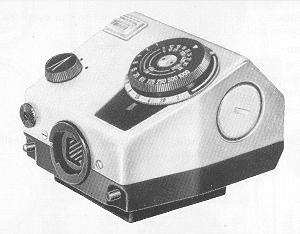
Pentacon Six TL TTL Prism
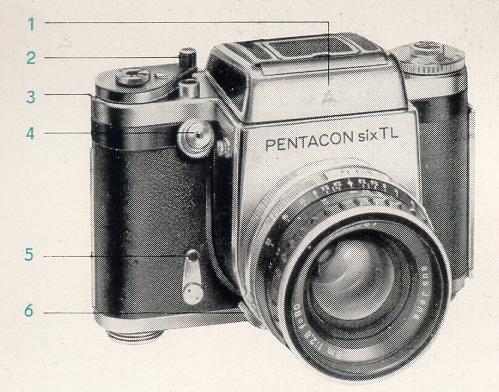 |
1. Finder hood 2. Rapid wind lever 3. Disconnecting lever 4. Shutter release 5. Winding lever for delayed-action mechanism 6. Flash socket
|
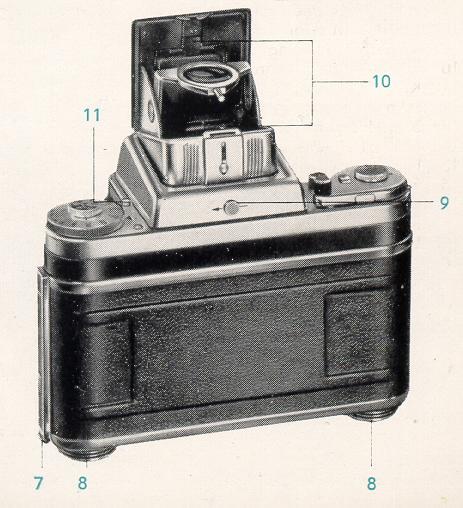 |
7. Latch
for camera back
8. Counter support for spool 9. Knob for opening the finder hood 10. Frame finder (sports finder) 11. Knob for unlocking finder hood
|
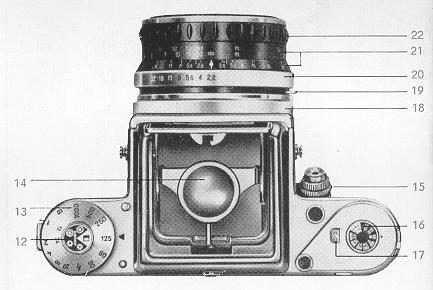 |
12. Film
type setting dial
13. Speed setting dial 14. Magnifier lens for focusing 15. Locking ring for shutter release 16. Film speed setting dial 17. Exposure counter 18. Milled ring for fixing the lens 19. Lever for checking depth of field 20. Diaphragm setting ring 21. Depth-of-field scale 22. Focusing ring
|
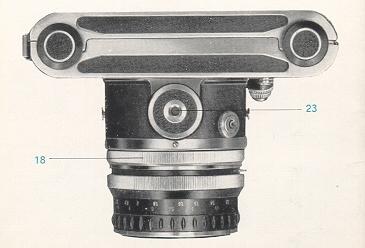 |
18. Milled
ring for fixing the lens
23. Tripod socket |
We are extremely pleased that you hove chosen the
genuine single lens reflex camera PENTAGON six TL and wish you every success in
your photographic activities with this camera.
The PENTAGON six TL carries
on the great tradition of the genuine single lens reflex cameras in the 6 x 6 cm
(2 1/4 in. square) format.
Its special features are:
Clearly arranged operating controls, shutter release
in anatomically correct position, interchangeable viewfinders (including TTL Prism
Attachment) and focusing screens, click stop shutter speed settings from 1 sec.
to 1/1000 sec. and B (geometrically graduated), designed for 120 roll film (12 frames)
or 220 roll film (24 frames), automatic exposure counter with locking device for
the film in use, focal-plane shutter of rubberized material.
X synchronization
for electronic flash and bulbs, locking device for flash plug, wide range of accessories
for every kind of photographic activity, interchangeable
lenses, with bayonet fitting and locking ring, from 50 mm to 1000 mm focal length,
up to 180 mm with automatic spring diaphragm.
External view of the camera:
Unfold the two inside pages of the front and back covers and look at the camera
itself in the same position as it is shown in the pictures of the instruction booklet.
The important parts are marked by numbers and explained on the page.
Abridged Instructions
6. Release the shutter and wind it again four times. The rapid wind lever must be swung without interruption as far as it will go and moved back. The exposure counter (17) shows the mark for picture 1.
7. Employ viewfinder image for focusing. Critical focusing is performed by means of the magnifying lens.
8. After the 12th and (in case of roll film 220) the 24th exposure, the winding mechanism is locked. It is released by means of disconnecting lever (3), whereupon film transporting can be continued.
9. In case of premature removal the film has to be
wound up to the end with the paper trailer by f u 11 swings of the rapid wind lever
and subsequent releasing of the shutter. Short rocking movements of the rapid wind
lever must not be performed before the 12th exposure has been made.
(see
also Section 4).
To achieve faultless advancement of the film, special
attention must be paid to the following 3 points:
1.
Remove the gumstrip and insert the paper leader carefully into the middle of the
spool. It must not brush against either one of the spool flanges (Fig. 1). If this
happens, the film will not advance properly. There is even the possibility of the
receiving spool getting jammed within the spool chamber because of the irregular
winding of the film, and the film transport mechanism might be overstrained on actuation
of the winding lever.
2. The paper leader, when being wound up, must lie tautly
on the core of the receiving spool. This can be achieved by slightly suppressing
the movement of the full spool on the supply side with the thumb of the left hand
(Fig. 2). Make sure that the paper windings are not too loose on the take-up spool
(Fig. 3) since this might cause overlapping or excessive spacing between frames.
The first exposure could, in such a case, be made before the film is in the picture
gate;
3. The short rocking movements of the rapid wind lever
when advancing the film, which are mentioned in this instruction booklet, may be
performed only under the following conditions:
a) when the film is being inserted,
as long as the camera back is still open, and
b) after exposure of the 12th
frame and subsequent release of the locking device to permit further advancement
of the film.
Thus, if for instance a roll film 120 is to be removed
from the camera after the 10th exposure, the shutter has to be wound and released
normally up to the 12th frame. Then, when the locking device of the transport mechanism
has been released, the film can be wound on to the end by short rocking movements.
In this manner you may also advance any 220 roll film after the 13th frame by rocking
it to the end.
| The exposure counter (17) jumps back to its starting point when the camera back is opened and is automatically set when the camera back is closed. The shutter has to be released and wound again four times, whereupon the mark for picture 1 will appear in the exposure counter. Do not let the winding lever jump back but move it back smoothly. At every subsequent winding of the shutter the counting mechanism advances to the next number. After the 12th and, in case of roll film 220, after the 24th exposure, the winding mechanism is locked. It has to be released again by actuation of disconnecting lever (3). The rapid wind lever can then be fully swung around again steadily and without interruption. |
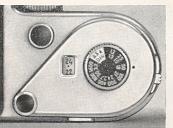 |
Film reminder dial
Film reminder dial (12) bearing the
symbols for black-and-white and color film, is mounted above the speed setting
dial (13). The symbol required is set for roll film 120 against the numeral
12 and for roll film 220 against the numeral 24 on the speed setting dial.
A second film reminder dial (16) marking the film speed in DIN and ASA readings
is positioned above the rapid wind lever.
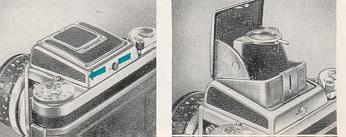
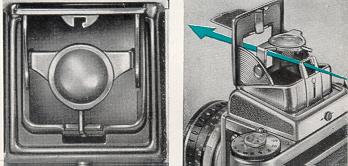
The finder
hood (1) opens and springs into operating position as soon as you push knob
(9) in the direction of the arrow. It is closed by finger-tip pressure an
the cover. The finder hood is automatically locked on to the camera. To
remove it, depress unlocking knob (11) on the camera top. The hood can then
be pushed towards the back and lifted off.
The magnifier
in the finder hood is designed for critical focusing | and to facilitate
picture composition. The magnifying lens (14) yielding a fourfold enlargement
may be swung into position. The magnifier in the finder hood is designed
for critical focusing | and to facilitate picture composition. The magnifying
lens (14) yielding a fourfold enlargement may be swung into position parallel
with the image field lens. The sports finder is moved into working position
by lifting the inner part of the finder hood cover and pulling out the frame
(10).
Pentaprism
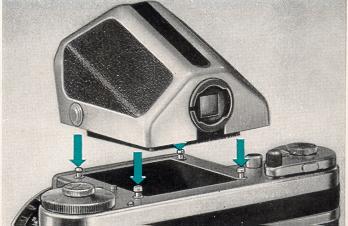
The Pentaprism
permits viewing the image at eye level. It is inserted in place of the finder
hood. The reflex image then appears with sides unreversed and enlarged approximately
2.5 times. Persons with faulty eyesight may insert a corrective lens into
the eyepiece of the viewfinder to replace their spectacles. You pull the
two lateral catches simultaneously towards the back and place the pentaprism
on the four connecting pins on top of the camera, then release the catches,
and the pentaprism snaps in. Removing the I prism is performed accordingly.
TTL Prism--please refer to "Accessories".
| Focusing
takes place with the mirror swung into viewing position, i.e. with the shutter
wound up. Rotate focusing ring (22) on the lens mount until the image of
the subject appears sharp on the field lens. Distance and definition may
also be set by means of the scale on the lens mount, in which case the field
lens serves only for determining picture composition. The depth of definition
can be read from the focusing ring with the help of depth-of-field scale
(21). Engraved on the left and right of the index mark on the depth-of-field
scale are diaphragm numerals. At the f/8 setting, for instance, the depth
of sharpness can be read from the focusing ring between the two diaphragm
numerals "8" on the depth-of-field scale.
III.: Distance 5 m (17 ft.), diaphragm setting f/8, depth of sharpness 3.5 m to approx. 9.5 m = approx. 11 1/2 to 30 ft. When using the sports finder, focusing has to be performed beforehand, either on the image field lens or by the scale of the focusing ring. |
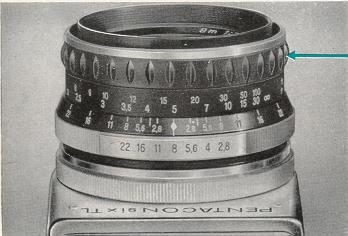 |
Image field lenses 1. Groundglass field lens (Order No. 207250)
7 different
image field lenses are available for the PENTAGON six TL (see also the Instruction
Booklet describing ,,Close-up Equipment for PRAKTISIX and PENTAGON six").
The field lenses are exchanged as follows: Remove the finder element from
the camera and then loosen the screws on the three retaining springs with
a screw driver. Swing the springs aside, take out the spring ring, and tip
the image lens out of the camera. Fixing any one of the other field lenses
is performed in reverse order. It is important to note that the thinner
part of field lenses made of glass must lie towards the back of the camera.
Please also note that different supporting angle pieces and spring rings
are provided for the Fresnel lens and for the other image field lenses.
2. Groundglass field lens with clear spot and
hairline cross (Order No. 207330)
3. Groundglass field lens with reticular guide
lines (Order No. 207340)
4. Clear glass field lens with hairline cross,
5 mm reticular (Order No. 207350)
5. Groundglass field lens with hairline cross,
5 mm reticular (Order No. 207360)
6. Groundglass field lens with rangefinder wedges
(Order No. 207370)
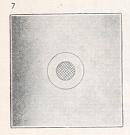
7. Fresnel lens with microprism screen and Groundglass
circle (Order No. 207251)
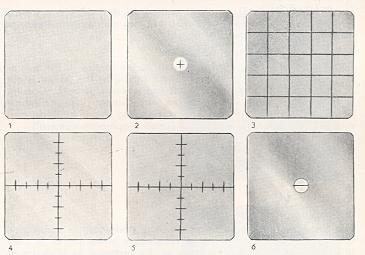
Image field
lens with rangefinder wedges (rangefinder lens)
The rangefinder
wedges correspond in effect to a split-image rangefinder. The rangefinder
lens forms two part images. These are moved towards or away from each other
by rotation of focusing ring (22). If the outlines join precisely where
the two sections meet, the image is in correct focus. This can be observed
best on straight vertical lines.
(7) Fresnel lens (see page 16).
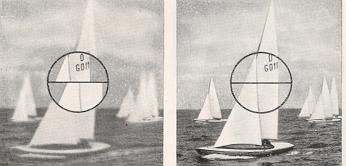
Fresnel lens with microprism screen Correct focusing is achieved as soon as the image
in the microprism screen looks clear and free from fuzziness. The image
is out of focus if it looks fuzzy or crumbles into screen elements. Focusing
is extremely reliable since you see very distinctly the difference between
sharpness and unsharpness. Focusing should be performed with the lens aperture
wide open (small diaphragm numeral). 2. Focusing on the groundglass circle
The circular groundglass screen is used preferably
in connection with small lens apertures (large diaphragm numerals) or in
case of greater scales of reproduction as, for instance, in close-up or
macro photography. The remaining section of the viewfinder (Fresnel lens)
is not meant for focusing. top picture- correct bottom picture- incorrect
The PENTAGON
six TL can be supplied, as desired either with a Fresnel lens for extra
image brightness and microp;ism screen, or with a groundglass image field
lens.
1. Focusing on the microprism screen
Focusing
with the microprism screen

The diaphragm
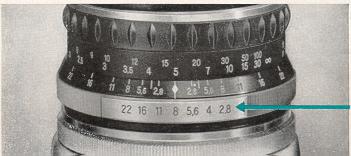
The diaphragm is set by rotation of
the diaphragm ring (20) on the lens mount The diaphragm numeral required
for the exposure has to be brought to meet the red index mark. Lenses with
automatic spring diaphragm allow for full aperture focusing. Not until the
shutter is released does the diaphragm close down to the pre-set value.
To check the depth of field during focusing, you simply depress lever (19)
on the lens mount. This causes the diaphragm to close down to the value
preselected by means of setting ring (20).
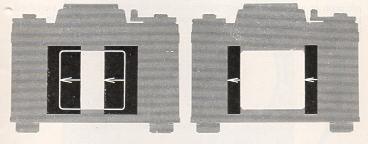
The focal-plane shutter
The focal-plane shutter of the PENTAcON
six TL gives exposure speeds ranging from 1 sec. to 1/1000 sec. and B (any
desired duration). For exposure speeds of longer than 1 sec. it is advisable
to use a special wire release with locking device. The speeds are graduated
so that each figure indicates double, or one half of the speed marked by
the next figure on the scale. The diaphragm scale works analogously. If
the light value is to be maintained, the next smaller aperture has to be
employed for twice the exposure time, or vice versa.
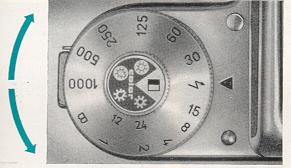
The exposure speeds
The exposure speeds may be set either
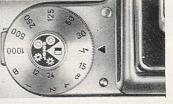
before or after the shutter has been wound. The speed setting dial (13)
is rotatable in either direction. The desired exposure speed figure must
come to stand against the red triangular mark. The speed settings click
in as a safeguard against unintentional displacement.
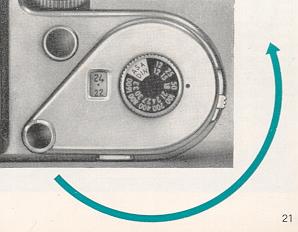
Rapid wind lever
The rapid wind lever serves not only
to wind the shutter but simultaneously to transport the film. By this same
performance the diaphragm is set to its widest aperture, the exposure counter
switched to the next number, and the mirror swung away to allow the light
rays to reach the image field lens.
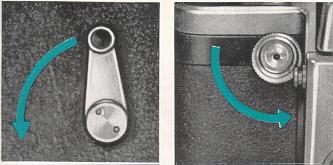
Delayed-action mechanism- Shutter release
The delayed-action
mechanism is tensioned by swinging the winding lever (5) through about 90
degrees and set in motion by actuation of shutter release (4). The shutter
must be wound beforehand. The self-timer runs for approx. 10 seconds. It
may be employed with all shutter speeds.
The shutter release is locked by turning the
lower milled ring (15) on the release knob (4) anti-clockwise as far as
it will go (the red dot must be at the top) Inadvertent tripping of the
shutter is thus made impossible. The shutter mechanism is unlocked by turning
the milled ring back again.
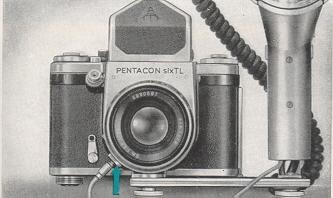
Synchronization
Synchronization with electronic
flash and flash bulbs is effected by means of the X contact. The flash socket
(6) is built into the lower part of the camera front. Clockwise rotation
of the milled ring on the flash socket keeps the flash plug locked in position.
When inserting or removing the flash plug make sure that the red dot on
the milled ring stands opposite the red dot on the front of the flash socket.
For the use of electronic flash, the speed setting dial must be moved to
the (lighting bolt) setting, for fast-burning bulbs to 1/15 sec., and for
bulbs of a longer flash duration to 1/8 sec. For delayed-action exposures
the shutter release has to be depressed until the flash lights up. (Use
cable release with locking device). The correct diaphragm setting is found
by dividing the guide number of the flash by the flash-to-subject distance
figure.
Removing the film
Remove the
film after exposing the 12th frame (on film 120) or the 24th frame (on film
220) and subsequently winding up the paper trailer. To achieve this, first
actuate disconnecting lever (3) and then turn the rapid wind lever with
full 11 swings followed by release of the shutter, or carry out short rocking
movements, until the winding of the lever becomes noticeably easier.
This means that if a roll film 120 is to be removed
from the camera after the 10th exposure, the shutter has to be normally
wound and released up to the 12th frame.
Then, when the locking device of the transport
mechanism has been released, the film can be wound on to the end by short
rocking movements. In this manner you may also advance any 220 roll film
after the 13th frame by rocking it to the end.
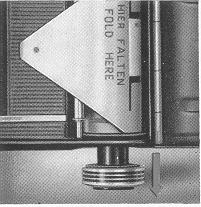
Now open the camera back, pull out the spool support
and lock it in position. Tip the spool with the exposed film into your hand and
fasten the paper trailer with the gumstrip. Should the camera be firmly connected
to any other equipment the film spool can also be removed by means of its lower
flange.
In this case, the spool must still be resting against
the upper part of the spool chamber, i.e. engaged by the carrier mechanism.
Exchanging lenses
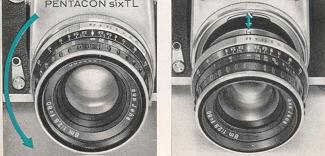
Exchanging lenses is a quick and simple
matter. Turn milled ring ( 18) of the bayonet fitting anti-clockwise (as
seen from the front) until it stops and remove the lens from the camera.
The red mark on the scale of the lens to be inserted must be a the top,
and the screw, or pin, on the inner edge of the lens mount has to engage
in the recess in the lens seat of the camera (see illustration). To fasten
the lens tighten milled ring (18) by clockwise movement (as seen from the
front).
Supplementary
lenses without automatic diaphragm
Lenses
The standard
lens, Zeiss Biometar 80mm f/2.8 is equipped with automatic spring diaphragm
control (ASD). No specific handling of the lens is necessary except setting
the aperture required for the exposure. The diaphragm is automatically controlled
by the camera. During the focusing procedure it is completely open
Supplementary lenses
with automatic diaphragm are operated in the same manner as described
above for standard lenses. This applies both to setting the diaphragm stop
and to checking the depth of field.
(e.g. PENTAGON 300 mm f/4 with manual pre-set
diaphragm) are set by pressing the setting ring directly behind the diaphragm
scale towards the back and adjusting it to bring its mark against the desired
diaphragm numeral, where it clicks in. This makes it possible also with
these lenses to focus at full aperture. Immediately before making the exposure,
you turn the diaphragm ring back to the preselected stop.
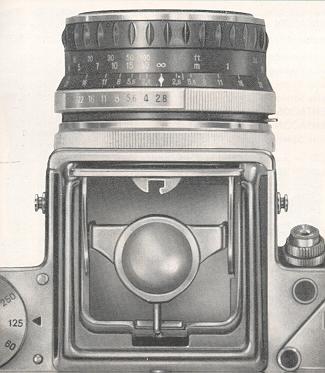
With lenses of a longer focal length (exceeding 300
mm) the automatic diaphragm lever in the camera may project into the path of rays
and can, therefore, be moved away from its normal working position towards the camera
body. To achieve this, remove the lens from the camera and swing the lever, which
becomes visible on the left inside the opening, just far enough that it will not
touch the camera body when the shutter is wound. Swing the lever back into operating
position when lenses with automatic diaphragm are to be used.
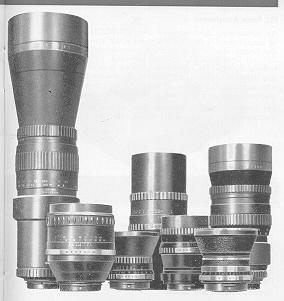
Interchangeable lenses Standard lens Zeiss Biometar 80 mm f/2.8 ASD Supplementary lenses:
The following
interchangeable lenses are available for the PENTACON six TL:
Zeiss Flektogon
50 mm f/4 ASD
Zeiss Biometar 120 mm f/2.8 ASD
Zeiss Sonnar 180 mm
f/2.8 ASD
PENTAGON
(Orestegor) * 300 mm f/4 PD
PENTAGON (Orestegor) * 500 mm f/5.6 PD
Zeiss Spiegelobjektiv
(Mirror Lens) 1000 mm f/5.6
ASD = automatic spring diaphragm
PD = pre-set diaphragm
* The lenses hitherto listed under the name of
Meyer Optics no bear the trade name PENTACON.
Accessories
for the PENTACON six TL
TTL Prism Attachment
An outstanding advantage of the PENTAGON six
TL is its ability to accept the TTL Prism Attachment which can be used instead
of the finder hood or the ordinary pentaprism. It enables partially integral
light metering to be performed, based on the modern, technically accurate
internal measuring system. All factors making any difference with regard
to the exposure are automatically taken into account. Correction of exposure
values as, for instance, in close-up work or with filters, is no longer
necessary.
For further information please refer to our brochures
and to the instructions for using the TTL Prism Attachment.
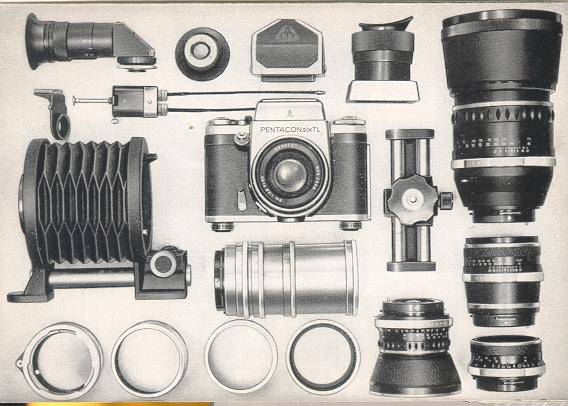
Equipment
for close-up work
Set of Intermediate Rings
Set of Intermediate Rings with Plunger
10 mm Intermediate Ring with Plunger
Clase-up Bellows Attachment
Reversing Tube
Special Intermediate
Ring with Cable Release Connection
Double Cable Release
Special Image Field Lenses
Focusing Magnifier
For further details please refer to our brochures
and to the instructions for using "Close-up Equipment for PENTACON six and
PRAKTISIX."
Accessories for the connection
to the eyepiece
- accessory
images
Additional Accessories
| The following accessories may be attached
to the eyepiece of the pentaprism and of the TTL Prism Attachment: Eye Cup
|
Special Pressure Plate for the use of
photographic glass plates Focusing Side Universal Tripod Filters Lens - Hoods Cable Releases One final hint with regard to setting up the camera on a flat surface.
A screw (Order Number 223650) to be threaded into the tripod socket of the
camera may be used as a third supporting
|
The details given in this booklet are subject to slight alterations which
may result from further development in the manufacturing Process.
Please read these Instructions for Use carefully, since we can accept no liability
for damage caused by improper handling of the camera.