If you find this manual
useful,
how about a donation of $3 to:
M. Butkus, 29 Lake Ave.,
High Bridge, NJ 08829-1701
and send your
e-mail address
so I can thank you.
Most other places would charge
you $7.50 for a electronic copy
or $18.00 for a hard to read Xerox copy.
This will help me to continue to host this site,
buy new manuals,
and pay their shipping costs.
It'll make you feel better, won't
it ?
If you use Pay Pal, use the link below.
Use the above address for a check, M.O. or cash.
CLICK HERE FOR Konica FS-1 English PDF FILE
MADE DIRECTLY FROM MANUAL
Konica FS-1 Bedienungsanleitung
Konica FS-1 Mode
D'Emploi
Konica FS-1 Manual de Instrucciones
Konica FS-1
Gebruiksaanwijzing
Click here to
continue to Konica FS-1 PDF
version of this HTML file
Contents
|
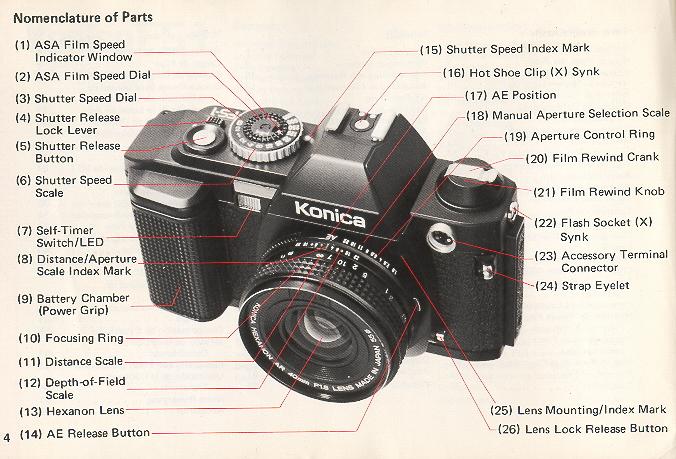
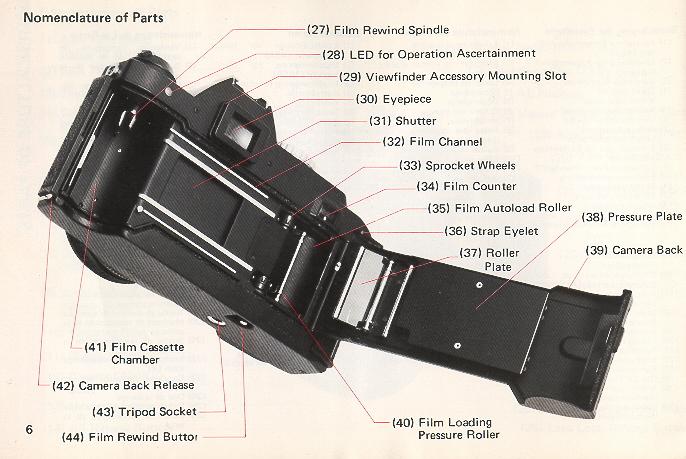
Nomenclature of Parts 4
Loading Batteries 8
Film Loading ........ 10
Set me Film Speed ....... 18
Setting Lens to AE 19
Release Lock Lever 20
Determination of Shutter Speed . . . 21
Focusing , 22
Aiming Your Konica FS-1 24
AE Photography 25
Film Rewind 27
LED Information in Viewfinder . . . 30
Warnings against Under- and
Over-exposures 34
Low Battery Warning Signal 35 |
Photography with Self Timer 38I
Interchange at Lenses 40
B (Bulb) Exposure 42
Manual Photography 44
Selection of Shutter Speed 45
Aperture vs Depth-of-Field 48
Exposure Compensation 52
Stopped-down Metering Method . . . 55
Electronic Flash Photography 58
Use of the Strap 64
Precautions for Use 67
Specifications of the Konica FS-1 . . 68
Accessories .70
Depth-of-Field Table 81
Konica Interchangeable Lenses 82 |
|
 |
(1) Loading Batteries · Nickel cadmium batteries for
recharging are not usable.
1 ) Remove the battery chamber, while the two lock knobs located at the back of the battery chamber are pulled inward.
2) Use four AA Alkaline
batteries available from your photo dealer and load the battery chamber. Be sure to follow the "+" and "--" signs as shown
on the diagram inside the
battery chamber.
3) Attach the battery chamber to the Konica FS-1 body by first inserting the guide claw (in orange color) to the body and sliding the lock knobs
apart, with the guide claw depressed, until the green safety mark is seen.
· Take out the batteries if you do not intend to use the model for a prolonged period of time.
(2) Film Auto load System
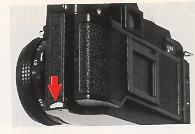 |
The Konica FS-1's autoload system is so designed that once the film is set to a prescribed position and the
back cover closed, the film will be automatically transported by one frame. Film loading has been somewhat troublesome in the past, but your
Konica FS-1 enables you to do it safely and surely.
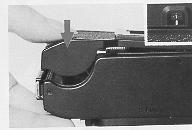
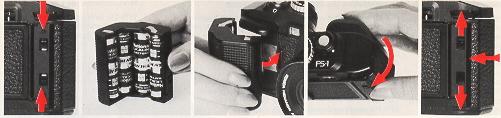
Release the lock claw of the back cover to open the back cover. Do not forcibly try to open the back cover further when it has stopped.
|
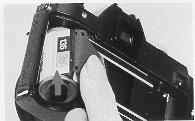 |
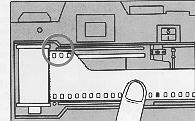
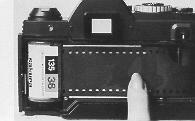
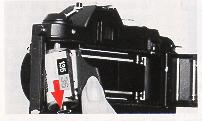
Insert the 35mm film cassette into the film chamber from the cutout lower section.
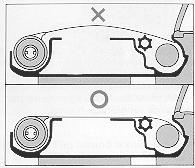
While lightly holding down the film cassette, slowly put on the film.
In case the film leader is long, pull it out until the first two or three upper perforations make their appearance. |
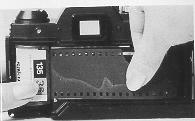 |
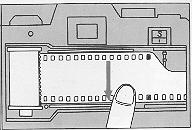
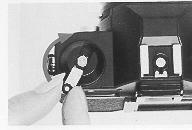
Pull out the film and insert it into the film autoload roller until it is no longer visible. |
Snap down the back cover, and it will be closed without fail. At the same time, the autoload system will be put into operation, automatically
winding up the film until the film frame number "1" appears in the counter. You can ascertain the auto-loading with a revolution of the film rewind
knob.
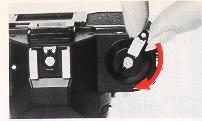
Flip up the film rewind crank, and slowly turn it in the arrow-marked direction 360 degrees to eliminate the film slack in the cassette.
If the auto-loading has properly been conducted, the perforations come in gear with the sprockets and a change in the pressure on the finger
may be felt. Adapt yourself to this pressure change and make it a practice to take pictures after this ascertainment at all times.
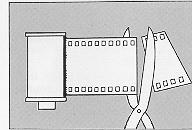
In case you use long-footage film and feed a film cassette, the film in this cassette may be automatically loaded with its tip cut at right
angles. For this case, too, follow the above instruction for automatic loading. Correctly insert the film tip into the film roller.
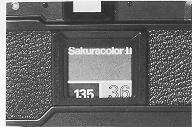
Insert the end portion of the film box into the film memo holder located on the back cover to remind you of the film type in the
camera. You may also insert a piece of white paper to write notes.
(3) Set the Film Speed
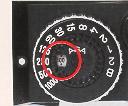 |
Turn the ASA set dial on top of the shutter speed dial with a finger tip so that the speed of the film loaded in your camera may appear in the
ASA film speed indicator window. Use the chart below to set film speeds not shown on the shutter dial. |
(4) Setting Lens to AE
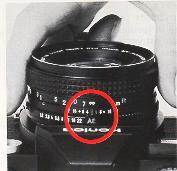 |
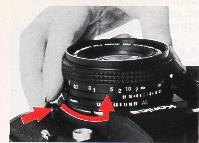
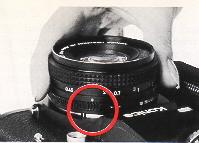
In AE Photography (Automatic Exposure) Turn the lens aperture ring to the AE mark. A safety lock will prevent
accidental change.
|
(5) Release Lock Lever
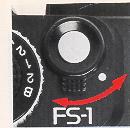 |
Move the lever around the shutter button till the white dot visible, and the shutter will be released. When the lever is alignment with the red dot,
the shutter will be locked and the safety device to prevent an unnecessary depression of the shutter button will be activated. |
· Be sure to move the lever until a click is felt at the on/off position.
(6) Determination of Shutter Speed
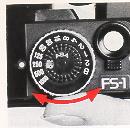 |
Turn the shutter speed dial and align the shutter speed scale with the index mark. The dial may be manipulated by the thumb tip while the
power grip is held in one hand, and it turns endlessly. With the use of ASA 100 film, the proper shutter speed range, in broad terms, will be
1/125 - 1/250 sec. outdoor And 1/30 -- 1/60 sec. indoor in AE photography. |
(7) Focusing
When the finder is looked into through the eyepiece, you will find a split image at the center of the field of view, a microdiaprism around the split
image and a mat plane in the remaining part of the field of view. Any of these three parts is usable for focusing. Using the split image section,
turn the focus ring so that the vertically split images may be viewed as a single image.
Using the microdiaprism section, turn the focus ring so that the flickering may disappear to produce a clear-cut image. |
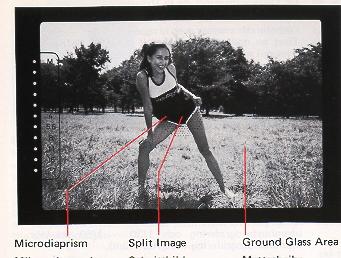 |
Using the mat section, focusing may easily be done with a close-up or telephoto lens.
(8) Aiming Your Konica FS-1
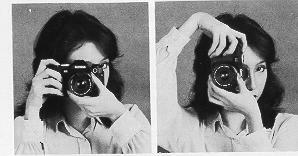 |
It is good practice to hold your camera with two hands as illustrated.
Keep the elbow of the support arm against your body to maintain stability and reduce picture shake.
* When shooting vertical pictures, be sure that you do not depress the film rewind knob or button.! |
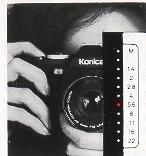
(9) AE Photography
|
When the shutter button is depressed, the aperture indicator LED at the left side of the viewfinder, will light, indicating the approximate
aperture for correct exposure. The actual lens will be set to the exact aperture required (to 1/10 f/stop accuracy) for precise exposure.
Single-frame shooting -- A single frame may be exposed by depressing the shutter button. Detach the finger from the button at once. |
 |
Continuous shooting --When you keep your finger on the shutter release button, you will shoot pictures in continuous sequence at the rate of
1.5 fps. The Konica FS-1 metering system determines and adjusts for correct exposure at every frame in continuous shooting mode.
Ascertainment of Film Transport-- You will see the film rewind knob turning, assuring you of proper film transport. The LED for the
ascertainment of operation will also fit every time a picture is taken.
(10) Film Rewind
|
· When the whole film has been exposed, the LED for the ascertainment of film transport will be instantly lit and the auto-winding system will
simultaneously stop operating.
· If you keep shooting pictures beyond the prescribed number of exposures on one roll of film, some of the perforations will be snapped off In
some cases.
· When the film is to be rewound, make sure that the shutter button is locked to prevent an accidental depression.
|
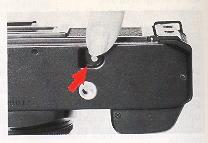 |
1) Press in the rewind button at the base of your Konica FS-1 camera.
2) Flip up the film rewind crank and turn it in the direction of the arrow mark, and the film will be rewound on the film cassette spindle. Here,
the film counter will move in reverse, but this reverse count does not correspond to the film length rewound.
3) When there is a sudden drop in the pressure on the fingers, the film rewind is completed. Open the camera back, remove the exposed
35mm cassette.
LED Information in Viewfinder
|
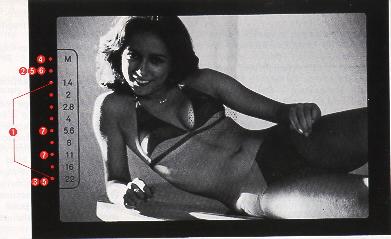
|
When the shutter button is lightly depressed by the bulb of the forefinger, photographing data will be shown in the finder. The red-colored
LED with which all data, aperture values and warnings for the prevention of photographing errors, are so arranged as to be readily understood, will be turned
on or flicker.
(1) Indication of the correct aperture value -- The LED for one of the aperture values from f/1.4 to f/22 will be turned on, indicating the correct
aperture value in AE photography. |
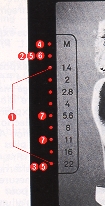 |
(2) Warning against an underexposure -- The LED for f/1.0 (intermediate between M and f/1.4) will flicker.
(3) Warning against an overexposure -- The LED for f/22 will flicker.
(4) Manual indication-- The LED for M will flicker and the LED for some of the aperture values between f/1.4 and f/22 will be turned on indicating the correct exposure
(with the use of a Hexanon AR lens).
(5) Warning against a rundown of the cells--The LEDs for f/1.0 (intermediate between M and f/1.4) and f/22 will alternately flicker. (6.) Indication for stopped-down metering --The LED of f/1.0 (in between M and f/1.4) is the fixed point mark, and the correct exposure will be
assured when the mark is turned on.
(7) Indication for completed recharge of the electronic flash unit --
When the recharge of the
exclusive electronic light unit (X-24) is completed, the LED either for f/5.6 or f/11 will flicker.
|
· In AE photography under a fluorescent lamp, there are cases in which two LEDs for indication of the correct aperture value are seen turned
on. This phenomenon is caused by the flickering of the fluorescent lamp, so pictures can continuously be taken.
Warnings against Under- and Over-exposures
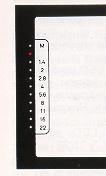 |
Warning against an under-exposure -- The under-exposure warning LED will be turned on when the shutter button is lightly pressed down. In
this situation, select a slower shutter speed.
· In photography at slow shutter speeds, the camera is apt to be jarred when it is held in both hands. The use of a tripod and the cable switch
designed exclusively for this camera is advisable. |
Warning against an over exposure
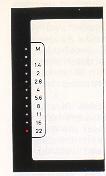 |
The over-exposure warning LED will be turned on when the shutter button is lightly depressed. Select a
faster shutter speed.
|
Low Battery Warning Signal
In case new AA alkali manganese dry cells are in use, 15 rolls of 36-exposure film may be taken before a warning appears for a drop in
voltage. When the AA batteries become weak, the under/ over exposure warning lamps will light in an alternating sequence, signaling "low
battery power". You might as well replace the cells with new ones as soon as possible. The cells may be exchanged during the course of the
shooting of one roll of film.
There is still enough power to shoot approximately five more rolls of film, after which all system will automatically turn off until replacement
batteries are installed.
· When the battery cells are to be exchanged with new ones during the course of the shooting of one roll of film, put me lens cap, set the
reloaded battery compartment to the camera body and depress the shutter button. One frame will not be exposed, preventing the overlapping
of pictures.
· Avoid continuous shooting when the warning lamp for the battery voltage Is turned on.
· During low battery power condition, the correct exposure LED will light, and the under and over exposure warning LED's will cycle (Pulse) at
a faster rate.
· For stopped-down metering with a warning for a drop in voltage, the correct exposure will be assured the LED of f/1.0 (in between M and
f/1.4) will stop flickering and will be turned on.
Photography with Self Timer
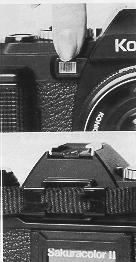 |
When the self timer switch is depressed the red LED will start to pulse, at an even faster sequential rate to help the subjects determine the
moment of shutter release (picture taking). The time for self timer operation is 10 seconds.
· To obtain better exposures when using the self timer--
When the self-timer is in used or when a picture is to be taken with the eye detached from the eyepiece, shield the eyepiece with the adjusting
ring of the hand strap to prevent light from inversely straying into the eyepiece. The correct exposure may not be assured, if light inversely strays into the eyepiece. |
1) Divide the adjusting ring of the strap into two. It will be readily detachable if you try to bend the ring at the center.
2) Insert each part into the accessory grooves of the eyepiece and cover the viewfinder windows with the camera strap.
Interchange of Lenses
To remove the lens, hold the base of the lens and turn it counterclockwise, while the lens interchange button is kept depressed. Take out the
lens when the red dot of the lens comes in line with the lens mount/dismount indicator of the camera body (red dot).
To install a lens, align the red dot of the lens with the lens mount/dis. mount indicator (red dot) of the camera body and lightly sink the lens into
the camera body. Hold the lens and turn it clockwise until it stops with a clicking sound.
B (Bulb) Exposure
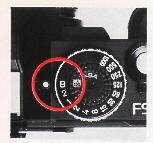 |
The B (bulb) exposure mechanism is used for an exposure of more than three seconds. Set the shutter speed dial to B and depress the
shutter button, and the shutter will be opened. When the finger is detached from the button, the shutter will be closed. If your camera is set to
manual and a desired shutter speed, a long-time exposure may be made.
· For a time (B) exposure, it is advisable to use a tripod and a Konica FS-1 cable switch which are available from your photo dealer. |
· Fit the cable switch into the accessory terminal connector. The accessory terminal connector is also the attachment point for a cableless
switch and intervalometer.
Manual Photography
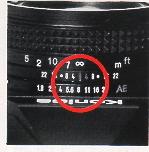 |
To manually set the exposure with your Konica FS-1, merely set the lens to any aperture other than the AE position. A red LED will pulse at the
"M" mark in the viewfinder to signify manual operation.
|
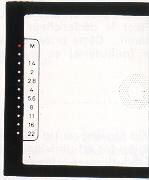 |
The Konica FS-1 through the lens (TTL)--automatic exposure (AK) system operates at all times, even during manual operation displaying the
correct exposure in the viewfinder, for the scene, even though you have set an aperture and shutter speed combination manually.
|
Selection of Shutter Speed
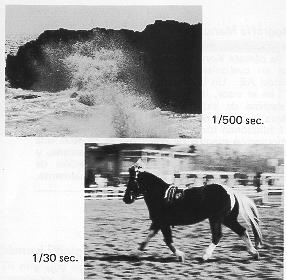 |
The shutter speeds range from B 2, 1 to 1/1000 sec. The shutter speeds are calibrated on the dial. An intermediate point between readings is
not usable, so make sure that the dial clicks into position.
Your camera is equipped with a system of giving priority to shutter speed. Depending on the brightness and movement of a subject, a shutter
speed may be optionally selected. |
Basis for Shutter Speed Selection
In a broad term, the recommended shutter speed is 1/125 to 1/250 sec. for outdoor photography and
1/30 to 1/60 sec. for outdoor shooting. For a moving subject, determine the shutter speed in the following manner:
1) If you want a moving subject to look still in a finished picture select a fast speed from a range of 1/250 to 1./;000 second.
2) If you want to stress the movement of a moving subject, select a slow speed from a range of 1/30 to 1/60 second.
Aperture vs Depth-of-Field
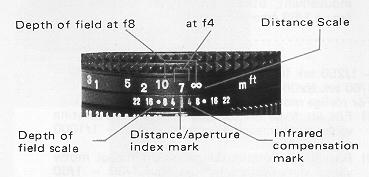 |
When the lens is focused on a subject there is a range around the subject which will be clearly be delineated in a finished picture. This range
is known as a depth of field.
|
1) The larger the aperture value (i.e., the smaller the lens aperture), 2) the longer the camera-to-subject distance, 3) the shorter the focal
length, the greater the depth of field. The depth of field is shallow for the area in front of the focal point and deep for the area behind. The actual depth may be
known by checking the depth-of-field scale.
Reading of Depth of-Field Scale
For a depth-of-field scale, identical aperture readings are calibrated in parallel on both sides of the distance index mark. The range which is
sandwiched between a pair of identical aperture readings is a depth of field in which the image will be clearly delineated in a finished picture.
For example when the camera-to-subject distance is 7 m with a 40 mm standard lens, the depth of field will be about 5~10 m for f/4 and
about 3 m to infinity for f/8.
The red colored "4" on the depth-of-field scale is an infrared compensation mark, which is used for a compensation of the focal point with the
use of infrared film. For example, if the camera-to-subject distance is infinity, the infinity mark will be brought in line with the infrared
compensation mark.
When priority is to be given to the determination of a lens aperture, turn the shutter speed dial while looking through the finder, slightly press
down the shutter button and change the shutter speed so that the LED will be turned on at the reading of the desired lens aperture.
Exposure Compensation for Backlight Photography
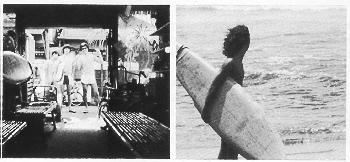 |
In normal TTL-AE photography, the correct exposure may be obtained. However, in a situation where the subject is in backlight, where there is
much difference between the bright and dim parts of the main subject's periphery, or where it is desirable to produce special effects in a
finished picture, the exposure may be compensated to raise the effects.
|
In a situation where the subject is dark against a bright background scene.
The AE responds to the overall bright background and in some cases the subject may appear dark (underexposed). For such situations:
1 ) You may change the ASA scale by half to compensate for the backlight situation and shoot in AE mode.
Example: ASA of film 400, change ASA scale to 200 or 2) You may note the aperture LED in the viewfinder and manually set the aperture ring
on the lens by one stop. For example: meter reading AE=f11, set lens manually to f8.
In a situation where the subject is bright and background dark, reverse the above instructions.
1) Double the ASA number. Example: 400 to 800 or 2) You may read the aperture in the viewfinder and set the lens manually to the next f stop.
Example: meter reading f5.6--set lens manually to f8.
· After special exposure photography, be sure to reset the AE mark, and/or reset the ASA speed dial to the correct sensitivity of the film.
Stopped-down Metering Method
With a Hexanon AR lens bearing an AE mark, the correct exposure is determined at the full opening of the lens both in AE and manual
photography, to determine the correct exposure in stopped-down metering situation.
1 ) A manual pre-set aperture ARP lens or a manual pre-set ARM lens is in use.
2) The AE cannot be used because of the use of an extension ring or bellows.
3) A lens of some other make is used on a lens mount adapter.
Exposure Determination
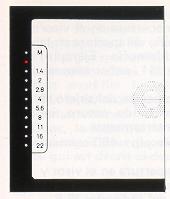 |
For stopped-down metering, look through the finder and turn the aperture ring or the shutter speed dial, while the shutter button is lightly
depressed.
When the LED positioned between the "M" and "f/1.4" mark glows, you have set the correct exposure.
· Stopped-down metering tends to be affected by the rays inversely straying into the eyepiece. Prevent the rays with an eyecup or some other
device.
· Stopped-down metering is also done for microscopic photography. Adjust the shutter speed according to the brightness of the light source. |
Electronic Flash Photography
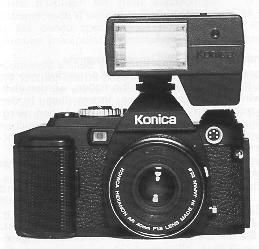 |
During the night or in a dark room where AE photography is unsuitable, the use of the Konica X-24 Auto electronic flash is recommended.
The X-24 flash was especially designed for use with the Konica FS-1camera to eliminate complicated exposure calculations. |
To use the Konica X-24 Auto Flash
1) Use four AA Alkaline or nickel cadmium rechargeable batteries to power the Konica X-24 auto flash.
2) Attach the X-24 auto flash to the
hotshoe a top the Konica FS-1 camera and set the F value scale to distance green (f5.6) or close range red (f11).
3) When the X-24 autoflash is charged --ready to shoot
a. the shutter speed will automatically change to 1/100th second flash sync speed.
b. the aperture will automatically change to f5.6 or f11 as preselected on the X-24 scale.
c. the LED in the viewfinder at f5.6 or f11 will pulse indicating that the flash is ready.
If the picture is taken before the flash is ready, the picture will be exposed in AE mode. Be sure to observe the under/over exposure warning
signals.
· With flash photography using the self timer, check that the charge is complete before depressing the self timer switch.
The range for automatic flash is:
ASA 100 film--f5.6 0.7 - 4.3m (2.3 - 14.2 ft) f11 0.7 2.1m (2.3 - 7.0ft)
ASA 400 film--f5.6 1.0 - 8.6m (3.3 - 28.4 ft) f 1 1 0.7 4.3m (2.3 - 14.2 ft)
Use of Other Types of Electronic Flash Units
An electronic light with a hotshoe, such as the Konica X-28, X-20 and X-14, may be electrically connected simply by fitting it to the hot shoe
clip. With an electronic light without a hot shoe connector, insert the plug of its cord into the X flash contact tap hole of the camera body.
1) set the shutter speed to 1/60 sec. for all types electronic flash except Konica X-24
Autoflash.
2) set the lens aperture manually per the instructions of the electronic flash unit.
3) when using automatic flash units such as the Konica X-24, set the lens aperture as indicated by the
autoflash.
4) for manual flash units, determine the correct aperture to set by dividing the guide number by the camera to subject distance. Example:
Using ASA 100 film with a Konica X-20 flash, you will get a guide number (GN) of 20, divided by the distance (5 meters) results in a lens
aperture of f4 (20 . 5 = 4).
Use of the Strap
The strap for the Konica FS-1 is constructed of wide, very durable nylon which can be used either as an adjustable neck strap or functional
hand strap.
· To use as Neck Strap
1) Open the lock at the tip of the suspension ring.
2) Insert the lock through the strap eyelet on the front of the camera body and close it. Make sure that the side bearing a Konica mark faces
outside.
3) Insert the other end of the strap through the eyelet on the back of the camera body and fasten the drum-shaped button into the long cut of
the strap.
4) The length of the neckstrap can be adjusted by flipping up the lever at the mid point of the strap.
· To use as a Hand Strap
1 ) The shorter strap fitted to the back is for use as a hand strap. Hold the base of the metal connector with finger tips.
2) Insert the hand strap about 3 cm, and push down the stopper pin outward.
3) Pull out the straps and separate them. Detach the longer one from the camera.
4) The adjustment ring fitted to the hand strap may be used in tightening the wrist with the strap or preventing light from straying into the
eyepiece.
Precautions for use
· At cold places where the temperature is below 0° C, the batteries will run down. Warm your camera before you use it.
· When the battery cells are to be exchanged, use AA alkali manganese dry cells. All the four cells must be replaced.
· When you know you will use the camera at a cold place, make sure that you will have spare battery cells and keep them warm with your
body or in some other means to prevent a drop in the battery performance.
Specifications of the Konica FS-1
Type: 35mm focal plane shutter TTL-AE single lens reflex camera with built-in auto-winder
Film: 35mm film in cartridge
Picture size: 24 x 36mm
Standard lens: Konica Hexanon AR 40mm f/1.8 (five groups and six elements), closest taking distance 0.45m
Mount: Bayonet-type Konica mount 11
Aperture mechanism: AE-type fully automatic aperture with smallest aperture at f/22.
Shutter: Digital-controlled, vertically travel electronic metal focal plane shutter
Shutter speeds: B. 2, 1 ~ 1 /1000 sec.
Synchro: Hot shoe and X contact with synchro socket, automatically set to 1/100sec. with exclusive Konica Auto
Strobo X-24. Manually set
to 2 ~ 1/60 sec. with electronic flash other than X-24. Synchronized with M. FP and MF bulbs at 1/30 sec. and slower shutter
speeds.
Self-timer: Digital-controlled electronic self-timer
Finder: Pentaprism eye-level finder, magnification X0.67 (at infinity with 40mm standard lens), field-of-view ratio 90%, real-image alignment
system with split-image, microdiaprism and mat plane
View-finder information: LED for one of the apertures in range of f/1.4 ~ 22 lights for correct exposure in AE photography. LED for f/1.0
(intermediate between M and f/1.4) flickers for under-exposure, whereas LED for f/22 flickers for an-over-exposure. The LED for M
flickers and that for one of the apertures in range of f/1.4 ~ 22 lights up (in use of Hexanon AR lens). LEDs for f/1.0 (intermediate
between M and f/1.4) and f/22 alternately flicker for a drop in voltage. LED for f/1.0 (intermediate between M and f/1.4) lights up for
stopped down metering. LED for f/5.6 or f/11 flickers for electronic light charge with exclusive X-24.
Exposure adjustment: TTL metering at full lens opening, shutter-speed priority aperture control system with gallium-arsenid-phosphorus
compound photocell
· AE-type fully automatic aperture lens (metering at full lens opening): Automatic aperture control system with priority given to shutter speed
selection for AE photography reading of correct aperture value coupled to film speed, shutter speed and f-value at full lens opening
· Manual aperture lens (stopped-down metering): System of alignment with fixed point coupled to film speed, shutter speed and lens aperture
AE coupling range: EV0 (at 2 sec. with f/1.4) ~ EV19 (at 1/1000 sec. with f/22) with ASA 100. EV 0.7 (at 2 sec. with f/2.8) to EV19 (at f/22
with 1/1000 sec.) with f/1.8 lens,
Film speed range: ASA 25 ~ 3,200
Film loading: Konica Autoload system
Film wind: Auto advance with motor inside take up roller
Film rewind: Crank type with film rewind button automatically returning to original position.
Film counter: Counts number of frames exposed with auto return to start "s".
Batteries: Four 1.5V AA alkali manganese dry cells.
Others: Exclusive electronic flash Konica Auto Strobo X-24. Camera is automatically switched to electronic flash photography with
mounting of X-24.
Dimensions and weight: 146 x 90 x 73mm, 7009 (minus batteries) with f/1.8 lens, 146 x 90 x 46mm, 5609 (minus batteries) without lens
· The descriptions in "Lower Battery Warning Signal" starting that continuous shooting may be done at a speed of 1.5 frames per second
and that the use of new AA alkali manganese dry cells makes it possible to expose 15 rolls of 36-exposure film until the appearance of a
battery rundown signal is based on Konishiroku's own specifications.
* The specifications and design are subject to change without notice.
* Designer Case - This smartly designed case in two tone brown/ beige simulated suede, provides superb flexibility for use as a shoulder
case or belt case. It is "designer styled" to match the Konica FS-1 future design.
* Carrying Bag - "Designer styled" in two tone beige/brown simulated suede, this functional bag holds the Konica. FS-1 camera plus
standard lens, Konica X-24 Auto flash accessory lenses and several rolls of film-- supplied with wide shoulder strap.
* Konica X-24 Automatic Electronic Flash
This flash unit was especially created for use with the Konica FS-1 camera. It conforms to the FS-1 camera contours and functions in
collaboration with the Konica FS-1 central processing unit (CPU) for automatic flash operation.
When mounted stop the Konica FS-1 camera, you only set the automatic distance control (green f5.6 or red f11). When the X-24 is turned
on and reaches 95% of flash power, it automatically signals the Konica FS-1 camera to change shutter speed to a fast 1/100th second, to
change the lens aperture to f5.6 or f11 and displays a blinking LED signal in the viewfinder that the flash is ready.
* Cable Switch - This switch type cable release is used in place of the conventional cable release since, the Konica FS-1 features an electromagnetic
release mechanism. When this switch is connected to the terminal of the camera, it is possible to trip the shutter by operating the hand-held switch. This switch is useful for bulb exposure and also
close-ups, telephoto shots, and also helps cancel out camera shake when
using slow shutter speeds.
* Remote Control Switch - The cord is 5m in length. Operating the switch on your end of the cord, the shutter may be released at a place away from the camera.
* Double Cable Switch - The double cable release switch for the use of Auto Bellows with an automatic aperture makes it possible to use
any Auto Bellows on the Konica FS-1.
* Interval Timer (To be put on sale)
This device allows photographs to be taken repeatedly at fixed intervals of time. When it is mounted on the camera and the switch is
turned on, the shutter is repeatedly tripped at the pre-set
* Close-up Lens - This lens permits AE close-ups simply by screwing it onto the front of the lens and mounting it in place. This makes
close-up photographs of plants and flowers as well as copies of documents and pictures easy work.
* Angle-Magnifier - This helpful gadget makes it possible to look into the viewfinder from above the camera and it comes in handy for when pictures are to be
taken at a low level such as in copying, close-ups and micro-photography. Furthermore, when the lever is rotated, the image in the center
of the viewfinder is enlarged two-fold with the magnifying glass and so focusing can be performed very accurately for close-ups, copying,
telephoto photography and micro-photography.
* Cable-less Switch (To be put on sale)
This switch is made up of a receiver, which will be fitted to the camera, and a transmitter, which will be used on your side. The infra-red
rays transmitted by the transmitter will be intercepted by the receiver, making it possible to operate the shutter with electric signals. Only the
Konica FS-1 with an automatic wind AE mechanism makes unmanned photographing possible and fully displays its performance in taking,
say, ecological pictures of animals, to which man cannot come.
 , M. Butkus, NJ.